1. Wprowadzenie
Thank you for choosing the Taiahiro Bk6301 Wireless Mechanical Gaming Keyboard and Mouse Combo. This manual provides detailed instructions for setting up, operating, and maintaining your new peripheral devices. This combo offers versatile connectivity options including 2.4G wireless, Bluetooth 5.0, and wired USB-C, ensuring compatibility with various devices.
2. Zawartość opakowania
Sprawdź, czy w przesyłce znajdują się wszystkie elementy:
- Taiahiro Bk6301 Wireless Mechanical Gaming Keyboard
- Taiahiro Wireless Gaming Mouse
- USB 2.4G Receiver (stored in mouse battery compartment)
- Kabel do ładowania/danych danych z USB-C na USB-A
- Instrukcja obsługi
- 1 AA Battery (for mouse, may be pre-installed or included separately)

Image 2.1: Contents of the Taiahiro Bk6301 Keyboard and Mouse Combo package, including the keyboard, mouse, USB receiver, and USB-C cable.
3. Koniec produktuview
3.1 Funkcje klawiatury
- Układ 98 klawiszy: Compact design with a full numeric keypad.
- Mechaniczne niebieskie przełączniki: Provide tactile and audible feedback for typing.
- Podświetlenie RGB: Możliwość dostosowania efektów świetlnych.
- Regulowany stojak na klawiaturę: Allows for ergonomic positioning.
- Łączność wielomodowa: Supports 2.4G wireless, Bluetooth 5.0, and wired USB-C.
- Akumulator: Built-in 2000mAh battery for wireless operation.
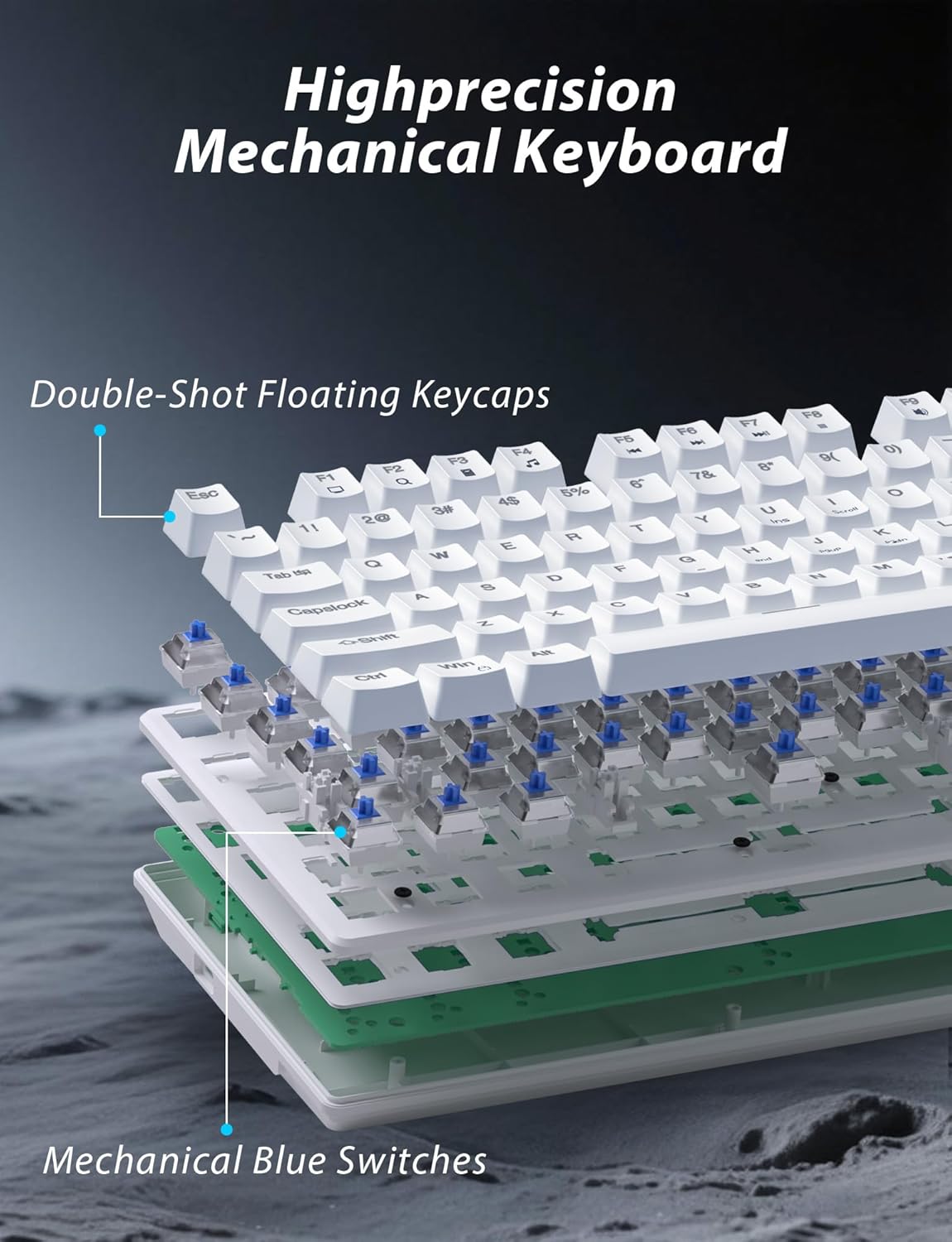
Obraz 3.1: Wybuch view illustrating the internal structure of the mechanical keyboard, highlighting the double-shot floating keycaps and mechanical blue switches.

Obraz 3.2: Bok view of the keyboard demonstrating its ergonomic design and adjustable stand for comfortable use.
3.2 Funkcje myszy
- Ergonomiczna konstrukcja: Shaped for comfortable grip.
- Regulowane DPI: Four levels (800/1600/2400/3200) for precision control.
- Przyciski Dalej/Wstecz: Convenient side buttons for navigation.
- Łączność w dwóch trybach: Supports 2.4G wireless and Bluetooth.

Image 3.3: The wireless gaming mouse, highlighting its ergonomic shape and four adjustable DPI levels.
4. Instrukcje konfiguracji
4.1 Keyboard Connection
The keyboard supports three connection modes: 2.4G wireless, Bluetooth, and wired USB-C.

Image 4.1: The keyboard displaying its three connectivity options: Bluetooth, 2.4GHz wireless, and USB-C wired connection.
Tryb bezprzewodowy 2.4G:
- Locate the USB 2.4G receiver, typically stored in the mouse's battery compartment.
- Podłącz odbiornik USB do wolnego portu USB w komputerze.
- On the keyboard, slide the mode switch (usually located on the top edge or bottom) to the '2.4G' position.
- Klawiatura powinna połączyć się automatycznie.
Tryb Bluetooth:
- Slide the mode switch on the keyboard to the 'BT' (Bluetooth) position.
- Zacznie migać kontrolka klawiatury, co oznacza, że klawiatura jest w trybie parowania.
- On your device (computer, laptop, smartphone), open Bluetooth settings and search for new devices.
- Select "Taiahiro Bk6301" or a similar name from the list of available devices to pair.
- Po sparowaniu kontrolka zacznie świecić światłem ciągłym.
Tryb przewodowy USB-C:
- Podłącz dołączony kabel USB-C do portu USB-C klawiatury.
- Podłącz drugi koniec (USB-A) do wolnego portu USB w komputerze.
- The keyboard will function as a wired device and will charge simultaneously.
4.2 Mouse Connection
The mouse supports 2.4G wireless and Bluetooth connectivity.

Image 4.2: The underside of the mouse, illustrating the battery compartment for one AA battery and the storage slot for the tiny USB receiver.
Montaż baterii:
- Otwórz komorę baterii znajdującą się na spodzie myszy.
- Włóż jedną baterię AA, zwracając uwagę na prawidłową biegunowość.
- Zamknij komorę baterii.
Tryb bezprzewodowy 2.4G:
- Ensure the USB 2.4G receiver is plugged into your computer.
- Slide the mode switch on the underside of the mouse to the '2.4G' position.
- Mysz powinna połączyć się automatycznie.
Tryb Bluetooth:
- Slide the mode switch on the underside of the mouse to the 'BT' (Bluetooth) position.
- The mouse will enter pairing mode.
- Na swoim urządzeniu otwórz ustawienia Bluetooth i wyszukaj nowe urządzenia.
- Select "Taiahiro Mouse" or a similar name from the list to pair.
5. Instrukcja obsługi
5.1 Funkcje klawiatury
Kontrola podświetlenia:
Klawiatura posiada konfigurowalne podświetlenie RGB.
- Zmień tryb podświetlenia: Naciskać Fn + Dom aby przełączać się między 18 różnymi efektami świetlnymi.
- Dostosuj jasność: Naciskać Fn + ↑ (Strzałka w górę) or Fn + ↓ (Strzałka w dół) to adjust between 5 brightness levels.
- Dostosuj prędkość: Naciskać Fn + ← (Strzałka w lewo) or Fn + → (Strzałka w prawo) to adjust between 5 lighting speed levels.

Image 5.1: Keyboard layout highlighting the function key combinations for controlling backlight modes, brightness, and speed.
Funkcje multimedialne:
Dostęp do sterowania multimediami można uzyskać, naciskając Fn key in combination with the designated F-keys (F1-F12).
- Fn+F1: Odtwarzacz multimedialny
- Fn+F2: Zmniejsz głośność
- Fn+F3: Zwiększ głośność
- Fn+F4: Niemy
- Fn+F5: Zatrzymywać się
- Fn+F6: Poprzedni utwór
- Fn+F7: Odtwórz/Pauza
- Fn+F8: Następny utwór
- Fn+F9: E-mail
- Fn+F10: Web Przeglądarka
- Fn+F11: Mój komputer
- Fn+F12: Kalkulator
5.2 Funkcje myszy
Regulacja DPI:
Naciśnij Przycisk DPI (located behind the scroll wheel) to cycle through the four DPI settings: 800, 1600, 2400, and 3200. Each press changes the sensitivity, allowing you to adjust cursor speed to your preference.
6. Konserwacja
6.1 Czyszczenie
- Klawiatura: Use a soft, dry cloth to wipe the surface. For deeper cleaning, use compressed air to remove debris from between keys. Avoid using harsh chemicals or abrasive materials.
- Mysz: Przetrzyj powierzchnię myszy miękką, lekko wilgotną szmatką.amp szmatką. Upewnij się, że do wewnętrznych elementów nie dostanie się żaden płyn.
6.2 Zarządzanie baterią
- Klawiatura: The keyboard has a built-in rechargeable battery. Connect the USB-C cable to a power source (e.g., computer USB port, USB wall adapter) to charge. The indicator light will show charging status.
- Mysz: The mouse uses one AA battery. Replace the battery when the mouse performance degrades or it stops responding. Ensure proper polarity when inserting a new battery.
7. Rozwiązywanie Problemów
If you encounter issues with your Taiahiro keyboard and mouse combo, please refer to the following solutions:
| Problem | Możliwe rozwiązanie |
|---|---|
| Keyboard/Mouse not responding (2.4G) |
|
| Keyboard/Mouse not connecting (Bluetooth) |
|
| Keyboard backlight not working or stuck |
|
| Klawisze nie reagują lub wpisują się podwójnie |
|
8. Specyfikacje
| Funkcja | Szczegół |
|---|---|
| Numer modelu | Bk6301 |
| Łączność | Bluetooth 5.0, bezprzewodowy 2.4G, przewodowy USB-C |
| Typ klawiatury | Mechaniczna klawiatura do gier |
| Układ klawiszy | 98 Keys (with Numeric Keypad) |
| Typ przełącznika | Mechaniczne niebieskie przełączniki |
| Podświetlenie klawiatury | RGB (18 modes, 5 brightness, 5 speed levels) |
| Bateria klawiatury | Akumulator 2000 mAh |
| Poziomy DPI myszy | 800 / 1600 / 2400 / 3200 |
| Bateria myszy | 1 bateria AA |
| Kompatybilne urządzenia | Personal Computer, Laptop, Smartphone |
| Waga przedmiotu | 2.72 funta (kombi) |
| Wymiary opakowania | 15 x 5.59 x 3.11 cala |
9. Gwarancja i wsparcie
9.1 Informacje o gwarancji
Taiahiro products are covered by a limited warranty from the date of purchase. Please refer to the warranty card included in your package or visit the official Taiahiro website for detailed warranty terms and conditions. This warranty typically covers manufacturing defects and material faults under normal use.
9.2 Obsługa klienta
For technical assistance, troubleshooting, or any questions regarding your Taiahiro Bk6301 combo, please contact our customer support team. You can find contact information on the Taiahiro official website or through your purchase platform. When contacting support, please have your product model number (Bk6301) and purchase details ready.


