1. Wprowadzenie
This manual provides detailed instructions for setting up, operating, and maintaining your BenQ EW2790U 27-inch 4K monitor. Please read this manual thoroughly before using the monitor to ensure proper functionality and to prevent damage.
2. Informacje dotyczące bezpieczeństwa
Aby zmniejszyć ryzyko pożaru, porażenia prądem elektrycznym i obrażeń, należy zawsze przestrzegać poniższych podstawowych zasad bezpieczeństwa:
- Nie wystawiaj monitora na działanie deszczu i wilgoci.
- Nie otwierać monitora casing; serwisowanie należy zlecić wykwalifikowanemu personelowi.
- Zapewnij odpowiednią wentylację wokół monitora.
- Należy używać wyłącznie przewodu zasilającego i zasilacza dostarczonych przez firmę BenQ.
- Odłączaj monitor od zasilania podczas burzy z piorunami lub jeśli nie używasz go przez dłuższy czas.
3. Zawartość opakowania
Sprawdź, czy w przesyłce znajdują się wszystkie elementy:
- BenQ EW2790U 27-calowy monitor 4K
- Przewód zasilający
- Kabel HDMI
- Kabel USB-C
- Szybki przewodnik
- Karta gwarancyjna
4. Konfiguracja
4.1 Montaż stojaka
- Aby zapobiec porysowaniu, połóż monitor ekranem do dołu na miękkiej i czystej powierzchni.
- Przymocuj podstawę stojaka do szyjki stojaka i zabezpiecz ją za pomocą dołączonej śruby.
- Dopasuj zespół stojaka do gniazda montażowego z tyłu monitora i dociśnij, aż zatrzaśnie się na swoim miejscu.

Figure 4.1: Assembled BenQ EW2790U monitor.
4.2 Kable połączeniowe
Podłącz niezbędne kable do monitora i komputera:
- Moc: Podłącz przewód zasilający do wejścia zasilania monitora, a następnie do gniazdka sieciowego.
- Wideo:
- HDMI: Connect an HDMI cable from your computer's HDMI output to one of the monitor's HDMI ports (HDMI 1, 2, or 3).
- USB typu C: Connect a USB-C cable from your computer's USB-C port to the monitor's USB-C (65W) port for video, data, and power delivery.
- Odbiór USB: Connect USB-A devices to the USB-A 3.2 downstream ports on the monitor.
- Audio: Jeśli chcesz, podłącz słuchawki do gniazda słuchawkowego.

Rysunek 4.2: Tył view of BenQ EW2790U showing connectivity ports.

Rysunek 4.3: Szczegółowy view of BenQ EW2790U input/output ports.
4.3 Adjusting Ergonomics
The EW2790U monitor offers various adjustments for comfortable viewing:
- Regulacja wysokości: Podnieś lub opuść monitor do preferowanej wysokości oczu.
- Przechylenie: Dostosuj kąt nachylenia ekranu w pionie.
- Obracać: Obróć ekran w poziomie.
- Sworzeń: Obróć ekran o 90 stopni, aby przejść do trybu portretowego.

Figure 4.4: BenQ EW2790U monitor pivot adjustment.
5. Obsługa monitora
5.1 Włączanie/wyłączanie zasilania
Press the Power key located on the bottom right of the monitor to turn it on or off.

Figure 5.1: Monitor controls: Scenario hotkey, 5-way controller, and Power key.
5.2 Menu ekranowe (OSD)
Use the 5-way controller on the bottom bezel to navigate the OSD menu and adjust settings such as brightness, contrast, color mode, and input source.
5.3 Scenario Hotkey
The Scenario hotkey allows quick access to custom or preset optimal monitor settings for various uses like work, studying, gaming, or watching movies.
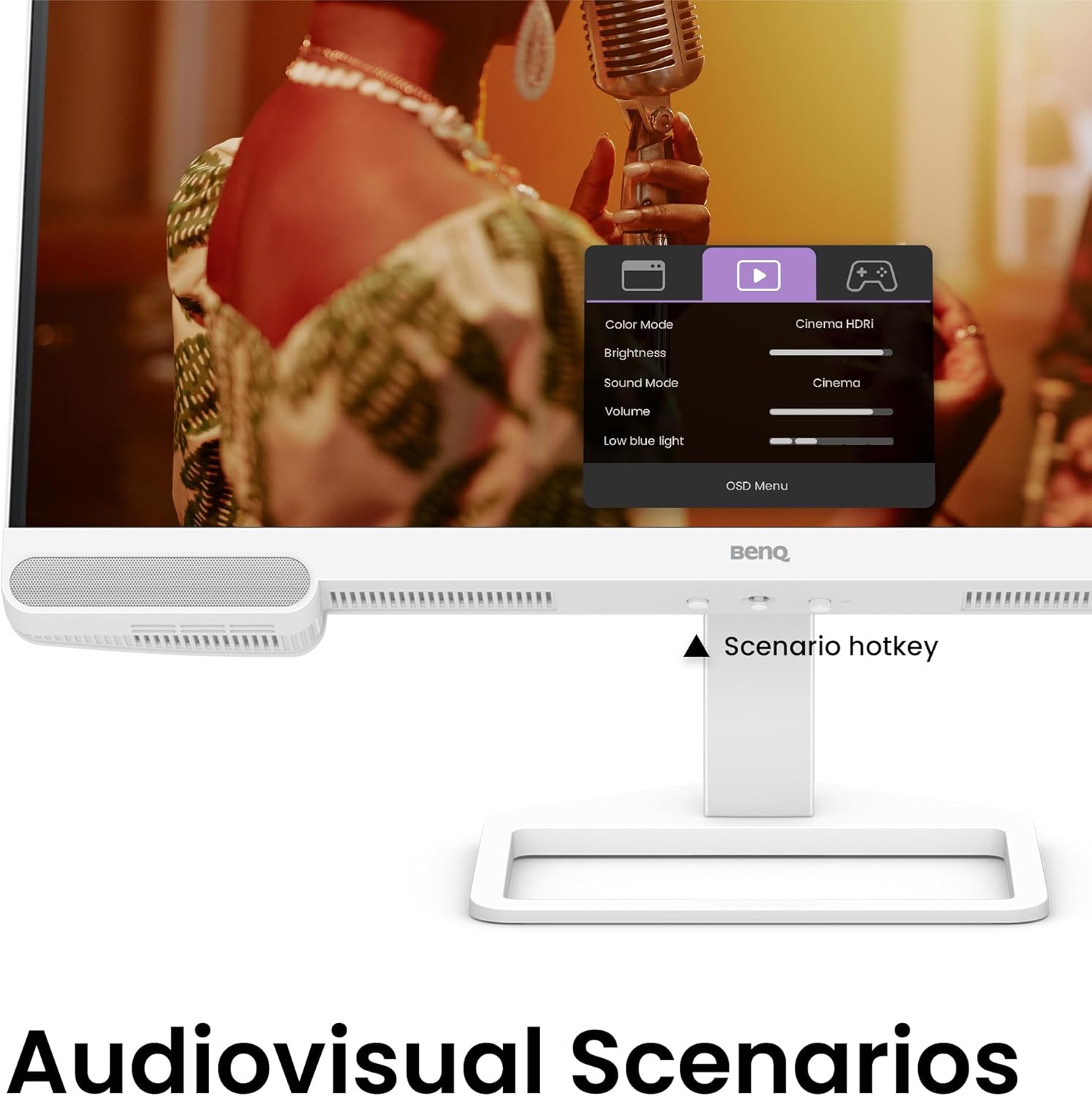
Figure 5.2: OSD menu accessed via Scenario hotkey.
5.4 Technologia kontrastu AI
The exclusive AI Contrast technology intelligently adjusts the contrast based on the displayed content, optimizing image quality without affecting other areas of the screen.

Figure 5.3: Demonstration of AI Contrast technology.
Wbudowane głośniki 5.5
The monitor includes a pair of 5W built-in speakers for audio output. Adjust the volume through the OSD menu or your connected device.

Figure 5.4: BenQ EW2790U built-in 5W speakers.
6. Konserwacja
6.1 Czyszczenie monitora
- Zawsze odłączaj monitor od zasilania przed czyszczeniem.
- Delikatnie użyj miękkiej, niestrzępiącej się szmatki dampSpłukać wodą lub łagodnym, nieściernym środkiem czyszczącym.
- Nie rozpylać środka czyszczącego bezpośrednio na ekran.
- Avoid using alcohol, ammonia, or abrasive cleaners, as they may damage the screen or casing.
6.2 Przechowywanie
Store the monitor in a cool, dry place away from direct sunlight and extreme temperatures. If storing for an extended period, consider using the original packaging for protection.
7. Rozwiązywanie Problemów
| Problem | Możliwa przyczyna | Rozwiązanie |
|---|---|---|
| Brak obrazu na ekranie | Odłączony kabel zasilający; Odłączony kabel wideo; Wybrano nieprawidłowe źródło sygnału wejściowego. | Ensure power and video cables are securely connected. Press the Scenario hotkey to select the correct input source. |
| Obraz jest niewyraźny lub zniekształcony | Nieprawidłowa rozdzielczość; Luźny kabel wideo. | Set the display resolution to 3840x2160. Check video cable connections. |
| Brak dźwięku z głośników | Volume too low; Muted; Incorrect audio output selected on computer. | Adjust volume via OSD menu or computer settings. Ensure monitor is selected as audio output device. |
| AI Contrast not working as expected | Feature disabled; Specific content not optimized. | Check OSD settings to ensure AI Contrast is enabled. Performance may vary with different content. |
8. Specyfikacje
| Funkcja | Szczegół |
|---|---|
| Rozmiar ekranu | 27 cali |
| Rezolucja | 3840x2160 (4K UHD) |
| Proporcje obrazu | 16:9 |
| Pokrycie koloru | 95% P3 |
| AI Contrast Technology | Tak |
| Wbudowane głośniki | 2 x 5W |
| Łączność | 1x USB Type-C (65W), 3x HDMI (2.0), USB-C 3.2 downstream, USB-A 3.2 downstream, Headphone Jack |
| Ergonomiczna konstrukcja | Regulacja wysokości, pochylenie, obrót, obrót |
| Waga przedmiotu | 21.4 funta |
| Wymiary produktu (dł. x szer. x wys.) | 17 x 8 x 21 cala |
9. Gwarancja i wsparcie
Your BenQ EW2790U monitor is covered by a manufacturer's warranty. Please refer to the warranty card included in your package for specific terms and conditions. For technical support, product registration, or service inquiries, please visit the official BenQ webstronie lub skontaktuj się z działem obsługi klienta.
Official BenQ Webstrona: www.benq.com