Wstęp
This manual provides detailed instructions for the GODIYMODULES TPA3116D2 Digital Power Amplifier Board. Designed for ease of use and high performance, this compact mono amplifier board features a TPA3116 digital power amplifier chip and an integrated volume potentiometer, making it suitable for a wide range of audio applications. Please read this manual thoroughly before operation to ensure proper setup and optimal performance.
Cechy
- Utilizes the TPA3116 digital power amplifier chip for efficient audio amplifikacja.
- Compact design, ideal for space-constrained projects.
- Integrated volume potentiometer for convenient audio level adjustment.
- Supports a wide working voltagZakres napięcia stałego od 5 V do 24 V.
- Delivers a maximum output power of 100W in mono configuration.
Specyfikacje
| Parametr | Wartość |
|---|---|
| Objętość roboczatage | Prąd stały 5V-24V |
| Board Dimensions (L x W) | 45 mm x 33 mm (1.77 x 1.30 cala) |
| Całkowita wysokość (w przybliżeniu) | 22 mm (0.87 cali) |
| Maksymalna moc wyjściowa | 100 W (monofoniczny) |
| Zestaw układów scalonych | TPA3116D2 |
| Typ montażu | Montaż powierzchniowy |
| Numer modelu przedmiotu | BTL-100WFYY-002 |
Organizować coś
Follow these steps to set up your TPA3116D2 Digital Power AmpZarząd Lifiera:
- Podłączenie zasilania: Connect a DC power supply within the 5V-24V range to the VCC and GND terminals. Ensure correct polarity to prevent damage.
- Wejście audio: Connect your audio source (e.g., smartphone, MP3 player) to the IN+ and IN- terminals.
- Wyjście głośnika: Connect your mono speaker to the OUT+ and OUT- terminals. Ensure the speaker impedance is compatible with the ampliyfikator.

Obraz: Góra view z amplifier board, highlighting the input (IN), output (OUT), and power (VCC) connection points.

Image: A pair of TPA3116D2 amplifier boards, showcasing their compact size and integrated volume control.
Instrukcja obsługi
Once the board is correctly wired and powered on, you can begin operation:
- Regulacja głośności: Use the integrated potentiometer knob to adjust the output volume. Rotate clockwise to increase volume and counter-clockwise to decrease it.
- Odtwarzanie dźwięku: Start playing audio from your connected source. The amplifier will output the sound through the connected speaker.
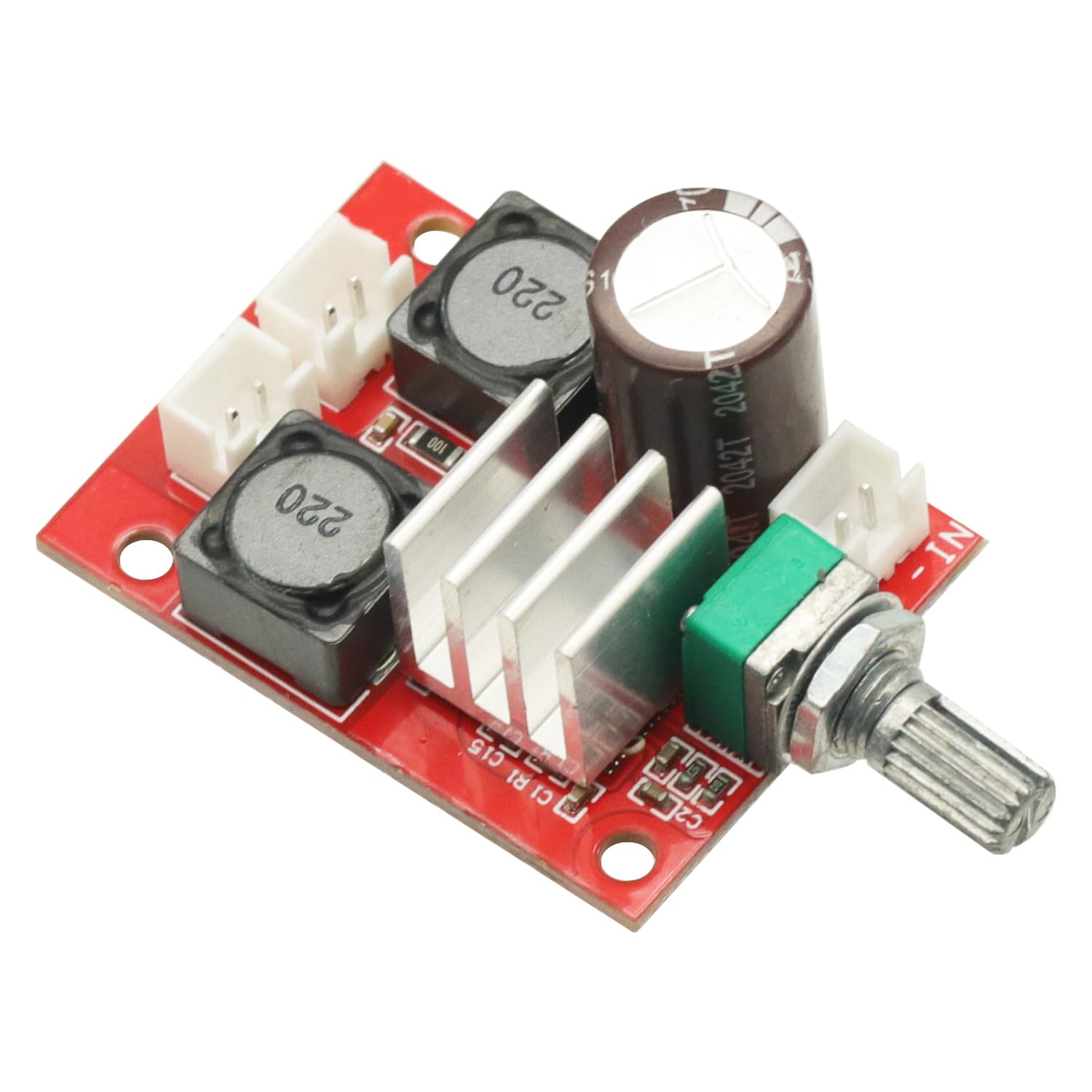
Obraz: kątowy view z amplifier board, clearly showing the volume adjustment potentiometer.
Konserwacja
Aby zapewnić długowieczność i optymalną wydajność Twojego ampW przypadku płyty głównej należy postępować zgodnie z poniższymi wytycznymi dotyczącymi konserwacji:
- Utrzymywać w suchości: Avoid exposing the board to moisture or liquids, which can cause short circuits and damage.
- Czyść delikatnie: W razie konieczności czyszczenia należy użyć miękkiej, suchej ściereczki. Nie należy używać silnych środków chemicznych ani materiałów ściernych.
- Zachowaj ostrożność: Avoid dropping or subjecting the board to strong impacts. When handling, minimize contact with electronic components to prevent static discharge.
- Wentylacja: Ensure adequate airflow around the board, especially during extended operation, to prevent overheating.
Rozwiązywanie problemów
Jeśli napotkasz problemy z urządzeniem amppłyta główna, zapoznaj się z poniższymi typowymi problemami i rozwiązaniami:
- Brak zasilania:
- Check if the DC power supply is connected correctly and providing voltage w zakresie 5 V–24 V.
- Verify power supply polarity.
- Brak dźwięku:
- Ensure the audio input source is active and connected properly to IN+ and IN-.
- Check speaker connections to OUT+ and OUT-.
- Confirm the volume potentiometer is not set to minimum.
- Zniekształcony dźwięk:
- Verify that the input audio signal is not too strong, causing clipping.
- Check the power supply for stability; insufficient current can cause distortion.
- Upewnij się, że impedancja głośnika jest zgodna z ampwymagania lifiera.
Gwarancja i wsparcie
This product is covered by a standard return policy. If you are not satisfied with your purchase, you may be eligible for a return or replacement within 30 days of receipt, subject to the seller's terms and conditions.
For technical support, troubleshooting assistance beyond this manual, or warranty inquiries, please contact the seller directly through the platform where the product was purchased. Provide your order details and a clear description of the issue for prompt assistance.


