1. Wprowadzenie
This user manual provides comprehensive instructions for the Callsky 10-inch Wi-Fi Tablet, Model Ctab 10. Please read this manual carefully before using your device to ensure proper operation and to maximize its features. Keep this manual for future reference.
2. Koniec produktuview
2.1 Zawartość opakowania
Po otwarciu opakowania należy sprawdzić, czy znajdują się w nim wszystkie wymienione poniżej elementy:
- Callsky Ctab 10 Tablet
- Kabel do ładowania USB typu C.
- Zasilacz
- Instrukcja obsługi (po japońsku)

Image: Package contents including the tablet, charging cable, power adapter, and user manual.
2.2 Komponenty urządzenia
Familiarize yourself with the physical layout and ports of your tablet:
- Przednia kamera: 5 MP do rozmów wideo i selfie.
- Kamera tylna: 8MP with autofocus for high-resolution photos.
- Przycisk zasilania: Located on the side for turning the device on/off and screen lock.
- Przyciski głośności: Dostosuj poziom dźwięku.
- Port USB typu C: Do ładowania i przesyłania danych.
- Gniazdo słuchawkowe 3.5 mm: Do wyjścia audio.
- Podwójne głośniki: For enhanced audio experience.
- Gniazdo kart microSD: For storage expansion up to 2TB.

Obraz: Ponadview of tablet features including face recognition, wireless projection, and physical dimensions.
2.3 Główne cechy
- Lekka konstrukcja: Ultra-thin at 8.7mm and weighing 425g for easy portability.
- System operacyjny Android 14: Enhanced privacy, personalized settings, and improved user experience.
- Wysoka wydajność: 1.8GHz Allwinner A523 Octa-core processor and Mali-G57 GPU for smooth multitasking, gaming, and HD video.
- Pamięć i przechowywanie: 3GB RAM + 9GB virtual memory, 128GB internal storage, expandable up to 2TB via MicroSD.
- Żywy wyświetlacz: 10.1-inch 1280x800 Incell IPS display with eye protection mode and Widevine L1 support for high-quality streaming.
- Łączność: Wi-Fi 6 and Bluetooth 5.4 for stable and high-speed connections.
- Zaawansowane funkcje: Wireless projection, face recognition, and split-screen functionality.
- Długotrwała bateria: Bateria 6000mAh zapewniająca dłuższe użytkowanie.

Image: Visual summary of the tablet's core specifications and features.
3. Konfiguracja
3.1 Pierwsze włączenie i ustawienia podstawowe
- Press and hold the Power button until the Callsky logo appears.
- Follow the on-screen prompts to select your language (e.g., English).
- Connect to a Wi-Fi network. Select your network from the list and enter the password if required.
- Review and accept the Google Services terms.
- Set up a screen lock (PIN, pattern, or password) for security. You can skip this step and set it up later.
- Complete the remaining setup steps as guided by the Android 14 interface.
3.2 Wkładanie karty MicroSD
Aby rozszerzyć pamięć tabletu:
- Znajdź gniazdo karty MicroSD z boku tabletu.
- Delikatnie włóż kartę MicroSD do gniazda, aż zatrzaśnie się na miejscu. Upewnij się, że karta jest prawidłowo ułożona.
- Tablet wykryje nową pamięć. Może pojawić się monit o sformatowanie karty w celu optymalnego wykorzystania urządzenia.
4. Instrukcja obsługi
4.1 Podstawowa nawigacja
- Gesty dotykowe: Dotknij, aby wybrać, przesuń, aby przewijać, uszczypnij, aby powiększyć.
- Ekran główny: Uzyskaj dostęp do aplikacji, widżetów i powiadomień.
- Powiadomienia: Przesuń palcem w dół od góry ekranu do view powiadomienia i szybkie ustawienia.
4.2 Zarządzanie pamięcią i magazynem
The tablet comes with 3GB of physical RAM and 9GB of virtual memory, totaling 12GB, along with 128GB of internal storage. You can expand storage up to 2TB using a MicroSD card.
- Aby sprawdzić pamięć masową: Przejdź do Ustawienia > Pamięć.
- To manage apps: Go to Ustawienia > Aplikacje.

Image: Details on memory and storage, including RAM, internal storage, and MicroSD expansion.
4.3 Wyświetlacz i wrażenia wizualne
The 10.1-inch 1280x800 Incell IPS display provides clear and vibrant visuals. It supports Widevine L1 for high-definition streaming from platforms like Netflix and YouTube.
- Tryb ochrony oczu: Activate this mode in settings to reduce blue light and eye strain during prolonged use.
- Podzielony ekran: Use two applications simultaneously for enhanced productivity.

Image: Tablet demonstrating Widevine L1 support for streaming services.
4.4 Łączność
The tablet supports Wi-Fi 6 and Bluetooth 5.4 for reliable and fast wireless connections.
- Wi-Fi: Connect to 2.4G or 5G networks. Go to Ustawienia > Sieć i internet > Wi-Fi aby zarządzać połączeniami.
- Bluetooth: Pair with wireless devices like headphones or keyboards. Go to Ustawienia > Podłączone urządzenia > Bluetooth.
- Projekcja bezprzewodowa: Share your screen with compatible displays. Access this feature from the quick settings panel.
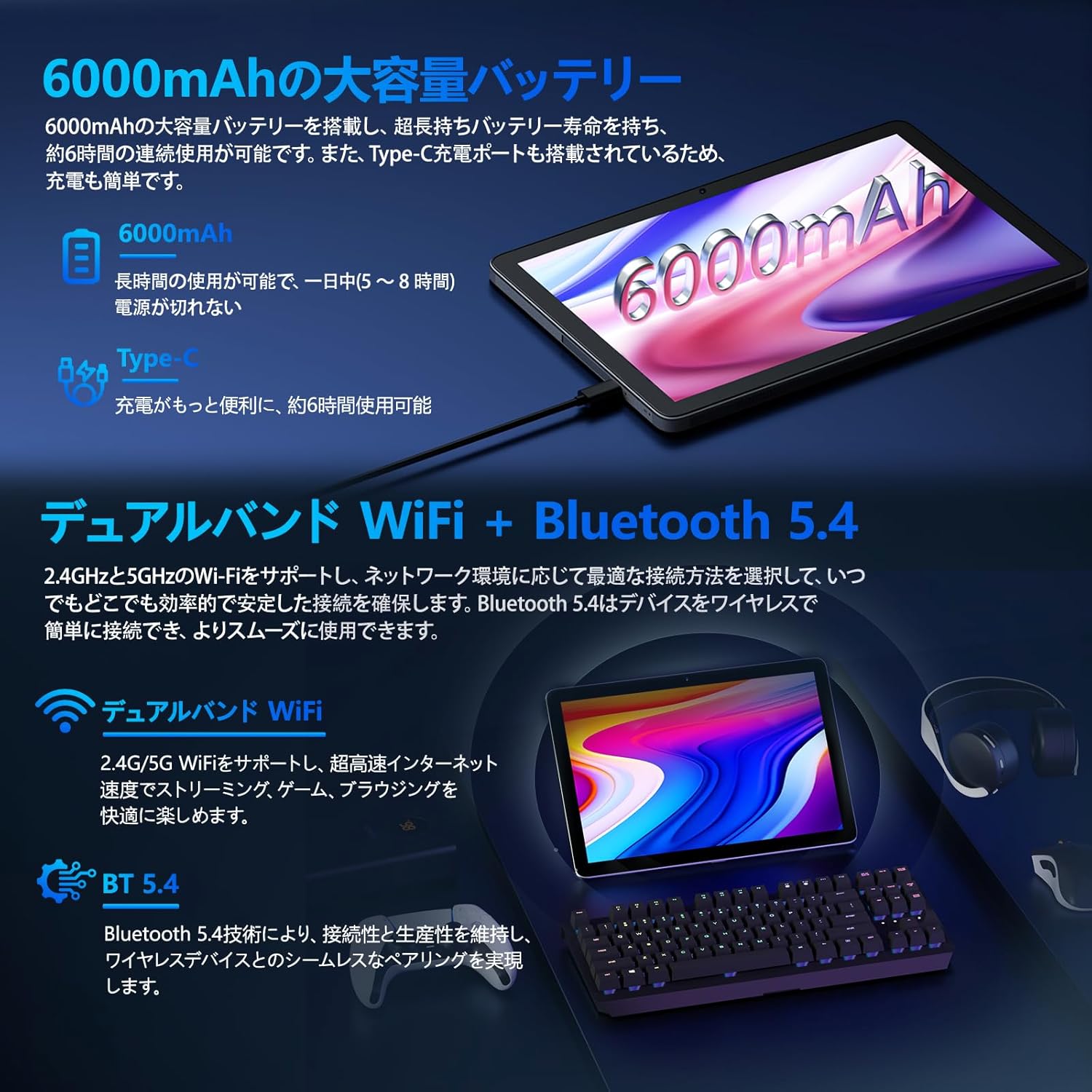
Image: Tablet highlighting battery capacity, Type-C charging, Wi-Fi, and Bluetooth features.
4.5 kamer
The tablet features a 5MP front camera and an 8MP rear camera with autofocus, suitable for video calls and capturing photos.
- Otwórz aplikację Aparat, aby zrobić zdjęcia lub nagrać filmy.
- Rozpoznawanie twarzy: Use the front camera for quick and secure unlocking. Set this up in Ustawienia > Bezpieczeństwo i prywatność > Odblokowanie twarzą.

Image: Illustration of the tablet's front and rear cameras and their resolutions.
4.6 Kids Mode (Parental Controls)
The tablet includes a dedicated Kids Mode and parental control features to ensure a safe and controlled environment for children.
- Access Kids Mode to provide curated content and limit screen time.
- Parents can manage app usage and content access through parental control settings.
4.7 Czujniki
The tablet is equipped with various sensors for enhanced functionality:
- GPS: Do usług lokalizacyjnych i nawigacji.
- Czujnik geomagnetyczny: Functions as a compass.
- Czujnik zbliżeniowy: Prevents unintended screen operations.
- Czujnik światła otoczenia: Automatycznie dostosowuje jasność ekranu.
- Żyroskop: For tilt operations and AR applications.
- Akcelerometr: Detects tilt, shock, and movement.
5. Konserwacja
5.1 Pielęgnacja baterii
The 6000mAh battery provides long usage times. To prolong battery life:
- Unikaj ekstremalnych temperatur.
- Nie należy dopuszczać do zbyt częstego całkowitego rozładowania akumulatora.
- Use the provided charger and cable.
- Optimize battery usage in Ustawienia > Bateria.

Image: Tablet connected to a Type-C charger, highlighting the 6000mAh battery.
5.2 Czyszczenie
Do czyszczenia ekranu i obudowy tabletu używaj miękkiej, niepozostawiającej włókien ściereczki. Unikaj stosowania silnych środków chemicznych i materiałów ściernych.
6. Rozwiązywanie Problemów
Jeśli masz problemy z tabletem, zapoznaj się z poniższymi typowymi problemami i ich rozwiązaniami:
| Problem | Możliwa przyczyna / rozwiązanie |
|---|---|
| Tablet się nie włącza | Upewnij się, że bateria jest naładowana. Podłącz ładowarkę i odczekaj kilka minut przed ponownym włączeniem. |
| Ekran nie reaguje | Restart the tablet by holding the power button. If unresponsive, force restart by holding the power button for a longer duration (e.g., 10-15 seconds). |
| Problemy z połączeniem Wi-Fi | Sprawdź, czy Wi-Fi jest włączone w ustawieniach. Uruchom ponownie router. Zapomnij o sieci i połącz się ponownie. |
| Device overheating / unexpected shutdowns | Close background applications. Avoid using the tablet in direct sunlight or hot environments. If the issue persists, contact customer support. |
| Aplikacje ulegają awarii lub zawieszają się | Wyczyść pamięć podręczną aplikacji (Ustawienia > Aplikacje > [Nazwa aplikacji] > Pamięć i pamięć podręczna > Wyczyść pamięć podręczną). Zaktualizuj aplikację. Zainstaluj aplikację ponownie. |
| Niska wydajność | Zamknij niepotrzebne aplikacje działające w tle. Wyczyść pamięć podręczną i tymczasowe. files. Ensure sufficient storage space. |
If the problem persists after trying these solutions, please contact Callsky customer support.
7. Specyfikacje
| Funkcja | Szczegół |
|---|---|
| Marka | Kalski |
| Nazwa modelu | Ctab 10 |
| System operacyjny | Android 14 |
| Rozmiar ekranu | 10.1 cali |
| Rozdzielczość wyświetlacza | 1280x800 pixels (Incell IPS) |
| Procesor | Allwinner A523 Octa-core (1.8 GHz) |
| Procesor graficzny | Mali-G57 (Integrated) |
| BARAN | 3 GB pamięci fizycznej + 9 GB pamięci wirtualnej (łącznie 12 GB) |
| Pamięć wewnętrzna | 128 GB |
| Możliwość rozbudowy pamięci masowej | Do 2 TB za pomocą karty MicroSD |
| Kamera tylna | 8 MP |
| Przednia kamera | 5 MP |
| Wi-Fi | Wi-Fi 6 (802.11ac, 802.11b, 802.11g, 802.11n) |
| Bluetooth | Bluetooth 5.4 |
| Pojemność baterii | 6000mAh (22.8 Watt-hours, 1 Lithium Polymer cell) |
| Port ładowania | Typ C |
| Wymiary | Wymiary 32.4 x 20.3 x 3.4 cm |
| Waga | 425 gramów |
| Certyfikaty | GMS Certified, PSE Certified |
8. Gwarancja i wsparcie
The Callsky Ctab 10 tablet comes with a 2-letnia gwarancja. This warranty covers manufacturing defects and ensures long-term reliability.
8.1 Obsługa klienta
If you encounter any issues or have questions regarding your Callsky tablet, please contact our customer support team. We are committed to providing prompt assistance.
- Sposób kontaktu: Refer to your purchase platform (e.g., Amazon) for specific contact details. Typically, you can find seller contact information through your order history.
- Czas reakcji: We aim to respond to inquiries within 24 hours on weekdays and within 48-72 hours on weekends or holidays.
Please have your product model (Ctab 10) and purchase details ready when contacting support.


