1. Wprowadzenie
This manual provides essential instructions for the setup, operation, and maintenance of your TMY Projector. Please read this manual thoroughly before using the product to ensure proper functionality and to maximize your viewdoświadczenie. Zachowaj tę instrukcję na przyszłość.
2. Koniec produktuview
2.1 Zawartość opakowania
Sprawdź, czy w opakowaniu znajdują się wszystkie elementy:
- TMY Projector Unit
- Zdalne sterowanie
- Kabel HDMI
- Przewód zasilający
- Karta gwarancyjna
2.2 Główne cechy
- Oficjalna licencja Netflix: Access streaming services directly without external devices.
- Rozdzielczość 1080P: Zapewnia wyraźny i szczegółowy obraz.
- Electric Focus & Auto Keystone: Automatic image adjustment for optimal clarity and shape.
- Stojak obrotowy 270°: Elastyczne kąty projekcji, w tym projekcja sufitowa.
- Upgraded WiFi 6 Connectivity: Ensures stable and fast wireless streaming.
- Dual-Mode Bluetooth 5.2: Connects to external speakers or functions as a standalone Bluetooth speaker.
- Wiele opcji łączności: HDMI, USB, Phone/PC mirroring.
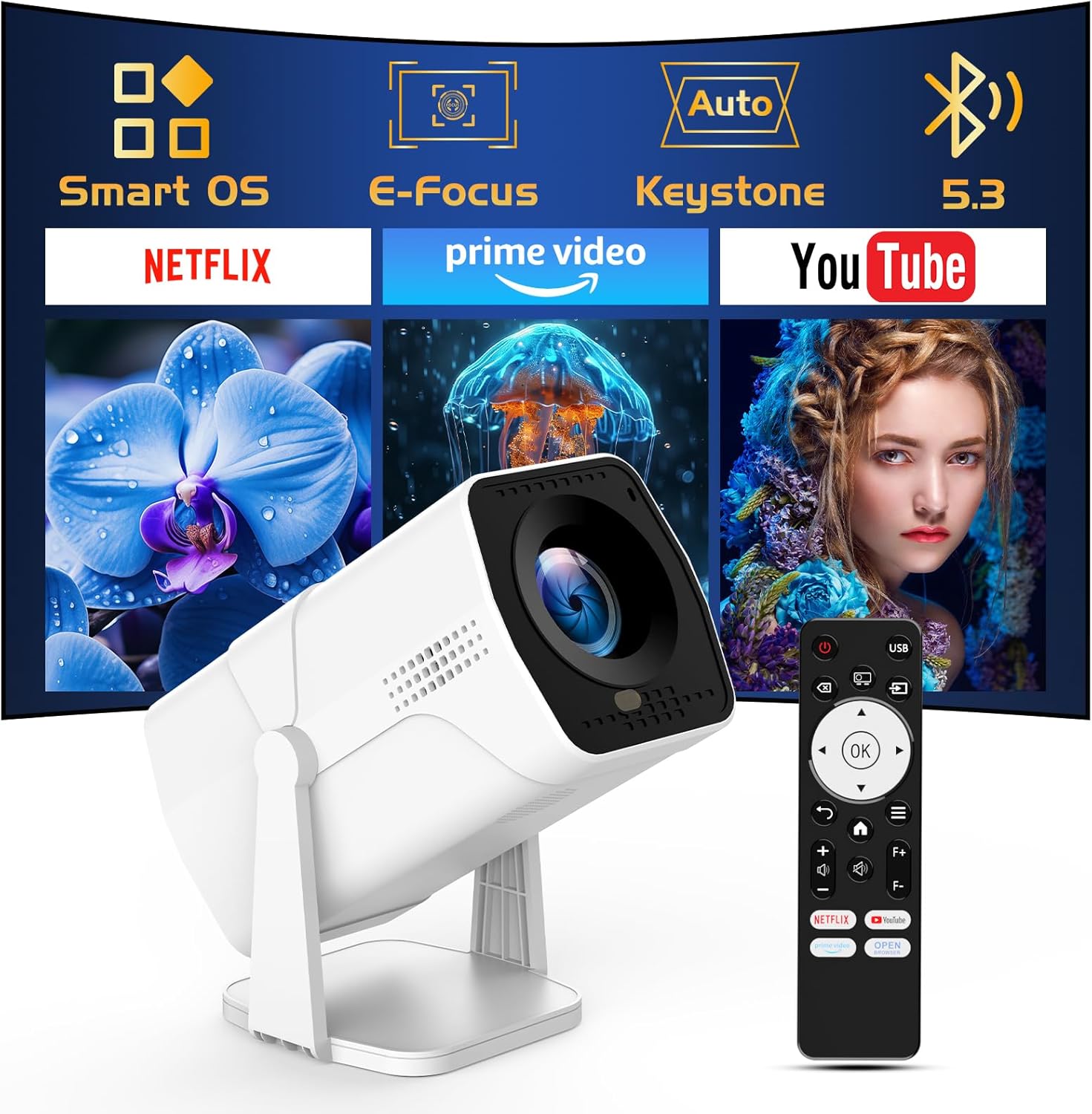
Image: The TMY Projector unit, its remote control, and a projected screen displaying logos for Smart OS, E-Focus, Auto Keystone, Bluetooth 5.3, Netflix, Prime Video, and YouTube.
3. Konfiguracja
3.1 Umieszczenie
Position the projector on a stable, flat surface. The 270° rotatable stand allows for versatile placement, including projecting onto walls or ceilings. Ensure adequate ventilation around the projector.

Image: A TMY Projector positioned on a bedside table, projecting an image onto the ceiling, demonstrating its 270° rotatable stand for multi-angle viewing.
3.2 Połączenie zasilania
- Podłącz przewód zasilający do portu wejściowego zasilania projektora.
- Podłącz drugi koniec przewodu zasilającego do standardowego gniazdka elektrycznego.
3.3 Pierwsze włączenie i regulacja ostrości
- Naciśnij przycisk zasilania na projektorze lub pilocie, aby włączyć urządzenie.
- Projektor posiada: Elektryczny fokus I Automatyczna korekcja trapezowa correction. The image will automatically adjust for clarity and a rectangular shape within approximately 2 seconds.
- If further adjustment is needed, use the remote control to fine-tune the focus.

Image: A TMY Projector projecting a vibrant image onto a screen, with an overlay illustrating the 'FOCUS' function and icons for Auto Keystone and 50%-100% Zoom.
3.4 Połączenie sieciowe (WiFi)
The projector supports WiFi 6 for a fast and stable internet connection.
- Navigate to the 'Settings' menu using the remote control.
- Wybierz „Sieć” lub „Ustawienia Wi-Fi”.
- Choose your desired WiFi network from the list and enter the password.
- Potwierdź połączenie.

Image: A TMY Projector wirelessly connected to a tablet, smartphone, and laptop, illustrating its WiFi 6 connectivity for faster streaming with no lagging.
3.5 Połączenie Bluetooth
The projector features Dual-Mode Bluetooth 5.2 for audio connectivity.
- Projector Mode (Output): To connect to external Bluetooth speakers or soundbars: Navigate to 'Bluetooth Settings', enable Bluetooth, and pair with your audio device.
- Speaker Mode (Input): To use the projector's built-in speakers as a standalone Bluetooth speaker: Select 'Speaker Mode' in the Bluetooth settings. Your phone or other device can then connect to the projector to play audio.

Image: A TMY Projector illustrating its two-way Bluetooth 5.2 functionality, showing connections to a soundbar (Projector Mode) and a smartphone (Speaker Mode).
4. Działanie
4.1 Nawigacja po systemie operacyjnym Smart OS
The projector runs on a smart TV operating system. Use the provided remote control to navigate menus, select applications, and control playback.

Image: The TMY Projector unit with a projected screen showing a grid of built-in smart OS applications, including Netflix, YouTube, Prime Video, TikTok, and others.
4.2 Dostęp do wbudowanych aplikacji
The projector comes with pre-installed and officially licensed applications such as Netflix, Prime Video, and YouTube. Access these directly from the home screen or through the 'App Store' for additional content.

Image: A TMY Projector projecting a screen filled with content from officially licensed apps like Netflix, Prime Video, and YouTube, with the remote control in the foreground.
4.3 Podłączanie urządzeń zewnętrznych
Projektor oferuje wiele portów umożliwiających podłączanie urządzeń zewnętrznych:
- HDMI: Connect TV sticks, TV boxes, PCs/Laptops, or gaming consoles (e.g., PS).
- USB: Odtwarzaj media files directly from USB drives or connect other USB accessories.
- Phone/PC Mirroring: Wirelessly mirror content from your smartphone or PC (refer to the on-screen instructions for specific mirroring protocols).
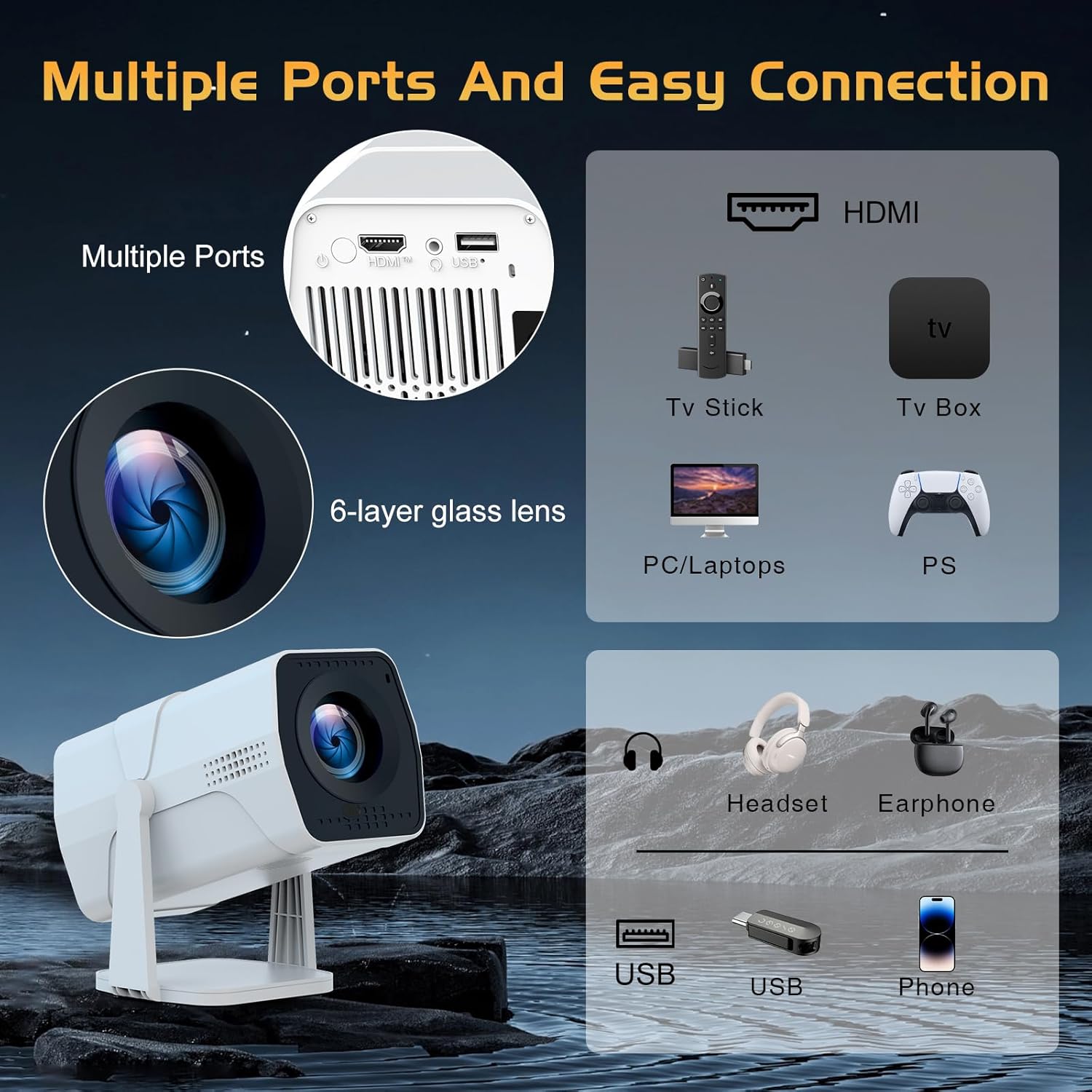
Image: A detailed diagram showing the multiple ports on the TMY Projector (HDMI, USB) and various connection possibilities, including TV sticks, PCs, gaming consoles, headsets, and phones.
4.4 Funkcja powiększania ekranu
The projector includes a 50%-100% zoom function, allowing you to adjust the screen size without moving the projector. This feature can be accessed via the remote control or settings menu.
5. Konserwacja
To ensure the longevity and optimal performance of your TMY Projector, follow these maintenance guidelines:
- Czyszczenie obiektywu: Używaj miękkiej, niepozostawiającej włókien ściereczki przeznaczonej specjalnie do soczewek optycznych. Unikaj materiałów ściernych i silnych środków chemicznych.
- Czyszczenie powierzchni zewnętrznej: Przetrzyj obudowę projektora miękką, suchą ściereczką. Nie używaj płynnych środków czyszczących bezpośrednio na urządzeniu.
- Wentylacja: Aby zapobiec przegrzaniu, upewnij się, że otwory wentylacyjne nie są zablokowane.
- Składowanie: Jeśli projektor nie będzie używany przez dłuższy czas, należy go przechowywać w chłodnym i suchym miejscu, z dala od bezpośredniego światła słonecznego i kurzu.
6. Rozwiązywanie Problemów
If you encounter issues with your TMY Projector, refer to the following common problems and solutions:
- Brak zasilania:
- Upewnij się, że przewód zasilający jest solidnie podłączony zarówno do projektora, jak i do sprawnego gniazdka elektrycznego.
- Sprawdź czy gniazdko elektryczne jest sprawne.
- Brak obrazu / Rozmazany obraz:
- Sprawdź, czy projektor jest włączony i czy osłona obiektywu została zdjęta.
- Allow the automatic focus and keystone correction to complete. If still blurry, manually adjust focus using the remote.
- Ensure the projection surface is suitable and the projector is within the recommended distance.
- If using an external source (HDMI), ensure the correct input source is selected.
- Brak dźwięku:
- Sprawdź poziom głośności projektora i podłączonych zewnętrznych urządzeń audio.
- Jeśli używasz głośników Bluetooth, upewnij się, że są prawidłowo sparowane i połączone.
- If using internal speakers, ensure external Bluetooth output is not selected.
- Pilot nie odpowiada:
- Sprawdź, czy baterie są prawidłowo włożone i nie są rozładowane.
- Skieruj pilota bezpośrednio na odbiornik podczerwieni projektora.
- Problemy z połączeniem Wi-Fi:
- Upewnij się, że Twoja sieć WiFi jest aktywna i znajduje się w zasięgu.
- Sprawdź dokładnie hasło WiFi.
- Restart the projector and your WiFi router.
- If the connection times out, try moving the projector closer to the router or reducing interference.
7. Specyfikacje
| Funkcja | Specyfikacja |
|---|---|
| Marka | TMY |
| Model | B0DRFF5KMF |
| Waga przedmiotu | 2.79 funta |
| Wymiary produktu | 5.35 x 4.84 x 7.09 cala |
| Kolor | Biały |
| Cechy specjalne | Speakers, Electric Focus, Auto Keystone, 270° Rotatable Stand |
| Technologia łączności | HDMI, USB, WiFi 6, Bluetooth 5.2 |
| Rozdzielczość wyświetlacza | 1920 x 1080 (1080P Full HD) |
| Zalecane zastosowania | Wnętrz |

Image: A visual comparison showing the TMY Projector's 1080P Full HD image quality, emphasizing that it is recommended for use in dark environments for optimal viewing, contrasted with daytime or light-on conditions.
8. Gwarancja i wsparcie
TMY is committed to providing excellent customer service and product support.
- Gwarancja: Ten produkt jest objęty 3-letnią gwarancją.
- Zasady zwrotu: Enjoy a 30-day return period.
- Wsparcie techniczne: Lifetime after-sale service and technical support are available.
- Czas reakcji: W przypadku zapytań dotyczących wsparcia, można spodziewać się szybkiej odpowiedzi w ciągu 24 godzin.
Aby uzyskać dalszą pomoc, odwiedź oficjalną stronę TMY Store on Amazon or contact customer support through the provided channels in your warranty card.


