1. Koniec produktuview
The ZIHNIC S12A Clip-on Earbuds are advanced open-ear wireless headphones designed for comfort and high-quality audio. Featuring Bluetooth 5.4 connectivity, a smart LED touch screen for intuitive control, and a non-in-ear design, these earbuds are suitable for extended wear during various activities including workouts, commuting, and daily use. They offer superior audio performance with noise cancellation and extended battery life.

Image: ZIHNIC S12A Clip-on Earbuds shown in their charging case, highlighting the sleek design and integrated display.
2. Przewodnik konfiguracji
2.1. Ładowanie początkowe
Before first use, fully charge your ZIHNIC S12A earbuds and their charging case. Connect the provided charging cable to the case and a compatible USB power source. The LED screen on the case will indicate the charging status. A full charge takes approximately 1.5 hours.

Image: Visual representation of the earbuds' battery life, showing 1.5 hours for quick charge, 9 hours of play time, and 36 hours of standby in the case.
2.2. Parowanie Bluetooth
- Otwórz etui ładujące. Słuchawki automatycznie przejdą w tryb parowania.
- Włącz Bluetooth na swoim urządzeniu (smartfonie, tablecie itp.).
- Szukaj available Bluetooth devices and select "ZIHNIC S12A" from the list.
- Po połączeniu komunikat głosowy potwierdzi pomyślne sparowanie. Słuchawki automatycznie połączą się z ostatnio sparowanym urządzeniem po wyjęciu z etui.
3. Instrukcja obsługi
3.1. Noszenie słuchawek dousznych
The ZIHNIC S12A earbuds feature an open-ear clip-on design for comfortable and secure fit without entering the ear canal. Gently clip the earbuds onto your ear, ensuring the audio output is positioned correctly for optimal sound. This design allows for environmental awareness while enjoying audio.

Image: A person demonstrating the comfortable and secure fit of the ZIHNIC S12A Open-Ear Clip-on Earbuds.
3.2. Smart LED Touch Screen Controls
The charging case features an intuitive LED touch screen for easy control and customization. Double-tap the screen to unlock and access various functions. These functions include:
- Kontrola odtwarzania: Odtwarzaj/pauza, pomijaj utwory.
- Regulacja głośności: Zwiększ lub zmniejsz głośność.
- Ustawienia korektora: Dostosuj dźwięk profiles (np. normalny, wzmocnienie basów).
- Blokada ekranu: Unikaj przypadkowego dotknięcia.
- Przełącznik języka: Zmień język wyświetlania.
- Poziom światła: Dostosowanie jasności ekranu.
- Lokalizator zgubionych słuchawek: Locate misplaced earbuds (see Troubleshooting section).
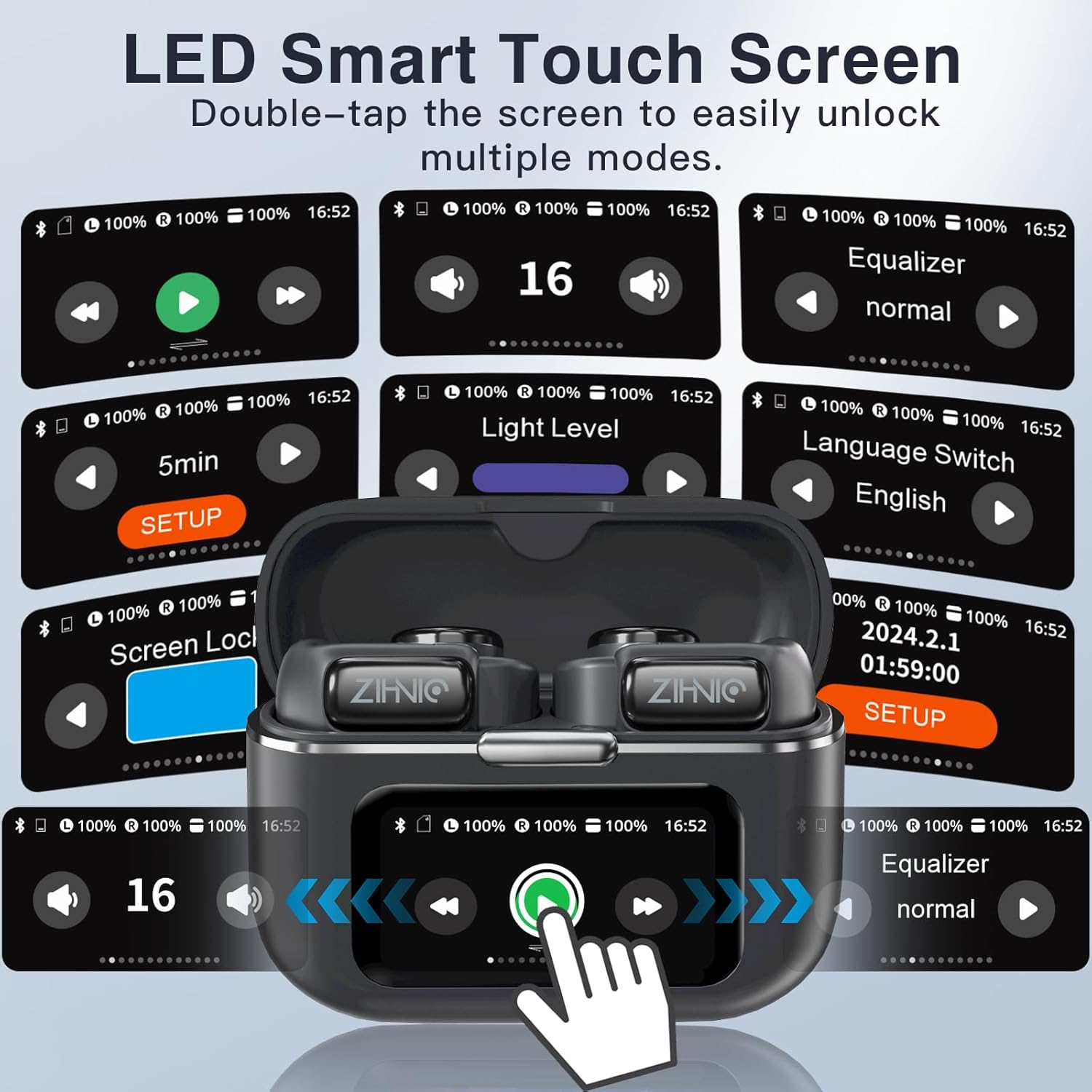
Image: A collage of the ZIHNIC S12A's LED Smart Touch Screen interface, showing various control options like playback, volume, equalizer, screen lock, and language settings.
3.3. Audio Playback and Storage
The earbuds deliver superior HiFi stereo sound with optimized amplitude and sensitivity, ensuring crystal-clear audio and dynamic sound reproduction. They are designed to minimize sound leakage for a private listening experience. The earbuds also feature 4GB of internal storage, allowing you to store up to 1000 songs directly on the device for offline listening.

Image: An exploded diagram illustrating the components responsible for HiFi Stereo Sound within the ZIHNIC S12A earbuds, emphasizing immersive audio quality.

Image: A graphic illustrating the 4GB internal storage capacity of the ZIHNIC S12A earbuds, capable of holding up to 1000 songs for music on the go.
3.4. Zarządzanie połączeniami
The built-in microphone with advanced noise-cancellation technology ensures clear, hands-free communication. To answer or end calls, use the touch controls on the earbuds as indicated in the Smart LED Touch Screen Controls section. For optimal call quality, ensure the microphone is not obstructed.
4. Konserwacja i pielęgnacja
- Czyszczenie: Regularnie czyść słuchawki i etui ładujące miękką, suchą i niepozostawiającą włókien ściereczką. Unikaj stosowania materiałów ściernych i silnych środków chemicznych.
- Wodoodporność: The earbuds are waterproof, making them suitable for workouts and light rain. However, avoid submerging them in water or exposing them to high-pressure water jets. Dry them thoroughly if they get wet.
- Składowanie: Gdy nie używasz słuchawek, przechowuj je w etui ładującym, aby chronić je przed kurzem i uszkodzeniami. Przechowuj w chłodnym, suchym miejscu, z dala od ekstremalnych temperatur.
- Pielęgnacja baterii: Aby przedłużyć żywotność baterii, unikaj częstego całkowitego rozładowywania słuchawek i etui. Ładuj je regularnie, nawet jeśli nie używasz ich codziennie.
5. Rozwiązywanie Problemów
If you encounter issues with your ZIHNIC S12A earbuds, refer to the common problems and solutions below:
| Problem | Możliwe rozwiązanie |
|---|---|
| Słuchawki nie łączą się/nie parują. |
|
| Brak dźwięku lub niski poziom głośności. |
|
| Microphone issues (e.g., screeching sounds for others). |
|
| Internal music storage not working. |
|
| Lost one earbud. |
|

Image: The ZIHNIC S12A charging case display showing the "Find My Earphone" feature, which assists in locating misplaced earbuds.
6. Specyfikacje
| Funkcja | Szczegół |
|---|---|
| Nazwa modelu | S12A |
| Marka | ŻYHNIC |
| Technologia łączności | Bezprzewodowa (Bluetooth 5.4) |
| Umieszczenie ucha | Otwarte ucho (zacisk) |
| Kontrola hałasu | Aktywna redukcja szumów |
| Metoda kontroli | Touch (Smart LED Screen) |
| Czas pracy baterii (odtwarzanie) | Do 9 godzin (słuchawki douszne), 36 godzin (z etui ładującym) |
| Czas ładowania | Około 1.5 godzin |
| Pamięć wewnętrzna | 4 GB (do 1000 utworów) |
| Waga przedmiotu | 50 gramów (1.76 uncji) |
| Zakres częstotliwości | 20Hz - 20,000Hz |
| Impedancja | 16 omy |
| Zawarte komponenty | Kabel, instrukcja obsługi |
7. Gwarancja i wsparcie
ZIHNIC S12A Clip-on Earbuds come with a 12-miesięczna gwarancja from the date of purchase, covering manufacturing defects. For any product inquiries, technical support, or warranty claims, please contact ZIHNIC customer support through the official channels provided at the time of purchase or visit the ZIHNIC brand store on Amazon.