1. Wprowadzenie
The SANZUCO ZNN F60-2 Wireless Intercom System provides effortless, full-duplex, hands-free communication for various environments including homes, offices, and hospitals. Designed for ease of use, this system offers a long range of up to 5300ft and features such as group call, auto answer, and clear sound quality. This manual will guide you through the setup, operation, and maintenance of your intercom system.
2. Co znajduje się w pudełku
- Full Duplex Intercom User Manual x 1
- Hands Free Wireless Intercom system (white) x 2
- Home intercom system Charging Cables x 2
- Intercom Charger x 2
3. Koniec produktuview & Cechy
The SANZUCO ZNN F60-2 Intercom System is pre-configured for instant use, requiring no complex setup or pairing. Simply plug in the units and begin communicating. Key features include:
- Komunikacja pełnodupleksowa: Umożliwia jednoczesną dwustronną rozmowę.
- Obsługa bez użycia rąk: Speak and listen without holding buttons.
- Daleki zasięg: Up to 5300ft for extensive coverage.
- Czysty dźwięk: High-fidelity processing ensures crystal-clear audio.
- Połączenie grupowe: Broadcast messages to all connected intercoms.
- Automatyczna odpowiedź: Automatically connects calls after two rings for convenience.
- Tryb cichy: Disables the ring tone for discreet communication.
- Funkcja odtwarzania: Allows replaying messages.
- 18 kanałów: (CODE A1-9, B1-9) with anti-interference technology and 2 secret codes.

Rysunek 1: Koniecview of SANZUCO Intercom main functions.

Figure 2: Full-Duplex and Hands-Free communication in an office environment.
4. Konfiguracja
Your SANZUCO Intercom System is designed for quick and easy setup. No complex installation or pairing is required.
4.1 Połączenie zasilania
- Locate the USB Type C port on the intercom unit.
- Connect one end of the provided charging cable to the intercom unit.
- Plug the other end of the charging cable into the intercom charger.
- Insert the intercom charger into a standard electrical outlet.
- Repeat for all intercom units.
The intercom requires continuous plug-in power and does not support batteries.
Przypisanie kanału 4.2
The system comes with 18 available channels (CODE A1-9, B1-9). A and B channels do not interfere with each other. You can assign different channels to different units or rooms to ensure privacy and organization.
- To select a channel, use the numbered keypad on the intercom unit.
- For specific instructions on changing channels, refer to the 'Operating Instructions' section or the video tutorial below.
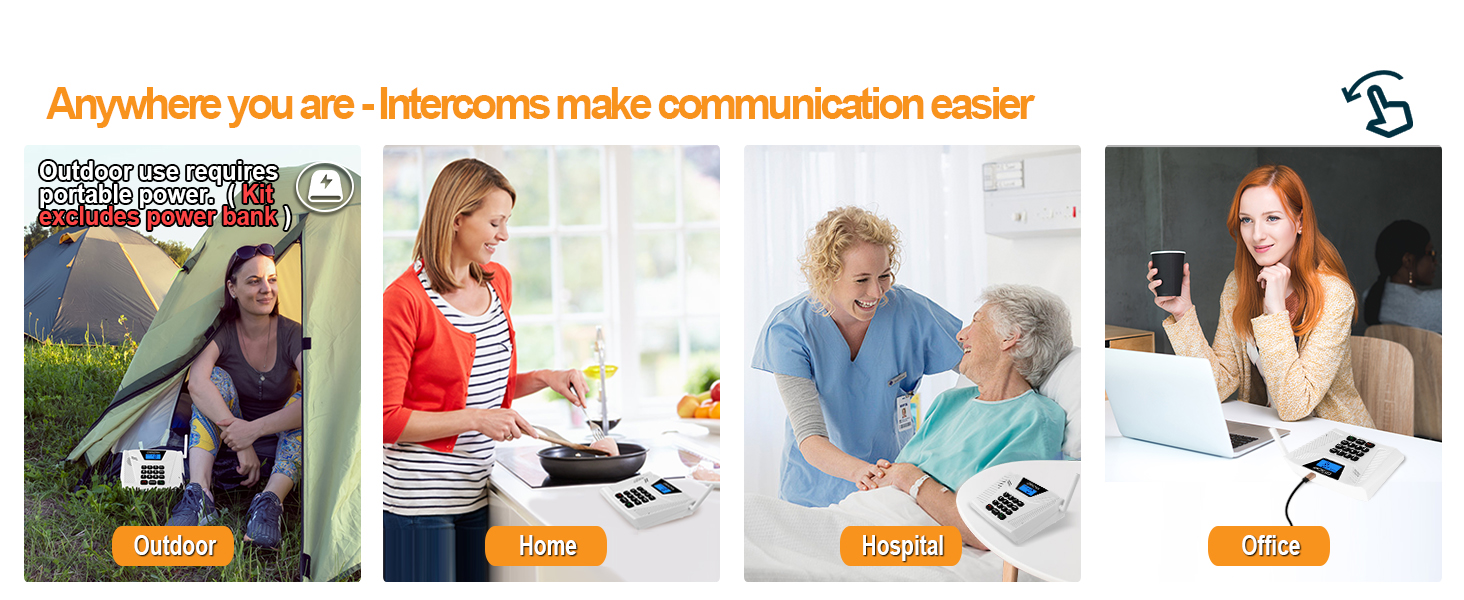
Figure 3: Intercoms can be used in various locations such as home, office, hospital, or outdoor settings with portable power.
5. Instrukcja obsługi
5.1 Making a Call (Full Duplex)
To initiate a hands-free, full-duplex conversation with another unit:
- Upewnij się, że oba urządzenia są włączone i pracują na tym samym kanale.
- Simply select the desired channel number on your intercom.
- The other unit will automatically answer after two rings (Auto Answer feature).
- Begin speaking hands-free.

Figure 4: The intercom's Auto Answer feature allows for seamless hands-free communication.
5.2 Funkcja wywołania grupowego
The Group Call function allows you to broadcast a message to all intercoms within the group simultaneously.
- Naciśnij i przytrzymaj GRUPA button on your intercom unit.
- Speak your message. All units set to the same group will receive the broadcast.
- Uwolnij GRUPA przycisk po zakończeniu mówienia.

Figure 5: The Group Call feature enables broadcasting messages to multiple intercoms.
5.3 Tryb cichy
To activate Silent Mode, which disables the ring tone:
- Naciśnij i przytrzymaj TOM- key until you hear a beep. This indicates Silent Mode is active.
To deactivate Silent Mode:
- Naciśnij i przytrzymaj Objętość + key until you hear a beep. This indicates Silent Mode is deactivated.

Figure 6: Silent Mode allows for quiet operation, ideal for bedrooms or quiet areas.
5.4 Replay Function
The Replay function allows you to listen to the last received message.
- Naciśnij MENU button to access the replay function.
5.5 Samouczki wideo
For visual guidance on operating your intercom system, please refer to the official video tutorials provided by SANZUCO:
Video 1: 2024 Intercom Function Description. This video provides a detailed overview of the intercom's various functions and how to use them.
Video 2: Auto Answer & Group Call. Learn how to utilize the automatic answer and group call features for efficient communication.
Video 3: How to Change Intercom Channels. A step-by-step guide on assigning and changing channels for your intercom units.
Video 4: Hands Free Intercoms Wireless for Home. Demonstrates the hands-free capability of the intercom system in a home setting.
6. Konserwacja
To ensure the longevity and optimal performance of your SANZUCO Wireless Intercom System, follow these simple maintenance guidelines:
- Aby utrzymać urządzenia w czystości, należy je przecierać miękką, suchą ściereczką.
- Avoid exposing the intercoms to water or excessive moisture.
- Nie używaj żrących chemikaliów ani ściernych środków czyszczących.
- Store the units in a cool, dry place when not in use for extended periods.
7. Rozwiązywanie Problemów
If you encounter any issues with your intercom system, please refer to the following common troubleshooting steps:
- Brak zasilania: Ensure the intercom unit is properly plugged into a working power outlet using the provided charger and cable.
- Brak komunikacji: Verify that all units intended for communication are set to the same channel. Check for any physical obstructions that might interfere with the signal, although the system is designed for a 5300ft range.
- Zakłócenia/słaba jakość dźwięku: Try changing the channel to one of the 18 available options. The system includes anti-interference technology, but external factors can sometimes affect clarity.
- Jednostka nie odpowiada: Unplug the unit from power, wait a few seconds, and then plug it back in to perform a soft reset.
Jeśli po wypróbowaniu tych kroków problem nadal występuje, skontaktuj się z obsługą klienta.
8. Specyfikacje
| Atrybut | Szczegół |
|---|---|
| Marka | SANZUKO |
| Numer modelu | ZNN F60-2 |
| Kolor | Biały |
| Źródło zasilania | Elektryczny przewodowy |
| Technologia łączności | Wired (for power) |
| Typ instalacji | Plug in and use |
| Metoda kontroli | Głos |
| Maksymalny zasięg | 5300 stóp |
| Wymiary produktu | 9.39 x 5.5 x 3.7 cala |
| Waga przedmiotu | 1.85 funta |
| Cechy specjalne | Auto Answer, Group Call, Hands-free two-way talk |
9. Gwarancja i wsparcie
Your SANZUCO Wireless Intercom System comes with dedicated customer support. If you are unsatisfied with your intercom system or require assistance, please contact us for 24/7 customer support.


