1. Wprowadzenie
This manual provides detailed instructions for the setup, operation, and maintenance of your TANLANIN TE-3008BR-TA Vinyl Record Player. Please read this manual thoroughly before using the product to ensure proper function and longevity. Keep this manual for future reference.

Image 1.1: TANLANIN TE-3008BR-TA Vinyl Record Player. This image shows the overall design of the record player with its dust cover open, revealing the platter, tonearm, and a vinyl record.
2. Zawartość opakowania
Sprawdź, czy w przesyłce znajdują się wszystkie elementy wymienione poniżej:
- 1x gramofon
- 1x Instrukcja obsługi (ten dokument)
- 1x 45 RPM Record Adapter
- 1x Replacement Needle (Stylus)
- Adapter sieciowy 1x
3. Koniec produktuview
Familiarize yourself with the components and controls of your record player.

Image 3.1: Front Panel Controls and Components. This diagram labels key parts of the record player, including the tonearm, headphone jack, AUX-in jack, mode selector, power/volume knob, and Bluetooth IN/OUT switch.
- Ramię gramofonu: Przeznaczony do przechowywania rysika i wkładki.
- Gniazdo słuchawkowe: Do podłączenia słuchawek w celu prywatnego słuchania.
- Gniazdo AUX-in: Do podłączania zewnętrznych urządzeń audio za pomocą kabla 3.5 mm.
- Wybór trybu: Switches between Bluetooth input, LP mode (vinyl playback), and AUX input.
- Włączanie/wyłączanie i pokrętło głośności: Controls power and adjusts the volume of the built-in speakers or connected headphones.
- Bluetooth IN/OUT Switch: Toggles Bluetooth functionality between receiving audio (input) and transmitting audio (output).

Image 3.2: Adjustable Counterweight. This image highlights the counterweight located at the rear of the tonearm, used for balancing the tonearm and setting tracking force.

Image 3.3: Rear Panel Ports. This image shows the RCA Line Out jacks (red for right, white for left) and the DC 5V power input port on the back of the unit.
4. Instrukcje konfiguracji
- Unpack the Record Player: Ostrożnie wyjmij wszystkie elementy z opakowania. Zachowaj opakowanie do transportu lub przechowywania w przyszłości.
- Umieszczenie: Place the record player on a stable, level surface away from direct sunlight, heat sources, and excessive dust or vibrations. Ensure adequate ventilation around the unit.
- Podłącz zasilanie: Insert the AC adapter into the DC 5V input port on the rear of the record player (refer to Image 3.3). Plug the other end into a suitable wall outlet.
- Usuń osłonę rysika: Gently remove the clear plastic stylus protector from the needle assembly. Be careful not to bend the stylus.
- Regulacja przeciwwagi:
- Carefully balance the tonearm by rotating the counterweight (refer to Image 3.2) until the tonearm floats horizontally.
- Once balanced, return the tonearm to its rest.
- Rotate the counterweight to apply the recommended tracking force. While a specific value is not provided, a common starting point for ceramic cartridges is 3-5 grams. Adjust slightly for optimal sound and to prevent skipping.
5. Instrukcja obsługi
5.1. Odtwarzanie płyt winylowych

Image 5.1: 3-Speed Playback. This image illustrates the record player's capability to play 7", 10", and 12" records at 33 1/3, 45, and 78 RPM speeds.
- Włączanie: Turn the Power ON/OFF & Volume Knob clockwise to power on the unit.
- Select LP Mode: Rotate the Mode Selector to the "LP" position.
- Miejsce zapisu: Place a vinyl record on the platter. If playing a 7-inch (45 RPM) record with a large center hole, place the included 45 RPM adapter on the spindle first.
- Wybierz prędkość: Set the speed switch (usually located near the platter) to the correct speed for your record (33 1/3, 45, or 78 RPM).
- Pozycja ramienia: Delikatnie unieś ramię za pomocą dźwigni. Przesuń ramię nad żądany rowek początkowy płyty.
- Dolne ramię gramofonu: Powoli opuść ramię gramofonu na płytę za pomocą dźwigni. Muzyka zacznie grać.
- Dostosuj głośność: Use the Power ON/OFF & Volume Knob to adjust the listening volume.
- Zatrzymaj odtwarzanie: At the end of the record, the tonearm may automatically return to its rest (auto-stop feature, if present). Alternatively, manually lift the tonearm using the cueing lever and return it to its rest.
5.2. Bluetooth Input (Receiving Audio)

Image 5.2: Bluetooth Input Playback. This image demonstrates connecting a smartphone or tablet to the record player via Bluetooth to play digital music through its built-in speakers.
- Włączanie: Turn the Power ON/OFF & Volume Knob clockwise to power on the unit.
- Select Bluetooth Input: Rotate the Mode Selector to the "BT" position. The Bluetooth indicator light will flash, indicating it's in pairing mode.
- Aktywuj Bluetooth na urządzeniu: Włącz Bluetooth w swoim smartfonie, tablecie lub innym urządzeniu audio.
- Paruj urządzenie: Szukaj "TANLANIN" (or similar device name) in your device's Bluetooth settings and select it to pair. Once connected, the Bluetooth indicator light will stop flashing and remain solid.
- Odtwórz muzykę: Start playing music on your connected device. The audio will play through the record player's built-in speakers.
- Dostosuj głośność: Use the Power ON/OFF & Volume Knob on the record player and/or the volume controls on your connected device to adjust the volume.
5.3. Bluetooth Output (Transmitting Audio)

Image 5.3: Bluetooth Output Ready. This image shows the record player transmitting audio to an external Bluetooth speaker, allowing for flexible audio setups.
- Włączanie: Turn the Power ON/OFF & Volume Knob clockwise to power on the unit.
- Prepare External Bluetooth Device: Upewnij się, że zewnętrzny głośnik lub słuchawki Bluetooth są w trybie parowania.
- Activate Bluetooth Output: Press the Bluetooth IN/OUT Switch (TX mode). The Bluetooth indicator light will flash rapidly, searching for an external device.
- Łączyć: The record player will automatically attempt to connect to the nearest available Bluetooth receiving device. Once connected, the indicator light will stop flashing and remain solid.
- Odtwórz dźwięk: Start playing a vinyl record or AUX input. The audio will be transmitted to your external Bluetooth device.
- Dostosuj głośność: Adjust the volume directly on your connected Bluetooth speaker or headphones. The record player's volume knob may not control the output volume in TX mode.
5.4. AUX Input (Connecting External Wired Devices)
- Włączanie: Turn the Power ON/OFF & Volume Knob clockwise to power on the unit.
- Wybierz tryb AUX: Rotate the Mode Selector to the "AUX" position.
- Podłącz urządzenie: Connect your external audio device (e.g., smartphone, MP3 player) to the AUX-in Jack (3.5mm) on the front panel using an audio cable (not included).
- Odtwórz muzykę: Start playing music on your connected device. The audio will play through the record player's built-in speakers.
- Dostosuj głośność: Use the Power ON/OFF & Volume Knob on the record player and/or the volume controls on your connected device to adjust the volume.
5.5. RCA Line Out (Connecting to External Amplifiers/Speakers)
- Wyłączone: Ensure the record player and your external amplifier/speakers are powered off before making connections.
- Podłącz kable RCA: Connect RCA cables (not included) from the "LINE OUT" ports on the rear of the record player (refer to Image 3.3) to the corresponding audio input on your amplifier or powered speakers. Match red to red (right channel) and white to white (left channel).
- Włączanie: Power on your external amplifier/speakers, then power on the record player.
- Odtwórz dźwięk: Play a vinyl record. The audio will be routed through your external system.
- Dostosuj głośność: Dostosuj głośność za pomocą elementów sterujących na urządzeniu zewnętrznym ampgłośniki lub aktywne głośniki.
5.6. Headphone Jack (Private Listening)
- Podłącz słuchawki: Plug your headphones into the Headphone Jack on the front panel.
- Odtwórz dźwięk: Play a vinyl record or use AUX input. The audio will automatically switch from the built-in speakers to your headphones.
- Dostosuj głośność: Use the Power ON/OFF & Volume Knob on the record player to adjust the headphone volume.
6. Konserwacja
6.1. Czyszczenie rysika
A clean stylus ensures optimal sound quality and extends the life of your records. Use a soft brush designed for stylus cleaning, brushing gently from back to front (in the direction of play). Do not use excessive force or harsh chemicals.
6.2. Czyszczenie gramofonu
Wipe the exterior of the record player with a soft, dry, lint-free cloth. For stubborn marks, a slightly damp cloth can be used, followed by a dry cloth. Avoid using abrasive cleaners, waxes, or solvents.
6.3. Replacing the Stylus
The stylus (needle) will wear out over time and should be replaced after approximately 300-500 hours of playback. A replacement needle is included in your package. Refer to the following steps:
- Gently pull the old stylus cartridge downwards and forwards to detach it from the tonearm.
- Align the new stylus cartridge with the tonearm and push it upwards and backwards until it clicks securely into place.
- Ensure the stylus is firmly attached before playing any records.
7. Rozwiązywanie Problemów
| Problem | Możliwa przyczyna | Rozwiązanie |
|---|---|---|
| Brak zasilania | AC adapter not connected or power outlet faulty. | Ensure AC adapter is securely connected to the unit and a working power outlet. Check if the power knob is turned on. |
| Brak dźwięku z głośników | Volume too low, wrong mode selected, headphones connected, or external speakers connected via RCA. | Increase volume. Ensure Mode Selector is on "LP" or "AUX" (if applicable). Disconnect headphones. If using RCA, ensure external system is powered on and volume is adjusted there. |
| Przeskakujący lub zniekształcony dźwięk | Dirty record, dirty/worn stylus, incorrect counterweight setting, or unstable surface. | Clean the record. Clean or replace the stylus. Re-adjust the counterweight. Place the record player on a stable, level surface. |
| Bluetooth pairing issues (Input) | Record player not in pairing mode, device too far, or previously paired device interfering. | Ensure Mode Selector is on "BT" and indicator is flashing. Move device closer. Turn off Bluetooth on other nearby devices. Try unpairing and re-pairing. |
| Bluetooth pairing issues (Output) | External device not in pairing mode, record player not in TX mode, or device too far. | Ensure external speaker/headphones are in pairing mode. Press the Bluetooth IN/OUT Switch to activate TX mode (rapid flashing). Move devices closer. |
| Poor sound quality from built-in speakers | Inherent speaker limitations. | For enhanced audio, consider connecting to external powered speakers or an amplifier via the RCA Line Out ports. |
8. Specyfikacje
| Marka | TANLANINA |
| Numer modelu | TE-3008BR-TA |
| Wymiary produktu | 14.64 x 12.83 x 5.43 cala |
| Waga przedmiotu | 9.58 funta (4.35 kilograma) |
| Obsługiwane prędkości | 33 1/3, 45, 78 obr./min |
| Obsługiwane rozmiary rekordów | 7", 10", 12" |
| Łączność | Bluetooth Input, Bluetooth Output, AUX-in, RCA Line Out, Headphone Jack |
| Cechy specjalne | Adjustable Counterweight, Built-in Stereo Speakers, Full-size Platter |
| Tworzywo | Acrylic, Wood |
| Kolor | Brązowy |
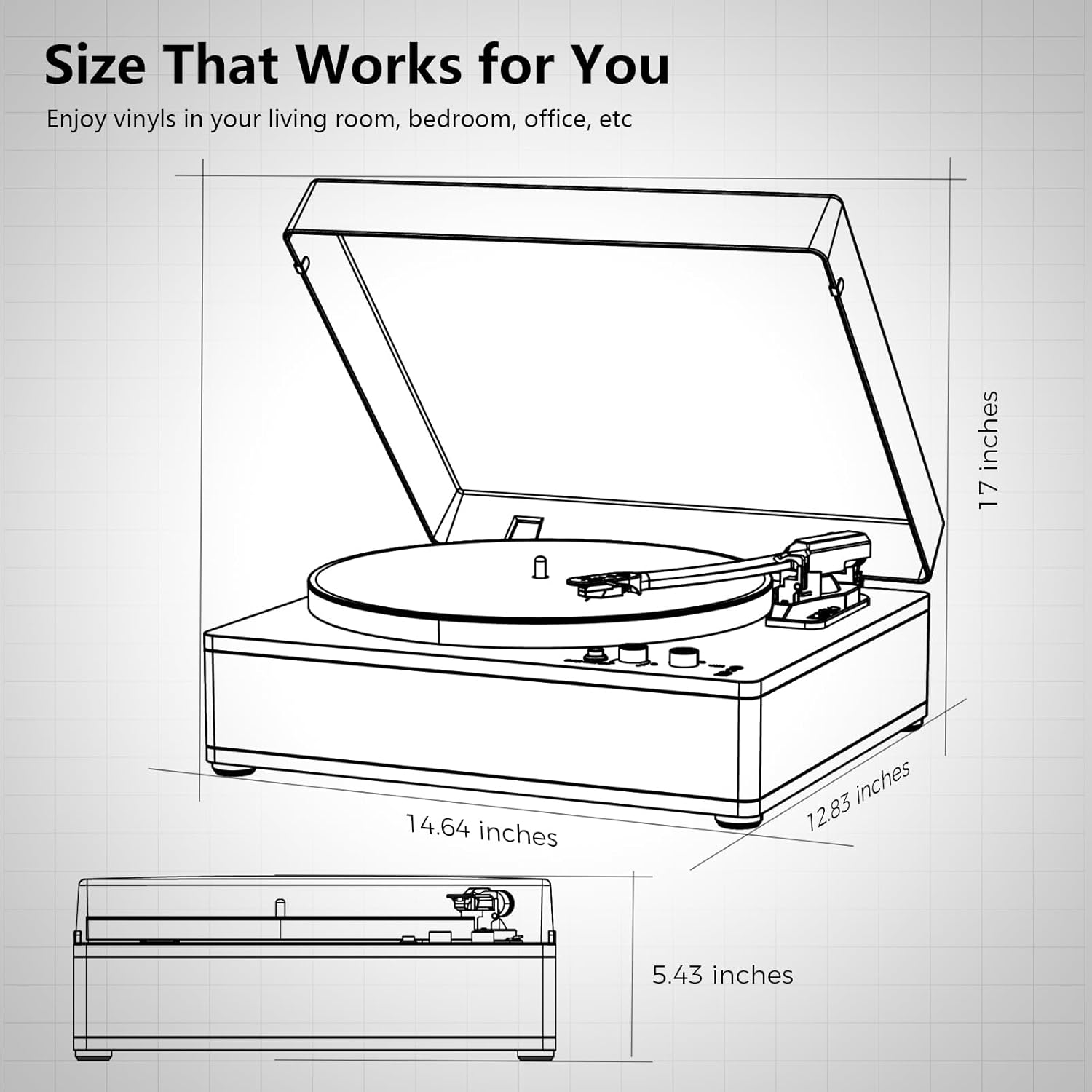
Image 8.1: Product Dimensions. This diagram provides a visual representation of the record player's measurements: 14.64 inches (width), 12.83 inches (depth), and 5.43 inches (height with dust cover closed).
9. Gwarancja i wsparcie
This product is covered by a manufacturer's warranty. For specific warranty terms and conditions, please refer to the documentation provided with your purchase or contact TANLANIN customer support. For technical assistance or further inquiries, please visit the official TANLANIN webstronie lub skontaktuj się z działem obsługi klienta.
Aby uzyskać więcej informacji, odwiedź stronę TANLANIN Store on Amazon.


