1. Wprowadzenie
This manual provides detailed instructions for the setup, operation, maintenance, and troubleshooting of your ATTACK SHARK X66 Gasket Wireless Mechanical Keyboard. Please read this manual thoroughly before using the product to ensure optimal performance and longevity.

Obraz: widok z góry view of the ATTACK SHARK X66 Gasket Wireless Mechanical Keyboard, showcasindzięki kompaktowej budowie i konstrukcji klawiszy.
2. Koniec produktuview
2.1 Główne cechy
- 60% Compact Design: Features 66 keys and a volume knob, optimizing desktop space while maintaining portability.
- Upgraded Gasket Mount: Incorporates 5 layers of sound insulation (PORON Sandwich Foam, Foamed IXPE Under Shaft Pads, PET Acoustic Premium Pads, Shaft Seat Sound Deadening Foam, Customized Bottom Foams) for reduced noise and a smooth typing experience.
- Łączność w trzech trybach: Obsługuje Bluetooth, łączność bezprzewodową 2.4 GHz i przewodowe połączenia USB-C.
- Multi-Device Tasking: Three Bluetooth channels (FN+Q/FN+W/FN+E) for efficient switching between devices.
- Długotrwała bateria: Equipped with a 3000mAh large-capacity rechargeable battery.
- Hot Swappable Switches: Full hot-swappable design compatible with 3-pin/5-pin switches, featuring pre-lubed Strawberry switches for a creamy sound and smooth keystroke.
- Dynamiczne podświetlenie RGB: Offers 9 backlight colors and 18 lighting effects with 16 million LED colors, customizable via software.
- Trwałe klawisze: Features side-printed gradient PBT keycaps that are resistant to oiling, non-slip, and wear-resistant.

Obraz: Ponadview of the X66 keyboard highlighting key features such as RGB Backlight, Triple Mode Connectivity, Hot Swappable switches, PBT Keycaps, 60% Layout, 3000mAh Battery, and Gasket Structure.
2.2 Zawartość opakowania
- ATTACK SHARK X66 Mechanical Keyboard
- USB-C Cable (1.5 meters)
- 2-in-1 Key Puller and Switch Puller
- Additional Strawberry Switches (2 pieces)
- Instrukcja obsługi
3. Konfiguracja
3.1 Tryby łączności
The X66 keyboard supports three connection modes: 2.4GHz wireless, Bluetooth, and USB-C wired.

Image: Diagram illustrating the three connectivity modes: Bluetooth 5.0, 2.4GHz Wireless with a USB dongle, and Type-C Wired connection.
- Połączenie bezprzewodowe 2.4 GHz:
- Znajdź odbiornik USB 2.4 GHz.
- Podłącz odbiornik do wolnego portu USB w komputerze.
- On the keyboard, slide the mode switch to the '2.4G' position. The keyboard will automatically connect.
- Połączenie Bluetooth:
- On the keyboard, slide the mode switch to the 'BT' position.
- Aby przejść do trybu parowania, naciśnij i przytrzymaj FN + P, FN+W, Lub FN + E for 3-5 seconds until the corresponding key's backlight flashes rapidly.
- On your device (PC, Mac, Tablet), search for Bluetooth devices and select 'ATTACK SHARK X66' to pair.
- Once paired, the key's backlight will stop flashing and remain steadily lit. You can pair up to three Bluetooth devices and switch between them using FN + Q/W/E.
- Połączenie przewodowe USB-C:
- Podłącz dołączony kabel USB-C do portu USB-C klawiatury.
- Podłącz drugi koniec kabla do wolnego portu USB w komputerze.
- Klawiatura automatycznie przełączy się na tryb przewodowy i rozpocznie ładowanie.
3.2 Zmiana systemu operacyjnego
The keyboard features a dedicated switch for Windows and Mac operating systems.
- Locate the 'Win/Mac' switch on the side or back of the keyboard.
- Slide the switch to the appropriate operating system setting for optimal key mapping.
4. Instrukcja obsługi
4.1 Funkcjonalność pokrętła głośności
The aluminum CNC metal knob provides convenient control over audio.
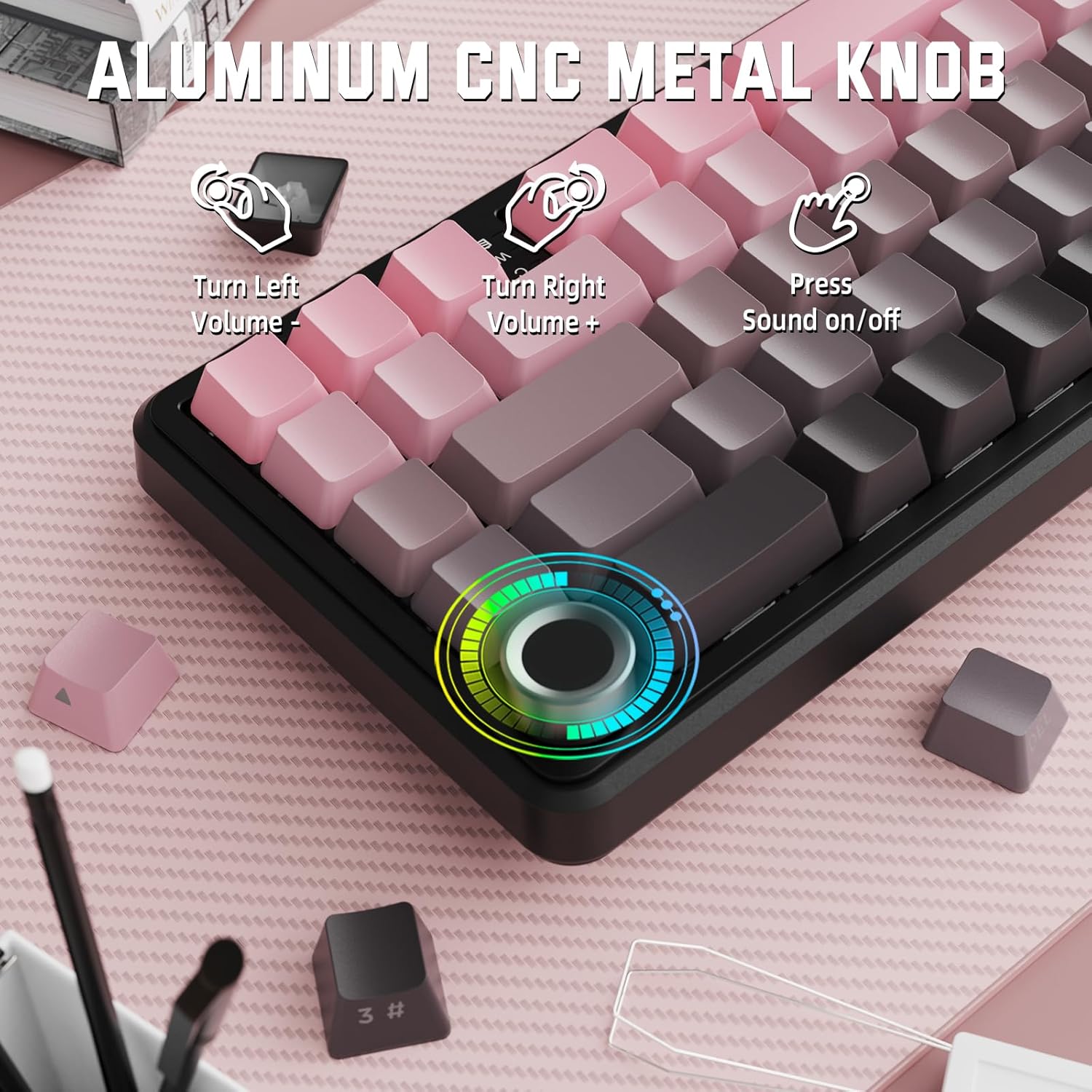
Image: Close-up of the volume knob with icons indicating its functions: Turn Left (Volume -), Turn Right (Volume +), Press (Sound on/off).
- Skręć w lewo: Zmniejsz głośność.
- Skręć w prawo: Zwiększ głośność.
- Naciskać: Wycisz/Włącz dźwięk.
4.2 Function Key Combinations (FN Key)
Due to the compact 60% layout, some functions are accessed via the FN key.
| Połączenie | Funkcjonować |
|---|---|
| FN + Q/W/E | Switch between Bluetooth devices 1, 2, and 3 |
| FN + Backspace | Sprawdź pojemność baterii |
| FN + 1-0 (top row) | F1-F10 functions (e.g., FN+1 for F1) |
| FN + -/= | F11/F12 functions |
| FN + \| | Usuwać |
| FN+P | Wydrukuj ekran |
| FN + [ { | Dom |
| FN + ] } | Koniec |
| FN + ; : | Strona w górę |
| FN + ' " | Strona w dół |
| FN + Arrow Keys | Navigation (e.g., FN+Up Arrow for Page Up) |
5. Personalizacja
5.1 Ustawienia podświetlenia RGB
The keyboard features dynamic RGB backlighting with multiple effects and colors.

Image: Visual representation of RGB backlight controls including turning on/off, changing lighting mode, speed, direction, brightness, and color, often in combination with the FN key.
- Turn on/off Lighting / Power Saving Mode: Specific key combination (refer to keyboard legends or software).
- Tryb oświetlenia: Cycle through 18 lighting effects.
- Prędkość oświetlenia: Dostosuj prędkość dynamicznych efektów świetlnych.
- Kierunek oświetlenia: Change the direction of certain lighting effects.
- Jasność oświetlenia: Adjust the intensity of the backlight.
- Kolor oświetlenia: Select from 9 preset backlight colors or customize via software.
5.2 Programowanie oprogramowania
For advanced customization of RGB modes, macros, and key remapping, dedicated software is available.
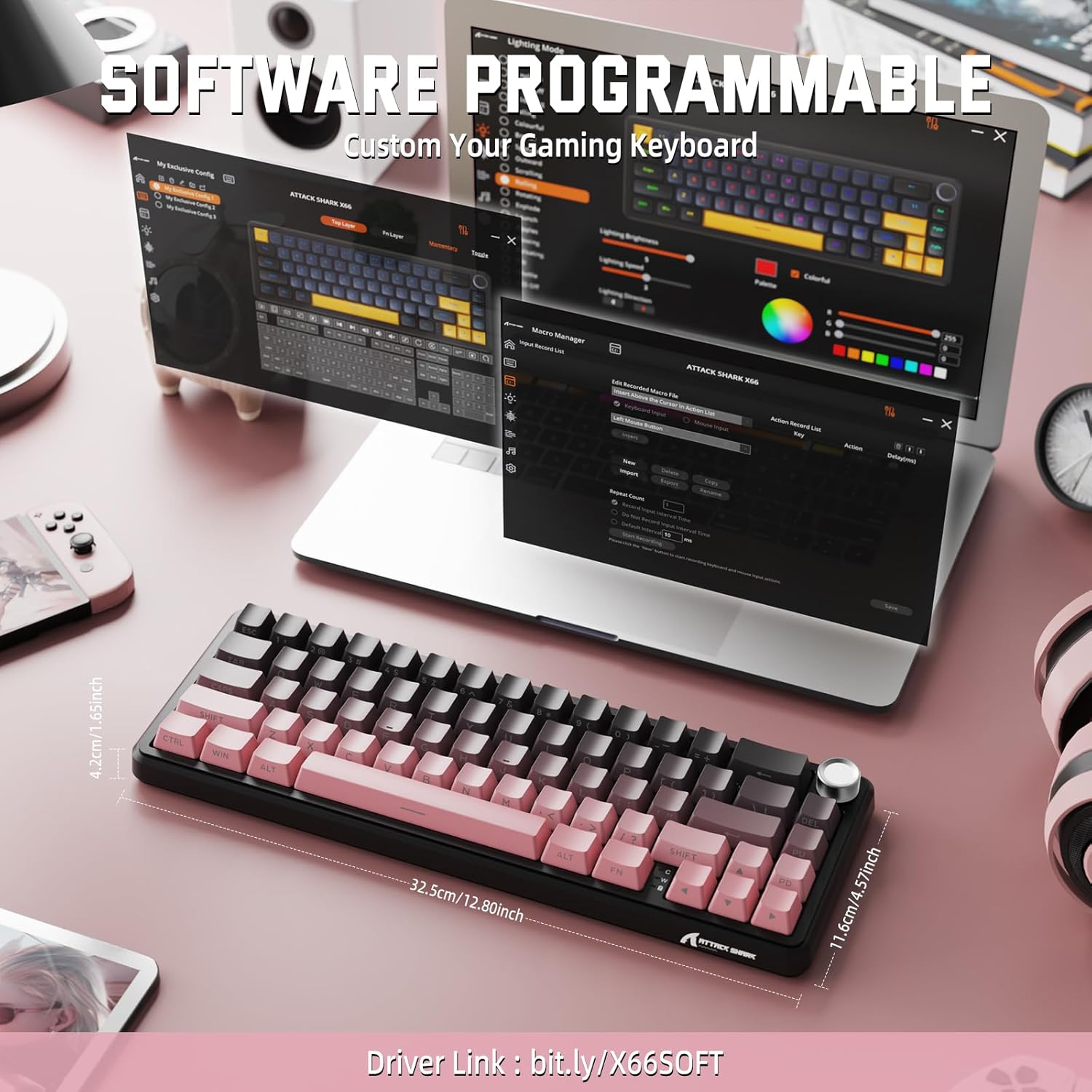
Image: Screenshot of the keyboard's software interface, showing options for custom key assignments, macro recording, and RGB lighting customization. A driver link is provided for download.
Download the official software from the manufacturer's webwitryna. Oprogramowanie pozwala na:
- Dostosuj efekty świetlne i kolory RGB.
- Program macros for complex key sequences.
- Przypisz poszczególne klawisze do różnych funkcji.
- Utwórz i zapisz wiele profiledla różnych aplikacji i gier.
6. Konserwacja
6.1 Czyszczenie klawiatury
- Przed czyszczeniem odłącz klawiaturę od wszystkich źródeł zasilania.
- Użyj miękkiej, niestrzępiącej się ściereczki, lekko wyczyśćampPrzetrzyj klawisze i obudowę wodą lub łagodnym środkiem czyszczącym.
- Do usuwania kurzu i zanieczyszczeń spomiędzy klawiszy należy użyć sprężonego powietrza.
- Unikaj stosowania silnych środków chemicznych, materiałów ściernych i rozpuszczalników.
6.2 Hot Swappable Switch Replacement
The keyboard's hot-swappable design allows for easy switch replacement without soldering.

Image: Illustration showing how to remove and insert mechanical switches on the X66 keyboard, highlighting compatibility with 3-pin and 5-pin switches.
- Za pomocą dołączonego ściągacza nakładek klawiszy ostrożnie zdejmij wybraną nakładkę klawisza.
- Za pomocą dołączonego ściągacza do przełączników ostrożnie chwyć górny i dolny zacisk przełącznika, a następnie pociągnij go prosto do góry.
- Dopasuj piny nowego przełącznika do otworów w płytce PCB. Upewnij się, że piny są proste, aby uniknąć ich wygięcia.
- Delikatnie dociśnij nowy przełącznik, aż usłyszysz kliknięcie.
- Załóż ponownie nakładkę klawisza.
6.3 Zarządzanie baterią
The keyboard is equipped with a 3000mAh rechargeable battery.

Image: Visual guide on how to check the battery capacity using FN + Backspace, showing different battery level indicators (30%, 50%, 100%) with corresponding key light patterns.
- Ładowanie: Connect the keyboard via the USB-C cable to a computer or a USB power adapter. The charging indicator will show the charging status.
- Sprawdzanie poziomu baterii: Naciskać FN + Backspace to display the current battery capacity via the key backlights.
- Czas pracy baterii: A full charge provides long-lasting usage, but actual duration varies based on RGB lighting usage and connection mode.
7. Rozwiązywanie Problemów
| Problem | Możliwa przyczyna | Rozwiązanie |
|---|---|---|
| Klawiatura nie odpowiada | Low battery, incorrect connection mode, driver issue. | Charge the keyboard. Ensure the mode switch is set correctly (2.4G, BT, or Wired). Reconnect the USB receiver/cable. Re-pair Bluetooth. Try a different USB port. |
| Połączenie Bluetooth niestabilne | Zakłócenia, odległość, niski poziom baterii. | Ensure no strong interference sources nearby. Move closer to the device. Charge the keyboard. Re-pair the Bluetooth connection. |
| Brak połączenia bezprzewodowego 2.4 GHz | Odbiornik nie jest podłączony, tryb jest nieprawidłowy, zakłócenia. | Ensure the 2.4GHz receiver is securely plugged in. Set the keyboard mode switch to '2.4G'. Try a different USB port for the receiver. |
| Oświetlenie RGB nie działa lub jest nieprawidłowe | Lighting settings, software issue. | Check lighting control key combinations (FN + lighting keys). Ensure software is installed and updated. Reset lighting settings via software. |
| Klawisze nie są rejestrowane lub wpisywane podwójnie | Uszkodzony przełącznik, zanieczyszczenia pod klawiszem. | Remove keycap and clean around the switch. If issue persists, replace the switch using the provided switch puller and spare switches. |
| Volume knob not functioning | Konflikt oprogramowania, przeszkoda fizyczna. | Ensure no software is overriding media controls. Check for any physical debris around the knob. Restart the computer. |
8. Specyfikacje
| Funkcja | Szczegół |
|---|---|
| Numer modelu | X66 |
| Układ | 66 Keys, 60% Compact QWERTY |
| Łączność | Bluetooth (5.0), 2.4GHz Wireless, USB-C Wired |
| Przełączniki | Hot Swappable (3-pin/5-pin compatible), Pre-lubed Strawberry Mechanical Switches |
| Klawisze | Side-printed Gradient PBT |
| Podświetlenie | RGB (16+ Million Colors, 9 preset colors, 18 effects) |
| Pojemność baterii | 3000mAh |
| Kompatybilne urządzenia | Windows, Mac OS, Laptop, PC, Tablet |
| Tworzywo | Polybutylene Terephthalate, Polycarbonate |
| Waga przedmiotu | 2 funta (ok. 0.91 kg) |
| Wymiary opakowania | 14.02 x 6.54 x 2.05 cala (ok. 35.6 x 16.6 x 5.2 cm) |
| Producent | ATAK REKIN |
9. Gwarancja i wsparcie
Aby uzyskać informacje o gwarancji i pomocy technicznej, zapoznaj się z oficjalną stroną ATTACK SHARK webOdwiedź witrynę lub skontaktuj się ze sprzedawcą. Zachowaj paragon zakupu na wypadek reklamacji.
Producent: ATAK REKIN
Sprzedający: MAGIC-REFINER US
10. Film o produkcie
Wideo: Oficjalny film prezentujący produktasing the features and design of the ATTACK SHARK X66 Gasket Wireless Mechanical Keyboard, including its compact size, RGB lighting, hot-swappable switches, and multi-mode connectivity. The video highlights the keyboard's aesthetic appeal and functional aspects.


