1. Wprowadzenie
This manual provides essential information for the safe and efficient operation of your Meizu mblu 21 smartphone. Please read it thoroughly before using the device.
The Meizu mblu 21 features a Prism Edge Design with a radiant gradient and a large immersive 6.79-inch HD display. It is equipped with a 13MP main camera and an 8MP front camera, powered by Android 14. The device includes a 4900mAh battery for extended use and supports 4G LTE connectivity, Dual-Band Wi-Fi, and Bluetooth 5.0.
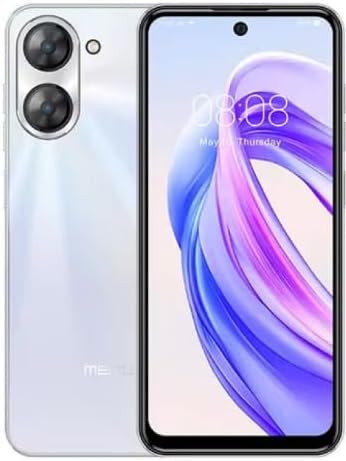
Rysunek 1.1: Przód i tył view of the Meizu mblu 21 smartphone in White Diamond color.
2. Co znajduje się w pudełku
Sprawdź, czy w opakowaniu znajdują się wszystkie elementy:
- Meizu mblu 21 Smartphone
- Zasilacz
- Kabel USB
- Narzędzie do wyjmowania karty SIM
- Szybki przewodnik

Figure 2.1: Meizu mblu 21 smartphone alongside its power adapter.
3. Konfiguracja
3.1. Wkładanie kart SIM i karty MicroSD
The Meizu mblu 21 supports Dual Nano SIM cards and a MicroSD card for expandable storage. Locate the SIM tray on the side of the device.
- Power off the device before inserting or removing SIM/MicroSD cards.
- Otwórz tackę na kartę SIM za pomocą dołączonego narzędzia do wyjmowania karty SIM.
- Carefully place the Nano SIM cards and/or MicroSD card into the designated slots on the tray, ensuring correct orientation.
- Delikatnie wsuń tackę z powrotem do urządzenia, aż będzie przylegać do powierzchni.
3.2. Pierwsze włączenie i kreator konfiguracji
- Press and hold the Power button until the Meizu logo appears.
- Follow the on-screen instructions to complete the initial setup, including selecting your language, connecting to a Wi-Fi network, and setting up your Google account.
4. Obsługa urządzenia
4.1. Wyświetlacz i nawigacja
The 6.79-inch HD display features a 90Hz adaptive refresh rate for smooth visuals. Navigate the interface using touch gestures: tap, swipe, pinch-to-zoom.
4.2. Funkcje aparatu
The device is equipped with a 13MP main camera and an 8MP front camera. Open the Camera application to capture photos and videos.
- 13MP Smart Camera: Ideal for capturing everyday moments with sharpness and true-to-life colors.
- Przedni aparat 8 MP: Designed for clear selfies and video calls.
4.3. Funkcje bezpieczeństwa
- Side Unlock: A fast and secure fingerprint sensor integrated into the side power button for instant access.
- Smart Face Unlock: Use the front camera to unlock your device quickly and conveniently.
4.4. Łączność
Your mblu 21 supports various connectivity options:
- 4G LTE: For mobile data connectivity. In the USA, this device is compatible with T-Mobile. Outside the USA, it works with any carrier worldwide.
- Dwuzakresowe Wi-Fi: Supports both 2.4GHz and 5GHz bands for seamless internet access.
- Bluetooth 5.0: For connecting wireless accessories with improved energy efficiency.
- VoLTE HD Calls: Enjoy sharper, clearer voice calls over LTE networks.

Figure 4.1: Key technology features of the Meizu mblu 21, including Android 14, Dual-Band Wi-Fi, Bluetooth 5.0, and VoLTE.
5. Konserwacja
5.1. Pielęgnacja baterii
The mblu 21 is equipped with a 4900mAh battery. To maximize battery lifespan:
- Unikaj ekstremalnych temperatur.
- Use only the provided power adapter or certified compatible chargers.
- Unikaj częstego całkowitego rozładowywania akumulatora.

Rysunek 5.1: Wewnętrzne view of the Meizu mblu 21, showcasing the 4900mAh battery and internal components.
5.2. Czyszczenie urządzenia
Do czyszczenia ekranu i obudowy telefonu używaj miękkiej, niepozostawiającej włókien ściereczki. Unikaj stosowania silnych środków chemicznych i materiałów ściernych.
5.3. Aktualizacje oprogramowania
Regularly check for and install software updates to ensure optimal performance and security. Updates can be found in the device's settings menu.
6. Rozwiązywanie Problemów
If you encounter issues with your Meizu mblu 21, try the following solutions:
- Urządzenie nie odpowiada: Naciśnij i przytrzymaj przycisk zasilania przez około 10–15 sekund, aby wymusić ponowne uruchomienie.
- Problemy z łącznością sieciową:
- Ensure SIM card is properly inserted.
- Włącz lub wyłącz tryb samolotowy.
- Check network settings (APN, preferred network type).
- Szybkie rozładowywanie baterii:
- Zamknij nieużywane aplikacje działające w tle.
- Zmniejsz jasność ekranu.
- Wyłącz niepotrzebne funkcje, takie jak GPS czy Bluetooth, gdy z nich nie korzystasz.
- Problemy z wydajnością:
- Clear cache and data of problematic apps.
- Zwolnij miejsce na dysku.
- Consider a factory reset (Note: This will erase all data on your device. Back up important data first.).
7. Specyfikacje
| Funkcja | Szczegół |
|---|---|
| Nazwa modelu | mblu 21 |
| Numer modelu | M416L |
| System operacyjny | Android 14 |
| Rozmiar ekranu | 6.79 cali |
| Pojemność pamięci masowej | 64 GB |
| Rozmiar zainstalowanej pamięci RAM | 4 GB |
| Pojemność baterii | 4900 mlnamp Godziny |
| Główna kamera | 13 MP |
| Przednia kamera | 8 MP |
| Wireless Carrier (USA) | T-Mobile |
| Technologia komórkowa | 4G LTE |
| Technologie łączności | 4G, Dual-Band Wi-Fi, Bluetooth 5.0 |
| Waga przedmiotu | 14 uncji |
| Wymiary opakowania | 7 x 4 x 2 cala |
| Kolor | White Diamond |
8. Gwarancja i wsparcie
Your Meizu mblu 21 smartphone comes with a manufacturer's warranty. Please refer to the warranty card included in your product packaging for specific terms and conditions.
For technical support, service, or further inquiries, please contact Meizu customer support through their official channels. Contact information can typically be found on the manufacturer's webmiejscu lub w dokumentacji produktu.


