Wstęp
This manual provides detailed instructions for setting up, operating, and maintaining your WEILAILIFE 4K 8-Channel PoE NVR Network Video Recorder. This NVR supports up to 8 x 8MP/4K IP cameras and is ONVIF compatible, offering advanced features like motion detection, remote access, and efficient H.265+ video compression.
Co jest w pudełku
- 8 Channel POE 4K NVR X 1
- Power Supply 48V2A X 1
- USB Mouse X 1
- Zdalne X 1
- Network Cable X 1
Video: Unboxing POE Network Video Recorder. This video demonstrates the contents of the NVR package, including the NVR unit, power supply, USB mouse, remote, and network cable.
Produkt ponadview
The WEILAILIFE 4K 8-Channel PoE NVR is designed for robust surveillance, supporting up to eight 8MP/4K IP cameras. It features a compact design with essential ports for connectivity and operation.

Image: Front and back panel of the WEILAILIFE 4K 8-Channel PoE NVR. The front panel includes LED indicators and a USB port. The back panel features 8 PoE ports, an Ethernet port, power interface, VGA output, HDMI output, and a USB 2.0 port.

Obraz: Ponadview of the 8-Channel 4K 8.0 Megapixel Network Video Recorder, highlighting its capabilities for motion detection, video/audio recording, and support for up to 8 cameras.

Image: A 4K Ultra HD NVR connected to a monitor displaying live feeds from four IP cameras, demonstrating its multi-channel viewmożliwości.
Główne cechy
Wykrywanie ruchu i alerty
Our PoE NVR, equipped with smart detection, can detect moving people and vehicles while significantly reducing false alarms. As soon as the camera detects any movement, it will immediately send notifications to your phone and email alerts with screenshots.

Image: Illustration of motion detection and alerts, showing a vehicle and a human being detected with corresponding notifications on a smartphone.
Easy Setup with Plug & Play
Upgrade your security with our easy-to-install PoE NVR System. Just connect a single Ethernet cable for quick setup. Compatible with 4K, 2K, 8MP, 5MP, 3MP, and 1080P IP cameras, it delivers clear video quality and reliable performance for both home and business use.
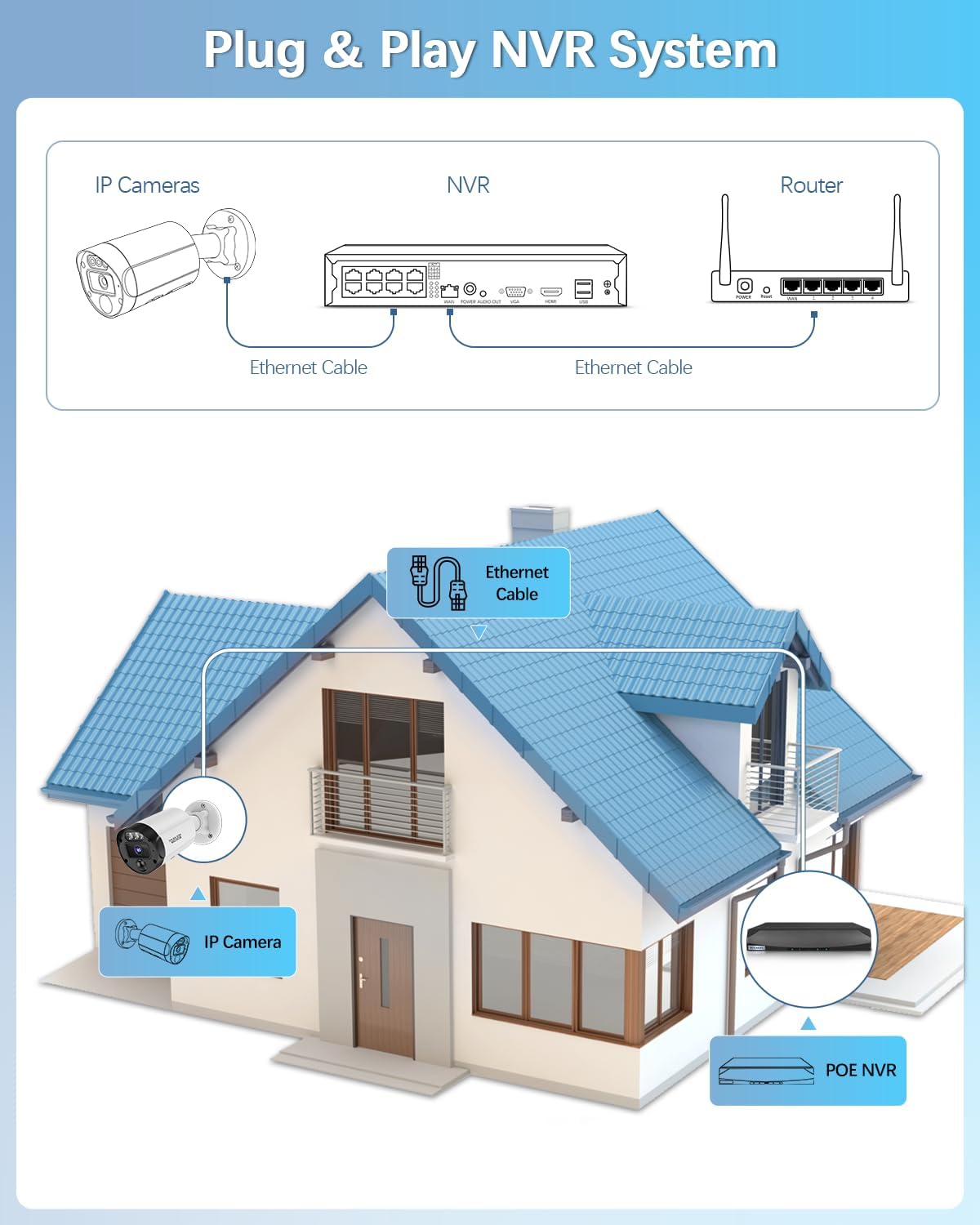
Image: Diagram illustrating the Plug & Play NVR system setup, showing IP cameras connected to the NVR via Ethernet cables, and the NVR connected to a router.
Privacy Protection & Remote Access
With privacy protection that masks key areas using black blocks, this PoE NVR also supports remote access, enabling you to monitor your property anytime, anywhere via smartphone, tablet, or computer.

Image: Diagram illustrating privacy protection zones, where specific areas of the camera's view can be masked with black blocks for privacy.

Image: Remote access feature shown across multiple devices including a smartphone, tablet, and laptop, all displaying live surveillance feeds.
H.265+ Compression
Our PoE NVR features H.265+ compression, which cuts file sizes while preserving high video quality. This means longer storage and less bandwidth usage, making it perfect for high-res video streaming. Enjoy clear footage without compromising storage or network performance.

Image: Comparison illustrating the benefits of H.265+ video compression over H.264, showing reduced storage consumption for the same video quality.
Free App & No Monthly Fee
You can download the free "Honestview" app from the App Store on your smartphone. With an internet connection, you'll be able to watch videos remotely from any location on your phone (iOS & Android), PC, or tablet.
Ustaw połączenie
Connecting PoE Cameras
Connect your PoE IP cameras directly to the NVR's PoE ports using Ethernet cables. The NVR will provide both power and data transmission, simplifying installation.
Video: POE Security Camera Connection Setting. This video demonstrates how to connect a PoE security camera to the NVR system.
Konfiguracja aplikacji mobilnej
To access your NVR remotely, download and install the "Honestview" app on your smartphone or tablet. Follow the in-app instructions to add your device by scanning the QR code on the NVR.
Video: Setup Guide for WEILAILIFE POE Surveillance. This video provides a step-by-step guide on setting up the WEILAILIFE PoE surveillance system using the mobile application.
Tryby pracy
The NVR offers various recording modes to suit your surveillance needs, including continuous recording, scheduled recording, motion-triggered recording, and loop recording.

Image: Visual representation of multiple recording modes, including motion detection recording, scheduled recording, and manual recording, for comprehensive surveillance.

Image: Icons representing versatile recording modes: 24-hour continuous recording, scheduled recording, motion-triggered recording, and loop recording.
Rozwiązywanie problemów
NVR Password Reset
If you forget your NVR password, you can reset it using the security questions you set up or by scanning a CAPTCHA QR code with the monitoring app on your phone. Alternatively, you can send the CAPTCHA QR to customer support for assistance.
Video: How to Reset NVR Password. This video provides instructions on how to reset the password for your NVR device.
Connecting Third-Party Cameras
This NVR is compatible with ONVIF-compliant IP cameras. To add a third-party camera, ensure it supports the ONVIF protocol and follow the NVR's interface instructions for adding new devices. This video provides a general guide for connecting third-party cameras to a PoE NVR.
Video: Add a Third-party Single Camera to the New UI of the POE NVR. This video demonstrates the process of adding a third-party camera to a PoE NVR system.
Ważna uwaga dotycząca zgodności
Please confirm that your IP cameras support the ONVIF protocol before purchase. This NVR is compatible only with ONVIF-compliant IP cameras and does not support analog cameras.
Specyfikacje
| Funkcja | Szczegół |
|---|---|
| Wymiary produktu | 11 x 5 x 12 cala (11" dł. x 5" szer. x 12" wys.) |
| Waga przedmiotu | 2 funta |
| Numer modelu przedmiotu | RM8CH4K |
| Producent | ŻYCIE |
| Technologia łączności | HDMI, USB, VGA |
| Kompatybilne urządzenia | Aparat fotograficzny, laptop, smartfon, tablet, telewizor |
| Rozmiar dysku twardego | 8 TB (Not Included) |
Gwarancja i wsparcie
For warranty information and technical support, please refer to the documentation included with your product or visit the official WEILAILIFE webwitryna. Dodatkowe plany ochrony mogą być dostępne do zakupu.


