Wstęp
This manual provides detailed instructions for the installation, operation, and maintenance of your AIDA Single Pole Motion Sensor Light Switch. This device is designed to enhance convenience and energy efficiency by automatically controlling lighting based on occupancy. Please read this manual thoroughly before installation and use to ensure proper function and safety.

Image: The AIDA Single Pole Motion Sensor Light Switch shown alongside its product packaging, highlighting its design and key features.
Ważne informacje dotyczące bezpieczeństwa
WARNING: RISK OF ELECTRIC SHOCK. Improper installation can be dangerous or illegal. Always consult a qualified electrician if you are unsure about any part of the installation process.
- Wyłącz zasilanie: Przed instalacją lub serwisowaniem przełącznika należy zawsze odłączyć zasilanie od wyłącznika automatycznego lub skrzynki bezpiecznikowej.
- Wymagany przewód neutralny: This device requires a neutral wire for proper operation. If your electrical box does not have a neutral wire, this switch is not compatible.
- Single Pole Only: This switch is designed for single-pole control only and is not suitable for 3-way or multiple-way circuits.
- UL/CUL Certified: The switch is UL and CUL listed, ensuring compliance with safety standards.
- Objętość operacyjnatage: Ensure your electrical system operates at 120 Volts (AC).
Zawartość opakowania
Przed rozpoczęciem instalacji sprawdź, czy wszystkie komponenty są obecne:
- AIDA Single Pole Occupancy Motion Sensor Light Switch
- Bezśrubowa płyta ścienna
- Wire Nuts (Terminal caps)
- Śruby montażowe
- Instrukcja obsługi (ten dokument)
Specyfikacja produktu
| Funkcja | Szczegół |
|---|---|
| Ocena wejściowa | 120/277 V~50/60 Hz |
| Applicable Load Types | 200W LED/CFL, 500W MLV, 500W INC/HAL, 5A Ballast (120V), 1/6HP Fan (4.4A 120V) |
| Typ przełącznika | Pojedynczy biegun |
| Wskaźnik drutu | #14 - #12 AWG |
| Typ okablowania | Zaślepka zacisku |
| Temperatura pracy | od 32°F do 104°F (od 0°C do 40°C) |
| Rozmiar produktu | 4.17"x1.73"x1.77" (106x44x45mm) |
| Tworzywo | Miedź, mosiądz (materiał stykowy) |
| Metoda kontroli | Sensor, Touch |

Image: A visual representation of the product dimensions and a detailed table of specifications for the AIDA motion sensor switch.

Image: A chart illustrating the universal compatibility of the AIDA motion sensor switch with various load types including LED/CFL, MLV, INV/HAL, Ballast, and Fan.
Konfiguracja i instalacja
Zanim zaczniesz:
- Wyłącz zasilanie: Locate your circuit breaker panel and turn off the power to the switch box you will be working on. Verify power is off using a voltagtester.
- Identyfikacja przewodów: Carefully remove the existing wall plate and switch. Identify the following wires:
- Line Wire (Black): Przenosi moc z wyłącznika obwodu.
- Load Wire (Black): Dostarcza prąd do oprawy oświetleniowej.
- Przewód neutralny (biały): Required for this switch.
- Ground Wire (Green or Bare Copper): Dla bezpieczeństwa.
- Confirm Neutral Wire: This switch requires a neutral wire. If you do not have a neutral wire (typically white) in your electrical box, this switch is not compatible.
Instrukcje okablowania:
Follow the wiring diagram carefully. Use the provided wire nuts to secure connections.
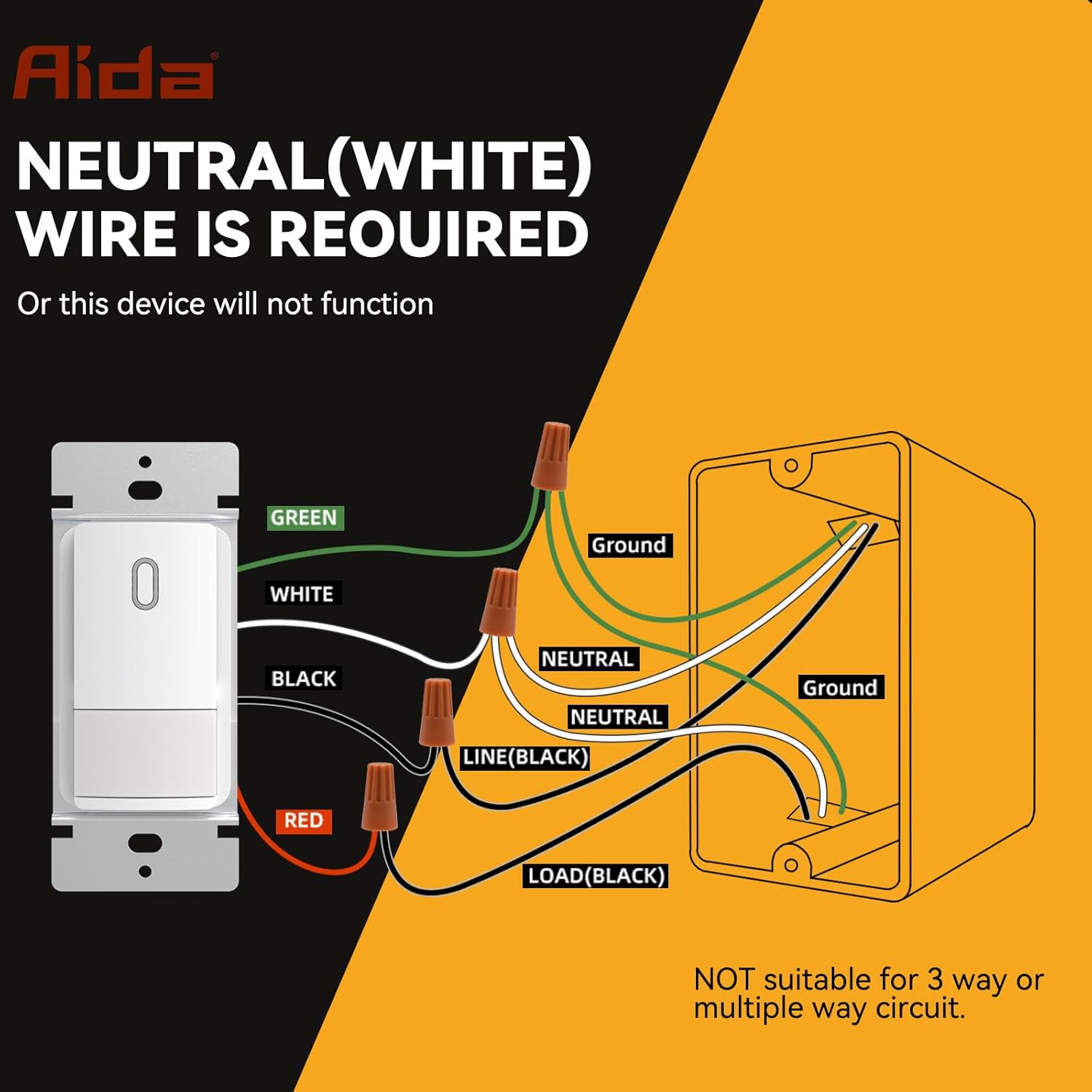
Image: A detailed wiring diagram showing connections for the AIDA motion sensor light switch, including Line, Load, Neutral, and Ground wires. It explicitly states that a neutral wire is required and the switch is not suitable for 3-way or multiple-way circuits.
- Połącz ZIELONY wire from the switch to your house's GRUNT drut.
- Połącz BIAŁY wire from the switch to your house's NEUTRALNY drut.
- Połącz CZARNY wire from the switch to your house's LINIA (gorący drut.
- Połącz CZERWONY wire from the switch to your house's OBCIĄŻENIE wire (to the light fixture).
Important: Ensure all connections are secure and insulated with wire nuts. This switch is for single-pole applications only. Do not use in 3-way or multi-way circuits.
Montaż przełącznika:
- Carefully fold the wires and push the switch into the electrical box.
- Przymocuj przełącznik do puszki elektrycznej za pomocą dołączonych śrub.
- Attach the screwless wall plate.
- Przywróć zasilanie za pomocą wyłącznika obwodu.

Image: A diagram showing the precise dimensions of the AIDA motion sensor light switch, its mounting bracket, and the screwless wall plate for easy installation.
Operating Instructions and Customization
The AIDA motion sensor switch offers various modes and adjustable settings to suit your needs.
Tryby działania:
- Occupancy Mode (Auto-On/Auto-Off): Lights automatically turn ON when motion is detected and OFF after a set delay when no motion is detected. Ideal for high-traffic areas like bathrooms, laundry rooms, and kitchens.
- Vacancy Mode (Manual-On/Auto-Off): Lights must be manually turned ON, but will automatically turn OFF after a set delay when no motion is detected. Suitable for bedrooms or TV rooms where you prefer manual control for turning on lights.
Ustawienia regulowane:
The switch features internal dip switches for customizing settings. Carefully remove the faceplate to access these controls.

Obraz: Zbliżenie view of the AIDA motion sensor switch's internal settings, showing dip switches for Adjustable Light Level (Timeout), PIR Sensitivity, and Ambient Light Sensor Mode.
- Adjustable Light Level (Timeout): This setting determines how long the light stays on after the last detected motion. Options typically include 30 seconds, 1 minute, 5 minutes, 15 minutes, or 30 minutes. Refer to the switch's internal labels for specific settings.
- Czułość PIR: Adjusts the sensitivity of the Passive Infrared (PIR) sensor to detect motion. Settings range from Low (L) to High (H). A higher sensitivity detects smaller movements or movements at a greater distance.
- Ambient Light Sensor Mode: Controls how the switch reacts to ambient light.
- Niski/Wysoki: The switch will only turn on lights if the ambient light level is below a certain threshold (e.g., only turn on at night).
- Wyłączony: The ambient light sensor is disabled, and the switch will turn on lights regardless of ambient light.
- Zwyczaj: Allows for more specific ambient light level adjustments.
Note: After adjusting any internal settings, reattach the faceplate securely.

Obraz: szczegółowy view of the AIDA motion sensor switch with its cover removed, showing the dip switches for adjusting timeout, PIR sensitivity, and ambient light sensor mode.
Konserwacja
The AIDA Motion Sensor Light Switch is designed for long-lasting, maintenance-free operation. To ensure optimal performance:
- Czyszczenie: Periodically wipe the switch and wall plate with a soft, damp ściereczką. Nie używaj środków czyszczących o właściwościach ściernych ani rozpuszczalników, ponieważ mogą one uszkodzić wykończenie lub elementy wewnętrzne.
- Przeszkoda: Ensure the sensor lens is not obstructed by furniture, decorations, or other objects, as this can impair motion detection.
- Brak części nadających się do samodzielnej naprawy przez użytkownika: There are no user-serviceable parts inside the switch. Do not attempt to open or repair the unit beyond adjusting the dip switches.
Rozwiązywanie problemów
| Problem | Możliwa przyczyna | Rozwiązanie |
|---|---|---|
| Light does not turn ON with motion. |
|
|
| Light stays ON constantly. |
|
|
| Light turns OFF too quickly or too slowly. |
|
|
| Switch makes a clicking noise. |
|
|
Gwarancja i obsługa klienta
AIDA products are manufactured to high-quality standards and are backed by a limited warranty. For specific warranty details, please refer to the warranty card included with your purchase or visit the official AIDA webstrona.
If you encounter any issues or have questions regarding your AIDA Single Pole Motion Sensor Light Switch, please contact our customer support team:
- Webstrona: Visit the AIDA Store on Amazon (dla ogólnych informacji o produkcie)
- E-mail: Zapoznaj się z opakowaniem produktu lub oficjalnymi informacjami webstrona z adresem e-mail kontaktowym.
- Telefon: Zapoznaj się z opakowaniem produktu lub oficjalnymi informacjami webstrona z numerem telefonu kontaktowego.
Please have your model number (B0DM4SGNBQ) and purchase date ready when contacting support.


