1. Wprowadzenie
The BOYA BY-V10 is a compact and lightweight wireless lavalier microphone system designed for use with USB-C compatible devices, including Android smartphones, iPhone 15/16, iPads, and laptops. It offers high-quality audio recording with features like one-click noise cancellation and stable wireless transmission, making it suitable for various content creation scenarios.

Image: The BOYA BY-V10 USB-C Wireless Lavalier Microphone system, showing the transmitter and receiver.
Wideo: Ponadview of the BOYA BY-V10 Wireless Microphone, highlighting its ease of use for recording.
2. Co znajduje się w pudełku
Sprawdź, czy w pakiecie znajdują się wszystkie komponenty:
- 1 x Nadajnik (TX)
- 1 x Receiver (RXU) with USB-C connector
- 1 x kabel ładujący USB-A do USB-C
- 1 x piankowa szyba przednia
- 1 x Torba transportowa
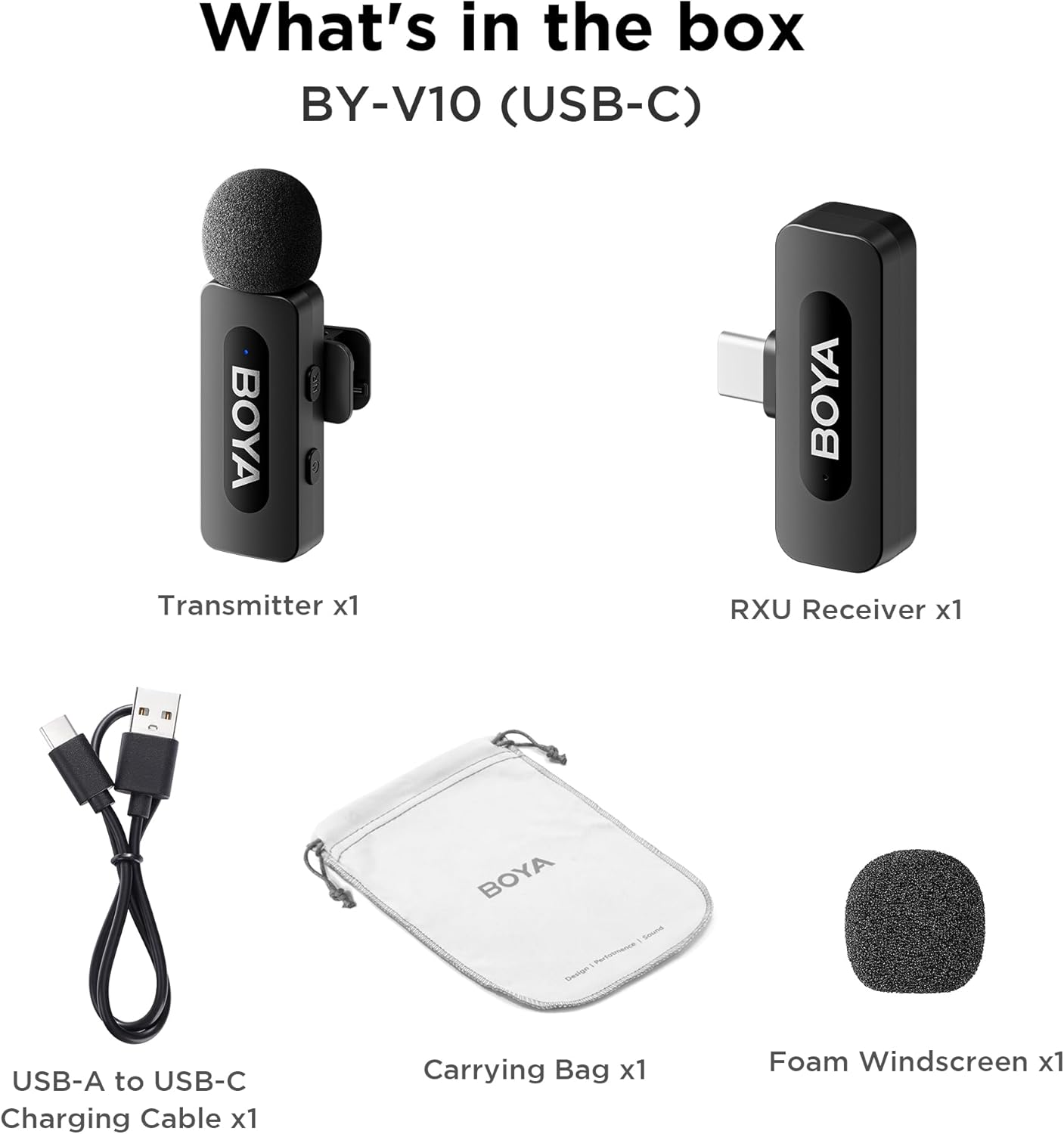
Image: The complete packing list for the BY-V10, showing all included accessories.
Video: An unboxing video demonstrating the contents of the BOYA BY-V Wireless Lavalier Microphone package.
3. Przewodnik konfiguracji
3.1 Pierwsze ładowanie
Before first use, ensure the transmitter is fully charged using the provided USB-A to USB-C charging cable. The receiver does not require charging as it draws power directly from your connected device.

Image: Battery life and charging details for the BY-V10 transmitter.
3.2 Łączenie się z urządzeniem
- Press and hold the power button on the Transmitter (TX) for 2 seconds to turn it on. The indicator light will blink.
- Plug the Receiver (RXU) directly into the USB-C port of your smartphone, iPad, or laptop.
- The Transmitter and Receiver will automatically pair within 10 seconds. The indicator light on both units will turn solid blue once successfully paired.
- Uwaga dla użytkowników Androida: Enable the "OTG" function in your device's settings before connecting the USB Type-C microphone.

Image: Visual instructions for the plug-and-play setup process.
3.3 Kompatybilność urządzenia
The BY-V10 is compatible with devices featuring a USB-C port, including:
- Smartfony z Androidem
- Modele iPhone'a 15/16
- iPads with USB-C
- Laptops with USB-C
Please ensure your device supports external USB-C audio input.

Image: Visual representation of compatible devices for the BY-V10 microphone.
4. Instrukcja obsługi
4.1 Noszenie mikrofonu
The transmitter features a 360° rotatable clip for easy attachment to your clothing. For optimal sound capture, clip the microphone approximately 6-8 inches from your mouth.

Image: The compact size and clip-on design of the BY-V10 transmitter.
4.2 Redukcja szumów jednym kliknięciem
To activate or deactivate the noise reduction mode, press the 'NR' button on the side of the transmitter. The indicator light will change to static green when noise reduction is enabled, and blink blue slowly when muted.

Image: Visual comparison of audio with and without noise cancellation enabled.

Image: Detailed explanation of the noise cancellation button and indicator lights.
4.3 Funkcja wyciszenia
To mute the microphone, briefly press the power button on the transmitter. The indicator light will blink blue slowly. Press again to unmute.
4.4 Zasięg transmisji
The BY-V10 offers a stable audio signal transmission range of up to 100 meters (328 feet) in open environments without obstacles or interference.

Image: Demonstration of the microphone's long-distance transmission capability.

Image: Further illustration of the extended transmission range.
4.5 Ładowanie podczas nagrywania
The receiver allows you to charge your phone or connected device while recording, ensuring uninterrupted long sessions for streaming or course recording.

Image: The receiver connected to a smartphone, illustrating the ability to charge the phone during recording.

Image: Another visual of the 'Support Using While Charging' feature.
5. Konserwacja
To ensure the longevity and optimal performance of your BOYA BY-V10 microphone, follow these maintenance guidelines:
- Czyszczenie: Do czyszczenia mikrofonu i odbiornika używaj miękkiej, suchej ściereczki. Unikaj stosowania płynów i środków czyszczących o właściwościach ściernych.
- Składowanie: Store the microphone system in its carrying bag when not in use to protect it from dust, moisture, and physical damage.
- Pielęgnacja baterii: Fully charge the transmitter before long periods of storage to maintain battery health.
- Zachowaj ostrożność: Avoid dropping the devices or exposing them to extreme temperatures.
6. Rozwiązywanie Problemów
If you encounter problems when using the unit, please refer to the following checklist. If the problem cannot be solved, please contact the seller for after-sales service.
- Nie można sparować urządzenia: Upewnij się, że nadajnik(i) są sparowane z jednym odbiornikiem. W przypadku sparowania z więcej niż jednym odbiornikiem, nie można określić, który odbiornik będzie sparowany z nadajnikiem(ami).
- Brak dźwięku z urządzenia lub brak dźwięku po podłączeniu do urządzenia zewnętrznego:
- Sprawdź, czy złącze odbiornika jest dobrze podłączone do urządzenia.
- Upewnij się, że nadajnik(i) nie są wyciszone. Jeśli wskaźnik miga powoli na niebiesko, użytkownicy muszą nacisnąć przycisk zasilania raz, aby włączyć nadajnik(i).
- Zasięg działania urządzenia jest ograniczony, a dźwięk jest często przerywany: Upewnij się, że nie ma zakłóceń między nadajnikiem(-ami) a odbiornikiem. Jeśli przerywany dźwięk nadal występuje często, skontaktuj się z nami w celu skorzystania z serwisu posprzedażowego.
- Urządzenie wyłącza się automatycznie: Jeżeli nadajnik(i) nie są sparowane, wyłączą się automatycznie po 10 minutach.
- Nie można włączyć urządzenia: Upewnij się, że jednostka ma wystarczająco dużo baterii, aby ją włączyć. Spróbuj podłączyć kabel ładujący, aby aktywować obwód.
- Etui ładujące nie ładuje urządzenia:
- Upewnij się, że bateria etui ładującego nie jest rozładowana. Spróbuj naładować etui.
- Wyczyść styki ładowania urządzenia oraz styki ładowania etui ładującego czystą szmatką, upewniając się, że nie są pokryte kurzem.
- Spróbuj docisnąć urządzenie umieszczone w etui ładującym, aż styki ładowania będą całkowicie połączone. Jeśli po tym czasie urządzenie nadal nie będzie się ładować, może to oznaczać, że siła magnetyczna jest za słaba. Skontaktuj się z nami w celu uzyskania pomocy posprzedażowej.

Image: A troubleshooting guide with solutions for common operational problems.
7. Specyfikacje
| Funkcja | Szczegół |
|---|---|
| Marka | CHŁOPIEC |
| Nazwa modelu | BY-V10(USB-C) |
| Współczynnik kształtu mikrofonu | Lavalier |
| Technologia łączności | USB |
| Typ złącza | USB typu C |
| Wzór biegunowy | Wielokierunkowy |
| Czułość audio | 42 decybeli |
| Stosunek sygnału do szumu | 80dB |
| Waga przedmiotu | 1.76 uncji (0.05 kilograma) |
| Wymiary produktu | 3.27 x 4.45 x 1.38 cala |
| Źródło zasilania | Zasilany bateryjnie (nadajnik) |
| Żywotność baterii (nadajnik) | Do 9 godzin |
| Czas ładowania (nadajnik) | Około 2 godzin |
| Funkcja specjalna | Mute Function, One-Click Noise Cancellation |
| Kompatybilne urządzenia | Laptop, smartfon (USB-C) |
8. Gwarancja i wsparcie
For warranty information, technical support, or any inquiries regarding your BOYA BY-V10 microphone, please refer to the official BOYA website or contact the seller directly through your purchase platform. Keep your proof of purchase for warranty claims.


