Wstęp
This manual provides detailed instructions for the Fantech Tamago WHG01 Wireless Headphones. It covers product features, setup, operation, maintenance, and troubleshooting to ensure optimal performance and user experience. The WHG01 offers tri-mode connectivity (StrikeSpeed 2.4GHz wireless, Bluetooth 5.2, and wired Type-C) and a detachable microphone, designed for versatile audio needs.
Co jest w pudełku
Sprawdź, czy w przesyłce znajdują się wszystkie elementy wymienione poniżej:
- Fantech Tamago WHG01 Headset
- USB Receiver (for StrikeSpeed 2.4GHz wireless)
- Kabel ładujący typu C.
- Odłączany mikrofon dookólny
- Instrukcja obsługi

Produkt ponadview
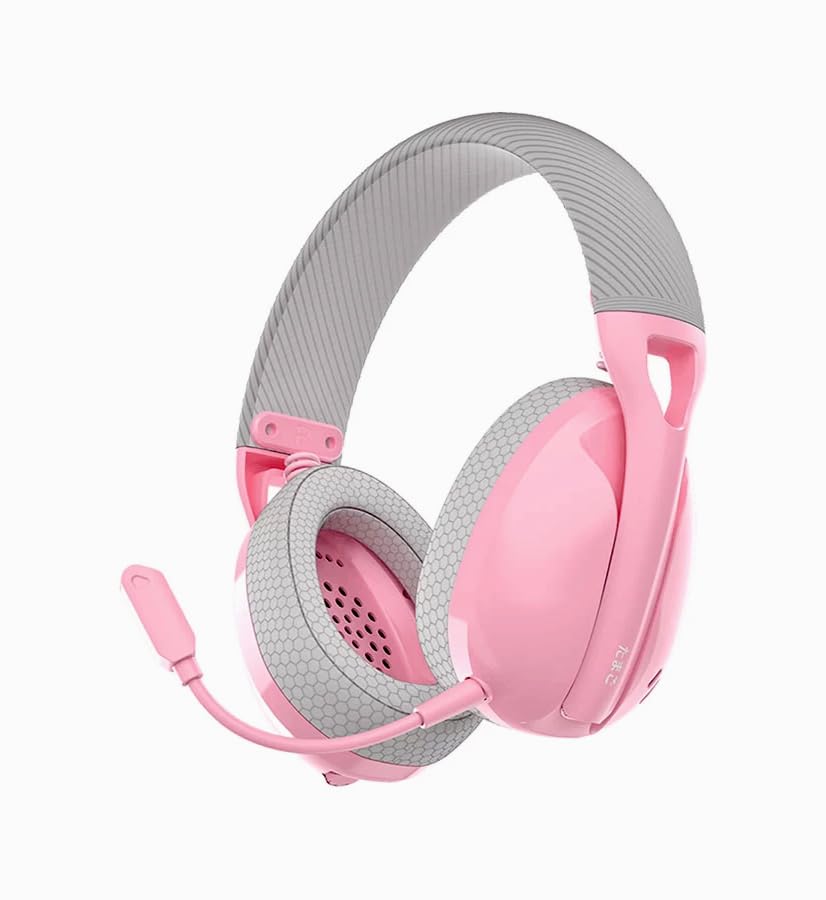
The Fantech Tamago WHG01 headphones are designed for comfort and versatility. Key features include:
- Ultra-lightweight Design: Weighing approximately 168g (172g with microphone), ensuring comfort during extended use.
- Oddychające nauszniki: Fabric-covered ear cushions for enhanced comfort and airflow.
- Odłączany mikrofon: A flexible omnidirectional microphone for clear communication, which can be removed when not needed.
- Sterowanie nauszne: Integrated buttons for power, volume adjustment, and microphone mute.

Organizować coś
1. Ładowanie zestawu słuchawkowego
Before first use, fully charge the headset. A built-in 400mAh battery provides up to 18 hours of playtime.
- Connect the supplied Type-C charging cable to the charging port on the headset.
- Podłącz drugi koniec kabla do źródła zasilania USB (np. portu USB komputera, zasilacza ściennego USB).
- The LED indicator on the headset will show charging status (refer to LED indicator section for details).
- Po całkowitym naładowaniu odłącz kabel ładujący.

2. Podłączanie mikrofonu
The WHG01 features a detachable omnidirectional microphone.
- Znajdź port mikrofonu na lewej słuchawce.
- Dopasuj złącze mikrofonu do portu i delikatnie je wciśnij, aż zatrzaśnie się na miejscu.
- To detach, gently pull the microphone out of the port.
3. Tryby łączności
The headset supports three connectivity modes: StrikeSpeed 2.4GHz Wireless, Bluetooth 5.2, and Wired Type-C.

StrikeSpeed 2.4GHz Wireless Connection
This mode provides low-latency wireless audio, ideal for gaming.
- Insert the USB receiver into an available USB port on your device (PC, laptop, compatible console).
- Power on the headset. The headset will automatically attempt to connect to the USB receiver.
- The LED indicator will confirm successful connection (refer to LED indicator section).
- Upewnij się, że zestaw słuchawkowy jest wybrany jako urządzenie wejściowe/wyjściowe audio w ustawieniach systemu.
Połączenie Bluetooth 5.2
For wireless connection to Bluetooth-enabled devices like smartphones, tablets, or laptops.
- Włącz zestaw słuchawkowy.
- Press and hold the mode button (or power button, depending on model specifics - refer to physical controls diagram if available) to enter Bluetooth pairing mode. The LED indicator will flash, indicating it's discoverable.
- On your device, go to Bluetooth settings and search for "Fantech Tamago WHG01" (or similar).
- Select the headset to pair. The LED indicator will change to a solid light upon successful pairing.
Przewodowe połączenie typu C
For a direct, stable connection and simultaneous charging.
- Podłącz kabel ładujący typu C do portu typu C zestawu słuchawkowego.
- Connect the other end of the cable to a compatible Type-C port on your device.
- Zestaw słuchawkowy będzie pełnić funkcję przewodowego urządzenia audio.
Instrukcja obsługi
Włączanie/wyłączanie zasilania
- Włączanie: Press and hold the Power button (usually located on the ear cup) for approximately 3 seconds until the LED indicator lights up.
- Aby wyłączyć: Naciśnij i przytrzymaj przycisk zasilania przez około 5 sekundy, aż wskaźnik LED zgaśnie.
Kontrola głośności
- Zwiększ głośność: Press the '+' button on the ear cup.
- Zmniejsz głośność: Press the '-' button on the ear cup.
Wyciszanie/wyłączanie wyciszenia mikrofonu
- Wyciszenie mikrofonu: Press the dedicated microphone mute button (or a specific combination, refer to product diagram) on the ear cup.
- Włącz mikrofon: Press the microphone mute button again.
Przełączanie trybów łączności
The headset allows seamless switching between its tri-modes.
- Press the Mode button (if available) to cycle through StrikeSpeed Wireless, Bluetooth, and Wired modes.
- The LED indicator will change to reflect the active mode.
Konserwacja
Czyszczenie
- Do czyszczenia powierzchni zestawu słuchawkowego należy używać miękkiej, suchej ściereczki.
- W przypadku poduszek nausznych należy je delikatnie przetrzeć miękką szmatką.amp ściereczką i pozostawić do całkowitego wyschnięcia.
- Nie należy używać silnych środków chemicznych, rozpuszczalników ani ściernych środków czyszczących.
Składowanie
- Przechowuj zestaw słuchawkowy w chłodnym, suchym miejscu, z dala od bezpośredniego światła słonecznego i ekstremalnych temperatur.
- Unikaj umieszczania ciężkich przedmiotów na zestawie słuchawkowym.
- Jeśli akumulator będzie przechowywany przez dłuższy okres, należy upewnić się, że jest częściowo naładowany (około 50%), aby wydłużyć jego żywotność.
Rozwiązywanie problemów
- Brak zasilania: Ensure the headset is charged. Connect the Type-C cable and check if the charging indicator lights up.
- Brak dźwięku (bezprzewodowo):
- Check if the headset is powered on and connected to the correct device.
- For StrikeSpeed, ensure the USB receiver is properly inserted and recognized by your device.
- For Bluetooth, ensure the headset is paired and selected as the audio output in your device's settings.
- Zwiększ głośność zestawu słuchawkowego i podłączonego urządzenia.
- Mikrofon nie działa:
- Sprawdź, czy mikrofon jest solidnie przymocowany do zestawu słuchawkowego.
- Check if the microphone is muted using the headset's controls.
- Verify that the correct microphone input device is selected in your computer's or device's sound settings.
- Problemy z połączeniem:
- Spróbuj ponownie uruchomić zestaw słuchawkowy i podłączone urządzenie.
- W przypadku technologii Bluetooth spróbuj rozłączyć i ponownie sparować zestaw słuchawkowy.
- Ensure there are no significant obstructions or interference sources between the headset and the wireless receiver/device.
Specyfikacje
| Model | WHG01 |
| Łączność | Tri-mode (StrikeSpeed 2.4GHz Wireless, Bluetooth 5.2, Wired Type-C) |
| Waga | 168g (172g with microphone) |
| Sterownik głośników | 40mm |
| Czułość głośnika | 106dB±3dB |
| Typ mikrofonu | Detachable Omnidirectional |
| Wymiar mikrofonu | ø6 mm * 2.7 mm |
| Czułość mikrofonu | -42±3dB |
| Pojemność baterii | 400mAh |
| Pauza w szkole | Do 18 godzin |
| Port ładowania | USB typu C |
| Core Construction | ABS |
| Kompatybilne urządzenia | PC, Laptop, Mobile devices |
Gwarancja i wsparcie
For warranty information and technical support, please refer to the official Fantech webOdwiedź witrynę lub skontaktuj się z lokalnym dystrybutorem. Zachowaj dowód zakupu na wypadek reklamacji.
Producent: Fantech
Importer/Pakowacz: MRJ Electronics Ahmedabad Gujarat. electronicsmrj@gmail.com. Contact: 9023265213
Data pierwszej dostępności: 25 września 2024


