1. Wprowadzenie
Thank you for choosing the LIGE FV13 Military Smartwatch. This device is designed to support your active lifestyle with robust features, including a large HD display, extensive health monitoring, and multiple sports modes. This manual will guide you through its functions and ensure optimal performance.

The LIGE FV13 Military Smartwatch, built for durability and functionality.
2. Co znajduje się w pudełku
- LIGE FV13 Smartwatch x 1
- Kabel ładujący x 1
- Instrukcja obsługi x 1
- Silicone Strap x 2
3. Przewodnik konfiguracji
3.1 Pierwsze ładowanie
Before first use, fully charge your smartwatch. Connect the magnetic charging cable to the charging points on the back of the watch and plug the USB end into a power adapter (5V/1A recommended). A full charge typically takes approximately 2.5 hours.
3.2 Instalacja aplikacji
To unlock all features, download the FitCloudPro app on your smartphone. Scan the QR code provided in the watch interface or the physical manual, or search for "FitCloudPro" in your device's app store (App Store for iOS, Google Play Store for Android).
Video demonstrating the app installation and pairing process for the LIGE FV13 Smartwatch.
3.3 Pairing the Smartwatch
- Sprawdź, czy Bluetooth w Twoim telefonie jest włączony.
- Otwórz FitCloudPro app and complete your profile informacja.
- Navigate to the 'Device' section in the app and tap 'Add Peripheral Now' or 'Bind Smartwatch'.
- The app will search for nearby devices. Select 'V99' (or the corresponding device name) from the list.
- Potwierdź prośbę o sparowanie zarówno na telefonie, jak i na smartwatchu.
- Allow necessary permissions for notifications and location services to ensure full functionality.
4. Instrukcja obsługi
4.1 Podstawowa nawigacja
- Przesuń w górę/w dół: Przewijaj menu i powiadomienia.
- Przesuń w lewo/w prawo: Uzyskaj szybki dostęp do funkcji i różnych tarcz zegarka.
- Uzyskiwać: Wybierz element lub potwierdź czynność.
- Przyciski boczne: Typically used for power, back, or quick access to specific functions. Refer to the watch interface for specific button assignments.
4.2 Połączenia i powiadomienia Bluetooth
Once paired, your smartwatch can handle calls and display notifications.
- Dzwonić: Use the dial pad on the watch or access your synced contacts to initiate calls directly from your wrist.
- Odbieranie połączeń: Answer or reject incoming calls directly on the watch. The built-in speaker and noise-reduction microphone ensure clear communication.
- Powiadomienia: Receive alerts for messages (SMS, WhatsApp, Facebook, Twitter, etc.) directly on your watch screen. Ensure notification permissions are granted in the FitCloudPro app.

Stay connected with Bluetooth calls and message notifications directly on your smartwatch.
4.3 24-Hour Health Monitoring
The FV13 smartwatch features advanced sensors for continuous health tracking.
- Tętno: Monitors your heart rate throughout the day. Access historical data in the app.
- Tlen we krwi (SpO2): Mierzy poziom tlenu we krwi.
- Monitorowanie snu: Automatically tracks your sleep patterns, including deep sleep, light sleep, and wake times, to help you understand and improve your sleep quality.
- Respiratory Rate: Provides data on your breathing patterns.
- Przypomnienia o siedzącym trybie życia: Alerts you to stand up and move after periods of inactivity.
Note: This device is not a medical device. Health data is for reference only and should not be used for medical diagnosis or treatment.

Comprehensive 24/7 health monitoring, including heart rate and sleep analysis.
4.4 100+ trybów sportowych
The smartwatch supports over 100 sports modes, allowing you to track various activities.
- Śledzenie aktywności: Automatically records steps, distance, calories burned, and heart rate during exercise.
- Scientific Training: Use the collected data to analyze your performance and optimize your workouts.
- Examples of supported modes include running, cycling, basketball, walking, climbing, swimming, and more.

Śledź swoje wyniki w ponad 100 trybach sportowych.
4.5 Światło LED
The smartwatch is equipped with a powerful LED flashlight for convenience in low-light conditions or emergencies. Activate it through the watch's quick settings or dedicated function.

Zintegrowana latarka LED zapewnia oświetlenie w różnych sytuacjach.
4.6 Sterowanie muzyką
Control music playback on your smartphone directly from your watch. Play, pause, skip tracks, and adjust volume without needing to take out your phone.
4.7 Inne funkcje
The LIGE FV13 offers a range of additional features:
- Prognoza pogody: Otrzymuj aktualne informacje o pogodzie w czasie rzeczywistym.
- Asystent głosowy: Współdziałaj z asystentem głosowym w swoim telefonie.
- Budzik: Ustaw alarmy i przypomnienia.
- Stoper i timer: Do precyzyjnego pomiaru czasu.
- Przypomnienia o nawodnieniu: Przypomina o piciu wody.
- Znajdź telefon: Znajdź zgubiony smartfon.
- Regulacja jasności: Customize screen brightness for different environments.
- Obsługa wielu języków: Obsługuje różne języki.

Ponadview of the smartwatch's diverse functionalities.
4.8 Tarcze zegarka
Customize your watch's appearance with a variety of watch faces available through the FitCloudPro app. You can also upload custom images to personalize your display.

The 1.85-inch HD screen offers a clear display and supports various watch faces.
5. Konserwacja
5.1 Czyszczenie
Regularly clean your smartwatch and strap to prevent skin irritation and maintain device longevity. Use a soft, damp Ściereczka do wycierania ekranu i paska. Unikaj stosowania silnych środków chemicznych i materiałów ściernych.
5.2 Wodoodporność (IP68)
The LIGE FV13 Smartwatch is IP68 rated, meaning it is resistant to dust and can withstand immersion in water up to 1.5 meters for 30 minutes. It is suitable for daily use, hand washing, and light rain. However, it is not recommended for hot showers, saunas, or diving, as steam and high water pressure can compromise the seals.

The IP68 rating ensures the smartwatch is resistant to water and dust for various scenarios.
5.3 Pielęgnacja baterii
To prolong battery life, avoid extreme temperatures and fully discharge the battery only occasionally. Charge the device using the provided cable and a compatible power adapter.

The 710mAh battery provides extended usage, with normal use up to 15 days and standby up to 45 days.
6. Rozwiązywanie Problemów
- Nie można połączyć/sparować: Ensure Bluetooth is on, the app is open, and the watch is close to the phone. Restart both devices and try again.
- Brak powiadomień: Check app permissions on your phone (notifications, background activity). Ensure notifications are enabled within the FitCloudPro app for specific applications.
- Niedokładne dane dotyczące zdrowia: Ensure the watch is worn snugly on your wrist, not too tight or too loose. Clean the sensors regularly. Remember, data is for reference, not medical use.
- Krótki czas pracy baterii: Reduce screen brightness, disable unnecessary notifications, and limit continuous heart rate monitoring.
- Watch Freezes/Unresponsive: Spróbuj ponownie uruchomić zegarek, naciskając i przytrzymując przycisk zasilania. Jeśli zegarek nie reaguje, pozwól baterii całkowicie się rozładować, a następnie naładuj ją ponownie.
7. Specyfikacje
- Marka: LIGA
- Numer modelu: FV13
- Ekran: 1.85 inches IPS HD Display
- System operacyjny: Noś system operacyjny
- Łączność: Bluetooth 5.0
- Pojemność baterii: 710 mAh litowo-polimerowy
- Czas pracy baterii: Up to 45 days standby, 15 days normal use
- Wodoodporność: IP68
- Cechy szczególne: LED Light, Activity Tracker, SMS Reminders, Exercise Recording (step counter, distance), Trajectory Map, Sleep Monitoring, Sedentary Reminder, Calorie Calculation, Low Battery Alert, Raise-to-Wake, Fast Charging, Ultra-low Power Consumption, Heart Rate Monitor, Vibration, Sports Modes, Music Control, Smart Alarm, Weather Forecast, Voice Assistant, Phone Finder.
- Zgodne urządzenia: Smartphones (Android 4.4+ and iOS 9.0+)
- Pojemność pamięci: 128 MB
- Kształt: Okrągły
- GPS: Brak GPS-u
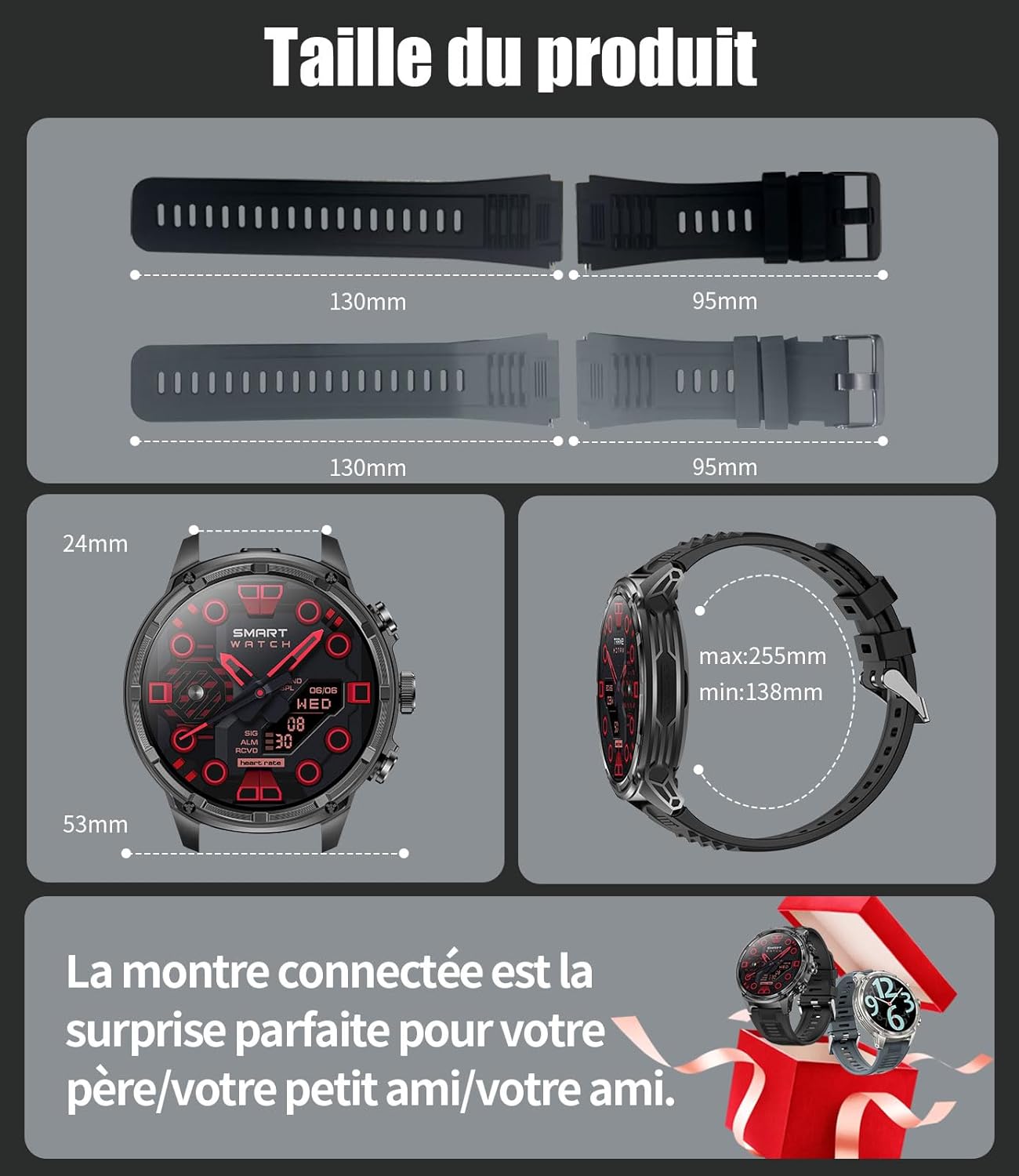
Detailed product dimensions for the LIGE FV13 Smartwatch.
8. Gwarancja i wsparcie
The LIGE FV13 Smartwatch comes with a 2-letnia gwarancja producenta. For any inquiries, technical support, or warranty claims, please contact LIGE customer service. You can typically find contact information on the official LIGE website or through your purchase platform. We aim to respond to all queries within 24 hours.

LIGE offers comprehensive customer support and a 2-year warranty for the FV13 Smartwatch.


