1. Wprowadzenie
Welcome to the user manual for your new ECHO Rainbow Pro S Smartwatch. This elegant and functional smartwatch is designed to enhance your daily life with integrated AI assistance, Bluetooth calling, comprehensive health sensors, and various sports modes. It comes with two interchangeable straps for maximum flexibility and is IP68 waterproof for worry-free use. This manual will guide you through the setup, operation, maintenance, and troubleshooting of your device.
2. Co znajduje się w pudełku
Sprawdź zawartość paczki, aby upewnić się, że znajdują się w niej wszystkie elementy:
- ECHO Rainbow Pro S Smartwatch (Rose Gold)
- Silicone Strap (Rose Gold)
- Nylon Strap (Bordeaux)
- Magnetyczny kabel ładujący
- Instrukcja obsługi (ten dokument)
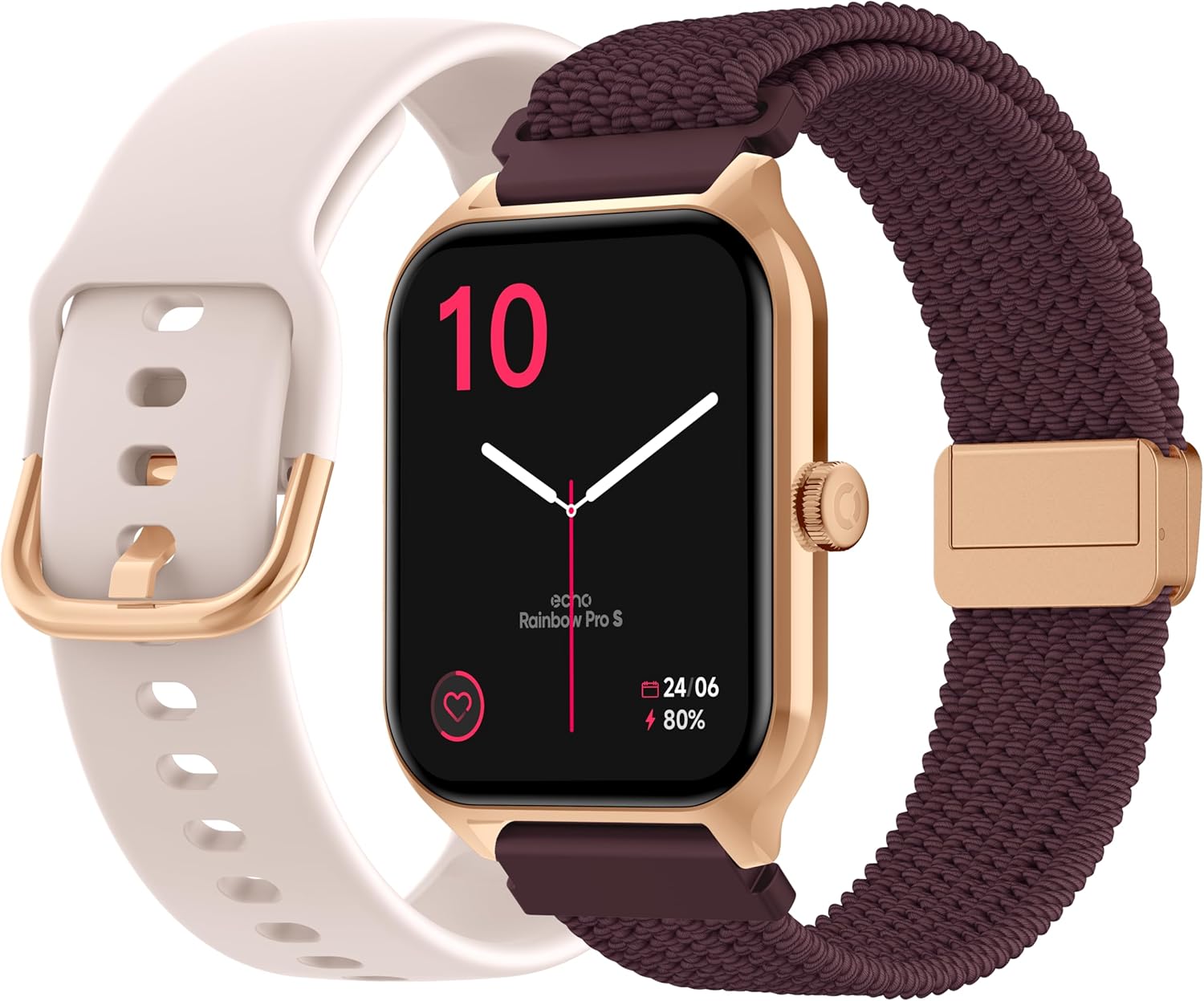
Image: The ECHO Rainbow Pro S Smartwatch, showcasing its rose gold finish, accompanied by both the rose gold silicone strap and the bordeaux nylon strap, along with the magnetic charging cable.
3. Konfiguracja
3.1 Ładowanie urządzenia
Before first use, fully charge your smartwatch. Connect the magnetic charging cable to the charging points on the back of the watch and plug the USB end into a standard USB power adapter (not included) or a computer's USB port. A full charge takes approximately 2.5 hours.
3.2 Instalowanie aplikacji Da Fit
The ECHO Rainbow Pro S Smartwatch works with the Da Fit application. Download the Da Fit app from the Apple App Store (for iOS devices) or Google Play Store (for Android devices).
- Scan the QR code in the watch's manual or on the watch screen (if available) or search for "Da Fit" in your app store.
- Zainstaluj aplikację na swoim smartfonie.
3.3 Parowanie ze smartfonem
To unlock the full potential of your smartwatch, pair it with the Da Fit app:
- Upewnij się, że Bluetooth jest włączony w Twoim smartfonie.
- Otwórz aplikację Da Fit.
- Follow the on-screen instructions to add a new device. The app will search for your ECHO Rainbow Pro S.
- Select your watch from the list of found devices. Confirm the pairing request on both your phone and the watch.
- Po sparowaniu zegarek będzie synchronizował dane z aplikacją.

Image: The ECHO Rainbow Pro S Smartwatch, showing the watch body, both the silicone and nylon straps, and the magnetic charging cable, illustrating the components for setup.
4. Korzystanie ze smartwatcha
4.1 Poruszanie się po interfejsie
The ECHO Rainbow Pro S features an intuitive 1.96-inch touchscreen. Swipe left, right, up, or down to access different functions and menus. The side button typically serves as a power button or a return-to-home screen button.
4.2 Monitorowanie stanu zdrowia
Your smartwatch is equipped with advanced sensors to track your well-being:
- Tętno: Stale monitoruje tętno przez całą dobę.
- Tlen we krwi (SpO2): Mierzy nasycenie krwi tlenem.
- Ciśnienie krwi: Podaje szacunkową wartość ciśnienia krwi.
- Monitorowanie snu: Analizuje wzorce snu, w tym sen głęboki i płytkitagt.j.
Wszystkie dane dotyczące zdrowia mogą być viewed in detail within the Da Fit app, allowing you to track trends and progress over time.

Zdjęcie: Tył view of the ECHO Rainbow Pro S Smartwatch, highlighting the optical sensors used for heart rate, SpO2, and blood pressure monitoring.

Image: The ECHO Rainbow Pro S Smartwatch screen showing various health metrics, including heart rate (BPM), SpO2 percentage, and activity data, demonstrating its health tracking capabilities.
4.3 Funkcje komunikacyjne
Bądź na bieżąco bezpośrednio ze swojego nadgarstka:
- Połączenia Bluetooth: Wykonuj i odbieraj połączenia bezpośrednio z zegarka podłączonego do smartfona.
- Powiadomienia: Otrzymuj powiadomienia o połączeniach, wiadomościach i aplikacjach ze sparowanego smartfona.

Image: The ECHO Rainbow Pro S Smartwatch displaying incoming call and message notifications, illustrating its communication features when paired with a smartphone.
4.4 Asystent AI
The ECHO Rainbow Pro S integrates an AI assistant for convenient voice commands and information retrieval. Simply activate the AI feature on your watch and speak your query or command.

Image: The ECHO Rainbow Pro S Smartwatch screen showing the AI assistant interface, ready to receive voice commands or queries.
4.5 Sports Modes & Coaching
With over 100 sports modes and integrated training programs, your smartwatch is an ideal companion for your fitness journey. Select your activity from the watch's menu to track performance metrics such as calories burned, distance, and duration. The Da Fit app provides personalized tracking and allows you to follow your course using your smartphone's GPS.

Image: The ECHO Rainbow Pro S Smartwatch displaying various sports modes and training exercises, with accompanying smartphone app screenshots showing detailed workout plans and GPS tracking.
NIGDY nie można dostosowywać
Spersonalizuj swoje doświadczenie ze smartwatchem:
- Tarcze zegarka: Choose from over 100 downloadable watch faces via the Da Fit app to match your style.
- Wymienne paski: Easily swap between the included silicone and nylon straps to suit your activity or outfit.
Image: The ECHO Rainbow Pro S Smartwatch, showcasing its rose gold finish, accompanied by both the rose gold silicone strap and the bordeaux nylon strap, highlighting the interchangeable design.
5. Konserwacja
5.1 Czyszczenie
To keep your smartwatch in optimal condition, clean it regularly. Wipe the screen and body with a soft, lint-free cloth. For stubborn smudges, slightly dampPrzetrzyj szmatkę wodą. Unikaj stosowania silnych środków chemicznych i materiałów ściernych.
5.2 Wodoodporność (IP68)
The ECHO Rainbow Pro S is IP68 rated, meaning it is resistant to water up to 1 meter deep for 30 minutes. This makes it suitable for daily activities like hand washing, rain, or accidental splashes. However, it is not recommended for swimming, diving, or high-pressure water activities. Avoid exposing the watch to hot water, steam, or corrosive liquids.
5.3 Żywotność baterii
The smartwatch offers up to 5 days of battery life with typical usage. To optimize battery performance:
- Zmniejsz jasność ekranu.
- Wyłącz ciągłe monitorowanie tętna, jeśli nie jest potrzebne.
- Limit the number of app notifications.
6. Rozwiązywanie Problemów
If you encounter any issues with your ECHO Rainbow Pro S Smartwatch, please refer to the following common problems and solutions:
| Problem | Rozwiązanie |
|---|---|
| Zegarek się nie włącza | Upewnij się, że zegarek jest w pełni naładowany. Podłącz go do magnetycznego kabla ładującego i źródła zasilania na co najmniej 30 minut. |
| Nie można sparować ze smartfonem | 1. Upewnij się, że Bluetooth jest włączony w Twoim telefonie. 2. Make sure the watch is within range of your phone. 3. Uruchom ponownie zegarek i telefon. 4. Clear Bluetooth cache on your phone (Android) or forget the device and re-pair (iOS/Android). 5. Ensure the Da Fit app has necessary permissions. |
| Niedokładne odczyty stanu zdrowia | 1. Upewnij się, że zegarek ściśle przylega do nadgarstka – nie jest za ciasny, ani za luźny. 2. Clean the sensors on the back of the watch. 3. Unikaj nadmiernego ruchu podczas pomiarów. 4. Note that these readings are for reference and not for medical diagnosis. |
| Powiadomienia nie odebrane | 1. Ensure the watch is paired and connected to your phone. 2. Check notification settings in the Da Fit app and on your phone (e.g., app permissions, DND mode). 3. Make sure the Da Fit app is running in the background. |
| Krótki czas pracy baterii | 1. Zmniejsz jasność ekranu. 2. Disable continuous heart rate monitoring if not needed. 3. Limit background app refresh for the Da Fit app. 4. Ensure no apps are constantly running on the watch. |
7. Specyfikacje
| Funkcja | Szczegół |
|---|---|
| Marka | ECHO |
| Model | Tęczowy Pro S |
| Numer modelu | bd279646-58a1-4a95-ab0c-0847dc2ca4e6 |
| Kolor | Różowe złoto |
| Rozmiar ekranu | 1.96 cali |
| Typ wyświetlacza | OLED or LED |
| Łączność | Bluetooth |
| Kompatybilne urządzenia | Smartfon, Tablet |
| Skład baterii | Litowo-polimerowy |
| Czas pracy baterii (typowy) | 5 dni |
| Czas ładowania | 2.5 godzin |
| Odporność na wodę | IP68 (do 1 metra przez 30 minut) |
| GPS | Brak GPS-u |
| Kształt | Okrągły |
| Zgodność aplikacji | Da Fit |
| Kraj pochodzenia | Chiny |
8. Gwarancja i wsparcie
8.1 Gwarancja na produkt
Your ECHO Rainbow Pro S Smartwatch is covered by a standard manufacturer's warranty against defects in materials and workmanship. The specific duration and terms of the warranty may vary based on your region and point of purchase. Please refer to your purchase documentation or contact your retailer for detailed warranty information.
8.2 Obsługa klienta
For technical assistance, troubleshooting beyond this manual, or warranty claims, please contact the retailer or manufacturer directly. Have your product model number (bd279646-58a1-4a95-ab0c-0847dc2ca4e6) and proof of purchase ready when contacting support.


