1. Wprowadzenie
Welcome to the Lumos Ultra E-Bike Smart Helmet user manual. This helmet is engineered to provide enhanced safety and visibility for e-bike, scooter, and bicycle riders. It integrates advanced lighting, turn signals, and MIPS technology to offer a secure and intelligent riding experience.
Please read this manual thoroughly before using your helmet to ensure proper setup, operation, and maintenance.
2. Ważne informacje dotyczące bezpieczeństwa
Your safety is paramount. Always wear your helmet correctly and ensure all features are functioning before each ride.
- Właściwe dopasowanie: A helmet can only protect if it fits correctly. Ensure the helmet is snug, level, and does not obstruct vision. Refer to the 'Helmet Fit' section for detailed instructions.
- Orzecznictwo: This helmet complies with U.S. CPSC Safety Standard for Bicycle Helmets for Persons Age 5 and Older and is NTA 8776 Certified, providing protection against impact at higher speeds, ideal for e-bike riders.
- Technologia MIPS: Equipped with Multi-Directional Impact Protection System (MIPS), this helmet is designed to help reduce rotational forces to the head that can result from certain angled impacts.
- Widoczność: The integrated LED lights and turn signals are designed to increase your visibility to others. However, they do not replace the need for standard bicycle lights or adherence to local traffic laws.
- Szkoda: Do not use a helmet that has been involved in an impact, even if there is no visible damage. The helmet's protective capabilities may be compromised.
- Modyfikacje: Do not modify the helmet in any way, as this may compromise its safety features.

Image: The Lumos Ultra E-Bike Smart Helmet is NTA 8776 certified for enhanced protection at higher speeds, making it suitable for e-bike use.

Image: The helmet incorporates MIPS technology, a low-friction layer designed to reduce rotational motion to the head during certain angled impacts, thereby helping to prevent brain injuries.
3. Zawartość opakowania
Sprawdź, czy w przesyłce znajdują się wszystkie elementy:
- Lumos Ultra E-Bike Smart Helmet
- Lumos Remote (Wireless Handlebar Remote)
- Instrukcja obsługi (ten dokument)
- Kabel ładujący (USB-C)

Image: The complete Lumos Ultra E-Bike Smart Helmet package, including the helmet, remote, and a visual representation of the companion app.
4. Przewodnik konfiguracji
4.1. Helmet Fit
A properly fitted helmet is crucial for safety and comfort. The Lumos Ultra E-Bike Smart Helmet accommodates head sizes from 21.2" to 24" (54cm to 61cm).
- Zmierz swoją głowę: Use a flexible tape measure to find the circumference of your head. Place the tape approximately 1 inch (2.5 cm) above your eyebrows and ears.
- Adjust the Fit System: Use the adjustable dial fit system at the back of the helmet to achieve a snug and comfortable fit. The helmet should not move freely when you shake your head.
- Dopasuj paski: Ensure the chin strap is centered under your chin and tightened so that the helmet is secure but not uncomfortably tight. The side straps should form a 'V' shape just below your ears.
- Sprawdź stabilność: With the helmet on and straps fastened, try to move the helmet from side to side and front to back. It should feel secure and not shift significantly.

Image: A visual guide to measuring head circumference and ensuring a correct helmet fit for optimal safety and comfort.
4.2. Ładowanie kasku
Before first use, fully charge your Lumos Ultra E-Bike Smart Helmet. Use the provided USB-C cable to connect the helmet to a power source (e.g., computer USB port or wall adapter).
- The charging port is located at the rear of the helmet.
- Kontrolka pokaże stan ładowania (np. czerwona oznacza ładowanie, zielona oznacza pełne naładowanie).
- Pełne naładowanie trwa zazwyczaj około 2–3 godzin.
4.3. Lumos App Connection
The Lumos app allows you to customize LED patterns, check battery life, and track rides. Download the 'Lumos' app from your device's app store.
- Ensure your helmet is charged and turned on.
- Włącz Bluetooth w swoim smartfonie.
- Open the Lumos app and follow the on-screen instructions to pair your helmet.
- Once connected, you can adjust light settings, brightness, and monitor battery levels.

Image: The Lumos app provides intuitive control over your helmet's lighting features and allows for personalized settings.
4.4. Parowanie zdalne
The wireless handlebar remote controls the helmet's turn signals. To pair the remote:
- Turn on your helmet.
- Press and hold the power button on the remote until the indicator light flashes.
- The remote should automatically pair with the helmet. A successful connection is indicated by a solid light on the remote.
- Mount the remote securely on your handlebar in an easily accessible position.

Image: The wireless remote allows for easy activation of the helmet's integrated turn signals, enhancing communication with other road users.
5. Instrukcja obsługi
5.1. Światła LED
The helmet features integrated front and rear LED lights for increased visibility. You can cycle through different light modes using the power button on the helmet or via the Lumos app.
- Światła przednie: White LEDs provide forward visibility.
- Tylne światła: Red LEDs enhance visibility from behind.
- Tryby oświetlenia: Various modes are available, including steady, flashing, and pulsating patterns. Refer to the app for full customization options.
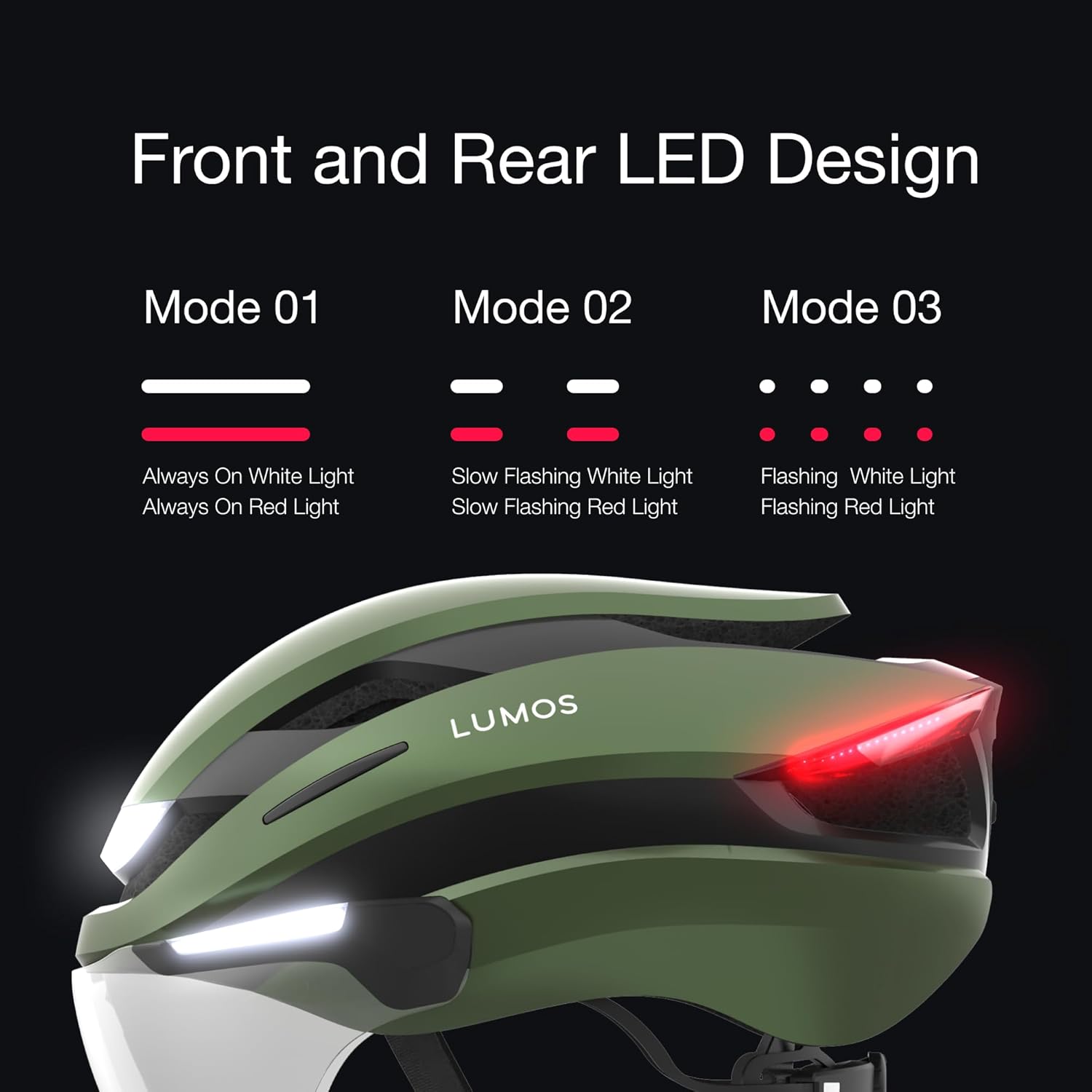
Image: The helmet offers multiple front and rear LED light modes to suit different riding conditions and preferences.
5.2. Kierunkowskazy
Activate the integrated turn signals using the paired Lumos Remote.
- Press the left button on the remote to activate the left turn signal.
- Press the right button on the remote to activate the right turn signal.
- The signals will flash for a set duration or until you press the button again to cancel.
- An audible beep from the helmet confirms turn signal activation, reminding you that the signal is on.
5.3. Retractable Face Shield
The helmet features a retractable face shield for eye protection against wind, debris, and insects.
- To deploy the shield, gently pull it down from its stored position until it clicks into place.
- To retract the shield, push it upwards until it securely locks into the helmet shell.
6. Konserwacja
6.1. Czyszczenie kasku
Regular cleaning helps maintain the helmet's appearance and functionality.
- Use a soft cloth, mild soap, and water to clean the outer shell and straps. Avoid harsh chemicals or abrasive materials.
- For the face shield, use a soft, lint-free cloth and water. If fogging occurs, an anti-fog spray can be applied.
- Allow the helmet to air dry completely before storage or next use.
6.2. Pielęgnacja baterii
Aby zmaksymalizować żywotność baterii:
- Charge the helmet regularly, even if not used frequently.
- Unikaj całkowitego rozładowania akumulatora na dłuższy czas.
- Store the helmet in a cool, dry place away from extreme temperatures.
7. Rozwiązywanie Problemów
If you encounter issues with your Lumos Ultra E-Bike Smart Helmet, refer to the solutions below:
| Problem | Możliwa przyczyna | Rozwiązanie |
|---|---|---|
| Helmet not turning on | Niski poziom naładowania baterii; przycisk zasilania nie został prawidłowo naciśnięty | Charge the helmet fully; Press and hold the power button for 2-3 seconds. |
| Światła nie działają | Low battery; Incorrect light mode selected; App connectivity issue | Charge the helmet; Cycle through light modes using the power button or app; Reconnect via the Lumos app. |
| Remote not controlling turn signals | Remote not paired; Remote battery low; Interference | Re-pair the remote (see Section 4.4); Charge or replace remote battery; Move away from strong signal interference. |
| App not connecting to helmet | Bluetooth off; Helmet off; App glitch | Ensure Bluetooth is enabled on your device; Turn helmet on; Restart the app and try pairing again. |
| Face shield fogs up | Temperature difference; Humidity | Apply an anti-fog spray to the shield; Ensure adequate ventilation. |
| Czas pracy baterii krótszy niż oczekiwano | All LEDs on constantly; Frequent use of high-brightness modes | Adjust light modes to flashing or lower brightness settings for extended battery life. |
If the issue persists, please contact Lumos customer support.
8. Specyfikacje
| Funkcja | Szczegół |
|---|---|
| Nazwa modelu | Ultra Ebike MIPS |
| Numer części | LHEUT-N0 |
| Kolor | Szmaragdowo zielony |
| Rozmiar | M-L (21.2"-24" / 54cm-61cm) |
| Materiał zewnętrzny | Poliwęglan (PC) |
| Materiał wewnętrzny | Styropian spieniony |
| Funkcja specjalna | Rechargeable Bike Helmet, Integrated LED Lights, Turn Signals, Retractable Face Shield, MIPS |
| Certyfikaty | U.S. CPSC Safety Standard for Bicycle Helmets for Persons Age 5 and Older, NTA 8776 Certified |
| Zalecane zastosowania | Cycling (E-Bike, Scooter, Bicycle) |
| UPC | 810059474055 |
| Pozycja Wymiary opakowania | 14.25 x 9.72 x 7.09 cala |
| Waga paczki | 0.93 kilograma |
9. Gwarancja i wsparcie
9.1. Informacje o gwarancji
The Lumos Ultra E-Bike Smart Helmet comes with a 1 rok gwarancji od daty zakupu. Niniejsza gwarancja obejmuje wady produkcyjne i problemy wynikające z normalnego użytkowania.
W przypadku roszczeń gwarancyjnych prosimy zachować dowód zakupu.
9.2. Accident Replacement Policy
Lumos offers an Accident Replacement Policy. If your helmet is damaged in a road accident, you may be eligible for a 30% discount on a replacement helmet. To initiate a claim:
- Contact Lumos customer support.
- Provide details of the accident and required proofs of the damaged helmet.
- Receive a code to repurchase the helmet at a discounted rate.
Note: This policy applies to helmets sold directly by Lumos helmet.
9.3. Obsługa klienta
For any questions, technical assistance, or support inquiries, please contact Lumos customer support:
- E-mail: wsparcie@lumoshelmet.co
- Webstrona: Visit the official Lumos webStrona z odpowiedziami na często zadawane pytania i dodatkowymi zasobami.
You can also find the Lumos app on the Google Play Store and Apple App Store for the latest updates and features.


