1. Wprowadzenie
Dziękujemy za zakupasing the LONPOO Portable CD Player Boombox, model ZXG-608B. This device offers versatile audio playback options including CD, Bluetooth 5.3, FM radio, USB, and AUX input, along with a microphone port for added functionality. Its compact design and rechargeable battery make it suitable for various environments.
This manual provides essential information for safe operation, setup, and maintenance of your boombox. Please read it thoroughly before use and retain it for future reference.

Image 1.1: The LONPOO ZXG-608B Portable CD Boombox highlighting its multiple playback options: Bluetooth, CD, FM Radio, USB, MIC Port, and AUX-IN.
2. Informacje dotyczące bezpieczeństwa
- Źródło zasilania: Use only the provided AC power cable or the internal rechargeable battery. Ensure the voltage odpowiada wymaganiom urządzenia.
- Woda i wilgoć: Do not expose the device to rain, moisture, or immerse it in water. Avoid placing objects filled with liquids, such as vases, on the device.
- Ciepło: Trzymaj urządzenie z dala od źródeł ciepła, takich jak grzejniki, kratki wentylacyjne, piece i inne urządzenia wytwarzające ciepło.
- Wentylacja: Zapewnij odpowiednią wentylację. Nie blokuj żadnych otworów wentylacyjnych.
- Czyszczenie: Unplug the device from the power outlet before cleaning. Use a dry, soft cloth. Do not use liquid cleaners or aerosol cleaners.
- Serwisowanie: Nie próbuj samodzielnie naprawiać tego produktu. Wszelkie czynności serwisowe należy powierzyć wykwalifikowanemu personelowi serwisowemu.
- Obsługa płyt CD: Handle CDs by their edges. Avoid touching the data side. Keep CDs clean and free from scratches.
- Bezpieczeństwo baterii: Do not disassemble, crush, or expose the built-in battery to extreme temperatures. Dispose of batteries according to local regulations.
3. Zawartość opakowania
Sprawdź, czy w opakowaniu znajdują się wszystkie elementy:
- 1x LONPOO Portable CD Player Boombox (Model ZXG-608B)
- 1x kabel zasilający AC
- 1x Pilot zdalnego sterowania (Baterie nie są dołączone)
- 1x Instrukcja obsługi (ten dokument)

Image 3.1: Contents of the package, including the boombox, remote control, AC power cable, and user manual. The image also shows the product dimensions: 20 cm (7.8 inches) height, 23 cm (9 inches) width, and 15 cm (5.9 inches) depth, with a weight of 4.4 lbs.
4. Koniec produktuview
Zapoznaj się z głównymi elementami i elementami sterowania swojego boomboxa.
4.1 Elementy sterujące i wyświetlacz na panelu przednim

Obraz 4.1: Przód view of the boombox and its remote control. The front panel features a large LCD display, STANDBY button, MODE button, previous/next track buttons, a large volume knob, EQ button, and USB port.
- Wyświetlacz LCD: Shows track number, time, mode, and other status indicators.
- Przycisk STANDBY: Włącza i wyłącza urządzenie.
- Przycisk TRYB: Switches between CD, Bluetooth, FM Radio, USB, and AUX modes.
- Previous/Next Buttons (|<>|): Navigates tracks/stations.
- Play/Pause/Scan Button (▶/SCAN): Plays/pauses media or scans FM radio stations.
- Przycisk STOP (■): Zatrzymuje odtwarzanie.
- Pokrętło głośności: Reguluje poziom wyjściowy audio.
- Przycisk korektora: Cycles through equalizer presets (Flat, Rock, Pop, Classic, Jazz).
- Port USB: Do odtwarzania dźwięku cyfrowego files z dysku flash USB.
- Gniazdo słuchawkowe: Do prywatnego słuchania.
4.2 Połączenia panelu tylnego
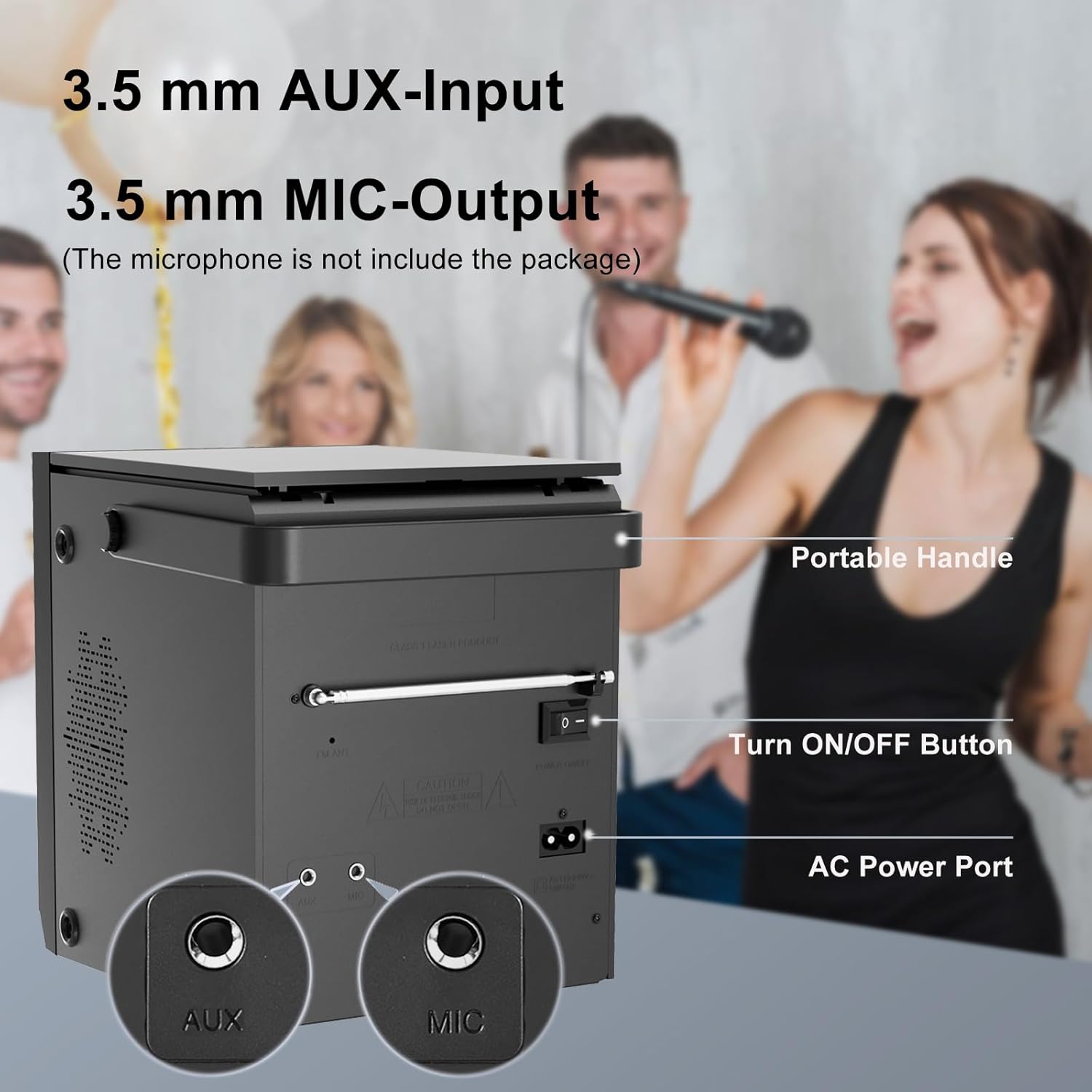
Image 4.2: Rear panel of the boombox, detailing the 3.5 mm AUX-Input, 3.5 mm MIC-Output, the main ON/OFF button, and the AC Power Port. A portable handle is also visible at the top.
- Wejście AUX (3.5 mm): Podłącz zewnętrzne urządzenia audio.
- MIC Output (3.5mm): Connect a microphone for karaoke or voice input.
- Przycisk WŁ./WYŁ.: Główny wyłącznik zasilania urządzenia.
- Port zasilania prądem przemiennym: Connect the AC power cable for power and charging.
- Antena FM: Rozłóż, aby uzyskać lepszy odbiór radia FM.
4.3 Top-Loading CD Compartment

Image 4.3: The top-loading CD compartment shown open with a CD inside. Icons illustrate playback options: Play in order, Single cycle, Repeat all, and Random play.
The CD compartment is located on the top of the unit. Gently lift the lid to access it.
4.4 Pilot zdalnego sterowania
The included remote control allows for convenient operation from a distance. (Batteries not included. Requires 2x AAA batteries, typically.)
5. Konfiguracja
5.1 Połączenie zasilania
- Zasilanie prądem zmiennym: Connect the supplied AC power cable to the AC Power Port on the rear of the boombox and then to a standard wall outlet.
- Akumulator: The boombox has a built-in 2000 mAh rechargeable battery, providing over 5 hours of continuous use at medium volume. The battery charges automatically when connected to AC power.

Image 5.1: The boombox powered by its internal rechargeable battery, capable of providing approximately 5 hours of playback.
5.2 Pierwsze włączenie zasilania
- Ensure the main ON/OFF switch on the rear panel is in the "ON" position.
- Naciśnij CZEKAJ przycisk na panelu przednim lub pilocie, aby włączyć urządzenie.
- Wyświetlacz LCD zostanie podświetlony.
6. Instrukcja obsługi
6.1 Odtwarzanie płyt CD
- Naciśnij TRYB button until "CD" mode is selected on the display.
- Open the CD compartment lid on top of the unit.
- Place a CD with the label side facing up. Gently close the lid.
- The boombox will read the CD, and playback should start automatically. If not, press the ▶/SCAN przycisk.
- Użyj |<>| przyciski do pomijania utworów.
- Naciśnij ▶/SCAN przycisk, aby wstrzymać/wznowić odtwarzanie.
- Naciśnij ■ ZATRZYMAJ aby zatrzymać odtwarzanie.
- Naciśnij POWTARZAĆ button on the remote control to cycle through repeat modes (Single, All, Random).
6.2 Tryb Bluetooth
NOTATKA: This device supports Bluetooth connection for audio input from external devices but does not support Bluetooth earphones.
- Naciśnij TRYB button until "BT" or "Bluetooth" is displayed. The unit will enter pairing mode, indicated by a flashing Bluetooth icon or "PAIR".
- Na urządzeniu z włączoną funkcją Bluetooth (np. smartfonie, tablecie) włącz Bluetooth i wyszukaj dostępne urządzenia.
- Select "LONPOO ZXG-608B" (or similar name) from the list.
- Once paired, the boombox will emit a confirmation sound, and the Bluetooth indicator will stop flashing.
- You can now play audio from your connected device through the boombox.

Image 6.1: Illustrates the process of pairing a smartphone with the boombox via Bluetooth for wireless audio streaming.
6.3 Radio FM
- Aby uzyskać optymalny odbiór, wysuń antenę FM na tylnym panelu.
- Naciśnij TRYB button until "FM" mode is selected.
- Naciśnij i przytrzymaj ▶/SCAN przycisk umożliwiający automatyczne skanowanie i zapisywanie dostępnych stacji FM.
- Użyj |<>| przyciski umożliwiające nawigację pomiędzy zapisanymi stacjami.
6.4 Odtwarzanie USB
- Włóż dysk flash USB do portu USB na panelu przednim.
- Naciśnij TRYB przycisk, aż wybierzesz tryb „USB”.
- Urządzenie automatycznie wykryje i rozpocznie odtwarzanie zgodnego dźwięku files (np. MP3).
- Użyj |<>| przyciski do pomijania utworów.
- Naciśnij ▶/SCAN przycisk, aby wstrzymać/wznowić odtwarzanie.
- Naciśnij ■ ZATRZYMAJ aby zatrzymać odtwarzanie.
6.5 Wejście AUX
- Connect an external audio device (e.g., MP3 player, smartphone) to the AUX Input port on the rear panel using a 3.5mm audio cable (not included).
- Naciśnij TRYB przycisk, aż wybierzesz tryb „AUX”.
- Steruj odtwarzaniem i głośnością z podłączonego urządzenia zewnętrznego.

Image 6.2: Demonstrates connecting external devices like a smartphone via AUX input and using the USB port for playback.
6.6 wejście mikrofonowe
- Connect a microphone (not included) to the MIC Output port on the rear panel.
- Adjust the volume using the main volume knob. The microphone input will mix with the currently playing audio source.

Image 6.3: Shows the boombox being used with a microphone, illustrating its karaoke function.
6.7 Ustawienia korektora graficznego (EQ)
Naciśnij EQ button on the front panel or remote control to cycle through preset equalizer modes:
- Płaski
- Głaz
- Muzyka pop
- Klasyczny
- Jazz

Image 6.4: Highlights the 20W stereo sound output and lists the available 3 repeat modes (Single, All, Random) and 5 EQ modes (Flat, Rock, Pop, Classic, Jazz).
7. Konserwacja
- Czyszczenie: Przetrzyj zewnętrzną część urządzenia miękką, suchą ściereczką. Nie używaj środków czyszczących o właściwościach ściernych ani rozpuszczalników.
- Pielęgnacja soczewek CD: Jeżeli występują problemy z odtwarzaniem płyt CD, należy użyć dostępnego w sprzedaży dysku czyszczącego do soczewek CD.
- Żywotność baterii: Aby przedłużyć żywotność baterii, unikaj częstego całkowitego rozładowywania baterii. Ładuj urządzenie regularnie, nawet jeśli nie jest używane przez dłuższy czas.
- Składowanie: When storing the unit for a long time, ensure it is powered off and disconnected from the AC supply. Store in a cool, dry place.
8. Rozwiązywanie Problemów
| Problem | Możliwa przyczyna | Rozwiązanie |
|---|---|---|
| Brak zasilania | AC cable not connected; Main power switch off; Battery depleted. | Check AC connection; Ensure rear ON/OFF switch is ON; Charge the battery. |
| Płyta CD nie odtwarza się / błąd „BRAK PŁYTY” | CD inserted incorrectly; CD is dirty or scratched; CD lens is dirty; Incompatible CD format. | Reinsert CD label side up; Clean CD; Use a CD lens cleaner; Ensure CD is audio CD format. |
| Bluetooth nie łączy się | Boombox not in BT mode; Device too far; Bluetooth already connected to another device. | Select BT mode; Move device closer; Disconnect from other devices and try again. |
| Słaby odbiór radia FM | Antena nie jest wysunięta; słaby sygnał. | Całkowicie rozłóż antenę FM. Zmień położenie urządzenia, aby uzyskać lepszy sygnał. |
| Problemy z odtwarzaniem przez USB | Dysk USB nie został prawidłowo włożony; niezgodny file format; dysk USB uszkodzony. | Reinsert USB drive; Ensure files are MP3 or compatible; Try a different USB drive. |
| No sound from AUX | AUX cable not connected; Incorrect mode selected; Volume too low on external device. | Check AUX cable connection; Select AUX mode; Increase volume on external device. |
9. Specyfikacje
- Model: ZXG-608B
- Marka: LONPOO
- Wymiary produktu (dł. x szer. x wys.): 4.72 x 7.09 x 5.91 cala (12 x 18 x 15 cm)
- Waga przedmiotu: 5.63 funtów (2.55 kg)
- Wyjście głośnika: 20 W RMS (10 W x 2)
- Łączność: Bluetooth 5.3, USB, AUX Input (3.5mm), MIC Port (3.5mm)
- Źródło zasilania: AC Power (Corded Electric) / Built-in Rechargeable Battery
- Pojemność baterii: 2000 mAh
- Playback Time (Battery): >5 hours (at medium volume)
- Obsługiwane nośniki: Audio CD, CD-R/RW, USB (MP3)
- Tuner radiowy: FM
- Tryby korektora: Flat, Rock, Pop, Classic, Jazz
- Dołączone akcesoria: AC Power Cable, Remote Control, User Manual
10. Gwarancja i wsparcie
LONPOO products are designed for reliability and performance. For warranty information, please refer to the warranty card included with your purchase or contact LONPOO customer support.
If you encounter any issues or have questions regarding your LONPOO Portable CD Player Boombox, please contact our customer support team for assistance. Contact details can typically be found on the official LONPOO webmiejscu lub na opakowaniu produktu.


