1. Wprowadzenie
This manual provides essential information for the proper use and maintenance of your EBTOOLS 8-Inch 2-in-1 Pocket PC Computer. Please read this guide thoroughly before operating the device to ensure optimal performance and longevity. This compact and versatile device features an 8-inch touchscreen, a 360-degree rotating design, and runs on Windows 11 Pro.

Image: The EBTOOLS 8-Inch 2-in-1 Pocket PC shown in its tablet configuration, with a scenic road displayed on the screen.
2. Zawartość opakowania
Sprawdź, czy w opakowaniu produktu znajdują się wszystkie elementy wymienione poniżej:
- 1 x EBTOOLS 8-Inch 2-in-1 Laptop
- 1 x Przewód zasilający
- 1 x zasilacz (wtyczka amerykańska)
- 2 x User Manuals (this document is one of them)

Image: The EBTOOLS 8-Inch 2-in-1 Pocket PC, its power supply cord, and the US plug adapter, laid out as they would appear in the package.
3. Koniec produktuview
The EBTOOLS 8-Inch 2-in-1 Pocket PC is designed for portability and versatility. It features a compact form factor and a 360-degree rotating display, allowing it to function as both a laptop and a tablet.
Główne cechy:
- Edytor: N100 CPU, capable of up to 3.4GHz frequency.
- Pamięć: 12 GB pamięci RAM LPDDR5.
- Składowanie: 512GB M.2 SSD, expandable up to 2TB.
- Wyświetlacz: 8-inch touchscreen with 360-degree rotation.
- Łączność: WiFi6 (2.4G/5G band) and Bluetooth 5.2.
- Kamera: 2MP 30 Frame HD built-in front camera for video calls.
- Klawiatura: Edge-less full-size QWERTY keyboard with integrated touchpad.
- Bateria: Built-in 5000mAh polymer lithium battery, providing 4-6 hours of use.
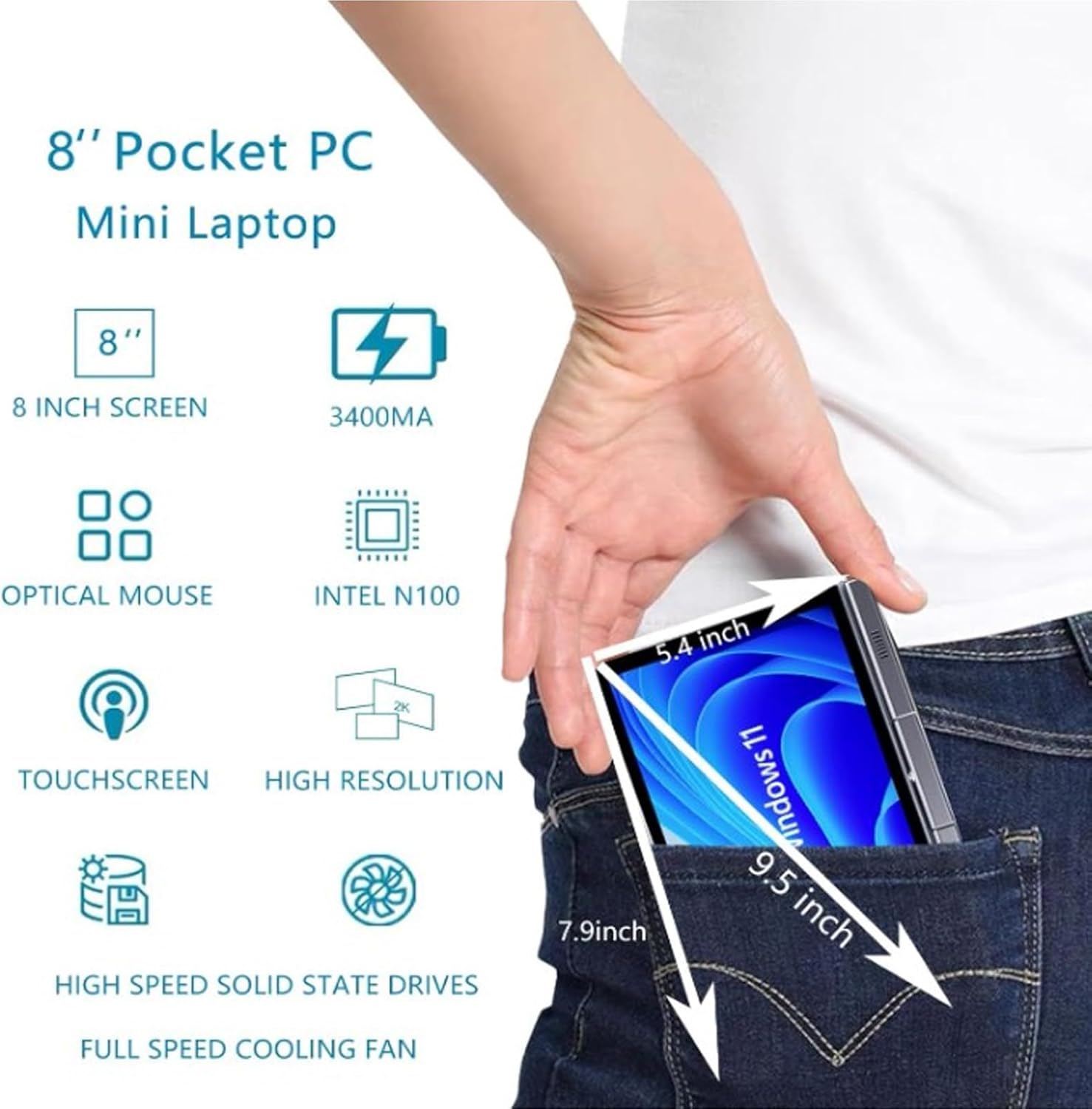
Image: A visual representation of the 8-inch Pocket PC's compact dimensions, demonstrating its portability by showing it fitting into a standard pocket.

Image: A labeled diagram highlighting the various ports (USB 3.0, Type-C, Audio, RJ45) and keyboard components (Front Camera, Speaker, Power Light, Power Button, Left/Right/Middle Mouse Buttons) of the EBTOOLS 8-Inch 2-in-1 Pocket PC.
4. Konfiguracja
4.1 Pierwsze włączenie i ładowanie
- Naładuj urządzenie: Before first use, connect the power adapter to the Type-C port on the device and plug it into a power outlet. Allow the device to charge fully. The power light indicator will show charging status.
- Włączanie: Press and hold the Power Button located on the keyboard deck until the screen illuminates.
- Początkowe ustawienia: Postępuj zgodnie z instrukcjami wyświetlanymi na ekranie, aby ukończyć proces konfiguracji systemu Windows 11 Pro, obejmujący wybór języka, nawiązanie połączenia sieciowego i utworzenie konta użytkownika.
The device is designed for immediate use upon completion of the initial Windows setup.
5. Instrukcja obsługi
5.1 Klawiatura i touchpad
- The device features an edge-less full-size QWERTY keyboard for typing.
- The integrated touchpad supports standard mouse functions, including moving the pointer, scrolling, and left/right clicks. The left, right, and middle mouse buttons are clearly indicated on the diagram.
5.2 Obsługa ekranu dotykowego
- The 8-inch display is a multi-touch screen. Use gestures such as tap, swipe, pinch-to-zoom, and rotate for navigation and interaction with applications.
5.3 Obrót o 360 stopni
- The display can be rotated 360 degrees to switch between laptop mode (traditional clamshell) and tablet mode (screen folded back against the base).
- When in tablet mode, the keyboard is automatically disabled to prevent accidental input.
5.4 Podłączanie urządzeń peryferyjnych
- USB 3.0: Connect external devices such as USB drives, mice, or keyboards to the USB 3.0 port.
- Typ C: Służy do ładowania i przesyłu danych.
- High Definition Multimedia Interface (HDMI): Connect an external monitor or projector using an HDMI cable for extended display.
- 3.5mm Standard Headphone Jack: Podłącz słuchawki lub głośniki zewnętrzne.
- Port sieciowy RJ45: Podłącz kabel Ethernet, aby uzyskać przewodowe połączenie z Internetem.
5.5 Łączność bezprzewodowa
- Wi-Fi6: Access wireless networks (2.4G and 5G bands) for internet connectivity. Enable Wi-Fi through Windows settings.
- Bluetooth 5.2: Pair with Bluetooth-enabled devices such as headphones, speakers, or other peripherals. Enable Bluetooth through Windows settings.
6. Konserwacja
6.1 Czyszczenie
- Use a soft, lint-free cloth to clean the screen and exterior surfaces. For stubborn marks, slightly dampWyczyść ściereczkę wodą lub płynem do czyszczenia ekranów.
- Unikaj stosowania silnych środków chemicznych, ściernych środków czyszczących lub aerozoli bezpośrednio na urządzeniu.
- Przed czyszczeniem upewnij się, że urządzenie jest wyłączone i odłączone od zasilania.
6.2 Przechowywanie
- Przechowywać urządzenie w chłodnym i suchym miejscu, z dala od bezpośredniego światła słonecznego i ekstremalnych temperatur.
- If storing for an extended period, ensure the battery is charged to approximately 50% to preserve battery health.
7. Rozwiązywanie Problemów
This section addresses common issues you might encounter with your EBTOOLS 8-Inch 2-in-1 Pocket PC.
7.1 Urządzenie się nie włącza
- Ensure the device is fully charged. Connect the power adapter and wait a few minutes before attempting to power on again.
- Verify the power adapter and cable are securely connected and the power outlet is functional.
- Aby wykonać twardy reset, spróbuj przytrzymać przycisk zasilania przez 10–15 sekund.
7.2 Problemy z łącznością Wi-Fi lub Bluetooth
- Sprawdź, czy w ustawieniach systemu Windows włączona jest funkcja Wi-Fi lub Bluetooth.
- Restart the device and your wireless router/Bluetooth device.
- Upewnij się, że znajdujesz się w zasięgu sieci Wi-Fi lub urządzenia Bluetooth.
- Update wireless drivers if available.
7.3 Ekran dotykowy nie reaguje
- Uruchom ponownie urządzenie.
- Upewnij się, że ekran jest czysty i wolny od zanieczyszczeń.
- Check for any system updates that might include touchscreen driver fixes.
7.4 Krótki czas pracy baterii
- Dostosuj ustawienia zasilania w systemie Windows, aby zoptymalizować zużycie baterii.
- Zamknij niepotrzebne aplikacje działające w tle.
- Zmniejsz jasność ekranu.
- Ensure the device is not running resource-intensive tasks continuously.
8. Specyfikacje
| Funkcja | Specyfikacja |
|---|---|
| System operacyjny | Windows 11 Pro |
| Rozmiar wyświetlacza | 8 cali |
| Edytor | N100 CPU (up to 3.4GHz) |
| BARAN | 12 GB pamięci LPDDR5 |
| Składowanie | 512GB M.2 SSD (supports up to 2TB) |
| Przednia kamera | 2MP 30 Frame HD Built-In Camera |
| Bluetooth | BT5.2 |
| Wireless Fidelity Type | 2.4G / 5G Band (WiFi6) |
| Interfejsy | 1 x USB3.0, 1 x 3.5mm Standard Headphone Jack, 1 x High Definition Multimedia Interface Port, 1 x Type-C, 1 x RJ45 Network Port |
| Typ baterii | Wbudowana bateria litowo-polimerowa 5000 mAh |
| Żywotność baterii | 4-6 godzin (typowe użytkowanie) |
| Waga przedmiotu | 2.68 funta (ok. 1.22 kg) |
| Wymiary opakowania | 9.45 x 7.09 x 2.36 cala |
9. Gwarancja i wsparcie
9.1 Gwarancja na produkt
Specific warranty details for your EBTOOLS 8-Inch 2-in-1 Pocket PC are typically provided with your purchase documentation or on the manufacturer's official website. Please refer to these resources for information regarding warranty coverage, duration, and terms.
9.2 Obsługa klienta
For technical assistance, troubleshooting beyond this manual, or warranty claims, please contact EBTOOLS customer support. Contact information can usually be found on the product packaging, the manufacturer's webna stronie internetowej lub u sprzedawcy.
When contacting support, please have your product model number (EBTOOLS9pxf4058ch-12) and purchase information readily available.


