1. Wprowadzenie i koniecview
The AZZA CSAZ-570B Cove is an ATX mid-tower computer case designed for gaming and high-performance PC builds. It features a back-connect supported design, optimizing cable management and internal aesthetics. This manual provides essential information for setting up, operating, and maintaining your computer case.
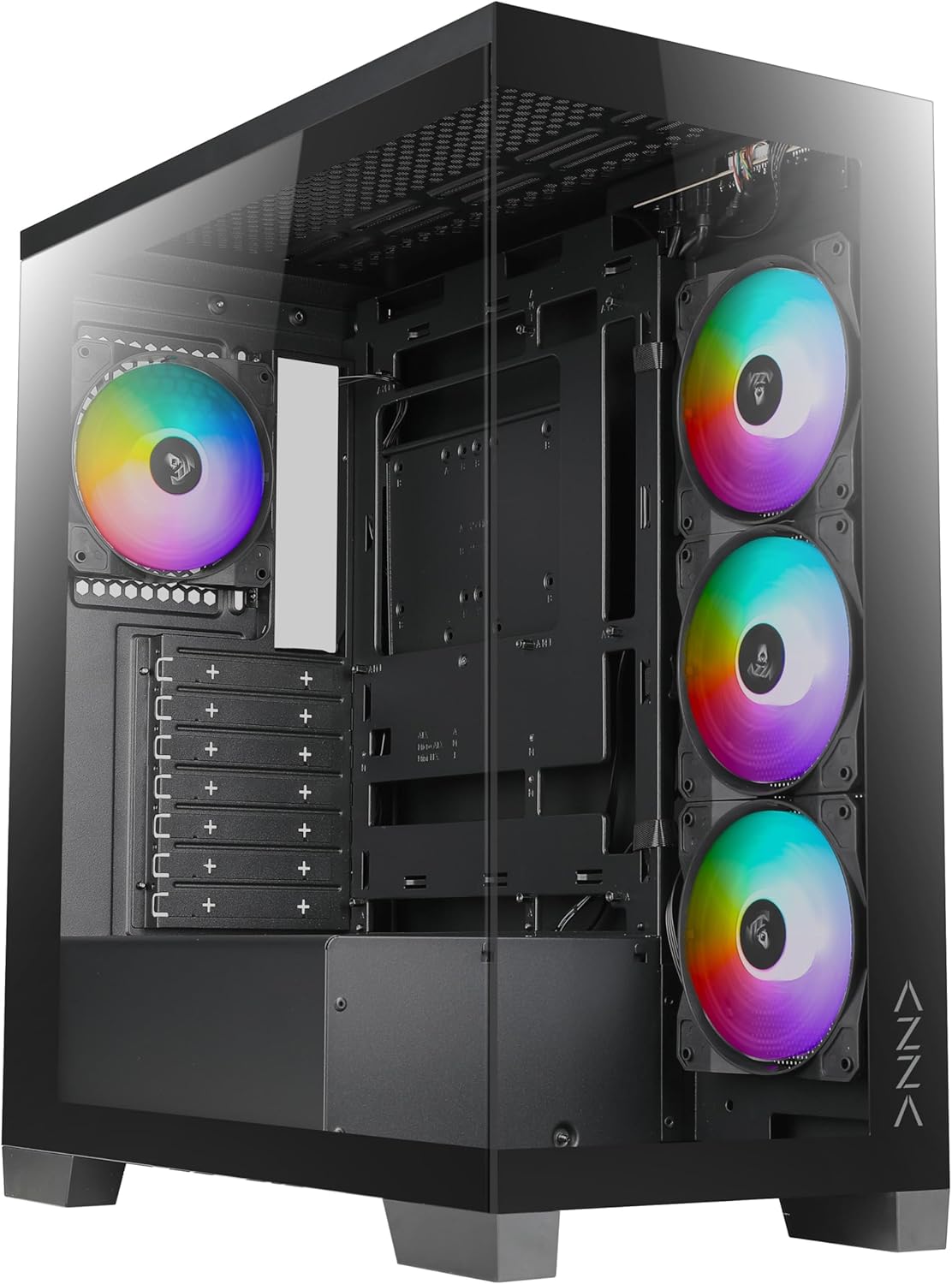
Rycina 1: Przód view of the AZZA CSAZ-570B Cove computer case with RGB fans visible.
Główne cechy:
- Performance Optimized: Full mesh front panel with 4 x 120 mm pre-installed addressable RGB fans for excellent airflow.
- Multifaceted Airflow Support: Supports up to 10 x 120 mm fans, including direct GPU airflow with 2 x 120 mm fans above the PSU shroud.
- Możliwość dostosowania oświetlenia: Controllable fan lighting via the top panel LED button, with motherboard RGB software synchronization support.
- Intuitive I/O: Top panel includes Power button, LED button, Combo HD Audio, 1 x USB 2.0, 1 x USB 3.0, and 1 x Type-C port.
- Back-Connect Supported: Designed to accommodate motherboards with back-mounted connectors for cleaner internal routing.
2. Konfiguracja i instalacja
This section outlines the steps for installing components into your AZZA CSAZ-570B Cove computer case.
2.1 Instalacja płyty głównej
The case supports ATX (including back-connect supported), Micro ATX, and ITX motherboards. Ensure standoffs are correctly aligned for your motherboard form factor before installation.

Figure 2: Internal layout indicating motherboard support area (A), maximum CPU cooler height (B), and maximum GPU length (C).
- Dopasuj swoją płytę główną do wstępnie zainstalowanych wsporników.
- Secure the motherboard using appropriate screws.
- Connect all necessary power cables (24-pin ATX, CPU 8-pin) and data cables.
- For back-connect motherboards, route cables through the designated rear channels.
2.2 Cooling System Configuration
The CSAZ-570B offers extensive cooling options for optimal thermal performance.

Figure 3: Diagram illustrating fan mounting locations and sizes within the case.
Wsparcie fanów:
- Przód: 4 x 120mm (pre-installed ARGB fans)
- Szczyt: 3 x 120 mm lub 2 x 140 mm
- Tył: 1 x 120mm
- Bok (tacka płyty głównej): 3 x 120mm
- Powyżej osłony zasilacza: 2 x 120mm (for direct GPU airflow)

Figure 4: Diagram showing radiator compatibility for the AZZA CSAZ-570B case.
Wsparcie chłodnicy:
- Motherboard Side: Do 360 mm
- Szczyt: Up to 280mm or 360mm
2.3 Instalacja urządzenia pamięci masowej
The case provides flexible options for installing 2.5" SSDs and 3.5" HDDs.

Rysunek 5: Wewnętrzne view highlighting locations for SSD and HDD installation.
- Prawy panel boczny: Supports 2 x 2.5" SSDs or 1 x 3.5" HDD.
- Taca metalowa: Supports 1 x 2.5" SSD.
2.4 Instalacja zasilania
The power supply mounts at the bottom of the case.
- Slide the power supply into the designated compartment at the bottom rear of the case.
- Zabezpiecz zasilacz śrubami od tyłu obudowy.
3. Instrukcja obsługi
This section details the functionality of the front I/O panel and lighting controls.
3.1 Przedni panel wejścia/wyjścia
The top panel provides convenient access to essential ports and controls.

Rysunek 6: Zbliżenie view of the top I/O panel with labeled ports and buttons.
- Przycisk zasilania: Press to power on or off the system.
- Przycisk LED: Cycles through various pre-programmed ARGB lighting modes for the installed fans.
- Combo HD Audio: Do podłączania słuchawek i mikrofonów.
- USB 2.0 x 1: Standardowy port USB dla urządzeń peryferyjnych.
- USB 3.0 x 1: Szybki port USB do przesyłu danych.
- Type-C x 1: Reversible USB-C port for modern devices.
3.2 Sterowanie oświetleniem ARGB
Zainstalowanymi fabrycznie wentylatorami ARGB można sterować na dwa sposoby:
- Przycisk LED: Use the dedicated LED button on the top panel to cycle through different lighting effects and colors.
- Oprogramowanie RGB płyty głównej: If your motherboard supports Addressable RGB (ARGB) synchronization, connect the case's ARGB cable to the motherboard's ARGB header. This allows you to control the fan lighting directly through your motherboard's software (e.g., ASUS Aura Sync, MSI Mystic Light Sync, Gigabyte RGB Fusion, ASRock Polychrome Sync). Ensure the LED button is not actively overriding the motherboard control.
4. Konserwacja
Regular maintenance helps ensure optimal performance and longevity of your computer case and its components.
- Czyszczenie kurzu: Periodically clean dust filters (if present) and internal components using compressed air. Dust accumulation can impede airflow and lead to overheating.
- Czyszczenie wentylatora: Gently clean fan blades to remove dust buildup, which can affect fan performance and noise levels.
- Zarządzanie kablami: Ensure cables are neatly routed and secured to prevent interference with airflow and moving parts.
- Czyszczenie zewnętrzne: Przetrzyj zewnętrzne powierzchnie miękką, damp płótno. Unikaj ściernych środków czyszczących.
5. Rozwiązywanie Problemów
This section provides general troubleshooting tips for common issues.
- System się nie włącza:
- Check if the power supply is properly connected to the wall outlet and the motherboard.
- Sprawdź, czy kabel przycisku zasilania obudowy jest prawidłowo podłączony do złącza na przednim panelu płyty głównej.
- Sprawdź, czy wyłącznik zasilania jest w pozycji „ON”.
- Wentylatory nie kręcą się/RGB nie działa:
- Confirm fan power cables are securely connected to the motherboard or fan controller.
- Check ARGB cables for proper connection to the motherboard's ARGB header or the case's ARGB controller.
- If using motherboard software, ensure the software is running and configured correctly.
- Try cycling the LED button on the top panel to see if the lights respond.
- Porty USB nie działają:
- Ensure the USB 2.0, USB 3.0, and Type-C headers from the case are correctly plugged into the corresponding headers on your motherboard.
- Check device drivers for your motherboard's USB controllers.
6. Specyfikacje
Detailed technical specifications for the AZZA CSAZ-570B Cove computer case.
| Funkcja | Specyfikacja |
|---|---|
| Nazwa modelu | CSAZ-570B |
| Typ sprawy | Mid Tower |
| Kolor | Czarny |
| Tworzywo | Plastik, szkło hartowane |
| Wymiary produktu (dł. x szer. x wys.) | 17.1" gł. x 9.1" szer. x 19.3" wys. (435 mm x 230 mm x 490 mm) |
| Waga przedmiotu | 21.8 funta |
| Zgodność płyty głównej | ATX (Back-connect supported), Micro ATX, ITX |
| Maksymalna wysokość chłodnicy procesora | 170mm |
| Maksymalna długość GPU | 400mm |
| Typ montażu zasilacza | Mocowanie dolne |
| Fabrycznie zainstalowane wentylatory | 4 x 120 mm ARGB (przód) |
| Przednie porty we / wy | Power Button, LED Button, Combo HD Audio, 1x USB 2.0, 1x USB 3.0, 1x Type-C |
| Zatoki napędowe | 2 x 2.5" SSD or 1 x 3.5" HDD (Right Side Panel), 1 x 2.5" SSD (Metal Tray) |
Figure 7: Product dimensions of the AZZA CSAZ-570B case.
7. Gwarancja i wsparcie
For warranty information and technical support, please contact AZZA directly.
- Producent: AZZA
- Sprzedający: AZZA USA (via Amazon)
- Product Protection Plans: Dodatkowe plany ochrony można zakupić osobno. Oferują one rozszerzony zakres ochrony wykraczający poza standardową gwarancję producenta.
- 3-letni plan ochrony
- 4-letni plan ochrony
- Complete Protect (subskrypcja miesięczna)
- Zasady zwrotu: This product is eligible for a 30-day return policy (refund/replacement) from the date of purchase.
- Official AZZA Store: Aby uzyskać dalsze informacje i aktualizacje produktów, odwiedź stronę AZZA Store on Amazon.


