1. Wprowadzenie
Thank you for choosing the LONPOO LP42M Active Bookshelf Speakers. These speakers are designed to deliver high-quality audio with versatile connectivity options, suitable for various home audio setups. This manual provides essential information for safe and efficient use of your new speakers.
2. Informacje dotyczące bezpieczeństwa
Przed użyciem produktu należy uważnie przeczytać wszystkie instrukcje bezpieczeństwa. Zachowaj tę instrukcję do wykorzystania w przyszłości.
- Źródło zasilania: Używaj wyłącznie dostarczonego zasilacza. Upewnij się, że napięcietage pasuje do lokalnego źródła zasilania.
- Wentylacja: Do not block any ventilation openings. Maintain adequate space around the speakers for proper airflow.
- Woda i wilgoć: Do not expose the speakers to water, rain, or moisture. Avoid placing liquid-filled objects on or near the speakers.
- Ciepło: Keep the speakers away from heat sources such as radiators, heat registers, stoves, or other heat-producing appliances.
- Czyszczenie: Unplug the speakers from the power outlet before cleaning. Use a soft, dry cloth. Do not use liquid cleaners or aerosol cleaners.
- Serwisowanie: Nie próbuj samodzielnie naprawiać tego produktu. Wszelkie czynności serwisowe należy powierzyć wykwalifikowanemu personelowi serwisowemu.
3. Zawartość opakowania
Sprawdź, czy w opakowaniu znajdują się wszystkie elementy:
- LONPOO LP42M Active Bookshelf Speaker Pair (1 powered speaker, 1 passive speaker)
- Pilot zdalnego sterowania x 1
- Speaker Wire (6.56ft / 2m) x 1
- Optical Cable (4.92ft / 1.5m) x 1
- AC Power Cord (3.94ft / 1.2m) x 1

4. Koniec produktuview
The LONPOO LP42M speakers feature a classic wooden design with advanced audio components and multiple connectivity options.
4.1 Front Panel (Powered Speaker)
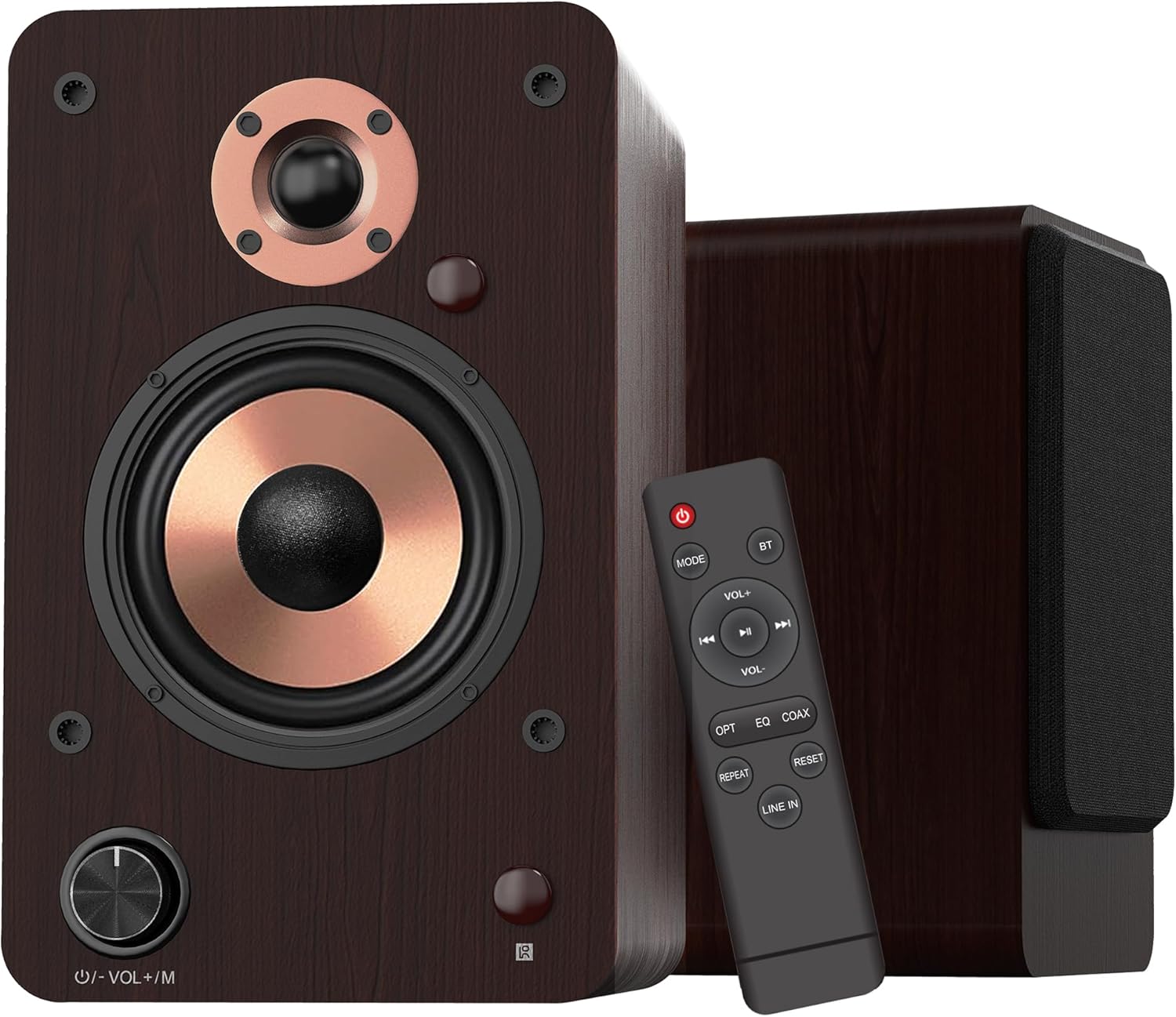
- Volume/Mode Knob: Rotate to adjust volume. Press to cycle through input modes.
- Wskaźnik LED: Displays the current input mode (Red: Standby, Blue: Bluetooth, Green: Optical, Purple: Coaxial/USB, Yellow: AUX, Light Blue: Line-in).
Komponenty głośników 4.2

- 1-inch Silk Dome Tweeter: Delivers crisp and clear high frequencies.
- 4-inch Aluminum Cone Woofer: Provides rich and powerful bass.
- 12mm MDF Wood Cabinet: Ensures solid construction and minimizes resonance for improved audio clarity.
4.3 Rear Panel (Powered Speaker)

- Przycisk TREBLE: Reguluje wyjście wysokiej częstotliwości.
- Przycisk BASS: Reguluje wyjście o niskiej częstotliwości.
- Przycisk zasilania: Włącza lub wyłącza system głośników.
- AC PORT: Podłącza się do przewodu zasilającego prądem zmiennym.
- GŁOŚNIK: Connects to the passive speaker using the provided speaker wire.
- LINE IN (RCA L/R): For connecting devices with RCA audio output (e.g., turntables, CD players).
- WEJŚCIE AUX: For connecting devices with a 3.5mm audio output.
- OPTYCZNY: For connecting devices with optical audio output (e.g., TVs, game consoles).
- WSPÓŁOSIOWY: For connecting devices with coaxial audio output.
- WEJŚCIE USB: For connecting USB flash drives for audio playback or connecting to a PC.
5. Konfiguracja
5.1 Rozpakowanie
Ostrożnie wyjmij wszystkie elementy z opakowania. Zachowaj opakowanie do transportu lub przechowywania w przyszłości.
5.2 Rozmieszczenie głośników
For optimal sound quality, place the speakers on a stable surface, such as a bookshelf or speaker stands. Position them along a wall or near a corner of the room to enhance bass response. Ensure the speakers are equidistant from your listening position for a balanced stereo image.
5.3 Podłączanie głośników
Connect the powered speaker to the passive speaker using the provided speaker wire. Ensure the red wire connects to the red terminal and the white/black wire connects to the black terminal on both speakers.

5.4 Podłączanie do źródeł dźwięku
The LP42M speakers offer multiple input options:
- Bluetooth: Do bezprzewodowego łączenia się ze smartfonami, tabletami i innymi urządzeniami obsługującymi technologię Bluetooth.
- USB: Connect a USB flash drive for direct audio playback or connect to a PC using a USB cable.
- Optyczny: Use the optical cable to connect to TVs, game consoles, or other digital audio sources.
- Współosiowy: Use a coaxial cable to connect to compatible digital audio sources.
- RCA (Line In): Use RCA cables to connect to devices like turntables, CD players, or DVD players.
- Hormon: Use a 3.5mm audio cable to connect to devices with a headphone jack.


5.5 Połączenie zasilania
Connect the AC power cord to the AC port on the rear of the powered speaker, then plug the other end into a wall outlet.
6. Instrukcja obsługi
6.1 Włączanie/wyłączanie zasilania
Odwróć MOC switch on the rear panel of the powered speaker to the 'ON' position to turn on the speakers. Flip it to 'OFF' to power down.
6.2 Wybór wejścia
Naciśnij Volume/Mode Knob on the front of the powered speaker or the 'MODE' button on the remote control to cycle through the available input modes: Bluetooth, Optical, Coaxial, RCA (Line In), USB, and AUX-in. The LED indicator will change color to reflect the selected mode.

6.3 Regulacja głośności
Obróć Volume/Mode Knob on the front of the powered speaker clockwise to increase volume and counter-clockwise to decrease volume. Alternatively, use the 'VOL+' and 'VOL-' buttons on the remote control.
6.4 kontrola tonów
Użyj POTROIĆ I BASS knobs on the rear panel of the powered speaker to adjust the high and low frequencies to your preference.

6.5 parowanie Bluetooth
- Switch the speaker to Bluetooth mode (blue LED indicator).
- On your device (smartphone, tablet), enable Bluetooth and search for 'LP42M'.
- Select 'LP42M' to pair. Once connected, the blue LED will remain solid.
6.6 Odtwarzanie USB
Włóż dysk flash USB zawierający dźwięk MP3/WMA files into the USB port. The speaker will automatically switch to USB mode and begin playback. Use the remote control for playback functions (play/pause, next/previous track).
6.7 Funkcje zdalnego sterowania

- Przycisk zasilania: Włącza/wyłącza głośniki (tryb czuwania).
- Sposób użycia: Przełącza między trybami wprowadzania danych.
- BT: Directly switches to Bluetooth mode.
- GŁOŚNOŚĆ+/GŁOŚNOŚĆ-: Reguluje głośność.
- Odtwórz/Pauza, Następny/Poprzedni: Controls audio playback (USB/Bluetooth).
- OPTOWAĆ: Directly switches to Optical mode.
- EQ: Cycles through sound equalization presets.
- NAKŁANIAĆ: Directly switches to Coaxial mode.
- POWTARZAĆ: Repeats current track or playlist (USB).
- RESETOWANIE: Resetuje ustawienia.
- WYRYSOWAĆ: Directly switches to Line In (RCA) mode.
7. Konserwacja
Właściwa konserwacja gwarantuje długowieczność i wydajność głośników.
- Czyszczenie: Use a soft, dry, lint-free cloth to clean the speaker cabinets. Do not use abrasive cleaners, waxes, or solvents.
- Pył: Regularnie odkurzaj kratki i powierzchnie głośników, aby zapobiec gromadzeniu się kurzu.
- Środowisko: Unikaj umieszczania głośników w bezpośrednim świetle słonecznym, w pobliżu źródeł ciepła lub w miejscach o dużej wilgotności.
8. Rozwiązywanie Problemów
Jeśli napotkasz problemy, zapoznaj się z poniższymi typowymi problemami i rozwiązaniami:
| Problem | Możliwa przyczyna | Rozwiązanie |
|---|---|---|
| Brak dźwięku | Power not connected; incorrect input mode; volume too low; cables loose. | Ensure power is on; select correct input mode; increase volume; check all cable connections. |
| Bluetooth nie łączy się | Speaker not in Bluetooth mode; device too far; already paired with another device. | Switch speaker to Bluetooth mode; ensure device is within 10m range; disconnect from other devices and try pairing again. |
| Zniekształcony dźwięk | Volume too high; poor source quality; loose cable connection. | Reduce volume on speaker and source; try a different audio source; check cable connections. |
| Pilot nie działa | Batteries dead; obstruction between remote and speaker; remote not pointed at sensor. | Replace batteries; remove obstructions; ensure remote is pointed at the speaker's sensor. |
9. Specyfikacje
| Funkcja | Specyfikacja |
|---|---|
| Typ głośnika | Aktywne głośniki półkowe |
| Moc wyjściowa | 100 W (50 W x 2) |
| Średnica głośnika niskotonowego | 4 inches (Aluminum Cone) |
| Średnica głośnika wysokotonowego | 1 inch (Silk Dome) |
| Odpowiedź częstotliwościowa | 40Hz-20kHz |
| Impedancja | 4 omy |
| Stosunek sygnału do szumu (S/N) | 80dB |
| Łączność | Bluetooth 5.3, Optical, Coaxial, RCA (Line In), USB, AUX-in (3.5mm) |
| Zasięg Bluetooth | Do 10 metrów (33 stóp) |
| Metoda kontroli | Pilot zdalnego sterowania, pokrętła na głośniku |
| Materiał szafki | 12mm MDF Wood |
| Wymiary (każdy głośnik) | 9.84" (H) x 7.07" (W) x 6.1" (L) / 25cm (H) x 18cm (W) x 15.5cm (L) |
| Waga (para) | 5.05 kg (11.13 funtów) |
| Kolor | Brązowy |
10. Oficjalne filmy o produktach
Watch these official videos for additional setup and feature demonstrations:
LONPOO Premium Bookshelf Speakers LP-42M
Wideo: Oficjalnyview of the LONPOO LP-42M Premium Bookshelf Speakers, showcasing their design and key features.
Active Bookshelf Speaker 100W
Video: A short demonstration highlighting the active features and 100W power output of the bookshelf speakers.
11. Gwarancja i wsparcie
The LONPOO LP42M speakers come with a Limited Warranty. Please refer to the warranty card included in your package for detailed terms and conditions.
For technical support, troubleshooting assistance, or warranty claims, please contact LONPOO customer service through the official webna stronie internetowej lub u sprzedawcy.


