
1. Wprowadzenie
Canyon DVR40 to kamera samochodowa przeznaczona do nagrywania dźwięków podczas jazdy samochodem.tage. Posiada czujnik Sony Starvis 415 do nagrywania wideo w rozdzielczości 4K, pole widzenia o szerokości 140° vieworaz 3-calowy pojemnościowy ekran dotykowy IPS. Urządzenie zawiera superkondensator zapewniający niezawodną pracę i obsługuje łączność Wi-Fi, umożliwiając sterowanie za pomocą aplikacji mobilnej.

Obraz 1.1: Przód view kamery samochodowej Canyon DVR40, na której widać obiektyw i logo.
2. Zawartość opakowania
Sprawdź, czy wszystkie wymienione poniżej elementy znajdują się w opakowaniu produktu.

Zdjęcie 2.1: Wszystkie elementy zawarte w zestawie kamery samochodowej Canyon DVR40.
- Kamera samochodowa Canyon DVR40
- Szybki przewodnik
- Karta gwarancyjna
- Akcesoria do instalacji kablowych
- Czytnik kart
- Magnetyczny uchwyt na przyssawkę ze złączem USB typu C
- Zasilacz samochodowy (2 złącza wyjściowe USB typu A)
- Kabel USB typu C (długość kabla 3.6 m)
- Filtr CPL
- Ściereczka do czyszczenia ekranu
- Etui tekstylne
3. Koniec produktuview
Zapoznaj się z głównymi elementami kamery samochodowej DVR40.

Zdjęcie 3.1: Kamera samochodowa Canyon DVR40, podkreślająca jej kompaktową konstrukcję.
Główne cechy:
- Nagrywanie w jakości 4K UltraHD: Nagrywa wideo z prędkością 30 klatek na sekundę, zapewniając wyraźny dźwięktage.
- Czujnik Sony Starvis 415: Poprawia jakość obrazu przy słabym oświetleniu dzięki trybowi widzenia nocnego.
- 140° Pole View: Zapewnia szerokie pokrycie drogi.
- 3-calowy pojemnościowy ekran dotykowy IPS: Do bezpośredniego sterowania i odtwarzania.
- Superkondensator: Zapewnia większą trwałość i odporność na temperaturę w porównaniu do tradycyjnych baterii.
- Mocowanie magnetyczne: Łatwa instalacja i demontaż dzięki zintegrowanemu zasilaczowi.
- Łączność Wi-Fi: Umożliwia sterowanie i footagZarządzanie elektroniczne odbywa się za pośrednictwem aplikacji mobilnej Canyon Eye.
- Czujnik G: Automatycznie wykrywa uderzenia i blokuje wideo files aby zapobiec nadpisywaniu.
4. Konfiguracja
4.1 Montaż kamery samochodowej
Urządzenie DVR40 jest wyposażone w uchwyt magnetyczny umożliwiający bezpieczne zamocowanie go na przedniej szybie pojazdu.
- Wyczyść obszar na przedniej szybie samochodu, w którym zamierzasz zamontować kamerę.
- Przymocuj magnetyczny uchwyt z przyssawką do przedniej szyby. Upewnij się, że jest on umieszczony w sposób zapewniający swobodny dostęp. view drogi.
- Podłącz kabel zasilający USB typu C do uchwytu magnetycznego.
- Dopasuj kamerę samochodową do uchwytu magnetycznego. Kamera zatrzaśnie się na swoim miejscu, zapewniając połączenie z zasilaniem.

Ilustracja 4.1: Uchwyt magnetyczny ze zintegrowanym zasilaczem zapewniający łatwą instalację.
4.2 Połączenie zasilania
Do zasilania kamery samochodowej użyj dołączonego zasilacza samochodowego i kabla USB typu C.
- Podłącz zasilacz samochodowy do gniazda zasilania 12 V w pojeździe (gniazdo zapalniczki).
- Podłącz kabel USB typu C do zasilacza samochodowego i uchwytu magnetycznego.
- Po włączeniu zapłonu pojazdu kamera samochodowa włączy się automatycznie i rozpocznie nagrywanie.
4.3 Konfiguracja początkowa i karta MicroSD
Przed pierwszym użyciem włóż kompatybilną kartę MicroSD (nie ma jej w zestawie) i sformatuj ją.
- Włóż szybką kartę MicroSD (klasy 10 lub wyższej, zalecana pojemność do 128 GB) do przeznaczonego gniazda w kamerze samochodowej.
- Włącz kamerę.
- Dostęp do ustawień aparatu można uzyskać za pomocą ekranu dotykowego lub aplikacji mobilnej.
- Znajdź opcję „Formatuj kartę SD” i potwierdź, aby sformatować kartę. To przygotuje kartę do nagrywania i zapewni optymalną wydajność.
5. Instrukcja obsługi
5.1 Podstawowe nagrywanie
Urządzenie DVR40 automatycznie rozpoczyna nagrywanie w pętli po włączeniu.
- Nagrywanie w pętli: Kamera nagrywa wideo w segmentach (np. 1, 3 lub 5 minut). Gdy karta MicroSD jest pełna, najstarszy niezabezpieczony film jest zapisywany. files są nadpisywane.
- Nagrywanie ręczne: Naciśnij przycisk nagrywania na kamerze (jeśli jest dostępny) lub użyj aplikacji mobilnej, aby ręcznie rozpocząć/zatrzymać nagrywanie.
- Jakość wideo: Kamera nagrywa w rozdzielczości 4K UltraHD z szybkością 30 klatek na sekundę.

Rysunek 5.1: Wizualna reprezentacja możliwości rejestrowania wysokiej jakości obrazu za pomocą rejestratora DVR40.
5.2 Czujnik G do rejestrowania wypadków
Wbudowany czujnik G wykrywa nagłe uderzenia lub gwałtowne przyspieszanie/zwalnianie.
- Po wykryciu zdarzenia bieżący fragment wideo zostaje automatycznie zablokowany i zapisany w chronionym folderze na karcie MicroSD.
- Te chronione files nie zostaną nadpisane przez nagrywanie w pętli.
- W razie potrzeby dostosuj czułość czujnika G w ustawieniach aparatu.

Rysunek 5.2: Ilustracja funkcji czujnika G w rejestrowaniu wypadków.
5.3 ekran dotykowy
3-calowy pojemnościowy ekran dotykowy IPS pozwala na bezpośrednią interakcję z kamerą.
- Poruszaj się po menu, dostosuj ustawienia i ponownieview nagrano footage bezpośrednio na urządzeniu.
- Wyświetlacz IPS oferuje szeroki viewkąty widzenia i wyraźna widoczność.

Ilustracja 5.3: Ekran dotykowy używany w urządzeniu DVR40.
5.4 Kontrola Wi-Fi i aplikacji mobilnych
Połącz DVR40 ze swoim smartfonem przez Wi-Fi, korzystając z aplikacji mobilnej Canyon Eye.
- Pobierz aplikację „Canyon Eye” ze sklepu z aplikacjami na swoim smartfonie.
- Włącz Wi-Fi w urządzeniu DVR40 poprzez menu ustawień.
- Na swoim smartfonie połącz się z siecią Wi-Fi urządzenia DVR40 (na ekranie kamery wyświetli się identyfikator SSID i hasło).
- Otwórz aplikację Canyon Eye. Teraz możesz view żyćtage, dostęp do nagranych filmów, zmiana ustawień i pobieranie filebezpośrednio na Twój telefon.
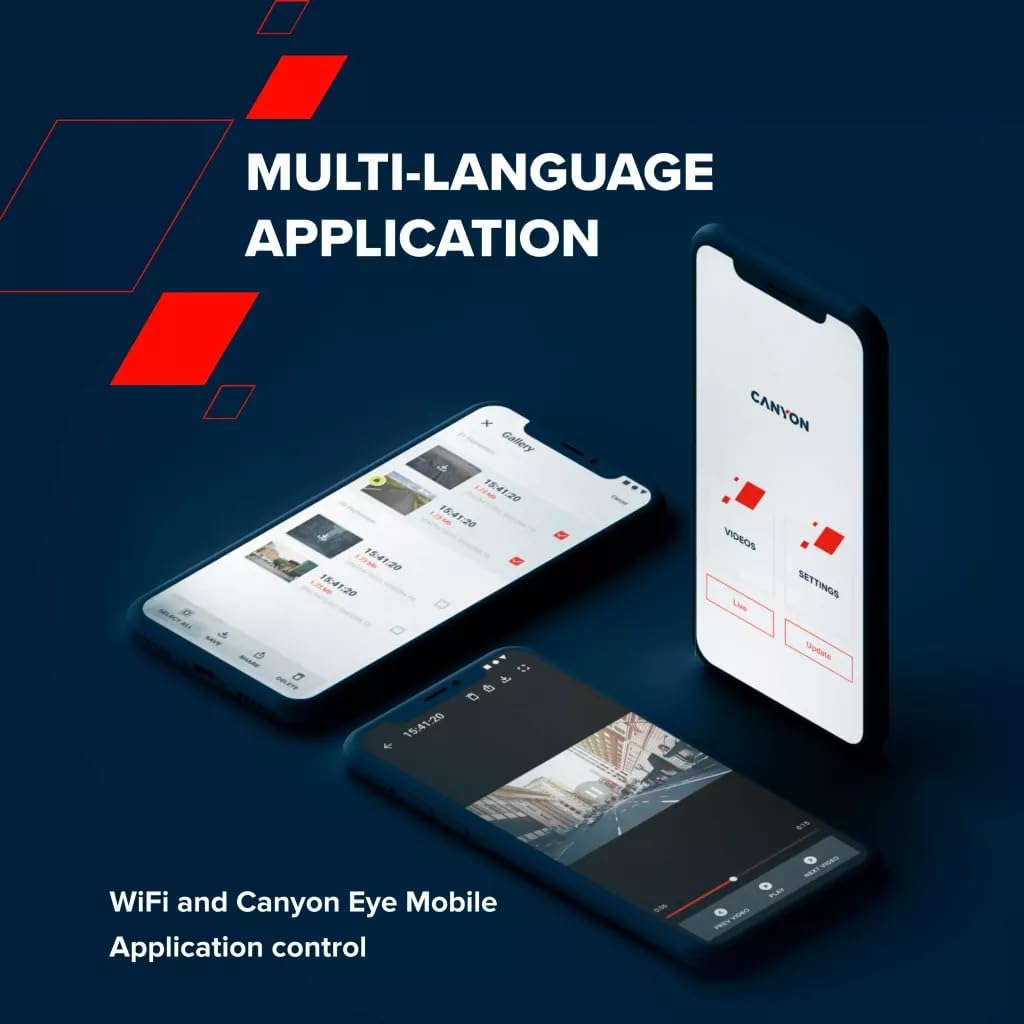
Rysunek 5.4: Interfejs aplikacji mobilnej Canyon Eye do zdalnego sterowania i file kierownictwo.
6. Konserwacja
6.1 Superkondensator
Urządzenie DVR40 jest wyposażone w superkondensator zamiast tradycyjnego akumulatora litowo-jonowego.
- Superkondensatory charakteryzują się zwiększoną trwałością i szerszym zakresem temperatur pracy (od -30°C do 80°C).
- Są mniej podatne na przegrzanie i mają dłuższą żywotność, dzięki czemu nadają się do stosowania w środowisku motoryzacyjnym.
- Superkondensator zapewnia wystarczającą moc, aby bezpiecznie zapisać ostatnie nagranie w przypadku odłączenia zewnętrznego zasilania.

Ilustracja 6.1: Superkondensator DVR40 gwarantuje niezawodną pracę w szerokim zakresie temperatur.
6.2 Czyszczenie i przechowywanie
- Delikatnie przetrzyj ekran i soczewkę dołączoną ściereczką czyszczącą. Unikaj materiałów ściernych i chemicznych środków czyszczących.
- Przed schowaniem aparatu należy upewnić się, że jest on czysty i suchy.
- Jeśli aparat nie będzie używany przez dłuższy czas, należy przechowywać go w chłodnym i suchym miejscu, z dala od bezpośredniego światła słonecznego.
7. Rozwiązywanie Problemów
Aby zapoznać się z najczęstszymi problemami i ich rozwiązaniami, zapoznaj się z poniższą tabelą.
| Problem | Możliwa przyczyna | Rozwiązanie |
|---|---|---|
| Kamera się nie włącza. | Brak zasilania; uszkodzony kabel/adapter. | Sprawdź podłączenie zasilacza samochodowego. Upewnij się, że zapłon pojazdu jest włączony. Wypróbuj inny port USB lub adapter, jeśli jest dostępny. |
| Nagrywanie zostaje nieoczekiwanie przerwane. | Karta MicroSD jest pełna lub uszkodzona; karta MicroSD o niskiej prędkości. | Sformatuj kartę MicroSD. Wymień ją na szybką kartę MicroSD (klasy 10 lub U3). |
| Wideotage jest niewyraźne lub niejasne. | Folia ochronna na soczewce; brudna soczewka; zatkana przednia szyba. | Zdejmij folię ochronną. Wyczyść obiektyw i przednią szybę aparatu. Upewnij się, że aparat jest bezpiecznie zamocowany. |
| Problemy z połączeniem Wi-Fi. | Nieprawidłowe hasło Wi-Fi; kamera nie ma włączonego Wi-Fi; problemy z aplikacją. | Upewnij się, że Wi-Fi jest włączone w aparacie. Sprawdź hasło Wi-Fi. Uruchom ponownie aparat i smartfon. Zainstaluj ponownie aplikację Canyon Eye. |
| G-Sensor jest zbyt czuły/niewystarczająco czuły. | Ustawienia czułości czujnika G. | Dostosuj poziom czułości czujnika G w ustawieniach aparatu. |
8. Specyfikacje
Szczegółowe dane techniczne kamery samochodowej Canyon DVR40.
| Funkcja | Specyfikacja |
|---|---|
| Marka | KANION |
| Nazwa modelu | DVR40 |
| Numer modelu | CND-DVR40 |
| Kolor | Czarny |
| Rozdzielczość nagrywania wideo | 2160p (4K UltraHD) |
| Klatki na sekundę | 30 kl./s (przy 4K) |
| Technologia czujnika optycznego | CMOS (Sony Starvis 415) |
| Rozmiar fotokomórki | 1/2.86'' |
| Pole View | 140° |
| Cechy specjalne | Zintegrowany superkondensator, ekran dotykowy, tryb widzenia nocnego, Wi-Fi, czujnik G |
| Wyświetlacz | 3-calowy pojemnościowy ekran dotykowy IPS |
| Typ montażu | Uchwyt magnetyczny |
| Źródło zasilania | Zasilacz samochodowy (USB typu C) |
| Zakres temperatur pracy | -30°C do 80°C (dzięki superkondensatorowi) |
| Zawarte komponenty | Kamera samochodowa, uchwyt magnetyczny, zasilacz samochodowy, kabel USB-C, czytnik kart, filtr CPL, ściereczka czyszcząca, etui tekstylne, skrócona instrukcja obsługi, karta gwarancyjna, akcesoria do montażu kabli |
| Baterie w zestawie | Nie (wykorzystuje superkondensator) |
9. Informacje dotyczące bezpieczeństwa
- Nie obsługuj aparatu ani nie zmieniaj ustawień podczas jazdy. Zawsze zjeżdżaj na pobocze w bezpieczne miejsce.
- Upewnij się, że kamera jest bezpiecznie zamontowana i nie przeszkadza. view drogi.
- Aby zapobiec uszkodzeniu urządzenia, należy używać wyłącznie dołączonego zasilacza i kabli.
- Nie wystawiaj aparatu na działanie nadmiernej wilgoci lub płynów.
- Unikaj demontażu urządzenia. W przypadku napraw skontaktuj się z wykwalifikowanym personelem serwisowym.
- Przechowuj aparat i akcesoria poza zasięgiem dzieci.
10. Gwarancja i wsparcie
Aby uzyskać informacje dotyczące gwarancji i pomocy technicznej, zapoznaj się z kartą gwarancyjną dołączoną do opakowania lub odwiedź oficjalną stronę internetową firmy Canyon webstrona.
Wsparcie online: https://canyon.eu/support/