1. Koniec produktuview
Lampa podszafkowa EZVALO z czujnikiem ruchu zapewnia wszechstronne i wygodne oświetlenie różnych pomieszczeń. Zaprojektowana z myślą o łatwej instalacji, wyposażona jest w udoskonalony czujnik ruchu, wiele trybów oświetlenia, regulowaną temperaturę barwową i funkcję ściemniania jasności. Akumulator zapewnia bezprzewodowe działanie, dzięki czemu idealnie nadaje się do kuchni, szaf, schodów i innych pomieszczeń.

Zdjęcie 1.1: Dwie lampy podszafkowe EZVALO z czujnikiem ruchu, ich opakowanie i kable do ładowania USB-C. Na zdjęciu widać równieżampspośród trzech dostępnych temperatur barwowych.
2. Zawartość opakowania
Sprawdź przesyłkę, aby upewnić się, że znajdują się w niej wszystkie elementy:
- 2 x EZVALO Lampy z czujnikiem ruchu (20.3 cm / 8 cali każda)
- 1 x kabel do szybkiego ładowania USB-C
- 4 x samoprzylepnych arkuszy żelaznych
- 1 x Instrukcja obsługi
3. Specyfikacje
| Atrybut | Szczegół |
|---|---|
| Marka | EZVALO |
| Numer modelu | EZL2401A-20 |
| Wymiary produktu (dł. x szer. x wys.) | 20.32 x 3.81 x 1.4 cm (8 x 1.5 x 0.55 cala) |
| Waga przedmiotu | 240 gramów |
| Tworzywo | Aluminium |
| Kolor | Czarny |
| Typ baterii | 1 litowo-jonowy (w zestawie) |
| Pojemność baterii | 1600 mAh |
| Czas ładowania | Około 2 godzin |
| Typ żarówki | LED (62 żarówki) |
| Strumień świetlny | 100 lm |
| Cotage | 10 watów |
| Tomtage | 3 V (prąd stały) |
| Cechy specjalne | Możliwość przyciemniania, czujnik ruchu |
| Typ instalacji | Mocowanie pod szafką |
4. Funkcje
- Zaktualizowany czujnik ruchu i 4 tryby oświetlenia: Oświetlenie włącza się automatycznie po wykryciu ruchu w promieniu 120 metrów. Wybierz pomiędzy:
- Tryb dzienny: Światła włączają się w dowolnym momencie, gdy zostaną wykryte ruchy.
- Tryb nocny: Światła włączają się po wykryciu ruchu wyłącznie w ciemnym otoczeniu.
- Tryb zawsze włączony: Zapewnia ciągłe oświetlenie.
- Tryb wyłączony: Wyłącza światło.
- 3 temperatury barwowe i możliwość ściemniania: Dostosuj oświetlenie do swoich potrzeb dzięki trzem opcjom temperatury barwowej:
- Ciepłe światło (3000 K)
- Naturalne światło (4200K)
- Zimna biel (6500K)
- Ulepszona bateria 1600 mAh i szybkie ładowanie: Wyposażone w pojemną baterię o pojemności 1600 mAh, zapewniającą do 6.5 godzin pracy w trybie Always-On (przy 100% jasności) lub 8-30 dni w trybach automatycznych (w zależności od częstotliwości aktywacji). Lampki ładują się w pełni w około 2 godziny przez USB-C.
- Bezproblemowa instalacja: Mocne, wbudowane magnesy umożliwiają szybki montaż na powierzchniach metalowych. Do powierzchni niemetalowych dołączone są samoprzylepne płytki żelazne, które zabezpieczają lampki. Montaż nie wymaga użycia narzędzi.

Ilustracja 4.1: Ilustracja trzech trybów pracy: Always On (ciągłe oświetlenie), tryb dzienny (automatyczna aktywacja po wykryciu ruchu) i tryb nocny (automatyczna aktywacja tylko po wykryciu ruchu w ciemnych miejscach).

Rysunek 4.2: Wizualna reprezentacja trzech regulowanych temperatur barwowych: chłodnej bieli (6500 K), naturalnej bieli (4200 K) i ciepłej bieli (3000 K), pokazanych w różnych ustawieniach.
5. Konfiguracja i instalacja
Oświetlenie podszafkowe z czujnikiem ruchu EZVALO zostało zaprojektowane tak, aby jego montaż był szybki i łatwy, bez konieczności użycia narzędzi.
5.1 Pierwsze ładowanie
Przed pierwszym użyciem należy w pełni naładować lampę za pomocą dołączonego kabla USB-C. Podłącz kabel do portu ładowania lampy i standardowego zasilacza USB (brak w zestawie). Wskaźnik ładowania pokaże stan naładowania.
5.2 Montaż światła
- Przygotuj powierzchnię: Upewnij się, że powierzchnia, na której chcesz dokonać instalacji jest czysta, sucha i gładka.
- Do powierzchni metalowych: Lampa posiada wbudowane silne magnesy. Wystarczy umieścić ją bezpośrednio na dowolnej metalowej powierzchni.
- Do powierzchni niemetalowych:
- Zdejmij folię ochronną z jednej strony samoprzylepnej płytki żelaznej.
- Dociśnij mocno stronę arkusza żelaza z klejem do wybranej powierzchni montażowej.
- Aby uzyskać optymalną przyczepność, odczekaj kilka minut, aż klej zwiąże.
- Przymocuj lampę do blachy za pomocą wbudowanych magnesów.

Ilustracja 5.1: Przewodnik wizualny prezentujący łatwy proces instalacji, podkreślający zastosowanie samoprzylepnych arkuszy żelaznych w przypadku powierzchni niemetalowych oraz silnych wbudowanych magnesów.
6. Instrukcja obsługi
Latarka EZVALO wyposażona jest w intuicyjne elementy sterujące umożliwiające wybór trybu, temperatury barwowej i jasności.
6.1 Panel sterowania ponadview

Rysunek 6.1: Szczegółowy view panelu sterowania oświetleniem, wskazującego czujnik ruchu PIR, port ładowania USB-C oraz przełącznik WŁ./WYŁ./Tryb dzienny/Tryb nocny, a także przyciski regulacji jasności i temperatury barwowej.
6.2 Tryby przełączania (WŁ./WYŁ./Dzień/Noc)
Znajdź główny włącznik światła. Przesuń go, aby wybrać jeden z następujących trybów:
- OFF: Światło jest całkowicie zgaszone.
- Tryb dzienny: Czujnik ruchu jest aktywny, a światło włączy się po wykryciu ruchu, niezależnie od warunków oświetleniowych otoczenia.
- Tryb nocny: Czujnik ruchu jest aktywny, a światło włączy się tylko wtedy, gdy zostanie wykryty ruch w ciemnym otoczeniu.
- Tryb zawsze włączony: Światło pozostaje włączone w sposób ciągły.
6.3 Regulacja temperatury barwowej
Naciśnij przycisk temperatury barwowej (często oznaczony ikoną słońca lub spektrum barw), aby przełączać się pomiędzy trzema dostępnymi temperaturami barwowymi: ciepłe światło (3000 K), światło naturalne (4200 K) i chłodna biel (6500 K).
6.4 Regulacja jasności
Naciśnij przycisk regulacji jasności (często oznaczony ikoną żarówki lub symbolami +/-), aby przełączać się między 3 poziomami jasności. Wybierz żądaną intensywność dla swojej aktywności.
6.5 Ładowanie baterii
Gdy jasność światła spada lub przestaje ono działać, oznacza to niski poziom naładowania baterii. Podłącz latarkę do źródła zasilania USB za pomocą dołączonego kabla USB-C. Wskaźnik ładowania potwierdzi ładowanie. Pełne ładowanie trwa około 2 godzin.
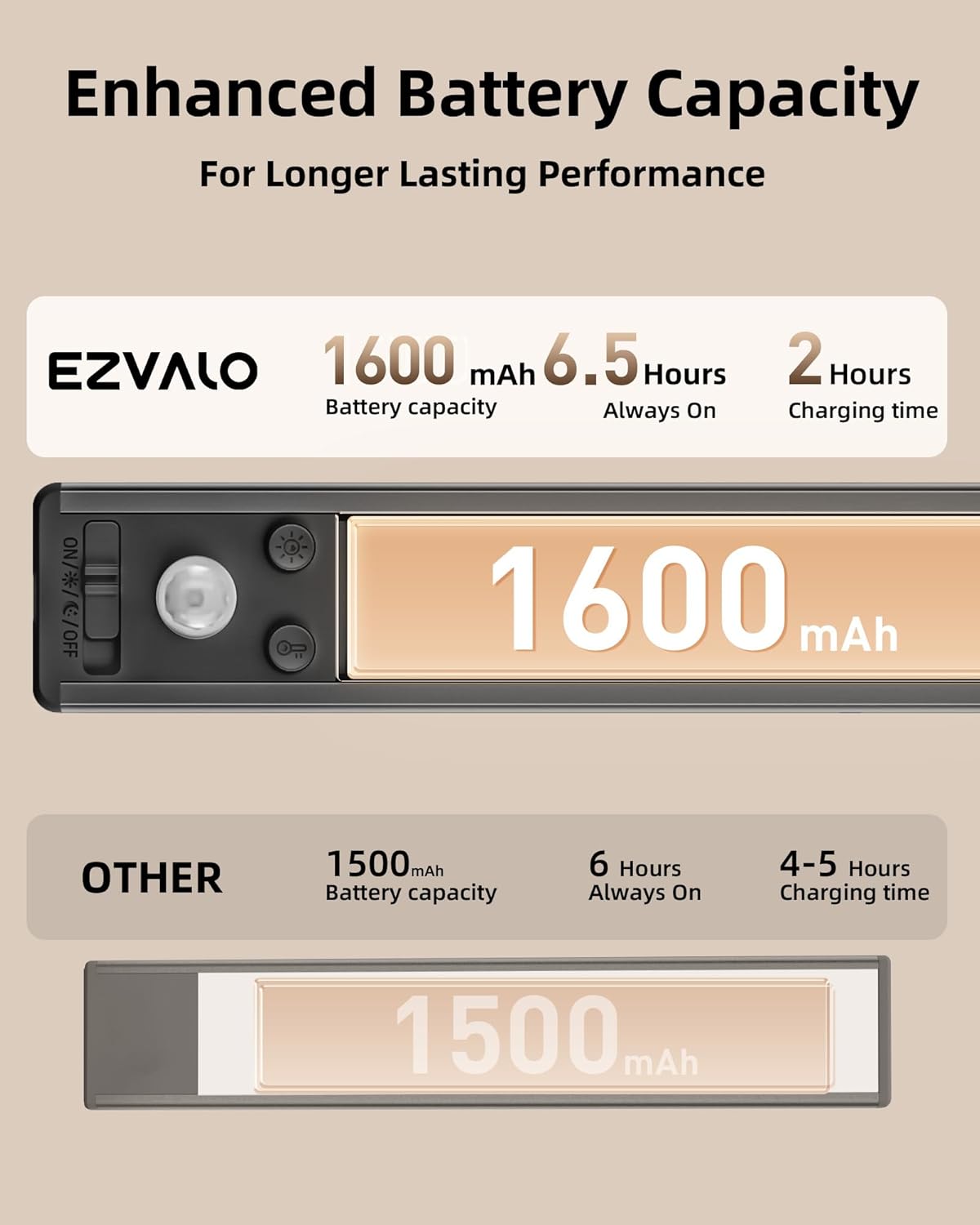
Ilustracja 6.2: Diagram ilustrujący zwiększoną pojemność baterii wynoszącą 1600 mAh, zapewniającą 6.5 godziny pracy w trybie Always-On i szybkie, 2-godzinne ładowanie, w porównaniu z innymi produktami.
7. Konserwacja
Aby zapewnić długowieczność i optymalną wydajność oświetlenia podszafkowego z czujnikiem ruchu EZVALO, należy przestrzegać poniższych prostych wskazówek dotyczących konserwacji:
- Czyszczenie: Delikatnie przetrzyj powierzchnię lampy miękką, suchą lub lekko wilgotną szmatką.amp ściereczką. Unikaj stosowania środków czyszczących o działaniu ściernym, rozpuszczalników i silnych środków chemicznych, ponieważ mogą one uszkodzić wykończenie lub elementy elektroniczne.
- Pielęgnacja baterii: Aby zapewnić optymalną żywotność baterii, należy unikać częstego całkowitego rozładowywania. Naładuj latarkę, gdy jasność wyraźnie spadnie. Jeśli latarka jest przechowywana przez dłuższy czas, ładuj ją do około 50% co kilka miesięcy.
- Składowanie: Przechowuj lampę w chłodnym i suchym miejscu, z dala od bezpośredniego światła słonecznego i ekstremalnych temperatur.
- Unikaj kontaktu z wodą: Ten produkt jest przeznaczony wyłącznie do użytku wewnątrz pomieszczeń i nie jest wodoodporny. Unikaj narażania go na działanie wody i wysokiej wilgotności.
8. Rozwiązywanie Problemów
Jeśli napotkasz jakiekolwiek problemy z oświetleniem podszafkowym EZVALO z czujnikiem ruchu, zapoznaj się z poniższymi typowymi rozwiązaniami:
- Światło się nie włącza:
- Upewnij się, że bateria jest naładowana. Podłącz lampę do źródła zasilania USB, aby ją naładować.
- Sprawdź przełącznik trybu. Upewnij się, że jest ustawiony na tryb dzienny, nocny lub zawsze włączony, a nie wyłączony.
- W trybie nocnym upewnij się, że otoczenie jest odpowiednio ciemne, aby czujnik mógł się aktywować.
- Czujnik ruchu nie działa:
- Sprawdź, czy światło jest w trybie dziennym lub nocnym.
- Upewnij się, że nie ma żadnych przeszkód blokujących czujnik ruchu.
- Sprawdź, czy światło znajduje się w zasięgu detekcji 120 metrów.
- Światło migocze lub jest słabe:
- Bateria może być słaba. Naładuj latarkę do pełna.
- Upewnij się, że poziom jasności jest ustawiony na żądaną intensywność.
- Światło pada na powierzchnię:
- W przypadku powierzchni niemetalowych należy upewnić się, że arkusze kleju zostały nałożone na czystą, suchą powierzchnię i pozostawione do prawidłowego związania. W razie potrzeby należy wymienić arkusze kleju.
- Sprawdź, czy połączenie magnetyczne jest bezpieczne.
Jeśli powyższe kroki nie rozwiążą problemu, skontaktuj się z obsługą klienta.
9. Informacje dotyczące bezpieczeństwa
Aby zapobiec obrażeniom lub uszkodzeniom, należy przeczytać i stosować się do poniższych instrukcji bezpieczeństwa:
- Nie rozmontowuj, nie naprawiaj ani nie modyfikuj produktu. Może to spowodować porażenie prądem, pożar lub uszkodzenie produktu.
- Trzymaj produkt z dala od wody, wilgoci i wysokiej wilgotności. Produkt przeznaczony jest wyłącznie do użytku wewnątrz pomieszczeń.
- Nie wystawiać produktu na bezpośrednie działanie promieni słonecznych, wysokich temperatur ani otwartego ognia.
- Należy używać wyłącznie dołączonego kabla ładującego USB-C lub certyfikowanego odpowiednika.
- Przechowywać w miejscu niedostępnym dla dzieci.
- Produkt i baterię należy utylizować w sposób odpowiedzialny, zgodnie z lokalnymi przepisami. Nie wrzucać baterii do odpadów domowych ani do ognia.
10. Gwarancja i wsparcie
EZVALO dokłada wszelkich starań, aby zapewnić Państwu pełną satysfakcję z naszych produktów. W przypadku jakichkolwiek problemów z oświetleniem podszafkowym EZVALO, w tym z uszkodzonym lub wadliwym produktem, prosimy o kontakt.
Zależy nam na szybkim rozwiązywaniu wszelkich problemów i zapewnieniu pozytywnych doświadczeń z naszymi produktami. Państwa satysfakcja jest naszym priorytetem.
Aby uzyskać pomoc techniczną, zapoznaj się z informacjami kontaktowymi podanymi przy zakupie lub odwiedź oficjalną stronę EZVALO webstrona.


