Wstęp
The Stinger HORIZON10 is a state-of-the-art 10.1-inch universal car stereo designed to enhance your in-vehicle entertainment and connectivity. Featuring a 1280x800 HD weather-resistant touchscreen, wireless Apple CarPlay and Android Auto, advanced audio controls, and multiple camera inputs, the HORIZON10 provides a comprehensive and intuitive user experience. This manual provides detailed instructions for setting up, operating, maintaining, and troubleshooting your new car stereo.

Image: The Stinger HORIZON10 Infotainment System, showcasindzięki eleganckiemu designowi i interfejsowi użytkownika.
Co jest w pudełku
Upon unboxing your Stinger HORIZON10, please verify that all the following components are included:
- 10.1" Multimedia Touchscreen Display
- Moduł radiowy
- Wspornik wyświetlacza
- Nose Bracket - Radio Bracket
- Osłona tylna złącza LVDS
- Śruby
- Wodoodporna wtyczka
- 16-stykowa wiązka AV
- 12-stykowa wiązka przedwzmacniacza
- 14-stykowa wiązka danych
- 26 Pin Power Harness LVDS Display Cable
- Mikrofon zewnętrzny
- Antena GPS
- GPS Mounting Plate
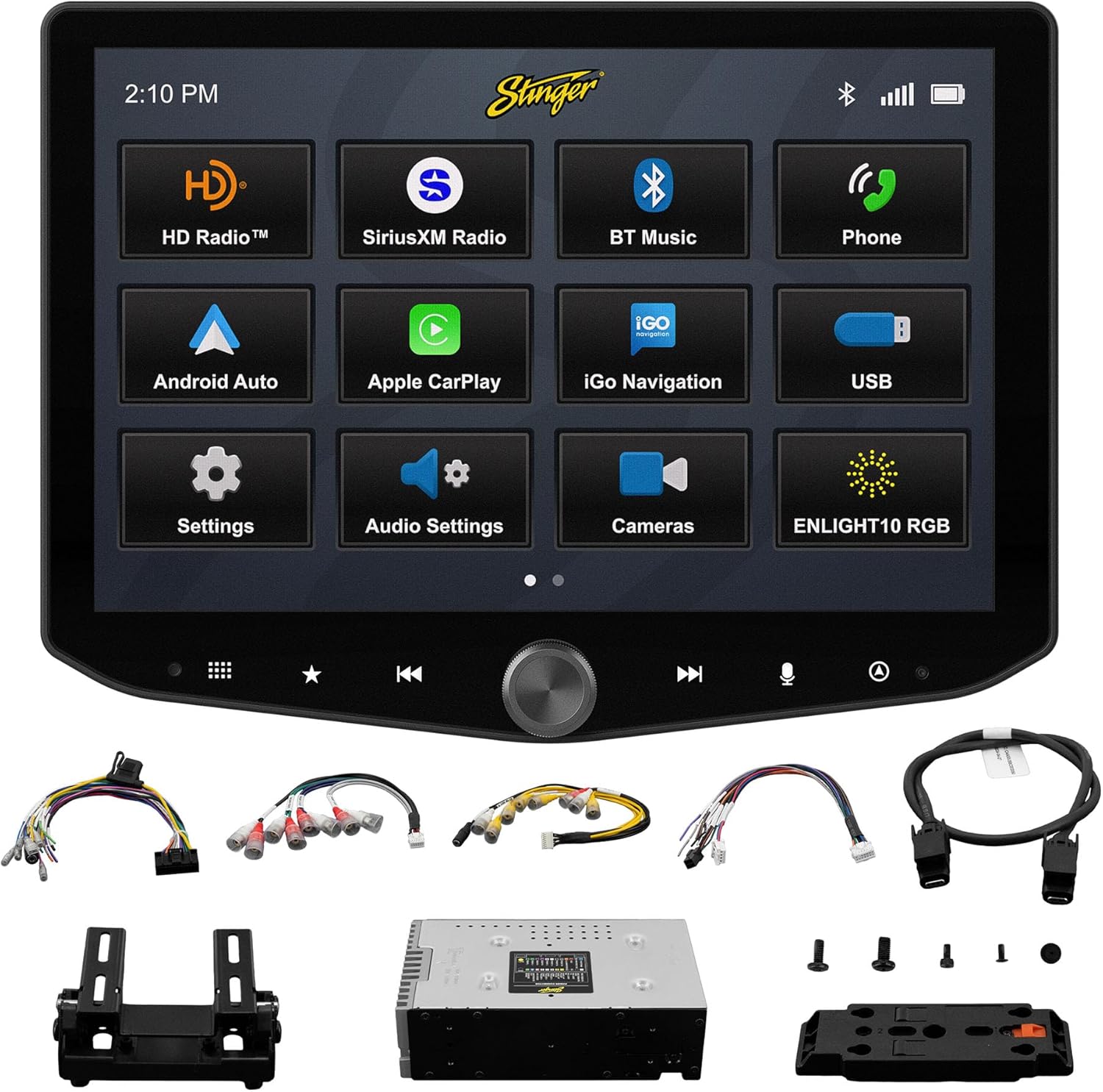
Image: All components included with the Stinger HORIZON10 car stereo system.
Konfiguracja i instalacja
Professional installation is highly recommended for the Stinger HORIZON10 to ensure proper functionality and integration with your vehicle's electrical system. This unit is designed for universal compatibility, but specific vehicle dash kits, wiring harness interfaces, or antenna adapters may be required and are sold separately.
Początkowe kroki konfiguracji:
- Montowanie: Securely mount the display and radio module using the provided brackets and screws. Ensure proper ventilation around the unit.
- Okablowanie: Connect the 16-pin AV harness, 12-pin pre-out harness, 14-pin data harness, and 26-pin power harness LVDS display cable to the corresponding ports on the radio module and your vehicle's wiring system. Refer to your vehicle's specific wiring diagram if necessary.
- Połączenia zewnętrzne: Connect the external microphone for hands-free calling and the GPS antenna for navigation functionality.
- Włączanie: Once all connections are secure, power on your vehicle to initiate the stereo. The unit should boot up and display the Stinger logo.
- Konfiguracja wstępna: Postępuj zgodnie ze wskazówkami wyświetlanymi na ekranie, aby dokonać początkowej konfiguracji, np. wybrać język i strefę czasową.
Instrukcja obsługi
Interfejs z ekranem dotykowym
The HORIZON10 features a large 10.1" 1280x800 HD floating touchscreen with anti-glare and anti-fingerprint film protection. Navigate through menus and applications by tapping, swiping, and pinching on the screen. The capacitive touch panel buttons and machined aluminum anodized knob provide additional tactile control.

Obraz: Szczegółowy view of the Stinger HORIZON10 touchscreen, highlighting its capacitive touch buttons and anodized knob.
Bezprzewodowy Apple CarPlay i Android Auto
Connect your iPhone or Android phone wirelessly to access navigation, calls, messages, music, and more directly on the HORIZON10 display. Wired connections are also supported via the USB-C input, which also provides fast 3A phone charging.

Image: The Stinger HORIZON10 displaying the Apple CarPlay interface wirelessly connected to an iPhone.

Image: The Stinger HORIZON10 displaying the Android Auto interface wirelessly connected to an Android phone.
Bluetooth 5.1 & Wi-Fi Connectivity
The unit supports dual phone connections for fast hands-free calling and music streaming via Bluetooth 5.1 A2DP. Wi-Fi connectivity enables additional features and updates.
Zaawansowane funkcje audio
Customize your sound experience with the 15-band adjustable EQ, 6 user EQ presets, and built-in crossover with HPF & LPF. The system offers 4.5 Vrms & 8ch RCA outputs with subwoofer control, and a Toslink (optical) audio output (48 kHz variable) for high-fidelity sound.

Image: Screenshot of the Stinger HORIZON10's advanced audio settings, showing the 15-band equalizer.
Wejścia kamery
Integrate up to four cameras (front/rear dashcam, blind spot cameras, backup camera) for enhanced safety and visibility. The system supports both AHD 720p and CVBS 480p camera inputs.

Image: The Stinger HORIZON10 displaying multiple camera views, illustrating its 4 camera input capability.
Tuner radiowy
Enjoy a wide variety of audio content with the built-in HD AM/FM radio tuner. The unit is also SiriusXM-Ready (SiriusXM Tuner Sold Separately).

Image: The Stinger HORIZON10 displaying the HD Radio interface, showing available stations.
USB & HDMI Inputs
The unit includes two USB-A inputs, one USB-C input (with 3A charging), and one HDMI input for media playback or mirroring.
Personalizacja
Personalize your experience by changing the background image and rearranging Home screen icons for easier access to your most used features.
onX Offroad App
The HORIZON10 includes a free 3-month trial of the onX GPS navigation off-roading map app. Register on the Stinger website to activate your trial.
Film o produkcieview
Wideo: Oficjalnyview of the Stinger HORIZON10's key features and capabilities.
Konserwacja
To ensure the longevity and optimal performance of your Stinger HORIZON10, follow these maintenance guidelines:
- Czyszczenie ekranu: Delikatnie przetrzyj ekran dotykowy miękką, niepozostawiającą włókien ściereczką. W przypadku uporczywych plam delikatnie przetrzyj.ampPrzetrzyj ściereczkę wodą lub środkiem do czyszczenia ekranów. Unikaj materiałów ściernych i silnych środków chemicznych.
- Odporność na warunki atmosferyczne: While the display is IP65 weather-resistant, the radio chassis is not. Avoid direct exposure of the main unit to water or excessive moisture.
- Opieka ogólna: Utrzymuj urządzenie w czystości, chroniąc je przed kurzem i zanieczyszczeniami. Upewnij się, że wszystkie połączenia są solidne.

Image: The Stinger HORIZON10 display with water droplets, demonstrating its IP65 weather-resistant feature.
Rozwiązywanie problemów
If you encounter issues with your Stinger HORIZON10, refer to the following common problems and solutions:
| Problem | Możliwa przyczyna | Rozwiązanie |
|---|---|---|
| Brak zasilania | Luźne połączenie zasilania, przepalony bezpiecznik, problem z akumulatorem pojazdu. | Check all power connections. Inspect vehicle fuses. Ensure vehicle battery is charged. |
| Brak wyjścia audio | Incorrect audio settings, loose speaker wires, ampproblem z lifierem. | Verify audio settings (volume, mute, source). Check speaker wire connections. Consult an audio specialist if using an external ampliyfikator. |
| CarPlay/Android Auto nie łączy się | Wyłączony moduł Bluetooth/Wi-Fi w telefonie, nieprawidłowe parowanie, problem z oprogramowaniem telefonu. | Ensure Bluetooth and Wi-Fi are enabled on your phone. Re-pair the device. Restart both the phone and the HORIZON10 unit. Update phone OS. |
| Ekran dotykowy nie reaguje | Temporary software glitch, excessive dirt/moisture on screen. | Perform a soft reset (refer to device settings for reset option). Clean the screen thoroughly. If persistent, contact support. |
| Słaby odbiór radia | Antenna not connected, damaged antenna, weak signal area. | Check antenna connection. Consider a signal booster if in a weak reception area. |
If the problem persists after attempting these solutions, please contact Stinger customer support.
Specyfikacje
| Funkcja | Szczegół |
|---|---|
| Numer modelu | 10.1" - IX210 |
| Wymiary produktu | 12.75 x 7.5 x 9.75 cala |
| Waga przedmiotu | 6.98 funta |
| Rozmiar wyświetlacza | 10.1 cali |
| Rozdzielczość wyświetlacza | 1280x800 HD |
| Odporność na warunki atmosferyczne | IP65 (Display only) |
| Technologia łączności | Bluetooth 5.1 A2DP, Wi-Fi |
| Typ kontrolera | Smartphone, Touchscreen |
| Wejścia USB | 2x USB-A, 1x USB-C (3A charging) |
| Porty HDMI | 1 |
| Wejścia kamery | 4 (AHD 720p / CVBS 480p compatible) |
| Tryb wyjścia audio | Stereofoniczny |
| Konfiguracja kanału dźwięku przestrzennego | 7.1 |
| Liczba kanałów | 8 |
| EQ | 15-band adjustable EQ, 6 user presets |
| Wyjścia RCA | 4.5 Vrms & 8ch with subwoofer control |
| Optyczne wyjście audio | Toslink (48 kHz variable) |
Informacje o gwarancji
For detailed warranty information regarding your Stinger HORIZON10, please refer to the warranty card included with your product or visit the official STINGER webWarunki gwarancji mogą się różnić i zależą od polityki producenta.
Obsługa klienta
Should you require further assistance, technical support, or have questions not covered in this manual, please contact STINGER customer service through their official webstronę internetową lub dane kontaktowe podane w dokumentacji produktu.
STINGER Official Webstrona: www.stinger.com


