Wstęp
Dziękujemy za zakupasing the Apera NNS NS-8091BT Music System. This portable device combines a classic FM radio with modern connectivity options, including USB, Micro SD, and Bluetooth 5.0. Its stylish design and versatile features make it an ideal companion for enjoying your favorite audio content anywhere. Please read this manual carefully before use to ensure proper operation and to maximize your listening experience.
Ważne informacje dotyczące bezpieczeństwa
- Nie wystawiaj urządzenia na działanie deszczu, wilgoci ani ekstremalnych temperatur.
- Unikaj upuszczania i narażania urządzenia na silne uderzenia.
- Nie rozmontowuj ani nie próbuj samodzielnie naprawiać urządzenia. Wszelkie prace serwisowe zleć wykwalifikowanemu personelowi.
- Trzymaj urządzenie z dala od bezpośredniego światła słonecznego i źródeł ciepła.
- Podczas korzystania z urządzenia należy zapewnić odpowiednią wentylację.
- Use only the provided charging cable or a compatible 5V DC adapter for charging.
- Before first use, fully charge the device for approximately 2 hours.
Zawartość opakowania
- NNS NS-8091BT Music System
- Kabel ładujący USB
- Instrukcja obsługi
Produkt ponadview
Familiarize yourself with the various parts and controls of your NNS NS-8091BT Music System.
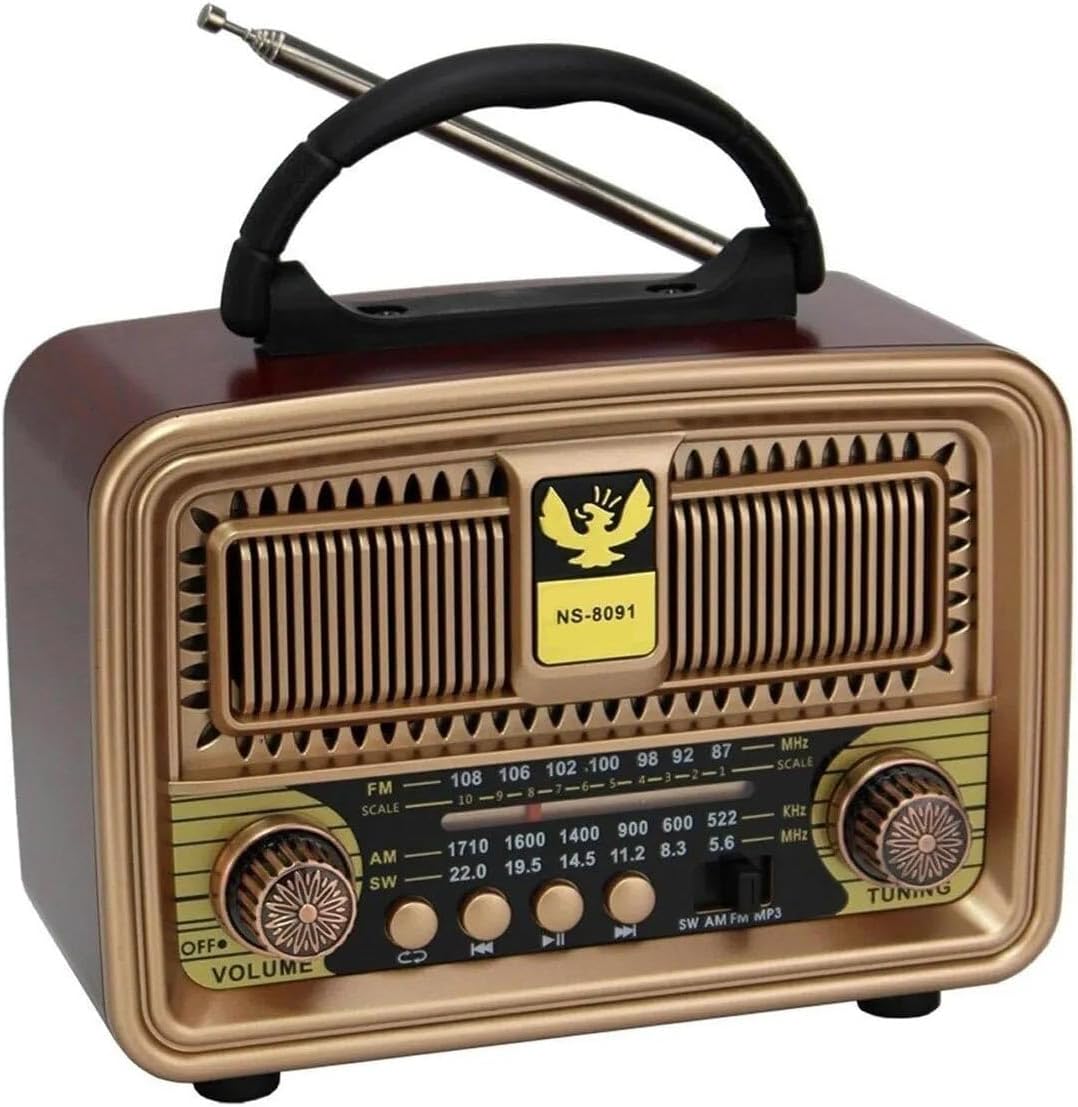
Rycina 1: Przód View of the Music System
This image displays the front of the NNS NS-8091BT Music System, highlighting its vintage-inspired design with a prominent speaker grille, a frequency display, and two rotary knobs for volume/power and tuning. The model number "NS-8091" is visible on the front panel.

Rysunek 2: Strona View z portami łączności
This image shows the side panel of the music system, detailing the input ports. From top to bottom, these include a standard USB port, a Micro SD (TF) card slot, and a DC 5V charging port, along with a "CHARGE" indicator.

Rysunek 3: Tył View z komorą baterii
This image illustrates the back of the music system, revealing the battery compartment. It is designed to accommodate one 18650 rechargeable battery (visible in blue) and two UM-1 (D-cell) 1.5V batteries, providing flexible power options.
Elementy sterujące i wskaźniki:
- Pokrętło WYŁ./GŁOŚNOŚĆ: Turns the unit on/off and adjusts the volume level.
- Pokrętło STROJENIA: Used to tune into radio stations.
- Przełącznik wyboru pasma: Selects between FM, AM, and SW radio bands.
- Przycisk trybu: Switches between FM Radio, USB/Micro SD, and Bluetooth modes.
- Przyciski sterowania odtwarzaniem: Previous Track, Play/Pause, Next Track (for USB/Micro SD/Bluetooth modes).
- Port USB: Do odtwarzania plików MP3 files z dysku flash USB.
- Micro SD (TF) Card Slot: Do odtwarzania plików MP3 filez karty Micro SD.
- Port ładowania prądu stałego 5 V: Do podłączenia kabla ładującego.
- Wskaźnik ŁADOWANIA: Lights up when the device is charging.
- Antena teleskopowa: For improving FM and SW radio reception.
- Komora baterii: Houses the 18650 rechargeable battery and slots for two D-cell batteries.
Organizować coś
1. Ładowanie baterii:
- Locate the DC 5V charging port on the side of the unit.
- Connect the provided USB charging cable to the port.
- Podłącz drugi koniec kabla USB do standardowego zasilacza USB (nie ma go w zestawie) lub do portu USB komputera.
- The "CHARGE" indicator light will illuminate, indicating that the device is charging.
- For first use, charge the device for approximately 2 hours to ensure the 1200mAh 18650 rechargeable battery is fully charged.
- Once fully charged, the indicator light may change color or turn off (behavior may vary by unit). Disconnect the charging cable.
Notatka: The unit can also be powered by two D-cell (UM-1 1.5V) batteries. Insert them into the battery compartment on the back, ensuring correct polarity.
2. Konfiguracja anteny:
For optimal radio reception, extend the telescopic antenna fully when using FM or SW radio modes.
Instrukcja obsługi
1. Włączanie/wyłączanie zasilania i regulacja głośności:
- To turn on the device, rotate the WYŁ./GŁOŚNOŚĆ knob clockwise until you hear a click and the unit powers on.
- Kontynuuj obrót pokrętła zgodnie z ruchem wskazówek zegara, aby zwiększyć głośność. Obróć w kierunku przeciwnym do ruchu wskazówek zegara, aby zmniejszyć głośność.
- To turn off the device, rotate the WYŁ./GŁOŚNOŚĆ knob counter-clockwise until you hear a click and the unit powers off.
2. Obsługa radia FM:
- Włącz urządzenie za pomocą WYŁ./GŁOŚNOŚĆ pokrętło.
- Set the Band Selector switch to "FM".
- Aby uzyskać lepszy odbiór, wysuń antenę teleskopową.
- Obróć STROJENIE knob to scan for available FM radio stations. The frequency display will show the current frequency.
- Dostosuj STROJENIE knob until you find a clear signal for your desired station.
Notatka: The device also supports AM and SW bands. Select the appropriate band using the Band Selector switch and tune as described above.
3. USB / Micro SD MP3 Player Operation:
- Włącz urządzenie.
- Insert a USB flash drive into the USB port or a Micro SD card into the TF card slot. Ensure the card is inserted correctly.
- The unit should automatically switch to USB/Micro SD mode and begin playing MP3 files. Jeśli nie, naciśnij Tryb button to cycle through modes until you reach USB/Micro SD mode.
- Użyj Poprzedni utwór, Odtwórz/Pauza, I Następny utwór przyciski do sterowania odtwarzaniem.
4. Działanie Bluetooth:
- Włącz urządzenie.
- Naciśnij Tryb button to switch to Bluetooth mode. The unit will emit an audible prompt indicating it's ready for pairing.
- Na smartfonie, tablecie lub innym urządzeniu z obsługą technologii Bluetooth włącz funkcję Bluetooth i wyszukaj dostępne urządzenia.
- Select "NS-8091BT" (or similar name) from the list of found devices to pair.
- Once successfully paired, the unit will emit another audible prompt. You can now play audio from your connected device wirelessly through the music system.
- Use the playback controls on your connected device or the Przyciski sterowania odtwarzaniem on the music system to manage your audio.
Konserwacja
- Czyszczenie: Do czyszczenia zewnętrznej części urządzenia należy używać miękkiej, suchej ściereczki. Nie należy używać środków ściernych, wosków ani rozpuszczalników.
- Składowanie: Jeśli urządzenie nie będzie używane przez dłuższy czas, należy je przechowywać w chłodnym i suchym miejscu, z dala od bezpośredniego światła słonecznego.
- Pielęgnacja baterii: If using the rechargeable battery, ensure it is charged regularly to maintain its lifespan. If using D-cell batteries, remove them if the unit will not be used for a long time to prevent leakage.
Rozwiązywanie problemów
| Problem | Możliwa przyczyna | Rozwiązanie |
|---|---|---|
| Brak zasilania | Bateria jest rozładowana lub nieprawidłowo włożona. | Charge the rechargeable battery or replace the D-cell batteries. Ensure batteries are inserted with correct polarity. |
| Słaby odbiór radia | Antena nie jest wysunięta; obszar o słabym sygnale. | Fully extend the telescopic antenna. Try repositioning the unit for better signal. |
| USB/Micro SD nie odtwarza się | Nieprawidłowy tryb; nieobsługiwany file format; nośnik uszkodzony. | Press the Mode button to select USB/Micro SD mode. Ensure filePliki są w formacie MP3. Spróbuj użyć innego dysku USB lub karty Micro SD. |
| Bluetooth nie łączy się | Not in Bluetooth mode; device not discoverable; already paired with another device. | Press the Mode button to select Bluetooth mode. Ensure Bluetooth is enabled on your external device and it's in pairing mode. Disconnect from other Bluetooth devices. |
| Niski poziom głośności lub zniekształcony dźwięk | Volume too low; battery low; audio source issue. | Adjust the volume knob. Charge the battery. Check the volume on your connected Bluetooth device or the quality of the MP3 file/radio signal. |
Specyfikacje
| Model | NS-8091BT |
| Marka | Apera |
| Łączność | Bluetooth 5.0, USB, Micro SD (TF) |
| Pasma radiowe | FM, AM, SW (3-band) |
| Moc wyjściowa głośnika | 5 waty |
| Źródło zasilania | 1200mAh 18650 Rechargeable Battery (included), 2 x UM-1 (D-cell) 1.5V Batteries (not included) |
| Wejście ładowania | Prąd stały 5 V |
| Wymiary produktu (dł. x gł. x wys.) | Wymiary: 18 cm x 8 cm x 13.5 cm |
| Typ materiału | Oak Wood (finish) |
| Kompatybilne urządzenia | Smartphones, Tablets, USB Flash Drives, Micro SD Cards |
Gwarancja i wsparcie
For warranty information and technical support, please refer to the warranty card included with your product or contact Apera customer service through their official website or the retailer where you purchased the product. Please have your model number (NS-8091BT) and purchase details ready when contacting support.
Apera Store: Visit Apera Store on Amazon


