Xtreme RGB Wireless Earbuds User Manual
Model: XBE9-0136-BLK
Brand: XTREME DIGITAL LIFESTYLE ACCESSORIES
Wstęp
The Xtreme RGB Wireless Earbuds are designed to provide a high-quality audio experience with vibrant LED RGB lighting. These true wireless Bluetooth earphones offer extended playtime, smart touch controls, and a convenient LED display on the charging case for battery status monitoring. This manual provides essential information for setup, operation, maintenance, and troubleshooting to ensure optimal performance of your earbuds.
Główne cechy
- Vibrant LED RGB Lighting: These earbuds feature stunning LED RGB lighting effects, offering a visually appealing and customizable look.
- Dłuższa żywotność baterii: Enjoy uninterrupted music and calls with up to 5 hours of playtime on a single charge. The portable charging case provides an additional 11 hours of battery life, giving you a total of 16 hours of use. The case can fully recharge the earbuds three times.
- Reliable Bluetooth Connectivity: With a robust Bluetooth connection that extends up to 33 feet, you can move freely without worrying about losing connection.
- Intuitive Smart Touch Controls: Managing your audio has never been easier with the smart touch controls. You can effortlessly play, pause, skip tracks, adjust volume, and answer or end calls with simple touch gestures.
- Convenient LED Display Charging Case: The sleek charging case features an LED display that shows the battery status of the case.
- Kontrola hałasu: Features Hybrid Noise Cancellation for focused listening.
- Zintegrowany mikrofon: For clear call handling.
Co jest w pudełku
The Xtreme RGB Wireless Earbuds package includes the following components:
- Xtreme RGB Wireless Earbuds (Left and Right)
- Etui z ładowaniem bezprzewodowym
- USB Charging Cable (typically included, though not explicitly listed in 'whats_in_the_box')
- Instrukcja obsługi (ten dokument)

Image: Xtreme RGB Wireless Earbuds and Charging Case in retail packaging.
Organizować coś
Początkowe ładowanie
Before first use, fully charge the charging case and earbuds. Place the earbuds into the charging case. Connect the charging case to a power source using a USB cable. The LED display on the case will indicate the charging status and battery level.

Image: Earbuds in charging case with LED battery display.
Parowanie Bluetooth
- Sprawdź, czy słuchawki są w pełni naładowane.
- Otwórz etui ładujące. Słuchawki automatycznie przejdą w tryb parowania.
- Włącz Bluetooth na swoim urządzeniu (smartfonie, tablecie itp.).
- Szukaj "Xtreme RGB Earbuds" or similar in the list of available Bluetooth devices.
- Wybierz słuchawki douszne, które chcesz połączyć. Po połączeniu usłyszysz komunikat głosowy potwierdzający pomyślne sparowanie.

Image: Close-up of the Xtreme RGB Wireless Earbuds.
Instrukcja obsługi
Sterowanie Smart Touch
The Xtreme RGB Wireless Earbuds feature intuitive touch controls on each earbud. Refer to the table below for common functions:
| Działanie | Funkcjonować |
|---|---|
| Pojedyncze dotknięcie (lewa/prawa słuchawka) | Odtwarzaj/wstrzymuj muzykę, odbieraj/kończ połączenia |
| Podwójne dotknięcie (prawa słuchawka) | Następny utwór |
| Podwójne dotknięcie (lewa słuchawka) | Poprzedni utwór |
| Długie naciśnięcie (prawa słuchawka) | Zwiększ głośność |
| Długie naciśnięcie (lewa słuchawka) | Zmniejsz głośność |
| Potrójne dotknięcie (lewa/prawa słuchawka) | Aktywuj Asystenta Głosowego |
| Długie naciśnięcie (2 sekundy) podczas połączenia przychodzącego | Odrzuć połączenie |

Image: Earbuds in charging case, illustrating touch control areas.
Odtwarzanie muzyki
After successful pairing, open your preferred music application on your device. Use the touch controls on the earbuds to manage playback as described above.
Zarządzanie połączeniami
When a call comes in, you can answer or reject it using the touch controls. During a call, use the controls to end the conversation. The integrated microphone ensures clear communication.
Oświetlenie RGB
The earbuds and charging case feature vibrant LED RGB lighting. This lighting is an aesthetic feature and typically activates when the earbuds are in use or when the case is opened/closed. Specific controls for the RGB lighting are integrated with the overall design and do not usually require separate user input for color changes, as they are color-changing LEDs.
Informacje o baterii
The Xtreme RGB Wireless Earbuds provide up to 5 hours of continuous playtime on a single charge. The portable charging case extends this to a total of 16 hours of use, providing an additional 11 hours of power. The case can fully recharge the earbuds three times before needing its own recharge.
The LED display on the charging case shows the current battery status of the case, allowing you to monitor power levels easily.
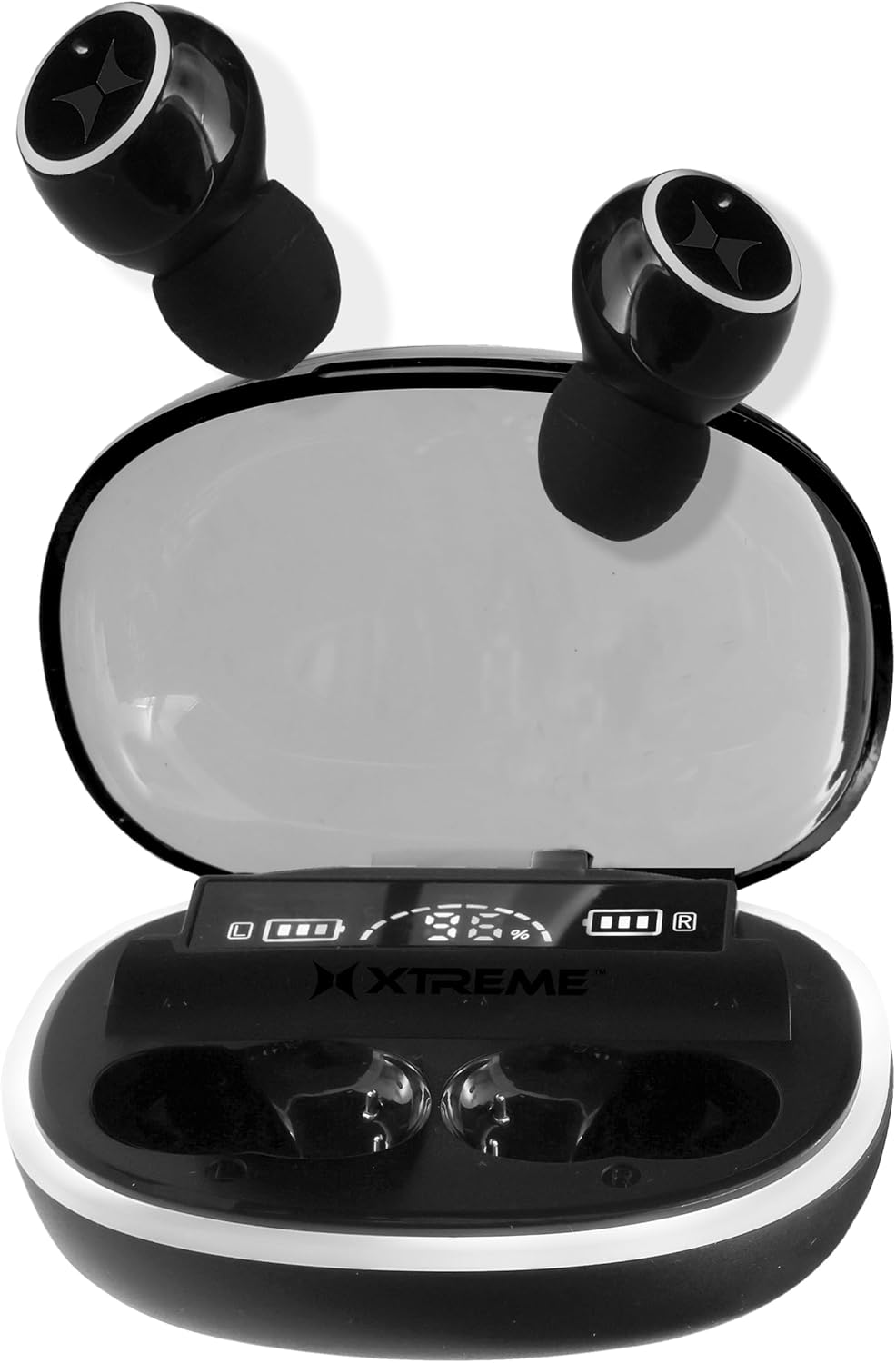
Image: Charging case with earbuds, illustrating compact design and LED display.
Konserwacja
Czyszczenie
Aby zachować optymalną wydajność i higienę, regularnie czyść słuchawki douszne i etui ładujące:
- Do czyszczenia słuchawek i etui ładującego używaj miękkiej, suchej i niepozostawiającej włókien ściereczki.
- For ear tips, gently remove them and clean with a mild soap solution if necessary, then rinse and dry thoroughly before reattaching.
- Unikaj stosowania materiałów ściernych, alkoholu lub środków czyszczących zawierających substancje chemiczne, gdyż mogą one uszkodzić produkt.
- Sprawdź, czy styki ładowania w słuchawkach i etui są czyste i wolne od zanieczyszczeń.
Składowanie
Gdy nie używasz słuchawek, przechowuj je w etui ładującym, aby chronić je przed kurzem, uszkodzeniami i utrzymać je w stanie naładowania. Przechowuj etui w chłodnym, suchym miejscu, z dala od bezpośredniego światła słonecznego i ekstremalnych temperatur.
Rozwiązywanie problemów
If you encounter any issues with your Xtreme RGB Wireless Earbuds, please refer to the following common solutions:
- Słuchawki nie łączą się: Ensure both earbuds are in the charging case, then open the lid to activate pairing mode. Check your device's Bluetooth settings and forget previous connections if necessary. Try restarting your device.
- Brak dźwięku w jednej słuchawce: Place both earbuds back into the charging case, close the lid, wait a few seconds, then open it again. This often re-syncs the earbuds. Ensure both earbuds are charged.
- Etui ładujące nie ładuje: Verify the USB cable is securely connected to both the case and the power source. Try a different USB cable or power adapter.
- Niska głośność lub słaba jakość dźwięku: Ensure the earbuds are properly seated in your ears. Clean any earwax or debris from the ear tips and speaker mesh. Adjust the volume on both your device and the earbuds.
- Przerywane połączenie: Ensure you are within the 33-foot Bluetooth range of your device. Avoid obstacles that may interfere with the signal. Reduce the number of active Bluetooth devices nearby.
Specyfikacje
| Funkcja | Szczegół |
|---|---|
| Nazwa modelu | XBE9-0136-BLK |
| Technologia łączności | Bezprzewodowy, Bluetooth |
| Technologia komunikacji bezprzewodowej | Bluetooth |
| Zawarte komponenty | Etui z ładowaniem bezprzewodowym |
| Tworzywo | Plastikowy |
| Konkretne zastosowania produktu | Exercising, Music, Gaming, Travel |
| Zalecane zastosowania produktu | Running, Exercising, Cycling, Calling, Gaming, Music, Travel |
| Kompatybilne urządzenia | Urządzenia z obsługą Bluetooth |
| Typ sterowania | Kontrola mediów |
| Metoda kontroli | Dotykać |
| Liczba elementów | 3 |
| Czas pracy baterii (słuchawki douszne) | 5 godzin |
| Typ sterownika audio | Dynamiczny sterownik |
| Zasięg Bluetooth | 33 stóp |
| Wersja Bluetooth | 5.0 |
| Etui transportowe Bateria Średnia żywotność | 11 godzin (dodatkowy czas odtwarzania) |
| Pojemność akumulatora w torbie transportowej | 11 godzin (dodatkowy czas odtwarzania) |
| Kolor etui | RGB |
| Kształt słuchawki | Zaokrąglone końcówki |
| UPC | 805106236960 |
| Producent | Ekstremalny |
| Wymiary opakowania | 7.4 x 4.53 x 1.54 cala |
| Waga przedmiotu | 6.7 uncji |
| ASIN | B0DC85QRHS |
| Umieszczenie ucha | W uchu |
| Współczynnik kształtu | W uchu |
| Kontrola hałasu | Hybrydowa redukcja szumów |
Oficjalny film o produkcie
Wideo: Ponadview of the Xtreme RGB Wireless Earbuds, highlighting key features and design elements.
Gwarancja i wsparcie
This product comes with a standard manufacturer's warranty. For detailed warranty information, technical support, or to inquire about replacement parts, please visit the official XTREME DIGITAL LIFESTYLE ACCESSORIES store on Amazon or contact their customer service directly.
Oficjalny sklep marki: XTREME DIGITAL LIFESTYLE ACCESSORIES Store


