1. Wprowadzenie
This manual provides instructions for the Ropwol H15 Digital Camera. Please read this manual thoroughly before using the camera to ensure proper operation and to maximize its features. Keep this manual for future reference.
2. Zawartość opakowania
Sprawdź, czy w opakowaniu znajdują się wszystkie elementy:
- Ropwol H15 Digital Camera (Black)
- Karta SD 32 GB
- Pasek
- Bateria
- Adapter
- Kabel do transmisji danych USB-C
- Instrukcja obsługi (ten dokument)
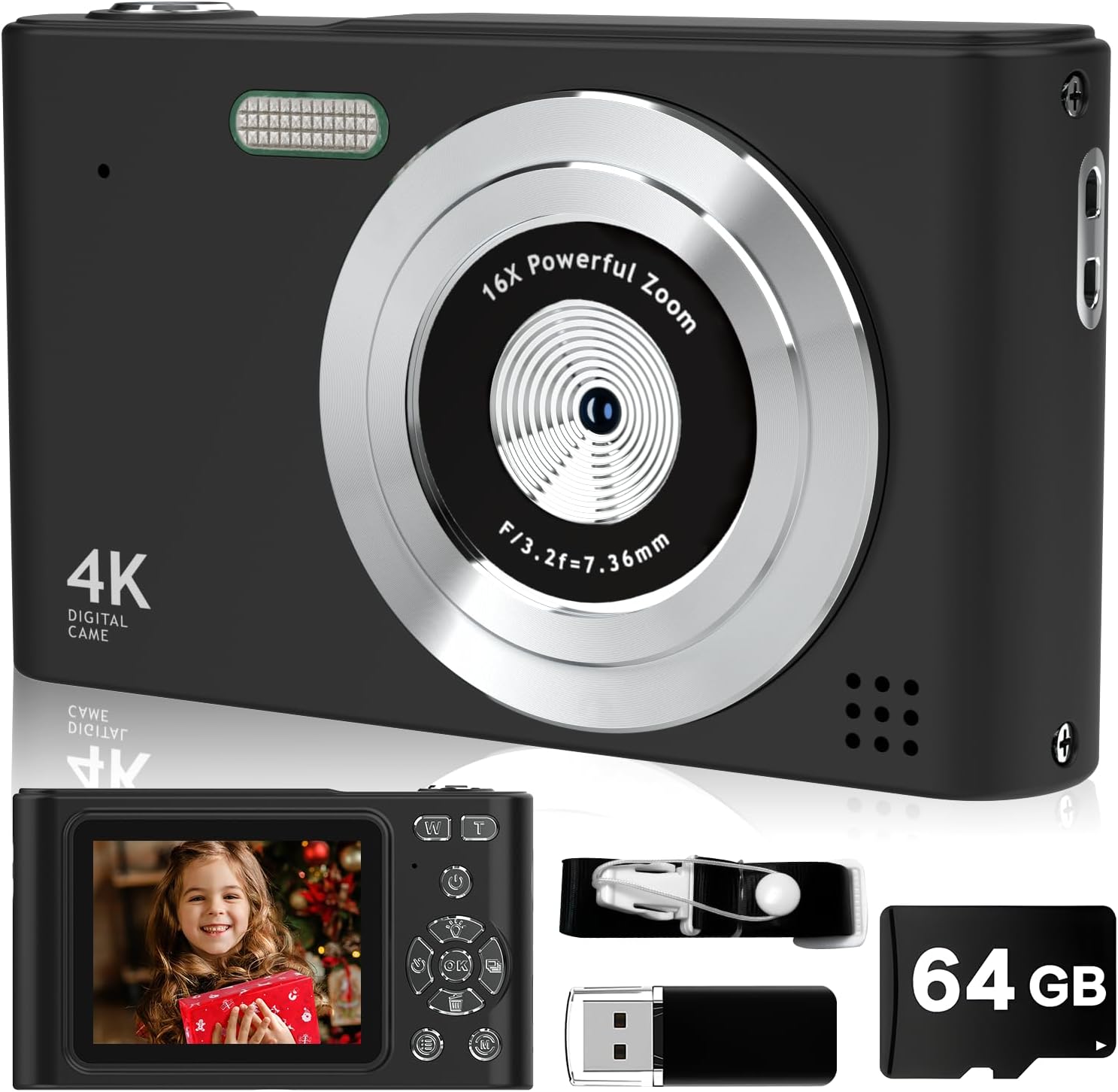
Image: The Ropwol H15 Digital Camera shown with its included accessories: a 32GB SD card, USB cable, and strap.
3. Konfiguracja
3.1. Ładowanie akumulatora
- Locate the USB-C port on the camera.
- Connect the provided USB-C data cable to the camera and the adapter.
- Podłącz adapter do gniazdka elektrycznego.
- The camera's indicator light will show charging status. Once fully charged, the light will change or turn off.
Notatka: The camera features a built-in rechargeable battery. It is not necessary to remove the battery for charging.
3.2. Wkładanie karty SD
- Sprawdź, czy kamera jest wyłączona.
- Locate the SD card slot, typically on the side or bottom of the camera.
- Insert the provided 32GB SD card into the slot with the metal contacts facing the correct direction (refer to the diagram on the camera or slot cover).
- Delikatnie dociśnij kartę, aż zatrzaśnie się na miejscu.

Image: The Ropwol H15 Digital Camera displaying its ports for the SD card and USB cable, highlighting connectivity options.
3.3. Mocowanie paska
Thread the camera strap through the designated loop on the camera body to prevent accidental drops.
4. Działanie
4.1. Włączanie/wyłączanie zasilania
Naciśnij i przytrzymaj przycisk zasilania (zwykle oznaczony symbolem ⏻ power symbol) to turn the camera on or off.
4.2. Robienie zdjęć
- Włącz kamerę.
- Skadruj ujęcie korzystając z ekranu LCD.
- Press the shutter button (typically on top of the camera) halfway to focus, then press fully to capture the image.

Image: The Ropwol H15 Digital Camera's rear view, showing the LCD screen and control buttons, with a photo of a child displayed.
4.3. Nagrywanie filmów
- Switch the camera to video mode (refer to the camera's on-screen menu or a dedicated button).
- Press the record button (often marked with a czerwona kropka) to start recording.
- Naciśnij ponownie przycisk nagrywania, aby zatrzymać nagrywanie.
4.4. Funkcja powiększania
Use the zoom buttons (often marked 'W' for Wide and 'T' for Telephoto) to adjust the 16x digital zoom. 'T' zooms in, 'W' zooms out.

Image: A visual comparison showing the effect of 2x and 16x digital zoom on the Ropwol H15 Digital Camera, illustrating its magnification capability.
4.5. Using Filters and Special Features
Navigate through the camera's menu to access various functions such as:
- Filtry: Apply different visual effects (e.g., Black/White, Warm, Cold) to your photos.
- Przeciwwstrząsowy: Activates digital image stabilization to reduce blur from camera movement.
- Samowyzwalacz: Set a delay (e.g., 2s, 5s, 10s) before a photo is taken, allowing you to be in the shot.
- Ciągłe strzelanie: Zrób wiele zdjęć jedno po drugim.

Image: The Ropwol H15 Digital Camera showcasing its self-timer options (2s, 5s, 10s), continuous shooting mode, and the anti-shake function for clearer images.
4.6. Connecting to a Computer (Webcam Function)
The camera can function as a webcam. Connect the camera to your computer using the USB-C cable. Select the "Webcam" option on the camera's screen if prompted.
5. Konserwacja
- Czyszczenie obiektywu: Używaj miękkiej, niepozostawiającej włókien ściereczki przeznaczonej specjalnie do czyszczenia obiektywów aparatów. Nie używaj materiałów ściernych ani silnych środków chemicznych.
- Czyszczenie ciała: Przetrzyj korpus aparatu miękką, suchą ściereczką. W przypadku uporczywych zabrudzeń delikatnie przetrzyj.ampi szmatkę z wodą.
- Składowanie: Przechowuj kamerę w chłodnym, suchym miejscu, z dala od bezpośredniego światła słonecznego i ekstremalnych temperatur.
- Pielęgnacja baterii: Recharge the battery regularly, even if the camera is not in frequent use, to maintain battery health. Avoid fully discharging the battery for extended periods.
- Zarządzanie kartami SD: Regularly transfer photos and videos to a computer or backup storage to free up space on the SD card and prevent data loss.
6. Rozwiązywanie Problemów
| Problem | Możliwa przyczyna | Rozwiązanie |
|---|---|---|
| Kamera się nie włącza. | Akumulator jest rozładowany. | Charge the camera battery using the provided USB-C cable and adapter. |
| Nie można robić zdjęć/kręcić filmów. | Karta SD jest pełna lub nie została prawidłowo włożona. | Sprawdź, czy karta SD jest prawidłowo włożona. Przenieś files to free up space or replace the SD card. |
| Obrazy są niewyraźne. | Camera shake; lens is dirty; subject is too close. | Ensure Anti-Shake is enabled. Clean the lens. Maintain appropriate distance from the subject. |
| Kamera zawiesza się lub przestaje reagować. | Tymczasowy błąd oprogramowania. | Naciśnij i przytrzymaj przycisk zasilania przez 10 sekund, aby wymusić wyłączenie, a następnie uruchom ponownie kamerę. |
| Computer does not recognize camera as webkamera | Incorrect connection mode selected. | Ensure "Webcam" mode is selected on the camera after connecting to the computer. Try a different USB port. |
7. Specyfikacje
| Funkcja | Szczegół |
|---|---|
| Nazwa modelu | H15 |
| Efektywna rozdzielczość obrazu nieruchomego | 44 MP (Maximum Image Size) |
| Rozdzielczość wideo | 1080p FHD |
| Zoom cyfrowy | 16x |
| Stabilizacja obrazu | Digital (Anti-Shake) |
| Technologia czujnika fotograficznego | CMOS |
| Rozmiar ekranu | 2.4 cali |
| Typ wyświetlacza | LCD |
| Łączność | Mikro USB |
| Obsługa kart pamięci | SD Card (up to 32GB included) |
| Typ baterii | Litowo-jonowy (wbudowany) |
| Cechy specjalne | Anti Shake, Self Timer, Filters, Continuous Shooting |
| Kolor | Czarny |
8. Gwarancja i pomoc techniczna
Gwarancja: The Ropwol H15 Digital Camera comes with a 2-year manufacturer's warranty. This warranty covers defects in materials and workmanship under normal use. Please retain your proof of purchase for warranty claims.
Wsparcie: For technical assistance, troubleshooting beyond this manual, or warranty inquiries, please contact Ropwol customer support through the retailer where the product was purchased or refer to the contact information provided in the product packaging.


