Wstęp
Thank you for choosing the iTOMA 515 Alarm Clock. This device combines an alarm clock with an FM radio, a dimmable LED display, and dual alarm functionality, designed for convenience and reliability. This manual provides detailed instructions for setup, operation, and maintenance to ensure optimal performance.
Zawartość opakowania
- 1 x iTOMA 515 Alarm Clock
- 1 x Instrukcja obsługi
Uwaga: Zasilacz nie jest dołączony do zestawu i należy go zakupić osobno.
Produkt ponadview
Familiarize yourself with the main components and controls of your iTOMA 515 Alarm Clock.
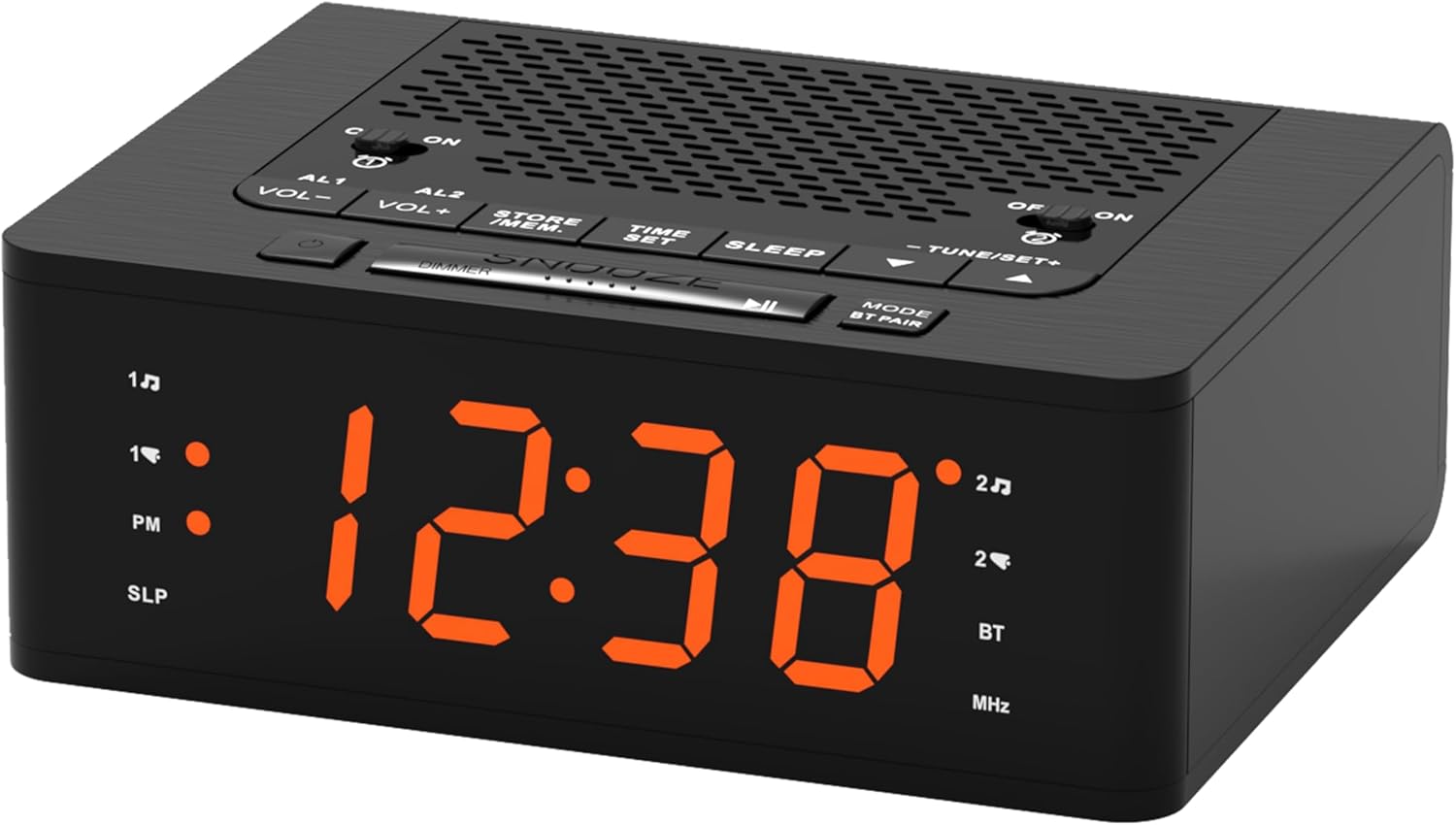
Obraz: Przód view of the iTOMA 515 Alarm Clock, showcasing the orange LED display and top-mounted control buttons.

Obraz: Szczyt view of the alarm clock, highlighting the various control buttons for volume, alarm settings, time, sleep, and tuning.
Przyciski sterujące:
- AL1 / AL2: Alarm 1 / Alarm 2 setting buttons.
- GŁOŚNOŚĆ+ / GŁOŚNOŚĆ-: Reguluje głośność.
- STORE / MEM: Saves and recalls FM radio presets.
- USTAWIENIE CZASU: Wchodzi w tryb ustawiania czasu.
- SPAĆ: Activates sleep timer for FM radio.
- TUNE+ / TUNE-: Dostosowuje częstotliwość radia FM.
- DRZEMKA / ŚCIEMNIACZ: Snoozes alarm; adjusts display brightness.
- MODE / BT PAIR: Switches between modes (FM, Bluetooth); initiates Bluetooth pairing.
- ON / OFF (for AL1/AL2): Toggles alarms on or off.
Organizować coś
1. Podłączenie zasilania
- Connect a compatible DC 5V power adapter (not included) to the DC IN port on the back of the alarm clock.
- Podłącz adapter do standardowego gniazdka ściennego. Wyświetlacz się zaświeci.
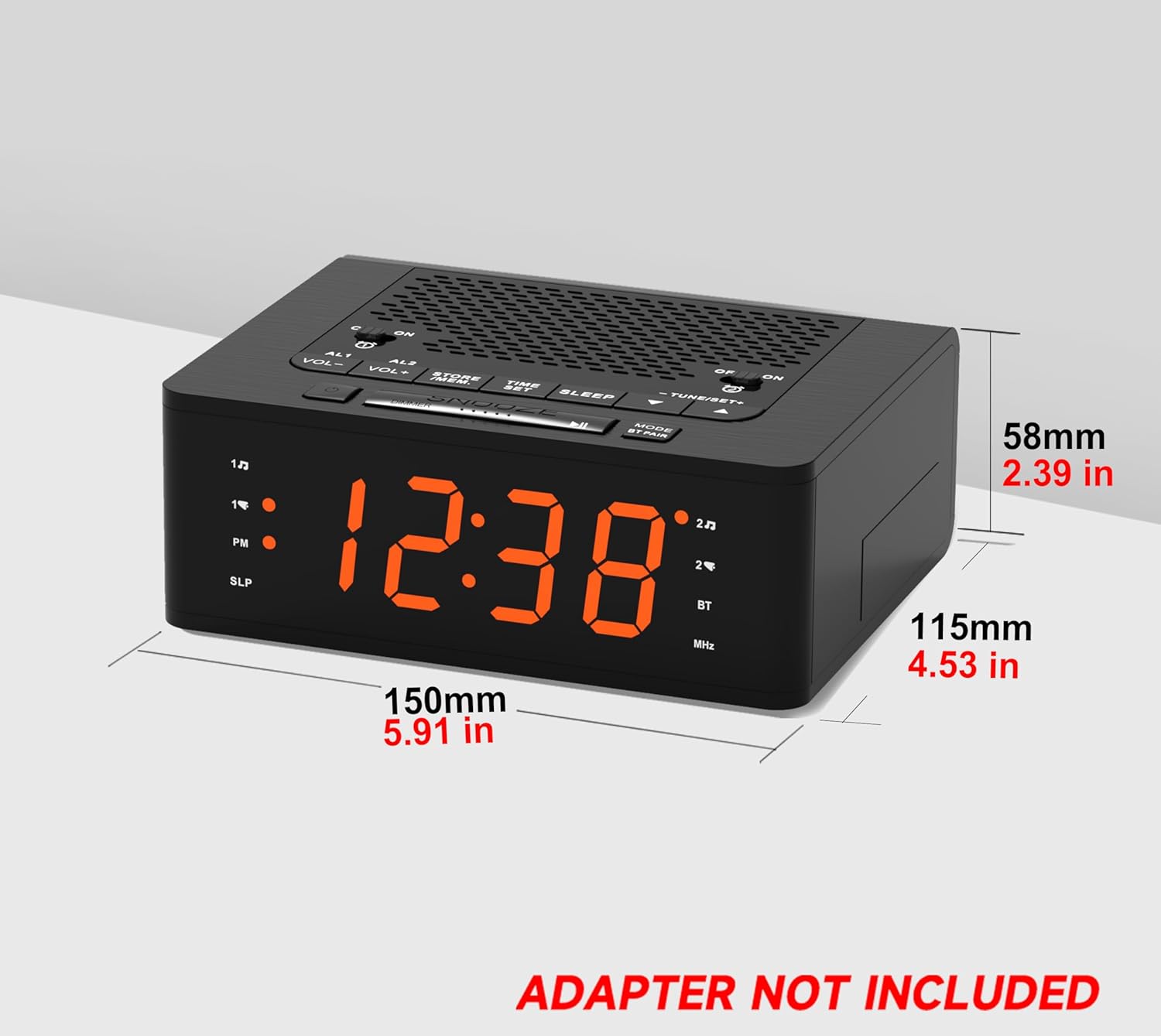
Obraz: Strona view of the iTOMA 515 Alarm Clock with dimensions indicated, and a clear note stating "ADAPTER NOT INCLUDED".
2. Ustawienie czasu początkowego
- Naciśnij i przytrzymaj USTAWIENIE CZASU Naciskaj przycisk, aż cyfry godziny zaczną migać.
- Użyj DOSTRAJANIE+ or MELODIA- Przyciski do ustawienia godziny. Zwróć uwagę na wskaźnik PM, jeśli używasz formatu 12-godzinnego.
- Naciskać USTAWIENIE CZASU ponownie, aby potwierdzić godzinę i przejść do ustawiania minut.
- Użyj DOSTRAJANIE+ or MELODIA- przyciski, aby ustawić minuty.
- Naciskać USTAWIENIE CZASU once more to confirm the minutes and exit time setting mode.
3. 12/24 Hour Format Selection
While the time is flashing during setup, press the TRYB przycisk umożliwiający przełączanie między formatem wyświetlania czasu 12-godzinnego i 24-godzinnego.
Instrukcja obsługi
1. Display Brightness Control (Dimmer)
The iTOMA 515 features a 4-level dimmable LED display.
- Naciśnij DRZEMKA / ŚCIEMNIACZ button repeatedly to cycle through the brightness levels: Level 3 (brightest), Level 2, Level 1, and OFF.
- Select the brightness level that suits your preference for optimal visibility without disturbance.

Obraz: The alarm clock display transitioning through four brightness levels (L3, L2, L1, OFF) to illustrate the dimmer function.
2. Ustawianie alarmów (AL1 i AL2)
The clock supports two independent alarms. You can set the alarm time, sound source (buzzer or FM radio), and alarm week mode.
- Naciśnij i przytrzymaj albo AL1 or AL2 Naciskaj przycisk, aż zaczną migać cyfry godziny alarmu.
- Użyj DOSTRAJANIE+ or MELODIA- przyciski do ustawienia godziny alarmu.
- Naciśnij odpowiedni AL1 or AL2 Naciśnij przycisk ponownie, aby zatwierdzić godzinę i przejść do ustawiania minut.
- Użyj DOSTRAJANIE+ or MELODIA- przyciski do regulacji minut alarmu.
- Naciśnij AL1 or AL2 button again to select the alarm sound source: Brzęczyk or Radio FM.
- Naciśnij AL1 or AL2 button again to select the alarm week mode: d1-7 (every day), d1-5 (weekdays only), or d6-7 (weekends only).
- Naciśnij AL1 or AL2 button one last time to save the settings and exit.

Obraz: The alarm clock display with indicators for two separate alarms, showing AM 7:00 (Wake Up Time) and PM 7:00 (Coffee Time) as examples.
3. Turning Alarms ON/OFF
To activate or deactivate an alarm, use the dedicated WŁ./WYŁ. buttons located on the top panel for AL1 and AL2.
4. Funkcja drzemki
Gdy zabrzmi alarm, naciśnij duży przycisk DRZEMKA button on the top of the clock to temporarily silence the alarm for an additional 9 minutes of sleep. The alarm will sound again after this period.

Obraz: A hand reaching to press the large SNOOZE button on the top of the alarm clock, indicating its function for an extra 9 minutes of sleep.
5. Obsługa radia FM
The iTOMA 515 features an FM radio with 20 preset stations and adjustable volume.
- Naciśnij TRYB button to switch to FM radio mode. The frequency will appear on the display.
- Automatyczne skanowanie: Naciśnij i przytrzymaj DOSTRAJANIE+ or MELODIA- przycisk, aby automatycznie wyszukać następną dostępną stację.
- Strojenie ręczne: Naciśnij krótko DOSTRAJANIE+ or MELODIA- button to manually adjust the frequency in small increments.
- Dostosuj głośność: Użyj Objętość + or TOM- buttons to adjust the radio volume (16 levels).
- Zapisz ustawienia wstępne: To save a station, tune to your desired frequency, then press and hold the STORE / MEM Naciskaj przycisk, aż zacznie migać numer ustawienia wstępnego. Użyj DOSTRAJANIE+ or MELODIA- to select the preset number (P01-P20), then press STORE / MEM ponownie, aby zapisać.
- Przywołaj ustawienia wstępne: W trybie FM naciśnij krótko przycisk STORE / MEM button to cycle through your saved preset stations.

Obraz: The alarm clock displaying an FM radio frequency (87.5 MHz), with icons indicating sleep timer, presets, and volume levels.
6. FM Radio Sleep Timer
Funkcja timera uśpienia pozwala zasypiać przy dźwiękach radia, które wyłączy się automatycznie po upływie określonego czasu.
- Podczas odtwarzania radia FM naciśnij przycisk SPAĆ button repeatedly to cycle through the sleep timer options (e.g., 90, 80, 70... 10 minutes, OFF).
- Radio będzie grało przez wybrany czas, a następnie wyłączy się automatycznie.
7. Parowanie Bluetooth
The iTOMA 515 supports Bluetooth connectivity for audio streaming.
- Naciśnij MODE / BT PAIR button to switch to Bluetooth mode. The display will show "BT" and flash, indicating it's in pairing mode.
- Na swoim urządzeniu mobilnym włącz Bluetooth i wyszukaj dostępne urządzenia.
- Select "iTOMA 515" from the list of devices to pair.
- Once paired, the "BT" indicator on the clock will stop flashing and remain solid. You can now stream audio from your device to the alarm clock.
Obraz: The iTOMA 515 Alarm Clock positioned next to a smartphone, illustrating its capability to play music via Bluetooth connection.
Konserwacja
To ensure the longevity and proper functioning of your iTOMA 515 Alarm Clock, follow these simple maintenance guidelines:
- Czyszczenie: Use a soft, dry cloth to wipe the exterior of the clock. Avoid using abrasive cleaners, waxes, or solvents as they may damage the finish.
- Umieszczenie: Zegar należy ustawić na stabilnej, płaskiej powierzchni, z dala od bezpośredniego światła słonecznego, źródeł ciepła i nadmiernej wilgoci.
- Wentylacja: Aby zapobiec przegrzaniu, należy upewnić się, że otwory wentylacyjne na górze i po bokach urządzenia nie są zablokowane.
- Odłączenie zasilania: If the clock will not be used for an extended period, unplug it from the power outlet.
Rozwiązywanie problemów
If you encounter issues with your iTOMA 515 Alarm Clock, refer to the following common problems and solutions:
| Problem | Możliwa przyczyna | Rozwiązanie |
|---|---|---|
| Wyświetlacz zegara jest wyłączony lub nie działa. | Brak połączenia z zasilaniem lub uszkodzony adapter. | Ensure the power adapter is securely plugged into the clock and a working wall outlet. Verify the adapter is functional. |
| Nie można ustawić czasu ani alarmu. | Incorrect button sequence or not in setting mode. | Naciśnij i przytrzymaj USTAWIENIE CZASU or respective ALARM button until digits flash. Follow the instructions carefully. |
| Odbiór radia FM jest słaby. | Słaby sygnał lub zakłócenia. | Adjust the position of the clock. Extend the FM antenna fully if available (not explicitly mentioned but common for radios). Try scanning for stations again. |
| Alarm nie włącza się. | Alarm is off or volume is too low. | Ensure the alarm's WŁ./WYŁ. button is set to ON. Check the alarm volume setting. |
| Cannot switch off military time (24-hour format). | Incorrect setting during time adjustment. | During time setting (when hour digits flash), press the TRYB przycisk umożliwiający przełączanie między formatem 12-godzinnym i 24-godzinnym. |
| Nie można sparować urządzenia Bluetooth. | Clock not in pairing mode or device too far. | Ensure the clock is in Bluetooth pairing mode (BT flashing). Move your device closer to the clock. Try restarting both devices. |
Specyfikacje
- Marka: iTOMA
- Model: 515
- Typ wyświetlacza: Dioda LED (pomarańczowa)
- Jasność wyświetlacza: 4 levels (L3, L2, L1, OFF)
- Źródło zasilania: Mains powered (DC 5V adapter, not included)
- Wymiary produktu: 15 cm (dł.) x 11.5 cm (szer.) x 5.8 cm (wys.) / 5.91 cala (dł.) x 4.53 cala (szer.) x 2.39 cala (wys.)
- Waga przedmiotu: 420 gramów
- Częstotliwość radiowa FM: 87.5 - 108 MHz
- Ustawienia FM: Do 20 stacji
- Głośność radia: 16 regulowane poziomy
- Wyłącznik czasowy: 10-90 minut
- Typy alarmów: Brzęczyk, radio FM
- Alarm Week Modes: Every day (d1-7), Weekdays (d1-5), Weekends (d6-7)
- Łączność: Bluetooth
Informacje o gwarancji
iTOMA products are manufactured to high-quality standards. For specific warranty details, please refer to the warranty card included with your purchase or contact iTOMA customer support. Keep your purchase receipt as proof of purchase for any warranty claims.
Wsparcie
For further assistance, technical support, or inquiries regarding your iTOMA 515 Alarm Clock, please visit the official iTOMA webOdwiedź stronę internetową lub skontaktuj się z działem obsługi klienta. Dane kontaktowe zazwyczaj znajdują się na opakowaniu produktu lub na oficjalnej stronie internetowej marki.


