1. Wprowadzenie
The Phomemo LT12 Label Maker Machine is a portable, rechargeable label printer designed for various organizational needs in home, office, and school environments. It features a QWERTY keyboard for direct input and Bluetooth connectivity for enhanced customization via the Printmaster application. This manual provides comprehensive instructions for setting up, operating, and maintaining your LT12 label maker.
2. Zawartość opakowania
Sprawdź, czy w przesyłce znajdują się wszystkie elementy wymienione poniżej:
- 1 x LT12 Label Maker
- 1 x kabel ładujący typu C
- 1 x 12mm x 4m Black on White Label Tape
- 1 x Instrukcja obsługi

Image: The Phomemo LT12 label maker, a Type-C charging cable, a roll of 12mm x 4m black on white label tape, and the user manual, laid out as included in the package.
3. Koniec produktuview i funkcje
The Phomemo LT12 is designed for ease of use and versatility. Key features include:
- Akumulator: Equipped with a 1200mAh lithium battery, providing 2-3 hours of continuous printing on a full charge. Charges via a Type-C cable. Features an automatic shut-off after 5 minutes of inactivity to conserve battery life.
- Metody podwójnego wprowadzania: Features a familiar QWERTY keyboard for direct, one-touch printing and Bluetooth connectivity for advanced editing via the Printmaster APP.
- Printmaster APP: Offers extensive customization with over 1600 icon symbols, 163 fonts, 30+ languages, and 287+ border styles. Supports saving templates and viewing print history.
- Efficient Labeling: Supports label widths from 9mm to 12mm, allowing for multiple lines of text. Includes a built-in cutter and supports horizontal or vertical printing.
- Etykiety trwałe: Labels are waterproof, BPA-free, heat resistant, and designed to tear off without residue. They are fade-resistant, maintaining clarity even in humid or harsh conditions.
- Ekran LCD z podświetleniem: A backlit LCD display ensures optimal visibility and readability of labels, even in low-light environments.
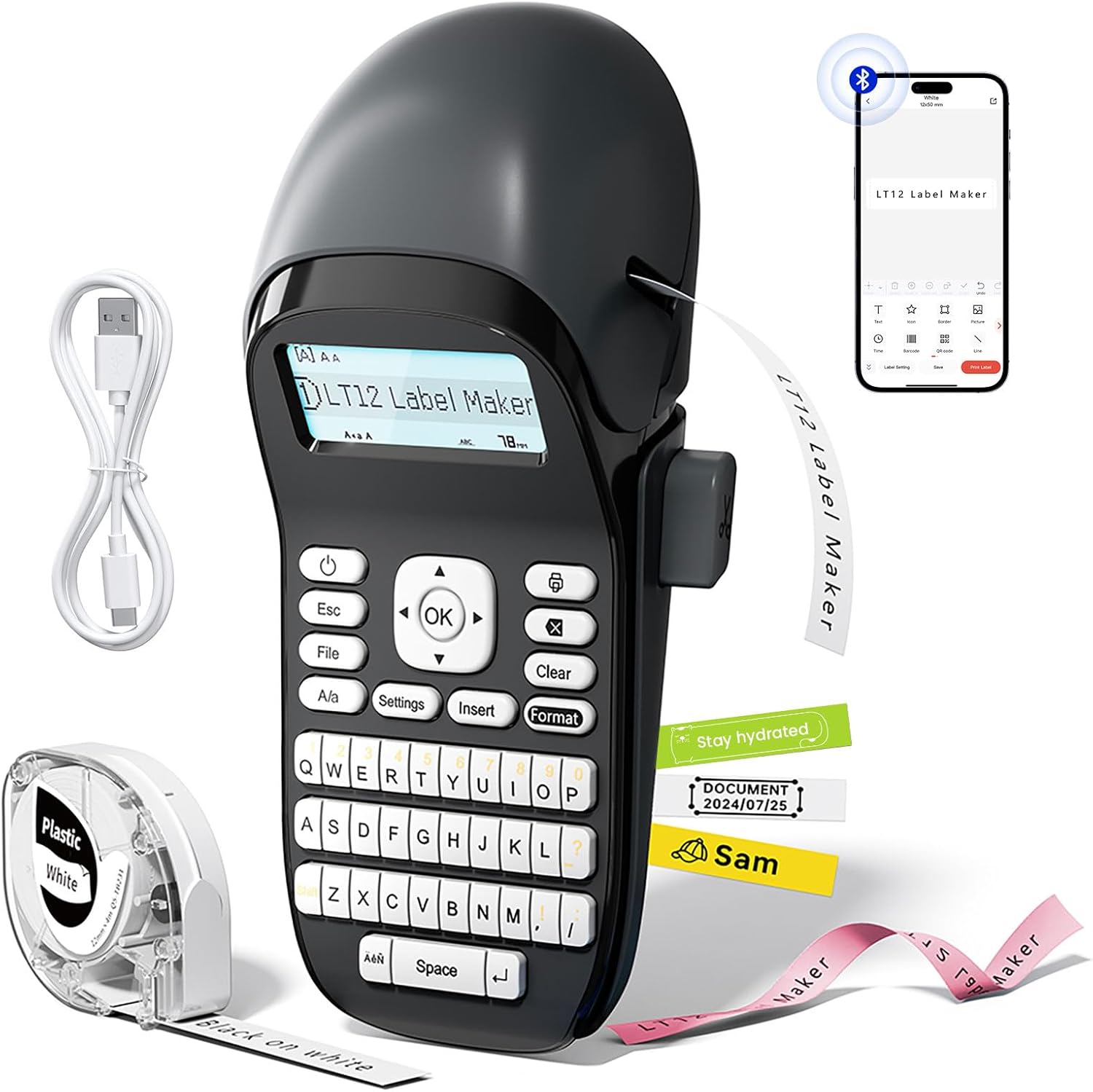
Image: The Phomemo LT12 Label Maker, showcasing its QWERTY keyboard, LCD screen, and a smartphone connected via Bluetooth, alongside label tape and a charging cable.

Image: A visual comparison highlighting the LT12's integrated 1200mAh rechargeable battery against other label makers that require 6 AA batteries.

Image: The Phomemo LT12 label maker with its LCD backlit screen illuminated, demonstrating clear visibility in a dimly lit setting.
4. Konfiguracja
4.1 Ładowanie urządzenia
Before first use, fully charge the LT12 label maker. Connect the provided Type-C charging cable to the device and a compatible USB power source. The charging indicator will show the charging status.
4.2 Ładowanie taśmy etykietowej
- Open the tape compartment cover on the side of the label maker.
- Insert the label tape cassette with the tape end facing the print head. Ensure the tape is properly aligned.
- Zamknij dokładnie pokrywę komory na taśmę.
4.3 Instalacja aplikacji i połączenie Bluetooth
To utilize advanced features and customization, connect your LT12 label maker to the Printmaster app:
- Pobierz Printmaster aplikację ze sklepu z aplikacjami na Twoim smartfonie (dostępną dla systemów Android i iOS).
- Turn on Bluetooth on your smartphone and power on the LT12 label maker.
- Open the Printmaster app and search for available Bluetooth devices.
- Select "LT12 Label Maker" from the list to establish a connection.

Image: A visual guide showing four steps to connect the Phomemo LT12 label maker to a smartphone via the Printmaster app: download app, enable Bluetooth, search for device, and select LT12.
5. Instrukcja obsługi
5.1 Basic Label Creation (Using Keyboard)
- Power on the label maker.
- Użyj klawiatury QWERTY, aby wpisać żądany tekst. Tekst pojawi się na ekranie LCD.
- Utilize the function keys for basic editing:
- Wyjście: Exit current menu or cancel action.
- File: Access saved labels or save current label (supports up to 9 fileS).
- Odp.: Toggle between uppercase and lowercase letters.
- Ustawienia: Adjust device settings (e.g., language, print density).
- Wstawić: Add symbols, dates, or other special characters.
- Format: Change font styles, sizes, or add borders.
- Jasne: Delete characters or clear the entire text.
- OK: Confirm selections or initiate printing.
- Naciśnij OK przycisk, aby wydrukować etykietę.

Obraz: szczegółowy view of the Phomemo LT12 label maker's QWERTY keyboard and its LCD screen, showing text input.
5.2 Advanced Label Creation (Using Printmaster App)
- Ensure your LT12 label maker is connected to the Printmaster app via Bluetooth.
- W aplikacji możesz:
- Type text and adjust font, size, and style.
- Access a library of over 1600 icons and symbols.
- Choose from 163 fonts and 287 border styles.
- Create and save custom templates for frequent use.
- Review your print history.
- Once your label design is complete in the app, tap the print icon to send it to the label maker.

Image: A series of smartphone screenshots illustrating the Printmaster app's interface for text editing, symbol insertion, and label customization.
6. Konserwacja
6.1 Czyszczenie
Regular cleaning ensures optimal performance:
- Przed czyszczeniem wyłącz urządzenie.
- Do przecierania zewnętrznej części drukarki etykiet należy używać miękkiej, suchej ściereczki.
- Gently clean the print head with a cotton swab moistened with rubbing alcohol if print quality degrades. Allow to dry completely before use.
6.2 Pielęgnacja baterii
- Aby przedłużyć żywotność baterii, należy unikać częstego całkowitego rozładowywania baterii.
- Ładuj urządzenie regularnie, nawet jeśli nie używasz go często.
- Jeśli akumulator będzie przechowywany przez dłuższy okres, należy naładować go do poziomu około 50% i ładować ponownie co 3–6 miesięcy.
6.3 Przechowywanie
Store the label maker in a cool, dry place away from direct sunlight and extreme temperatures. Remove the label tape cassette if storing for a very long period.
7. Rozwiązywanie Problemów
| Problem | Możliwa przyczyna | Rozwiązanie |
|---|---|---|
| Urządzenie nie włącza się lub nie ładuje. | Low battery; faulty charging cable or adapter; device malfunction. | Ensure the device is charged using the provided Type-C cable and a working power adapter. Try a different cable or adapter. If the issue persists, contact support. |
| Brak druku lub druk jest niewyraźny. | Label tape incorrectly installed; print head dirty; low battery. | Reinstall the label tape correctly. Clean the print head as described in Section 6.1. Charge the device fully. |
| Połączenie Bluetooth nie powiodło się. | Bluetooth not enabled; app issue; device not discoverable. | Ensure Bluetooth is enabled on both the label maker and your smartphone. Restart the app and the label maker. Try pairing again. |
| Etykiety nie są cięte prawidłowo. | Ostrze tnące stępione lub zablokowane. | Ensure no tape residue is obstructing the cutter. If the issue persists, contact support. |
| Labels peel off easily. | Surface not clean; label type unsuitable for surface. | Ensure the surface is clean, dry, and smooth before applying the label. Use appropriate label types for specific environments (e.g., waterproof for humid areas). |
8. Specyfikacje
| Funkcja | Szczegół |
|---|---|
| Nazwa modelu | LT12 |
| Marka | Fomemo |
| Technologia łączności | Bluetooth |
| Technologia druku | Termiczny |
| Maksymalny rozmiar nośnika | 12mm x 4m |
| Maksymalna rozdzielczość wydruku czarno-białego | 203 dpi |
| Maksymalna prędkość drukowania (monochromatyczna) | 30 stron na milion |
| Bateria | 1200mAh litowo-jonowy (w zestawie) |
| Interfejs ładowania | USB typu C |
| Wymiary produktu | 8.85" gł. x 4.29" szer. x 3.07" wys. |
| Waga przedmiotu | 10.3 uncji (291 grama) |
| Kompatybilne urządzenia | Smartfony, tablety (Android, iOS) |
| Typ atramentu do drukarki | No Ink (Thermal Printing) |
9. Informacje o gwarancji
The Phomemo LT12 Label Maker Machine comes with a Limited Warranty. For specific details regarding warranty coverage, duration, and terms, please refer to the warranty card included in your product packaging or visit the official Phomemo webStrona zawiera najbardziej aktualne informacje.
10. Wsparcie
For further assistance, technical support, or inquiries about your Phomemo LT12 Label Maker Machine, please contact Phomemo customer service through their official webwitrynę lub dane kontaktowe podane w dokumentacji produktu.
You can also find additional resources, FAQs, and product updates on the official Phomemo webstrona: Sklep Phomemo


