1. Wprowadzenie i koniecview
The Infinity Smart Watch for Women is designed to seamlessly integrate into your daily life, offering a blend of elegance and advanced functionality. Featuring a vibrant AMOLED 1.1" screen, this smartwatch provides comprehensive health and fitness tracking, communication features, and smart notifications. It is compatible with both iOS and Android phones.

Rycina 1: Przód view of the Infinity Smart Watch for Women, showcasing its elegant design and vibrant AMOLED display.
2. Co znajduje się w pudełku
- Infinity Smart Watch (Model WS_BLK)
- Kabel ładujący
- Instrukcja obsługi
3. Konfiguracja
3.1 Pierwsze ładowanie
Before first use, fully charge your smartwatch. Connect the magnetic charging cable to the charging points on the back of the watch and plug the USB end into a compatible power adapter (not included) or computer USB port. The watch display will indicate charging status.

Figure 2: The smartwatch connected to its magnetic charging cable, showing the battery charging indicator.
3.2 Instalacja i parowanie aplikacji
- Scan the QR code provided in the manual or on the watch screen (if available) to download the companion app. Alternatively, search for the app name (e.g., 'VeryFit' or 'FitCloudPro' as seen in related videos) in your smartphone's app store (iOS App Store or Google Play Store).
- Zainstaluj aplikację na swoim smartfonie.
- Otwórz aplikację i postępuj zgodnie z instrukcjami wyświetlanymi na ekranie, aby utworzyć konto i skonfigurować usługę Pro.file.
- Upewnij się, że Bluetooth jest włączony w Twoim smartfonie.
- In the app, navigate to the device pairing section and select your Infinity Smart Watch from the list of available devices.
- Potwierdź prośbę o sparowanie na smartfonie i smartwatchu.
Video 1: Official product video demonstrating the Infinity Smart Watch for Women, including its features and design. This video provides a visual guide to the watch's capabilities.
4. Instrukcja obsługi
4.1 Podstawowa nawigacja
- Przesuń palcem w górę: View recent notifications/messages.
- Przesuń w dół: Access quick settings (brightness, Do Not Disturb, flashlight, phone finder, settings).
- Przesuń w lewo/w prawo: Scroll through main features like activity data, heart rate, sleep tracking, and weather.
- Naciśnij przycisk boczny: Return to the watch face or access the main menu.
4.2 Wykonywanie i odbieranie połączeń
Once paired with your smartphone, you can make and answer calls directly from your smartwatch.
- Zadzwonić: Access the phone function from the main menu, use the dial pad or select a contact from your synced phonebook.
- Aby odebrać połączenie: Gdy ktoś dzwoni, zegarek wyświetla identyfikator dzwoniącego. Dotknij zielonej ikony, aby odebrać, lub czerwonej, aby odrzucić połączenie.
4.3 Inteligentne powiadomienia
Receive alerts for incoming calls, text messages, and app notifications directly on your wrist. Configure notification preferences within the companion app.

Figure 3: The smartwatch interface showing options for Bluetooth calls, smart notifications, and voice assistant.
4.4 Dostosowywanie tarcz zegarka
The smartwatch offers a variety of customizable watch faces to suit your style. You can change them directly on the watch or through the companion app, which provides over 200 options.
5. Funkcje monitorowania stanu zdrowia
The Infinity Smart Watch is equipped with a comprehensive suite of health and fitness tracking features:
- Monitorowanie częstości akcji serca: Stale monitoruje tętno przez cały dzień.
- Monitorowanie ciśnienia krwi: Provides on-demand blood pressure readings.
- Monitorowanie snu: Analizuje wzorce snu, w tym sen głęboki, sen płytki i godziny czuwania.
- Krokomierz: Counts your steps, distance traveled, and calories burned.
- Wiele trybów sportowych: Supports over 100 sports modes, allowing you to track specific workouts like walking, running, cycling, and swimming.
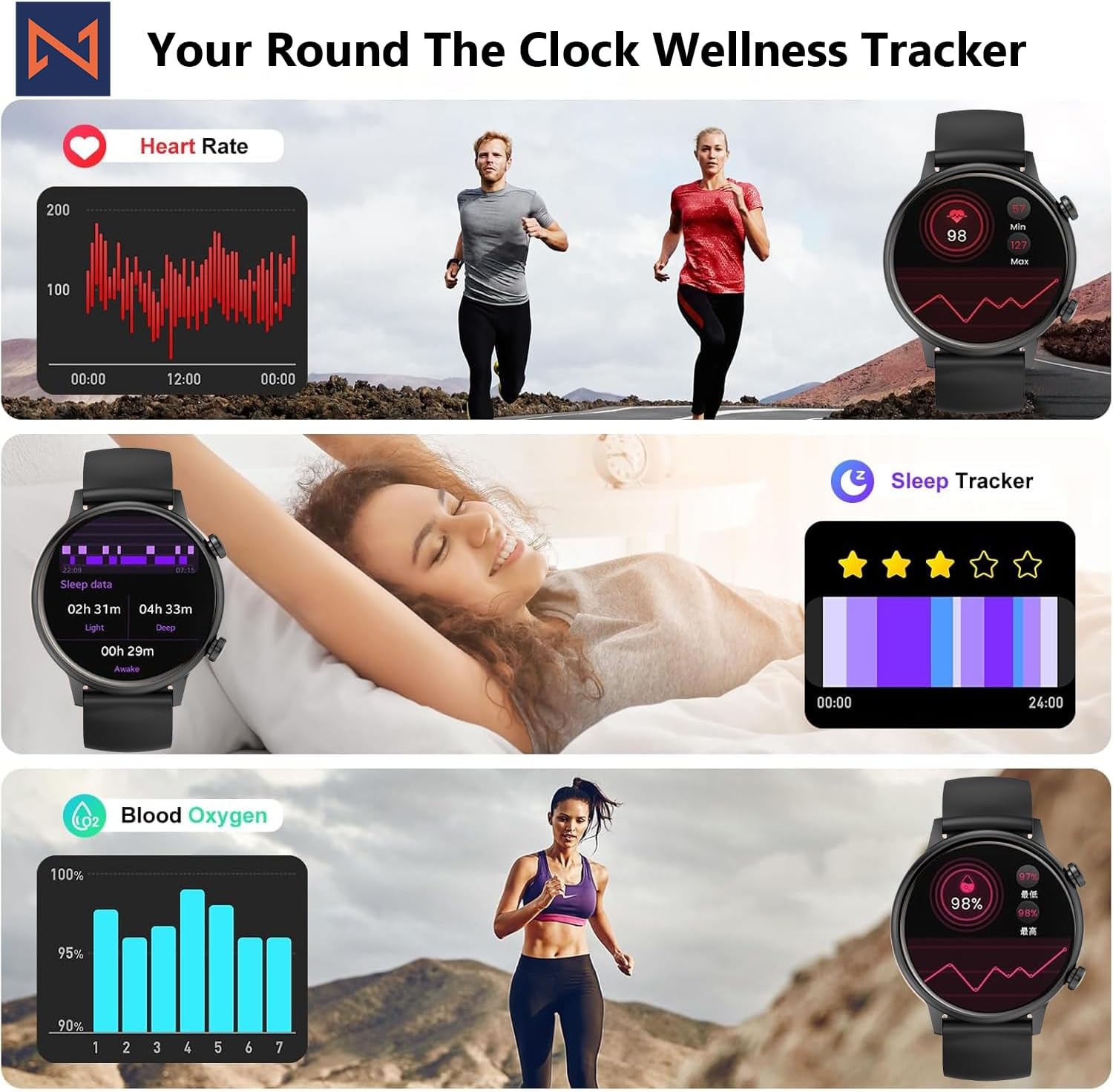
Figure 4: The smartwatch interface showing real-time heart rate, sleep tracking, and blood oxygen levels.

Figure 5: The smartwatch showing a selection of its multiple sports tracking modes.
6. Wodoodporność
The Infinity Smart Watch has an IP68 waterproof rating, making it resistant to dust, sweat, and water. It is suitable for daily wear, including hand washing, face washing, and swimming. Notatka: Avoid using the watch in hot water (e.g., hot showers, saunas) or for deep-sea diving, as extreme temperatures or high-pressure water may compromise its water resistance.

Figure 6: The smartwatch demonstrating its IP68 waterproof capability during water exposure.
7. Bateria i ładowanie
The smartwatch features a 200 mAh Lithium Polymer battery. A full charge typically takes approximately 2 hours, providing 3-5 days of working time and up to 30 days of standby time, depending on usage.
8. Specyfikacje
| Funkcja | Szczegół |
|---|---|
| Numer modelu | WS_BLK |
| Rozmiar ekranu | 1.1 cala AMOLED |
| Stopień wodoodporności | IP68 |
| Pojemność baterii | 200 mlnamp Godziny (litowo-polimerowe) |
| Łączność | Bluetooth |
| System operacyjny | Android (kompatybilny z iOS) |
| Pojemność pamięci masowej | 128 MB |
| Waga przedmiotu | 5 uncji |
| Producent | Kizzy Enterprises Inc |
9. Rozwiązywanie Problemów
- Zegarek się nie włącza: Ensure the watch is fully charged. Long-press the side button to power on.
- Nie można sparować z telefonem: Ensure Bluetooth is enabled on your phone and the watch is within range. Restart both devices and try pairing again through the app.
- Powiadomienia nie zostały odebrane: Check app settings on your phone to ensure notification permissions are granted for the smartwatch app. Also, verify that 'Do Not Disturb' mode is not active on the watch.
- Niedokładne odczyty stanu zdrowia: Ensure the watch is worn snugly on your wrist, not too tight or too loose. Clean the sensors regularly. Note that the blood pressure monitor may not be medically accurate and is for reference only.
- Zamrożenie ekranu: Restart the smartwatch by long-pressing the side button until it powers off, then power it back on. If the issue persists, check for app updates.
10. Gwarancja i wsparcie
For warranty information, technical support, or service inquiries, please refer to the contact details provided on the product packaging or the manufacturer's official webZachowaj paragon jako dowód zakupu na wypadek reklamacji.


