1. Koniec produktuview
The Norwii N97 is a versatile wireless presentation clicker designed for seamless control of presentations on both TV screens and projection screens. It features advanced digital pointer capabilities, including highlighting, magnification, and mouse cursor control, all activated via the Norwii Presenter software. The device offers dual connectivity through Bluetooth Low Energy (BLE) and a 2.4G USB-A receiver, ensuring broad compatibility with various operating systems and presentation software.

Image: Norwii N97 Presentation Clicker with key features labeled.
2. Konfiguracja i łączność
2.1. Podłączenie odbiornika USB
To connect via the USB receiver, simply plug the receiver into an available USB-A port on your computer. The Norwii Presenter software is pre-installed on the USB receiver for convenience.

Image: A hand inserting the USB receiver into a laptop's USB port.
2.2. Połączenie Bluetooth
- Ensure the presenter is turned off.
- Press and hold the 'Backward' button (up arrow) on the presenter.
- While holding the 'Backward' button, turn on the presenter.
- Release the 'Backward' button. The indicator light will flash rapidly, indicating it's in pairing mode.
- On your computer, navigate to Bluetooth settings and search for available devices.
- Select "Norwii N97s" from the list to connect.

Image: Diagram illustrating both Bluetooth and USB connectivity options for the Norwii N97.
2.3. Norwii Presenter Software
The Norwii Presenter software is essential for activating and utilizing the full range of digital pointer functions. It is compatible with Windows 7, macOS 10.15, and higher, and supports major presentation software like PowerPoint, Prezi, Keynote, Google Slides, Propresenter, MediaShout, and Zoom.
Ensure the software is running and the presenter is connected for optimal functionality. The software will indicate "Presenter connected" when successfully linked.

Image: Screenshot of the Norwii Presenter software interface, showing various settings and options.
3. Operating the Norwii N97
3.1. Podstawowe sterowanie
- Click (Up Arrow): Moves to the previous slide.
- Long Press (Up Arrow): Activates Full Screen mode or exits Full Screen (ESC).
- Click (Down Arrow): Moves to the next slide.
- Long Press (Down Arrow): Activates a Black Screen or exits Black Screen (ESC).
3.2. Digital Pointer Functions (Requires Norwii Presenter Software)
The Norwii N97 offers advanced digital pointer features for TV screens and projection displays when used with the Norwii Presenter software:
- Cyfrowy laser: Provides a customizable pointer on screen.
- Atrakcja: Emphasizes specific areas on your presentation.
- Lupa: Enlarges sections of the screen for detailed viewing.
- Sterowanie myszą: Use the left mouse button for interactions like playing videos or opening links. This function supports single left-clicks only, without right-click or double-click capabilities.

Image: The Norwii N97 demonstrating digital pointer, highlight, and magnifier features on a TV screen.

Image: A user controlling video playback on a monitor using the Norwii N97's mouse function.
3.3. Physical Laser Pointer
The Norwii N97 includes a traditional green physical laser pointer, ideal for use on projection screens. This feature does not require the Norwii Presenter software.

Image: The Norwii N97 emitting a green physical laser on a projection screen during a presentation.
3.4. Annotation, Eraser, and Volume Control
- Adnotacja: Click the annotation button to enter annotation mode. Move the presenter to draw on the screen.
- Gumka do ścierania: Click the eraser button to clear annotations.
- Tom: Press the volume button and move your hand up or down to adjust the system volume.

Image: A user demonstrating on-screen annotation and volume control using the Norwii N97.
3.5. Customizable Key Functions
The Norwii N97 allows for customization of its key functions through the Norwii Presenter software. All functions displayed in blue within the software interface can be modified to suit your preferences.

Image: Screenshot of the Norwii Presenter software's customization menu, showing options to reassign button functions.
3.6. Przełączanie trybów
The 'Up' and 'Down' arrow keys offer four distinct modes for different presentation scenarios. Users can switch between these modes by simultaneously pressing both the 'Up' and 'Down' keys. The current active mode is displayed within the Norwii Presenter software interface.
- Mode 1 (Up/Down): For PowerPoint, Keynote, and similar applications.
- Mode 2 (Left/Right): For Prezi, Propresenter, MediaShout, and similar applications.
- Mode 3 (Page Up/Page Down): For Google Slides, browsers, photo viewers i nie tylko.
- Mode 4 (Scroll Up/Down): For e-books and other scrolling content.
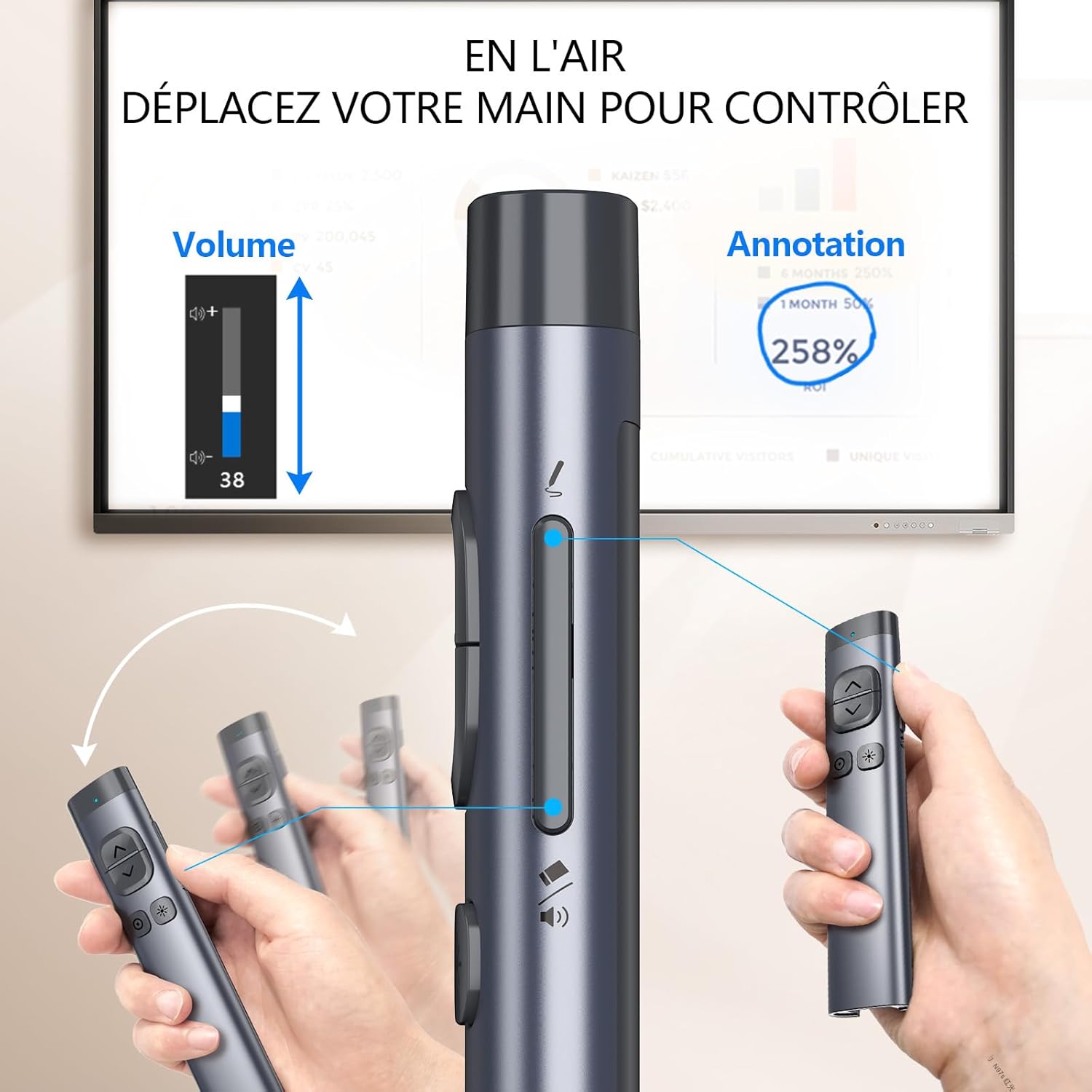
Image: A diagram illustrating the four different modes for the Norwii N97's navigation buttons.
4. Konserwacja
To ensure the longevity and optimal performance of your Norwii N97 Presentation Clicker, follow these maintenance guidelines:
- Czyszczenie: Do czyszczenia urządzenia używaj miękkiej, suchej ściereczki. Unikaj środków czyszczących o właściwościach ściernych i rozpuszczalników.
- Składowanie: Store the clicker in its protective case when not in use to prevent scratches and damage.
- Ładowanie: Charge the device using the provided USB-C cable. Avoid overcharging.
- Aktualizacje oprogramowania: Regularly check for software updates for the Norwii Presenter application to ensure you have the latest features and bug fixes. Updates are indicated by red dots in the 'About' section of the software.
Video: A comprehensive guide demonstrating setup, operation, and software features of the Norwii N97, including checking for software updates.
5. Rozwiązywanie Problemów
- Urządzenie nie łączy się:
- Ensure the USB receiver is securely plugged in or Bluetooth is properly paired.
- Check if the Norwii Presenter software is running and indicates "Presenter connected".
- Verify that your computer's Bluetooth is enabled and the device is discoverable during pairing.
- Digital pointer features not working:
- Confirm that the Norwii Presenter software is active and the device is connected.
- Ensure the specific digital laser, highlight, or magnifier functions are enabled within the software settings.
- Physical laser not working:
- Check the battery level of the presenter.
- Ensure the laser button is being pressed correctly.
- Przyciski nie reagują:
- Re-establish the connection (unplug/replug USB, or re-pair Bluetooth).
- Check the current mode of the navigation buttons; some functions are specific to certain modes.
- Verify custom key assignments in the Norwii Presenter software.
6. Specyfikacje
| Funkcja | Szczegół |
|---|---|
| Marka | Norwii |
| Numer modelu | N97 |
| Wymiary (dł. x szer. x wys.) | Wymiary 13.72 x 3 x 1.37 cm |
| Waga | 46.9 gramów |
| Bateria | 1 litowo-polimerowy (w zestawie) |
| Kolor | BLE&USB-A |
| Technologia łączności | Bluetooth, USB |
| Liczba przycisków | 6 |
| Typ kontrolera | Sterowanie przyciskami |
| Maksymalny zasięg | 164 stóp |
| Cechy specjalne | Annotation/Eraser, Metal casing and silent P+R button, Customizable key functions, Digital pointer for TV screens, Highlight, Magnify, Left mouse click |
| Kompatybilne urządzenia | TV screen, Projection screen, Computers with Windows 7, macOS 10.15 or higher, Compatible presentation software (PowerPoint, Prezi, Keynote, Google Slides, Propresenter, MediaShout, Zoom) |
7. Gwarancja i wsparcie
Norwii products are manufactured with high-quality standards. For warranty information and customer support, please refer to the documentation included with your purchase or visit the official Norwii webZachowaj dowód zakupu na wypadek roszczeń gwarancyjnych.
For technical assistance or inquiries, please contact Norwii customer service through their official channels.


