1. Wprowadzenie
This manual provides detailed instructions for the VDIAGTOOL VD70 Lite Bidirectional Scan Tool and the VDIAGTOOL BT300 Car Battery Tester. The VD70 Lite is an automotive diagnostic tool designed for comprehensive vehicle system analysis, offering OE-level diagnostics and various maintenance services. The BT300 is a dedicated battery tester for assessing the health and performance of 6V and 12V vehicle batteries, including cranking and charging system tests. This guide will assist you in setting up, operating, and maintaining both devices.

Figure 1.1: VDIAGTOOL VD70 Lite Scan Tool (bottom) and BT300 Battery Tester (top).
The image displays both the VDIAGTOOL VD70 Lite, a tablet-style diagnostic tool with a large screen, and the VDIAGTOOL BT300, a handheld battery tester with a smaller screen and physical buttons, connected by cables.
2. Narzędzie skanujące VDIAGTOOL VD70 Lite
2.1 Features and Capabilities
The VD70 Lite is a professional-grade diagnostic tool offering extensive functionalities for vehicle inspection and repair. Key features include:
- Full Bidirectional Controls: Przeprowadzanie aktywnych testów różnych podzespołów pojazdu.
- OE Factory Level All Systems Diagnostics: Access and diagnose all available vehicle modules.
- 31+ Hot Services: A wide range of maintenance and reset functions.
- Obsługa protokołów CAN FD i DoIP: Compatibility with newer vehicle communication protocols.
- Comprehensive Data Streaming: View, record, playback, and export live data (CSV format, 8-in-One graphing).
- 3-Year Software Updates: Ensures access to the latest vehicle coverage and features.

Rysunek 2.1: Koniecview of VDIAGTOOL VD70 Lite capabilities.
This image highlights the main features of the VD70 Lite, including 31+ Maintenance Services, Bi-Directional Controls, OE-Level Full Diagnostic, Eight-IN-One Graphing, Data Export, CAN FD & DoIP Protocol, 10,000+ Vehicle Coverage, and 3-Year Free Software Update. The device itself is shown in the foreground.
2.2 Bidirectional Control
Bidirectional control allows the VD70 Lite to send commands to vehicle systems and receive feedback, enabling active testing of components. This functionality is crucial for pinpointing issues and verifying repairs. Exampobejmują:
- Turning the fuel pump on and off.
- Activating the ABS pump motor.
- Włączanie i wyłączanie sprzęgła klimatyzacji.
- Performing window, mirror, or door tests.

Figure 2.2: VD70 Lite performing bidirectional control.
The image shows the VD70 Lite screen displaying an 'Actuation Test' menu, with options to control various vehicle components. A hand is interacting with the touchscreen, and arrows indicate commands being sent and received from a car.
2.3 Diagnostyka wszystkich systemów na poziomie OE
The VD70 Lite provides comprehensive diagnostic capabilities across all vehicle systems, similar to dealership-level tools. This includes:
- Odczyt i kasowanie kodów DTC: Retrieve and clear Diagnostic Trouble Codes from all modules.
- Informacje o ECU: Uzyskaj dostęp do informacji o jednostce sterującej elektronicznej.
- Wykresy danych na żywo: Monitor real-time sensor data in graphical format.
- Stopklatka: View migawka danych z czujnika w momencie ustawienia kodu DTC.
- Eksportuj dane jako CSV: Save diagnostic data for further analysis.

Figure 2.3: VD70 Lite displaying diagnostic data.
This image illustrates the VD70 Lite performing OE-level all system diagnostics, showing a screen with live data graphing and options for reading/erasing DTCs, ECU info, and freeze frame data.
2.4 Usługi konserwacyjne
The VD70 Lite offers over 31 maintenance and reset functions, covering a wide range of common vehicle services. These include, but are not limited to:
- Reset oleju
- Odpowietrzanie ABS
- Ponowna nauka przepustnicy
- Resetowanie EPB (elektronicznego hamulca postojowego)
- Kalibracja SAS (czujnika kąta skrętu)
- Resetowanie TPMS (systemu monitorowania ciśnienia w oponach)
- Kodowanie wtryskiwaczy
- Regeneracja DPF (filtra cząstek stałych)

Figure 2.4: Icons representing various maintenance services.
The image displays a grid of icons representing over 31 maintenance services available on the VD70 Lite, such as Oil Reset, ABS Bleed, Throttle Relearn, and EPB Reset, among others.
3. VDIAGTOOL BT300 Car Battery Tester
3.1 Features and Capabilities
The BT300 is a versatile 12V battery tester designed to quickly and accurately assess the health of various vehicle batteries and their charging systems. Its key functions include:
- 12V Battery Test: Tomtage, Load, Internal Resistance, Ripple Tests, Rating, SOC (State of Charge), SOH (State of Health), CCA (Cold Cranking Amps) Test.
- Próba rozruchu: Ocenia działanie rozrusznika.
- Test ładowania: Analyzes the alternator's charging system.
- Dane Review i Drukuj: Store and print test results.
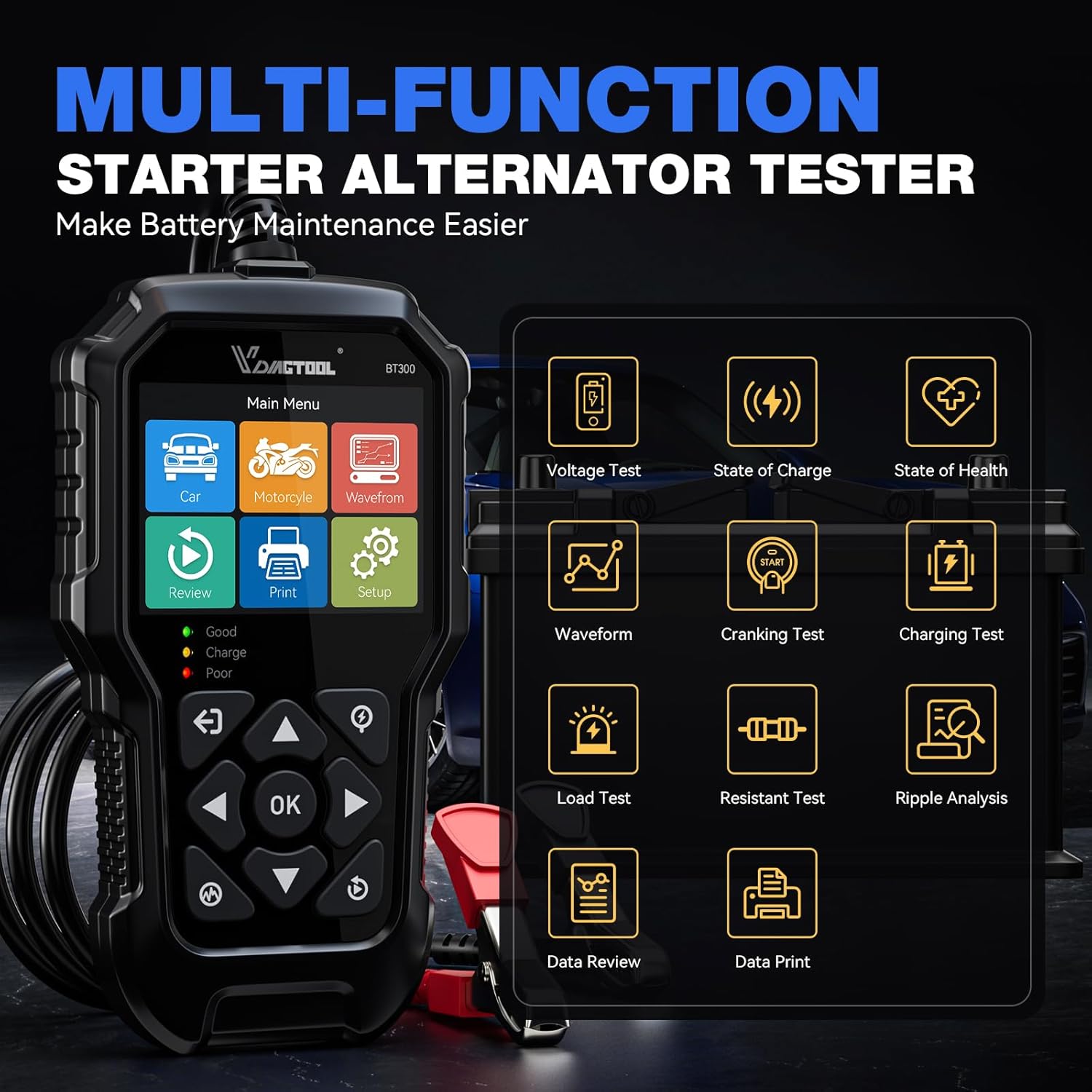
Figure 3.1: VDIAGTOOL BT300 main menu and test functions.
This image shows the BT300 handheld device with its main menu, including options for Car, Motorcycle, Waveform, Review, Print, and Setup. A grid of icons on the right illustrates various test functions like Voltage Test, State of Charge, State of Health, Waveform, Cranking Test, Charging Test, Load Test, Resistant Test, Ripple Analysis, Data Review, and Data Print.
3.2 Kompatybilność baterii
The BT300 is compatible with a wide range of 6V and 12V batteries, supporting CCA ratings from 5 to 3000. It can test various battery types, including:
- Akumulatory żelowe
- VRLA (Regular-Flooded) batteries
- AGM (Absorbed Glass Mat) batteries (Flat Plate and Spiral)
- Standard Lead-Acid (SLA) batteries

Rysunek 3.2: Zgodność BT300 z różnymi typami baterii.
The image displays the BT300 device surrounded by different types of batteries (AGM, GEL, VRLA, SLA), indicating its compatibility with 6V and 12V batteries ranging from 5-3000 CCA.
3.3 Testowanie baterii
Aby wykonać test baterii:
- Podłącz BT300 clampdo zacisków akumulatora pojazdu (czerwony do dodatniego, czarny do ujemnego).
- Select 'Battery Test' from the main menu.
- Follow the on-screen prompts to input battery type and CCA rating.
- The device will display results including SOH, SOC, CCA, Voltage i opór wewnętrzny.

Figure 3.3: BT300 battery test results screen.
This image shows the BT300 screen displaying detailed battery test results, including SOH (99%), SOC (24%), Internal Resistance (R), CCA, STD (Standard), and VOL (Voltage), along with a waveform graph.
3.4 Test układu ładowania
The charging test evaluates the alternator's ability to charge the battery and maintain proper system voltage.
- Connect the BT300 to the battery.
- Wybierz opcję „Test ładowania” z menu.
- Follow the instructions to start the engine and perform tests at idle and with electrical loads.
- The device will detect changes in battery voltage and analyze the alternator's output, including ripple voltage.
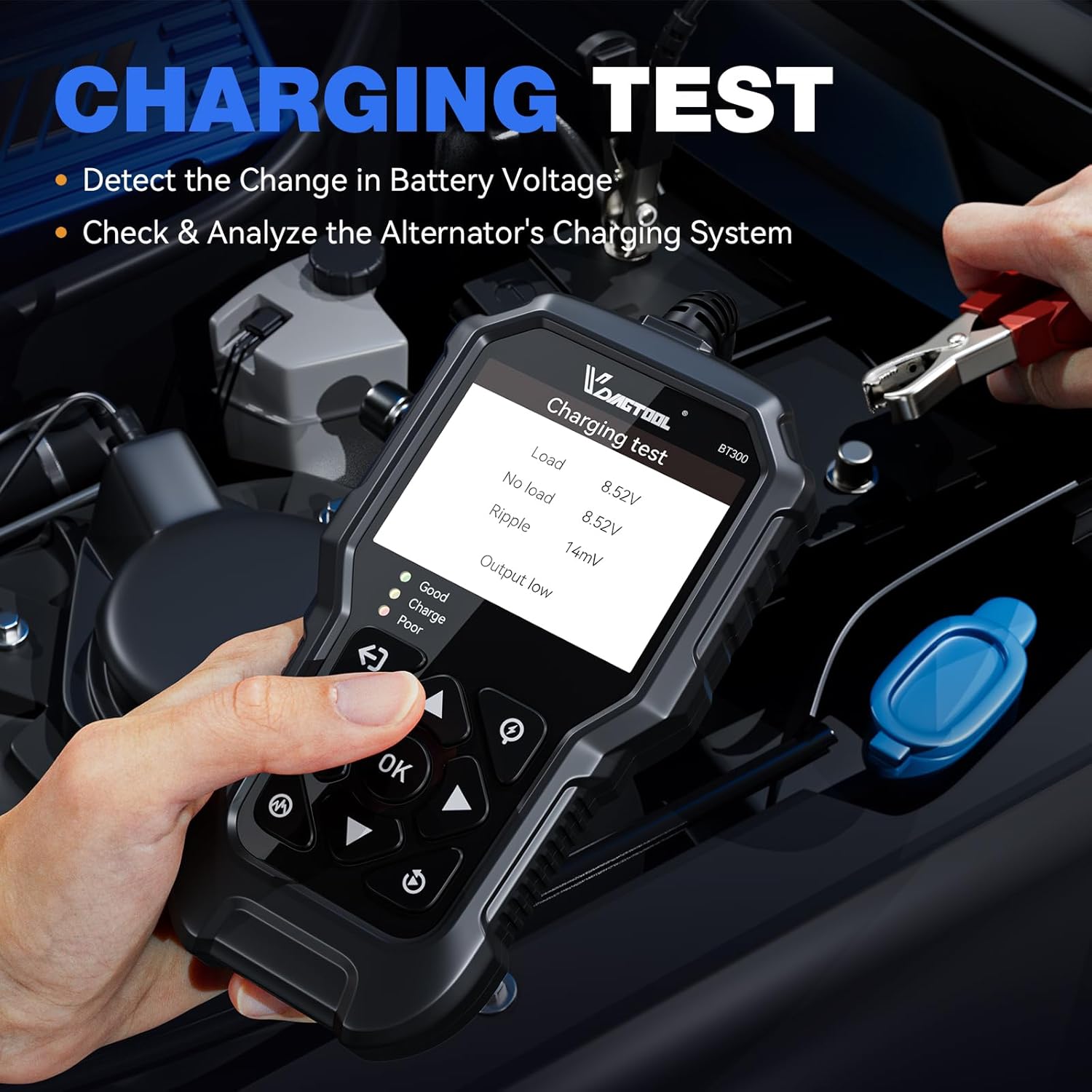
Figure 3.4: BT300 charging test results screen.
The image displays the BT300 screen showing results from a charging test, including Load, No Load, Ripple, and Output status.
4. Konfiguracja
4.1 VD70 Lite Initial Setup
- Włączanie: Naciśnij i przytrzymaj przycisk zasilania, aby włączyć urządzenie.
- Wybór języka: Aby wybrać preferowany język, postępuj zgodnie z instrukcjami wyświetlanymi na ekranie.
- Połączenie Wi-Fi: Connect to a stable Wi-Fi network for software updates and online features.
- Połączenie pojazdu: Locate your vehicle's OBD-II port (usually under the dashboard) and connect the VD70 Lite's diagnostic cable.
4.2 BT300 Initial Setup
- Włączanie: The BT300 is powered by the vehicle battery once connected.
- Wybór języka: Navigate to the 'Setup' menu to select your preferred language.
- Podłącz do akumulatora: Dołącz czerwony klamp do dodatniego (+) zacisku akumulatora i czarnego klamp do ujemnego (-) bieguna akumulatora. Upewnij się, że połączenie jest stabilne.
5. Instrukcja obsługi
5.1 Operating the VD70 Lite
- Menu główne: After powering on, the main menu will display options such as 'Auto Scan', 'Manual Diagnosis', 'Special Function', 'Report', 'Updates', 'Settings', and 'Service Center'.
- Automatyczne skanowanie: Select 'Auto Scan' to automatically identify the vehicle and perform a full system scan for DTCs.
- Diagnoza ręczna: Choose 'Manual Diagnosis' to manually select vehicle make, model, and year, then proceed with specific system diagnostics.
- Specjalna funkcja: Access 'Special Function' for maintenance services like Oil Reset, EPB Reset, etc.
- Dane Review: Use the 'Report' or 'Data Stream' options to review recorded data or generate diagnostic reports.
5.2 Operating the BT300
- Nawigacja: Use the 'Up', 'Down', 'Left', 'Right' arrow buttons to navigate through menus and adjust values. Press 'OK' to confirm selections.
- Wybierz typ testu: From the main menu, select 'Car' or 'Motorcycle' depending on the vehicle type.
- Perform Battery Test: Choose 'Battery Test' and follow the prompts to input battery specifications (e.g., CCA, battery type).
- Perform Cranking Test: Select 'Cranking Test' and follow instructions to start the engine.
- Perform Charging Test: Select 'Charging Test' and follow instructions to run the engine at idle and with loads.
- Review Wyniki: Użyj 'Review' option to view past test results.
6. Konserwacja
- Czyszczenie: Użyj miękkiego, damp cloth to clean the device screens and bodies. Avoid abrasive cleaners or solvents.
- Składowanie: Store both devices in a dry, cool environment, away from direct sunlight and extreme temperatures.
- Pielęgnacja kabli: Inspect cables regularly for damage. Do not bend or crimp cables excessively.
- Software Updates (VD70 Lite): Regularly check for and install software updates via Wi-Fi to ensure optimal performance and the latest vehicle coverage.
7. Rozwiązywanie Problemów
- Urządzenie nie włącza się:
- VD70 Lite: Ensure the device is charged or connected to the vehicle's OBD-II port.
- BT300: Ensure clamps są dobrze podłączone do zacisków akumulatora.
- Communication Error with Vehicle (VD70 Lite):
- Verify the OBD-II cable is securely connected to both the device and the vehicle.
- Ensure the vehicle ignition is on.
- Check if the vehicle supports the OBD-II protocol (most vehicles from 1996 onwards).
- Inaccurate Battery Test Results (BT300):
- Upewnij się, że akumulator klampsą czyste i mają dobry kontakt z zaciskami akumulatora.
- Verify correct battery type and CCA values are entered into the tester.
- Test a fully charged battery for comparison.
- Software Freezing (VD70 Lite):
- Uruchom ponownie urządzenie.
- Upewnij się, że oprogramowanie jest aktualne.
8. Specyfikacje
8.1 VDIAGTOOL VD70 Lite
- System operacyjny: Android 10.0
- Edytor: Czterordzeniowy 1.5GHz
- Pamięć: 2 GB pamięci RAM + 64 GB pamięci masowej
- Wyświetlacz: 7-calowy wyświetlacz LCD
- Bateria: 18.25 Wh
- Łączność: 2.4 & 5GHz Wi-Fi, CAN FD & DoIP
- Pokrycie pojazdu: 10,000+ models
- Aktualizacje oprogramowania: 3 lata za darmo
8.2 VDIAGTOOL BT300
- Pojemność bateriitage: 6 V i 12 V
- Zakres CCA: 5-3000 CCA
- Rodzaje baterii: GEL, VRLA (Regular-Flooded), AGM (Flat Plate, Spiral), SLA
- Tests Performed: Battery Test (Voltage, Load, Internal Resistance, Ripple, SOC, SOH, CCA), Cranking Test, Charging Test
9. Gwarancja i wsparcie
For warranty information, technical support, or service inquiries, please contact VDIAGTOOL customer support. Refer to the product packaging or the official VDIAGTOOL webna naszej stronie znajdziesz najnowsze dane kontaktowe i zasady gwarancji.


