1. Wprowadzenie
The LAUNCH X431 PRO Star is an advanced automotive intelligent diagnostic tool designed for comprehensive vehicle analysis. This device features an 8-inch touch screen, runs on Android 10.0, and is powered by a 2.0GHz 4-Core processor with 4GB RAM and 64GB ROM. It includes a 6000mAh battery for extended operation. The PRO Star supports fault diagnosis for a wide range of vehicle models and systems, offering functions such as code reading, code clearing, data stream analysis, reset functions, action testing, coding, and matching.

Figure 1.1: LAUNCH X431 PRO Star Diagnostic Scanner with key features highlighted.
2. Konfiguracja i pierwsze użycie
2.1 Rozpakowanie i zawartość opakowania
Carefully unpack all items from the carrying box. Verify that all components listed below are present.

Figure 2.1: Contents of the LAUNCH X431 PRO Star package.
- LAUNCH X-431 PRO STAR Tablet
- Skrzynia transportowa
- Diagnostic Cable (OBDII)
- Kabel USB typu C
- Zasilacz sieciowy
- US Plug, UK Plug, EU Plug
- Instrukcja obsługi
- Szybka porada
- Lista rzeczy do spakowania
- PIN Envelope
2.2 Początkowa konfiguracja urządzenia
- Naładuj urządzenie: Fully charge the LAUNCH X431 PRO Star tablet using the provided AC adapter and Type-C USB cable before first use.
- Włączanie: Naciśnij i przytrzymaj przycisk zasilania, aby włączyć urządzenie.
- Język i strefa czasowa: Postępuj zgodnie z instrukcjami wyświetlanymi na ekranie, aby wybrać preferowany język i strefę czasową.
- Połącz się z Wi-Fi: Connect the device to a stable Wi-Fi network (supports 2.4GHz and 5.0GHz). Internet access is required for registration and software updates.
- Zarejestruj Konto: Register an account on the manufacturer's website using the serial number provided with your device.
- Aktualizacja oprogramowania: After registration, you will be prompted to update the software. Perform all available updates to ensure optimal functionality and access to the latest vehicle data. This process may take some time.
3. Instrukcja obsługi
3.1 Podłączanie do pojazdu
- Znajdź port OBDII pojazdu, zazwyczaj znajdujący się pod deską rozdzielczą po stronie kierowcy.
- Connect the diagnostic cable to the LAUNCH X431 PRO Star tablet.
- Podłącz drugi koniec kabla diagnostycznego do portu OBDII pojazdu.
- Turn the vehicle's ignition to the 'ON' position (do not start the engine).
3.2 Podstawowe funkcje diagnostyczne
Once connected, the device will attempt to auto-detect the vehicle's VIN. If auto-detection fails, you can manually enter the vehicle information.
- Raport o stanie zdrowia: After identifying the vehicle, the system can generate a comprehensive health report.
- Pełne skanowanie systemu: Perform a complete scan of all available vehicle systems.
- Odczyt/kasowanie kodów: View diagnostic trouble codes (DTCs) and clear them after repairs.
- Dane na żywo: Monitoruj w czasie rzeczywistym strumienie danych z różnych czujników i komponentów.
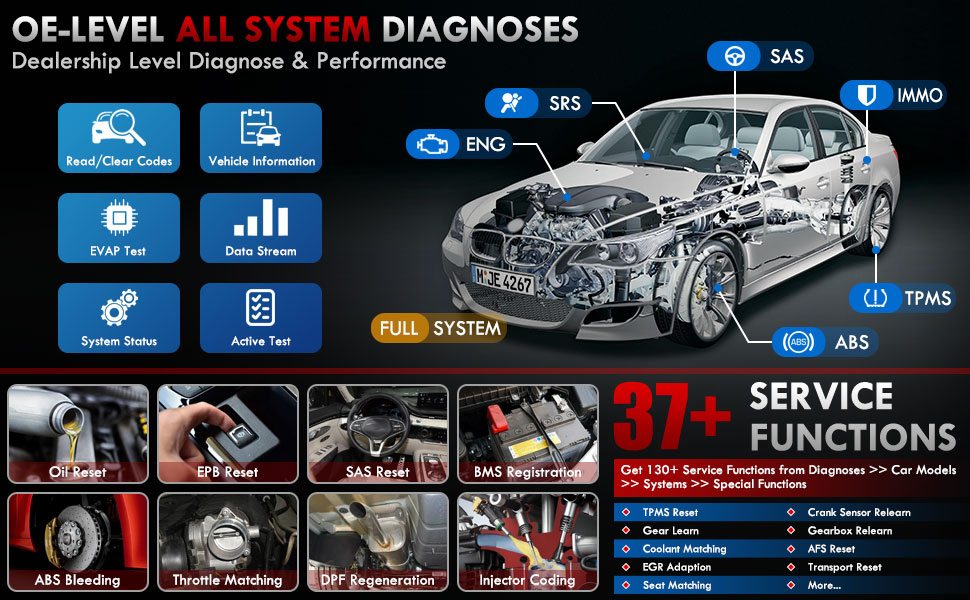
Rysunek 3.1: Koniecview of OE-level all system diagnostic capabilities.
3.3 Advanced Maintenance Services (37+)
The LAUNCH X431 PRO Star offers over 37 advanced maintenance and reset functions, with the potential to expand to over 130 types depending on the vehicle's make, model, and year. These services include:
- Reset oleju
- Krwawienie z ABS
- Rejestracja baterii
- Reset EPB (elektroniczny hamulec postojowy)
- Regeneracja DPF (filtra cząstek stałych)
- Kodowanie wtryskiwaczy
- Reset SAS (czujnik kąta skrętu)
- Dopasowanie przepustnicy
- Reset TPMS (system monitorowania ciśnienia w oponach)
- Reset skrzyni biegów
- Resetowanie zawieszenia
- Nagłówek AFSamp Nastawić

Rysunek 3.2: Examples of the 37+ maintenance service functions.
3.4 Sterowanie dwukierunkowe (test aktywny)
This feature allows the technician to send commands to vehicle systems and components to test their functionality. This helps in quickly identifying faulty components without manual disassembly. Exampobejmują:
- Turning the radiator fan on/off
- Testowanie siłowników zamków drzwi
- Energizing injectors
- Lustra operacyjne
- Otwieranie/zamykanie okien

Figure 3.3: Illustration of bi-directional control capabilities.
3.5 Kodowanie ECU
ECU Coding enables the matching, relearning, and coding of newly installed ECU modules after repairs or replacements. It also allows for the activation of higher-level vehicle functions. This includes:
- Flash/Match/Calibration
- Recode and Relearn
- Alter Configuration
- Reprogram Adaptive Data
- Recognize New CPU
- Match Current Settings
- Customize Car Features (e.g., automatic lock, reverse rearview mirror down, windows close when rain)

Rysunek 3.4: Examples of ECU coding applications.
3.6 FCA SGW Vehicle Access & Quick Guided Functions
- FCA SGW: The X431 PRO Star is AutoAuth certified, allowing secure diagnosis of SGW (Security Gateway) vehicles without limitations.
- Quick Guided: Provides step-by-step guidance for Volkswagen group vehicles, simplifying complex diagnostic procedures.
3.7 Moduły rozszerzeń
The device supports various optional add-on tools to expand its capabilities, including:
- Battery Tester (e.g., BST360)
- Videoscope (e.g., VSP-600)
- Oscilloscope (e.g., O2-2)
- TPMS Detector (e.g., TSGUN, i-TPMS)
- WiFi Thermal Printer (e.g., X-431)
- Narzędzie do kalibracji ADAS
- XPROG 3 (Immobilizer Programmer)

Figure 3.5: Various optional extension modules for the X431 PRO Star.
4. Konserwacja
4.1 Aktualizacje oprogramowania
The LAUNCH X431 PRO Star includes 2 years of free software updates. After this period, the device will continue to function, but new software releases and vehicle data updates will require a subscription. Regular updates ensure compatibility with new vehicle models and access to the latest diagnostic features.
4.2 Ogólna opieka
- Utrzymuj urządzenie w czystości, bez kurzu i wilgoci.
- Przechowuj urządzenie w ochronnym etui, gdy nie używasz go.
- Unikaj wystawiania urządzenia na działanie ekstremalnych temperatur lub bezpośredniego światła słonecznego przez dłuższy czas.
- Use only the provided charging accessories to prevent damage.
5. Rozwiązywanie Problemów
If you encounter issues with your LAUNCH X431 PRO Star, consider the following:
- Problemy z połączeniem: Ensure the diagnostic cable is securely connected to both the scanner and the vehicle's OBDII port. Verify the vehicle's ignition is in the 'ON' position.
- Awarie oprogramowania: Ensure the device's software is up to date. A factory reset may resolve persistent software issues (note: this will erase user data).
- Zgodność pojazdu: While the device covers over 99% of vehicles, specific advanced functions may vary by make, model, and year. Consult the vehicle coverage list or contact support for details.
- Wydajność urządzenia: If the device is slow or unresponsive, try restarting it. Ensure sufficient battery charge.
6. Specyfikacje
| Funkcja | Specyfikacja |
|---|---|
| Model | LAUNCH X-431 PRO STAR |
| System operacyjny | Android 10.0 |
| Edytor | 2.0 GHz 4-rdzeniowy |
| BARAN | 4 GB |
| ROM (pamięć masowa) | 64 GB |
| Wyświetlacz | 8-calowy ekran dotykowy (rozdzielczość 1280x800) |
| Bateria | 6000mAh |
| Łączność | Wi-Fi (2.4/5.0 GHz), CANFD, DoIP |
| Kamera | 8.0 MP Rear-facing |
| Waga przedmiotu | 8.4 funta |
| Wymiary opakowania | 13.6 x 13.2 x 6.1 cala |
| Typ dopasowania samochodowego | Uniwersalne dopasowanie |
7. Gwarancja i wsparcie
7.1 Informacje o gwarancji
The LAUNCH X431 PRO Star comes with a 2-letnia gwarancja obejmujące wady produkcyjne i awarie sprzętu.
7.2 Wsparcie techniczne
LAUNCH provides 7*24 technical support for any post-sales issues or technical assistance. For support, please refer to the contact information provided in your product packaging or visit the official LAUNCH webstrona.


