Wstęp
This instruction manual provides essential information for the setup, operation, and maintenance of your LOUTOC Replacement Remote Control, model URMT26CND002. This remote is designed as a universal replacement for various Philips Android and Google Smart TV models. Please read this manual thoroughly before use to ensure optimal performance and longevity of your device.
Organizować coś
1. Instalacja baterii
Do pilota potrzebne są dwie (2) baterie AAA (brak w zestawie). Aby je zainstalować, wykonaj następujące czynności:
- Znajdź pokrywę komory baterii z tyłu pilota.
- Aby otworzyć komorę, przesuń pokrywę w dół.
- Włóż dwie baterie AAA, upewniając się, że bieguny dodatni (+) i ujemny (-) są prawidłowo ustawione względem oznaczeń wewnątrz komory.
- Przesuń pokrywę komory baterii z powrotem na miejsce, aż zatrzaśnie się pewnie.
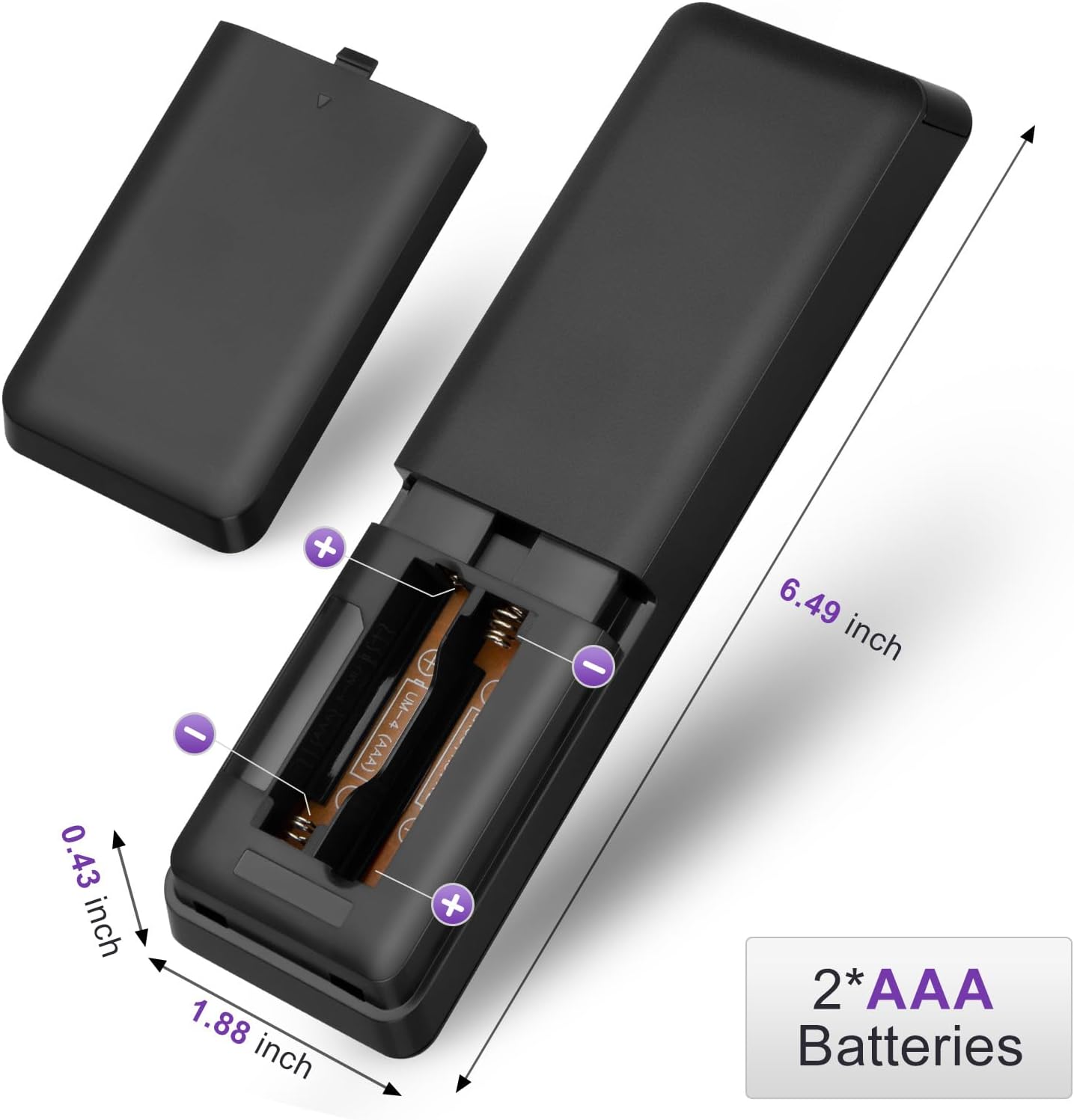
Figure 1: Battery installation for the LOUTOC remote control.
2. Początkowe użycie
This LOUTOC remote control is pre-programmed and designed to work immediately with compatible Philips Smart TVs. No additional setup or pairing is required. Simply install the batteries, point the remote at your TV, and begin use.

Figure 2: Key features including no setup required and fast response time.
Instrukcja obsługi
The LOUTOC remote control features a standard layout for easy navigation and control of your Philips Smart TV. Below is a detailed description of each button's function.
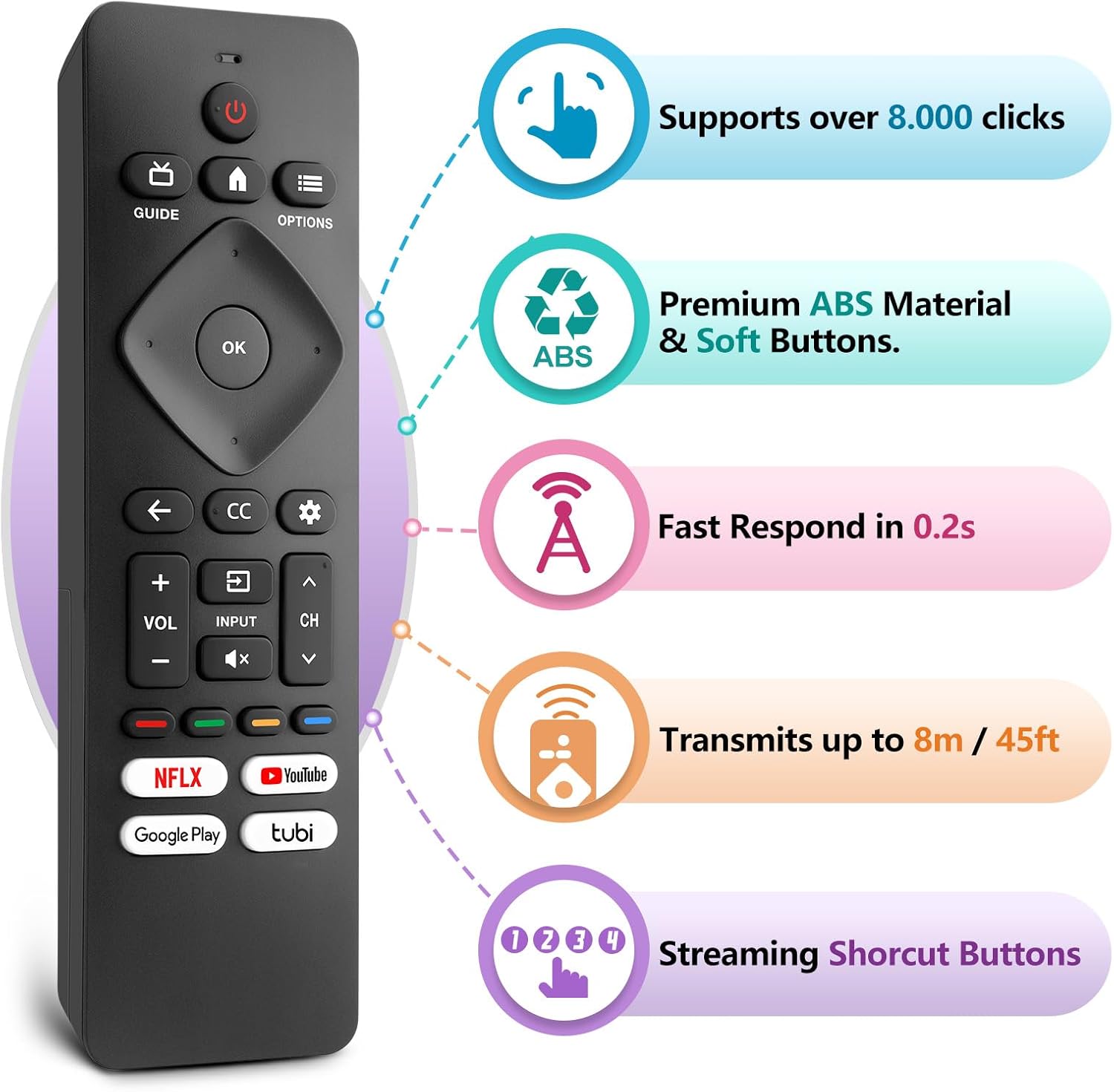
Figure 3: LOUTOC Remote Control Button Layout and Functions.
- MOC: Turns the TV on or off. Press for less than 1 second for Quick Start Standby. Hold for 1 second or more for Low Power Standby.
- PRZEWODNIK: Displays the TV program guide (availability may vary by service provider and region).
- DOM: Accesses your apps, Live TV, input devices, settings, and the Google Play Store.
- OPCJE: Provides quick access to TV settings (settings vary depending on active screen).
- CURSOR (Up, Down, Left, Right) & OK: Moves to select an item and confirms selections on the menu.
- Z POWROTEM: Powrót do poprzedniego ekranu.
- CC (Napisy dla niesłyszących): Selects closed caption settings.
- PANEL: Accesses the Google TV dashboard for user settings, notifications, and kids mode.
- WEJŚCIE: Selects the input source for connected devices.
- NIEMY: Toggles the sound on and off.
- GŁOŚNOŚĆ +/-: reguluje poziom głośności.
- CH +/-: Selects the next or previous channel.
- COLOR BUTTONS (Red, Green, Yellow, Blue): Works as direct access to user-specified net apps or functions.
Przyciski skrótów
The remote includes dedicated shortcut buttons for popular streaming services:
- NETFLIX
- YouTube
- Google Play
- Tubi

Figure 4: Dedicated streaming service shortcut buttons.
Zgodność
This LOUTOC remote control is compatible with a wide range of Philips Android and Google Smart TV models. It is designed to replace various original Philips remote controls.
Compatible Philips Google TV Models:
- 70PUL7553/F7, 75PUL7552/F7, 65PUL7552/F7, 55PUL7552/F7, 50PUL7552/F7
- 43PUL7672/F7, 43PUL7652/F7, 65PUL7672/F7, 55PUL7672/F7, 50PUL7672/F7
- Generally compatible with Philips Google TV 7000 and 7600 Series.
Compatible Philips Android TV Models:
- 65PFL5766/F7, 55PFL5766/F7, 50PFL5766/F7, 43PFL5766/F7, 50PFL5806/F7
- 75PFL5604/F7, 75PFL5604/F7A, 75PFL5604/F7E, 75PFL5704/F7A, 75PFL5704/F7
- 32PFL5505/F7, 65PFL5604/F7, 55PFL5604/F7, 50PFL5604/F7, 43PFL5604/F7
- 50PFL5604/F7A, 43PFL5766/F6, 50PFL5766/F6, 65PFL5766/F6, 55PFL5766/F6
- 55PFL5704/F7, 65PFL5704/F7, 50PFL5704/F7, 43PFL5704/F7, 65PFL5504/F7
- 65PFL5604/F7A, 55PFL5604/F7A, 55PFL5766/F7E
- Generally compatible with Philips Android TV 5000, 5500, 5700, 5704, and 5800 Series.

Figure 5: Compatibility with Philips Google TV and Android TV series.
Specyfikacje
| Funkcja | Szczegół |
|---|---|
| Numer modelu | URMT26CND002 |
| Wymiary | 6 x 1.2 x 0.8 cala (15.24 x 3.05 x 2.03 cm) |
| Waga przedmiotu | 1.76 uncji (50 grama) |
| Wymagane baterie | 2 baterie AAA (brak w zestawie) |
| Odległość transmisji | Approximately 6-8 meters (19-26 feet) |
| Czas reakcji | W ciągu 0.5 sekund |
| Tworzywo | Premium ABS Material |
| Cechy specjalne | Ergonomic, Lightweight, No Programming Required, Pre-Programmed, Universal |
Rozwiązywanie problemów
- Pilot nie odpowiada:
- Sprawdź, czy baterie zostały włożone prawidłowo, z zachowaniem właściwej polaryzacji (+/-).
- Wymień stare baterie na nowe baterie AAA.
- Check for any obstructions between the remote and the TV's infrared receiver.
- Ensure you are within the effective operating range (6-8 meters) of the TV.
- Niektóre przyciski nie działają:
- Verify that the button is clean and not stuck.
- Some functions may be specific to certain TV models or require the TV to be in a particular mode (e.g., input selection).
- No Voice Control:
- This remote control does not support voice control functionality.
Konserwacja
Aby zapewnić długowieczność i prawidłowe działanie pilota, należy przestrzegać poniższych wskazówek dotyczących konserwacji:
- Czyszczenie: Use a soft, dry cloth to clean the remote. Avoid using liquid cleaners or abrasive materials.
- Składowanie: Przechowuj pilota w chłodnym, suchym miejscu, z dala od bezpośredniego światła słonecznego i ekstremalnych temperatur.
- Pielęgnacja baterii: Jeżeli pilot nie będzie używany przez dłuższy czas, wyjmij baterie, aby zapobiec wyciekowi.
- Unikaj kropli: Chroń pilota przed uderzeniami fizycznymi, gdyż mogą one uszkodzić podzespoły wewnętrzne.
Gwarancja i wsparcie
LOUTOC offers a 60-day replacement policy for this product. If you encounter any issues or have questions regarding your order, please contact LOUTOC customer support directly. Our team aims to respond within 12 hours during the work week to assist you.
For further assistance, please refer to the contact information provided with your purchase or visit the official LOUTOC store on Amazon: LOUTOC Store