1. Koniec produktuview
The VIVOTEK FD9383-HTV is a high-performance 5-megapixel outdoor network dome camera designed for robust surveillance applications. It features a 2.8-12mm motorized varifocal lens, providing flexibility in field of view, and integrated IR LEDs for clear night vision up to 98 feet. This camera is built to withstand harsh outdoor conditions with IP66 and IK10 ratings, ensuring protection against dust, water, and vandalism. It also includes a built-in microphone for audio monitoring.
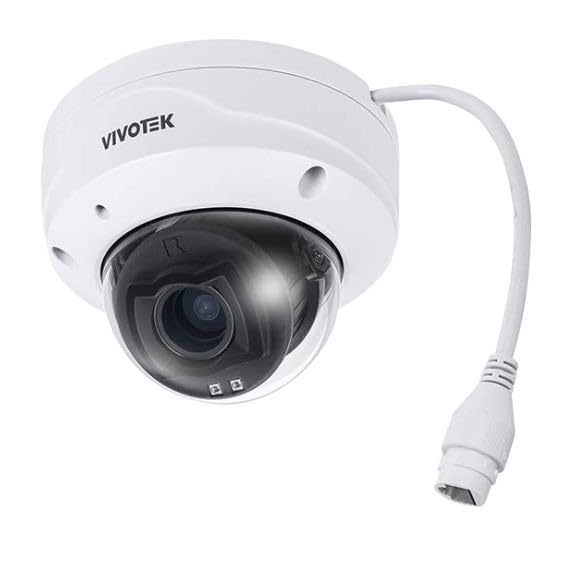
Obraz 1.1: Przód view of the VIVOTEK FD9383-HTV 5MP Outdoor Network Dome Camera.
Główne cechy:
- 2560 x 1920 Resolution at 30 fps for high-quality video.
- IR LEDs for Night Vision up to 98 feet (30 meters).
- 2.8-12mm Motorized Varifocal Lens for flexible viewkąty.
- 95.4 to 28.7° Horizontal Angle of View.
- Built-In Microphone for audio capture.
- IP66-Rated for outdoor use, protecting against dust and water.
- IK10-Rated for vandal resistance.
- Supports microSD Cards up to 1TB for local storage.
- RJ45 Ethernet with Power over Ethernet (PoE) Technology.
- Complies with ONVIF Profiles G, S, T for broad compatibility.
2. Zawartość opakowania
Sprawdź, czy wszystkie przedmioty są obecne i w dobrym stanie. Jeśli któregokolwiek z nich brakuje lub jest uszkodzony, natychmiast skontaktuj się ze sprzedawcą.
- VIVOTEK FD9383-HTV Network Dome Camera
- Zestaw śrub montażowych (śruby, kotwy ścienne)
- Zestaw złączy wodoodpornych
- Alignment Sticker/Drill Template
- Szybki przewodnik instalacji
- Software CD (or download link information)
3. Informacje dotyczące bezpieczeństwa
Please read these safety instructions carefully before operating the device to prevent injury to yourself or others and to avoid damage to the device. Keep this manual for future reference.
- Instalacja: Instalację powinien wykonywać wyłącznie wykwalifikowany personel, zgodnie z lokalnymi przepisami.
- Źródło zasilania: Use only the specified power source (PoE or 12V DC adapter, if applicable) to avoid fire or electric shock.
- Środowisko: Nie wystawiaj aparatu na działanie ekstremalnych temperatur, wilgoci ani czynników korozyjnych poza określonymi warunkami pracy.
- Czyszczenie: Przed czyszczeniem odłącz zasilanie. Użyj miękkiej, suchej ściereczki. Nie używaj środków czyszczących w płynie ani aerozolu.
- Serwisowanie: Nie próbuj samodzielnie naprawiać tego produktu. Wszelkie czynności serwisowe należy powierzyć wykwalifikowanemu personelowi serwisowemu.
4. Konfiguracja
4.1 Fizyczna instalacja
The FD9383-HTV camera is designed for wall or ceiling mounting. Ensure the mounting surface is strong enough to support the camera's weight.
- Przygotuj powierzchnię montażową: Use the provided drill template to mark the screw holes on the desired mounting location.
- Wiercenie otworów: Drill pilot holes for the mounting screws and, if necessary, for the network cable. Insert wall anchors if mounting on drywall or masonry.
- Zamontuj wspornik montażowy: Secure the camera's mounting bracket to the surface using the provided screws.
- Podłącz kable: Route the Ethernet cable through the mounting surface or cable entry point. Connect the RJ45 connector to the camera's network port. If not using PoE, connect a 12V DC power adapter (sold separately) to the power input. Ensure waterproof connections for outdoor installations.
- Secure Camera Body: Attach the camera body to the mounting bracket. Adjust the camera's orientation and angle as needed.
- Zakończ instalację: Secure all covers and ensure the camera is firmly mounted and protected from the elements.

Image 4.1: Illustrative diagram of camera mounting and cable connection.
4.2 Połączenie sieciowe
Kamera obsługuje technologię Power over Ethernet (PoE), co upraszcza instalację i pozwala na przesyłanie zasilania i danych za pomocą jednego kabla Ethernet.
- Connect the camera to a PoE-enabled switch or a PoE injector using a standard Ethernet cable.
- Alternatively, connect to a standard network switch and use a separate 12V DC power adapter.
- Ensure your network is configured to assign an IP address to the camera (DHCP recommended for initial setup).
4.3 Konfiguracja początkowa
After physical installation and network connection, you need to access the camera's web interfejs do konfiguracji początkowej.
- Odkryj aparat: Use VIVOTEK's IP Search utility (available on their website) or a network scanner to find the camera's IP address on your network.
- Dostęp Web Interfejs: Otwórz web browser (e.g., Chrome, Firefox) and enter the camera's IP address in the address bar.
- Login: The default username is typically 'root' and the password is 'pass'. You will be prompted to change the password upon first login for security reasons.
- Podstawowe ustawienia: Configure essential settings such as date/time, network settings (if not using DHCP), and user accounts.
5. Obsługa
5.1 Dostęp do interfejsu aparatu
Once configured, you can access the camera's live view and settings through its web interface or compatible VIVOTEK software/NVR systems.
- Enter the camera's IP address in your web przeglądarka.
- Log in with your configured username and password.
- The interface provides access to live video, recording settings, motion detection, and other advanced features.
5.2 Adjusting Lens and Focus
The FD9383-HTV features a motorized varifocal lens, allowing remote adjustment of zoom and focus.
- Navigate to the 'Video' or 'Lens' settings section in the web interfejs.
- Use the zoom controls to adjust the focal length (2.8mm to 12mm) to achieve the desired field of view.
- Utilize the focus controls to sharpen the image. Many VIVOTEK cameras offer a one-touch focus feature for automatic adjustment.
5.3 Ustawienia widzenia nocnego
The camera automatically switches to night vision mode in low-light conditions using its IR LEDs.
- In the 'Image' or 'IR' settings, you can configure the IR illuminator's behavior (e.g., auto, manual on/off).
- Adjust IR intensity if available, to prevent overexposure or underexposure in specific scenarios.
5.4 Rejestrowanie i przechowywanie
The camera supports various recording methods, including local storage on a microSD card and network video recording (NVR).
- Karta MicroSD: Insert a compatible microSD card (up to 1TB) into the camera's slot. Format the card via the web interface. Configure recording schedules and triggers (e.g., continuous, motion-triggered).
- NVR/NAS: Connect the camera to a VIVOTEK NVR or a compatible Network Attached Storage (NAS) device. Configure recording settings on the NVR/NAS.
5.5 Wykrywanie ruchu
Configure motion detection to trigger recordings, send alerts, or activate other actions.
- Access the 'Event' or 'Motion Detection' settings in the web interfejs.
- Define detection zones within the camera's field of view.
- Dostosuj poziomy czułości, aby zminimalizować liczbę fałszywych alarmów.
- Set up actions to be taken when motion is detected (e.g., record video, send email notification).
6. Konserwacja
6.1 Czyszczenie
Regularne czyszczenie pozwala zachować optymalną jakość obrazu i wydłużyć żywotność aparatu.
- Obiektyw: Gently wipe the lens with a soft, lint-free cloth. For stubborn dirt, use a lens cleaning solution specifically designed for optical surfaces. Avoid abrasive materials.
- Mieszkania: Wytrzyj obudowę kamery za pomocąamp płótno. Nie używaj silnych detergentów ani rozpuszczalników.
- Pokrywa kopuły: If applicable, carefully clean the dome cover to ensure clear visibility.
6.2 aktualizacji oprogramowania sprzętowego
Okresowo sprawdzaj VIVOTEK website for firmware updates. Firmware updates often include bug fixes, performance improvements, and new features.
- Download the latest firmware for your FD9383-HTV model from the official VIVOTEK support page.
- Uzyskaj dostęp do kamery web interface and navigate to the 'System' or 'Maintenance' section.
- Follow the on-screen instructions to upload and install the firmware. Do not power off the camera during the update process.
7. Rozwiązywanie Problemów
This section provides solutions to common issues you might encounter with your VIVOTEK FD9383-HTV camera.
| Problem | Możliwa przyczyna | Rozwiązanie |
|---|---|---|
| Kamera nie włącza się | No power from PoE switch/injector; faulty power adapter; loose cable connection. | Check PoE status on switch; verify power adapter functionality; ensure all cables are securely connected. |
| Nie można uzyskać dostępu do kamery przez sieć | Incorrect IP address; network cable issue; firewall blocking access; camera not receiving an IP address. | Verify IP address; check network cable integrity; temporarily disable firewall; use IP Search utility to find camera. |
| Poor image quality (blurry, dark) | Lens out of focus; dirty lens/dome; insufficient lighting; incorrect image settings. | Dostosuj ostrość za pomocą web interface; clean lens/dome; check IR settings; reset image settings to default. |
| Wykrywanie ruchu nie działa | Detection zones not configured; sensitivity too low; event actions not set up. | Configure detection zones; increase sensitivity; ensure event actions (e.g., record, notify) are enabled. |
| Karta MicroSD nie nagrywa | Card not formatted; card full; recording schedule not active; faulty card. | Format microSD card in camera settings; check recording schedule; replace card if faulty. |
8. Specyfikacje
Detailed technical specifications for the VIVOTEK FD9383-HTV camera.
| Funkcja | Specyfikacja |
|---|---|
| Czujnik obrazu | 1/2.8" Type CMOS |
| Rezolucja | 2560 x 1920 przy 30 fps |
| Długość ogniskowej | 2.8 to 12mm Motorized Varifocal Lens |
| Kąt poziomy View | 95.4 do 28.7° |
| Wizja nocna | IR LEDs up to 98 feet (30 meters) |
| Audio | Wbudowany mikrofon |
| Składowanie | Supports microSD Cards up to 1TB |
| Interfejs sieciowy | 1x RJ45 Input (PoE) |
| Ocena środowiskowa | IP66 (odporność na kurz i wodę) |
| Odporność na wandalizm | IK10-Rated |
| ONVIF Compliance | Zawodowiecfiles G, S, T |
| Wymiary produktu | 5.3 x 4.1 x 4.1 cala (13.5 x 10.4 x 10.4 cm) |
| Waga przedmiotu | 1.9 funtów (0.86 kg) |
9. Gwarancja i wsparcie
Produkty VIVOTEK objęte są ograniczoną gwarancją. Szczegółowe warunki gwarancji można znaleźć w karcie gwarancyjnej dołączonej do produktu lub na oficjalnej stronie VIVOTEK. webstrona.
For technical support, product documentation, and software downloads, please visit the VIVOTEK official support portal:
https://www.vivotek.com/support
When contacting support, please have your camera's model number (FD9383-HTV) and serial number ready.


