Wstęp
The Beghelli Salvalavita SLV20 Plus is a mobile phone specifically designed for seniors, prioritizing ease of use, safety, and clear communication. It features large backlit keys, a high-volume speaker, a bright 2.8-inch color display, and a dedicated SOS button for emergencies. This manual provides detailed instructions to help you set up, operate, and maintain your device.
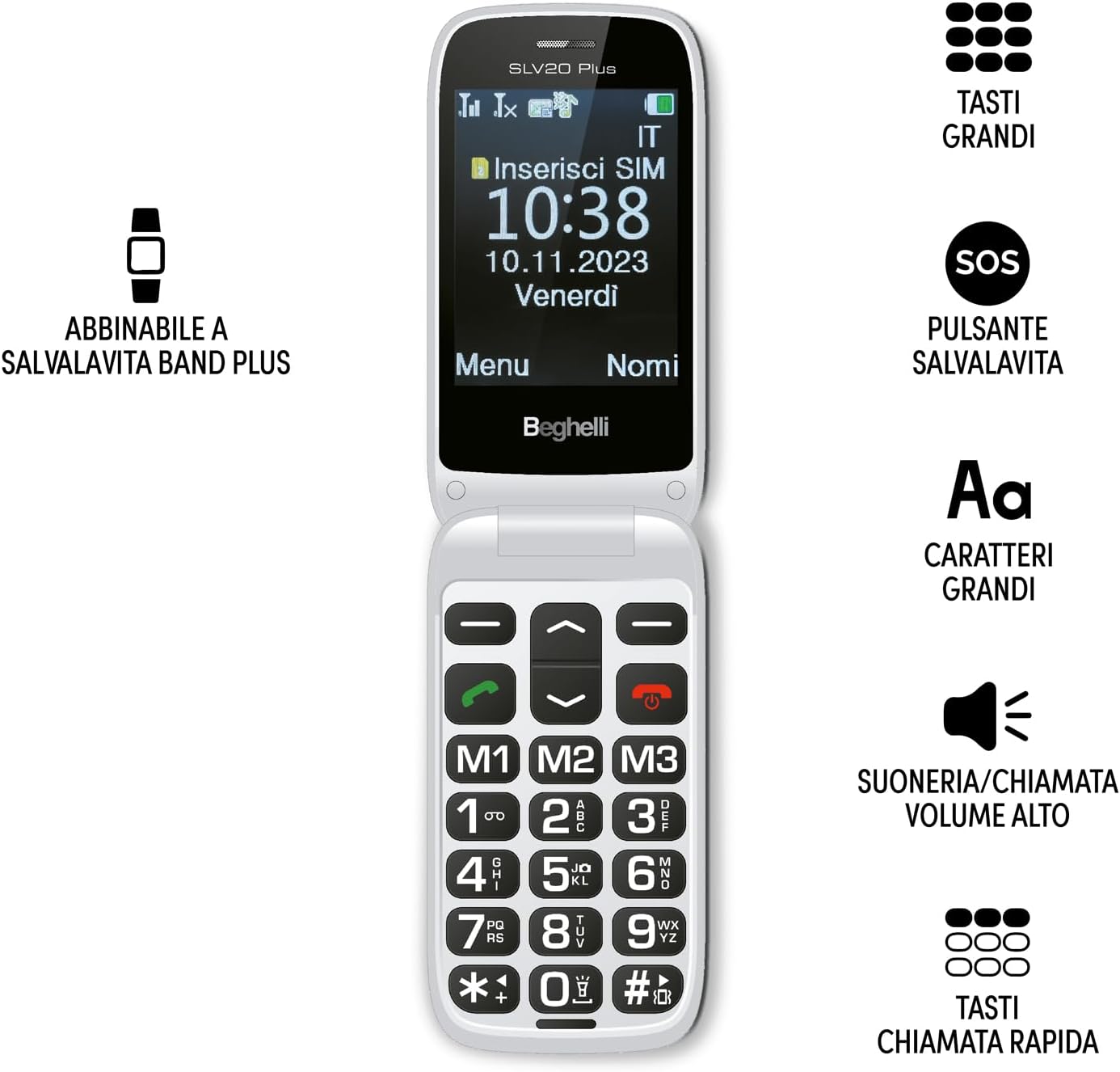
Image: The Beghelli Salvalavita SLV20 Plus, shown open to highlight its large, easy-to-read keys and clear display, designed for user convenience.
Organizować coś
1. Rozpakowanie i komponenty
Przed rozpoczęciem upewnij się, że w opakowaniu znajdują się wszystkie elementy:
- Beghelli Salvalavita SLV20 Plus Mobile Phone
- Akumulator litowo-jonowy do ponownego ładowania
- Baza ładująca
- Zasilacz
- Instrukcja obsługi (ten dokument)

Image: The included charging base and power adapter for the Beghelli Salvalavita SLV20 Plus, facilitating easy and convenient recharging.
2. Instalacja karty SIM
- Wyłącz telefon i zdejmij tylną obudowę.
- Znajdź gniazdo karty SIM.
- Insert your activated SIM card into the slot, ensuring the gold contacts face downwards and the cut corner aligns correctly.
- Delikatnie wciśnij kartę SIM, aż wskoczy na miejsce.
- Załóż tylną obudowę.
3. Montaż i ładowanie akumulatora
- With the back cover removed, insert the rechargeable Lithium-ion battery into its compartment, aligning the contacts.
- Załóż tylną obudowę.
- Podłącz zasilacz do stacji ładującej.
- Place the phone into the charging base. Ensure the phone is correctly seated and the charging indicator appears on the screen.
- For first use, charge the phone for at least 4 hours to ensure optimal battery performance.
4. Pierwsze włączenie zasilania
Press and hold the Power/End Call button (usually marked with a red phone icon) until the screen lights up and the Beghelli logo appears. The phone will then guide you through any initial setup steps, such as setting the language or time.
Instrukcja obsługi
1. Podstawowe funkcje telefonu
- Nawiązywanie połączenia: Dial the desired number using the large keypad and press the Green Call button.
- Odbieranie połączenia: Gdy telefon zadzwoni, naciśnij zielony przycisk połączenia, aby odebrać.
- Zakończenie połączenia: Naciśnij czerwony przycisk Zakończ połączenie.
- Regulacja głośności: Use the dedicated volume keys on the side of the phone during a call or to adjust ringtone volume. The phone features high volume for clear audio.
- Wysyłanie SMS-ów: Navigate to the 'Messages' menu, select 'New Message', type your text using the keypad, and select the recipient from your contacts or enter a number.
2. SOS Button Functionality
The SOS button is a critical safety feature. In an emergency, press and hold the SOS button located on the back of the phone for a few seconds. The phone will automatically:
- Initiate calls to up to 5 pre-programmed emergency numbers in sequence until one is answered.
- Send a pre-set emergency SMS message to these same 5 numbers.
Programowanie numerów SOS: Refer to the phone's settings menu under 'SOS Settings' to add or modify emergency contact numbers and the emergency SMS message.
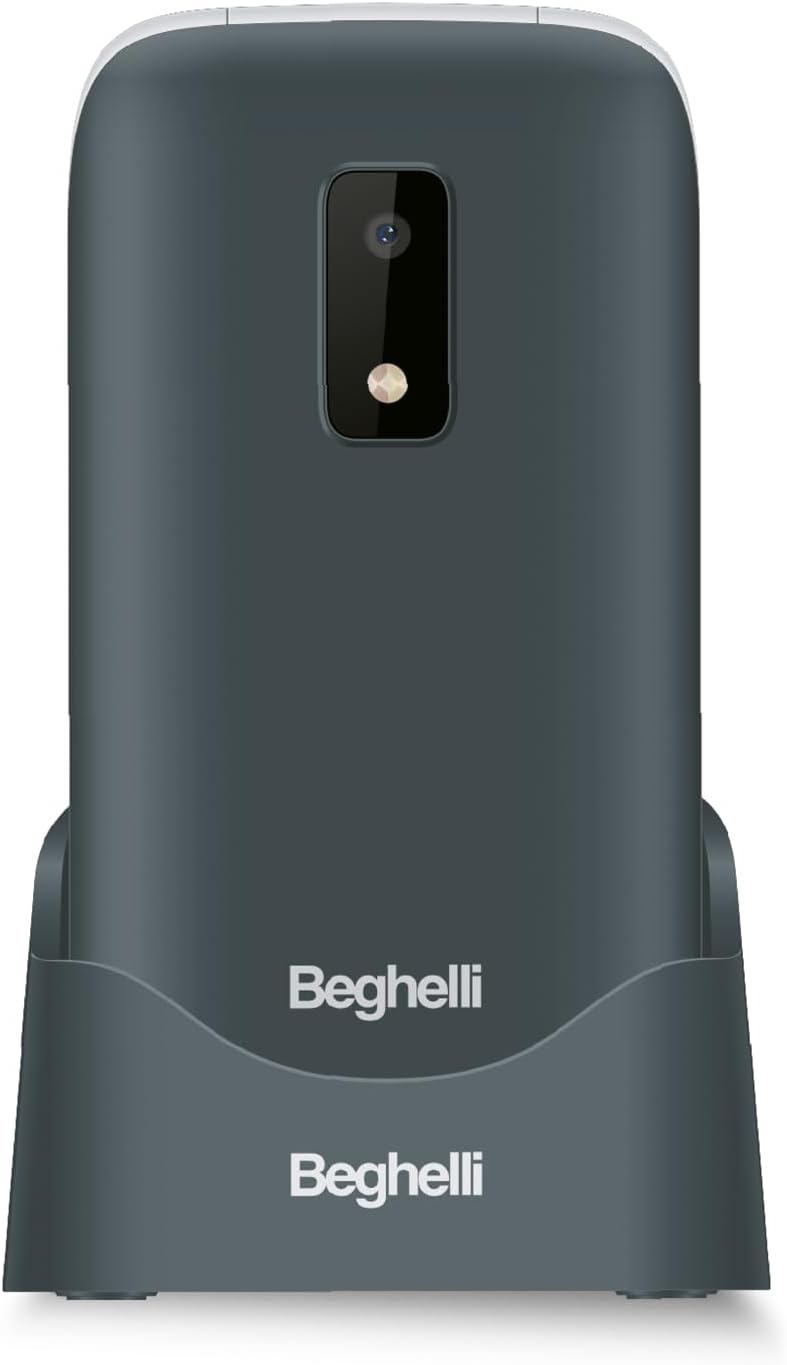
Zdjęcie: Tył view of the Beghelli Salvalavita SLV20 Plus, highlighting the prominent SOS button and integrated camera, designed for quick access to emergency features.
3. Quick Dial Keys (M1, M2, M3)
The M1, M2, and M3 keys allow for quick dialing of frequently contacted numbers. To program these keys:
- Przejdź do menu „Ustawienia”.
- Select 'Speed Dial' or 'Quick Dial Settings'.
- Choose M1, M2, or M3 and assign a contact from your phonebook or enter a new number.
- Once programmed, simply press and hold the M1, M2, or M3 key to dial the assigned number.
4. Dodatkowe funkcje
- Kamera: Access the camera from the main menu to take photos. Photos are saved to the phone's memory or an inserted SD card (if applicable).
- Flesz: Activate the built-in flashlight via a dedicated button or menu option for convenience in low-light conditions.
- Radio FM: Włącz swoje ulubione stacje radiowe FM. Słuchawki mogą być potrzebne jako antena.
5. Optional Salvalavita 24/7 Service
The Beghelli Salvalavita SLV20 Plus can be connected to the optional Salvalavita 24/7 Center service. This service provides constant support and protection by connecting your SOS button directly to a monitoring center. For more information on subscribing to this service, please refer to the documentation provided with the service or visit the official Beghelli webstrona.
Konserwacja
- Czyszczenie: Do czyszczenia obudowy telefonu używaj miękkiej, suchej ściereczki. Unikaj stosowania płynnych środków czyszczących i materiałów ściernych.
- Pielęgnacja baterii: Aby przedłużyć żywotność baterii, należy unikać ekstremalnych temperatur. Nie pozostawiaj telefonu całkowicie rozładowanego przez dłuższy czas.
- Składowanie: Jeśli przechowujesz telefon przez dłuższy czas, naładuj baterię do około 50% i przechowuj ją w chłodnym, suchym miejscu.
Rozwiązywanie problemów
| Problem | Możliwe rozwiązanie |
|---|---|
| Telefon nie włącza się. | Upewnij się, że bateria jest prawidłowo włożona i naładowana. Podłącz telefon do ładowarki i spróbuj ponownie. |
| Brak sygnału sieciowego. | Check if the SIM card is properly inserted. Ensure you are in an area with network coverage. Contact your service provider if the issue persists. |
| Cannot hear calls clearly. | Adjust the call volume using the side keys. Ensure the speaker is not obstructed. |
| Przycisk SOS nie działa. | Verify that emergency numbers are correctly programmed in the SOS settings. Ensure the phone has network signal. |
If you encounter issues not listed here or if the suggested solutions do not resolve the problem, please contact Beghelli customer support for assistance.
Specyfikacje
| Funkcja | Szczegół |
|---|---|
| Numer modelu | SLV20 Plus |
| Wymiary (dł. x szer. x wys.) | Wymiary 10.9 x 5.5 x 1.9 cm |
| Waga | 100 gramów |
| Typ baterii | 1 litowo-jonowy (w zestawie) |
| Rozmiar wyświetlacza | 2.8 cali |
| Główne cechy | Large Backlit Keys, SOS Button, High Volume, Flashlight, FM Radio, Camera, Quick Dial Keys |
Gwarancja i wsparcie
The Beghelli Salvalavita SLV20 Plus typically comes with a manufacturer's warranty. Please refer to the warranty card included in your product packaging for specific terms and conditions. Generally, spare parts availability is indicated for 2 years from the date of purchase.
In case of product defects or issues, a refund or replacement policy is usually available for 30 days from the purchase date, subject to retailer terms.
For technical support, service, or warranty claims, please contact Beghelli customer service through their official website or the contact information provided in your product documentation. Always have your model number (SLV20 Plus) and proof of purchase ready when contacting support.


