Wstęp
The PeriPage P40 is a sleek, portable mini thermal printer designed for mobile and wireless printing. It utilizes Bluetooth connectivity and requires no ink, making it suitable for printing documents, photos, and even tattoo stencils directly from your Android or iOS device. This manual provides comprehensive instructions for setting up, operating, and maintaining your P40 printer.

Image: The PeriPage P40 Mini Thermal Printer, a compact white device.
Informacje dotyczące bezpieczeństwa
- Do not disassemble, repair, or modify the printer.
- Keep the printer away from water, moisture, and direct sunlight.
- Należy używać wyłącznie wskazanego kabla ładującego i zasilacza.
- Unikaj dotykania głowicy drukującej bezpośrednio po drukowaniu, gdyż może być gorąca.
- Store the printer and thermal paper in a cool, dry place.
- Przechowywać w miejscu niedostępnym dla dzieci.
Zawartość opakowania
Proszę sprawdzić zawartość opakowania po rozpakowaniu:
- PeriPage P40 Mini Thermal Printer
- Thermal Paper Roll (Included Components: Paper)
- Kabel do ładowania USB typu C.
- Instrukcja obsługi (ten dokument)
Produkt ponadview
Familiarize yourself with the various parts of your PeriPage P40 printer.

Obraz: Szczegółowy view of the PeriPage P40 printer showing the Power Button with Indicator Light, Cover-open Button, Type-C Interface for charging/connection, and the internal mechanism for easy paper replacement.
- Przycisk zasilania / kontrolka: Służy do włączania/wyłączania drukarki i wskazuje jej stan.
- Cover-open Button: Zwalnia górną pokrywę w celu załadowania papieru.
- Interfejs typu C: For charging the printer and connecting to a computer (if applicable, though primarily Bluetooth).
- Otwór wyjściowy papieru: Where printed paper emerges.
- Przedział papieru: Holds the thermal paper.
Organizować coś
1. Ładowanie drukarki
Before first use, fully charge the printer. Connect the provided USB Type-C cable to the printer's Type-C interface and the other end to a USB power adapter (not included) or a computer's USB port. The indicator light will show charging status (e.g., red while charging, green when fully charged).
The printer features a 2600mAh battery, offering approximately 3 hours of continuous printing or up to 90 days of standby time on a full charge, capable of printing around 360 papers.
Image: Information graphic detailing the PeriPage P40's battery performance: 90 days standby, 2600mAh battery, 3 hours continuous print, and 360 papers print per full charge.
2. Installing Thermal Paper
The PeriPage P40 supports two types of thermal paper: folding paper and inner roll paper.

Image: Illustration showing the two supported paper types for the PeriPage P40: Folding Paper for automatic paging and multiple paper printing, and Inner Roll Paper for portability, free space, and customized paper length.
- Press the Cover-open Button to open the printer's top cover.
- Insert the thermal paper into the paper compartment, ensuring the printing side faces the print head. For roll paper, ensure it unwinds from the bottom. For folding paper, align it correctly.
- Pull a small amount of paper out of the paper exit slot.
- Zamknij górną pokrywę, aż zatrzaśnie się na swoim miejscu.
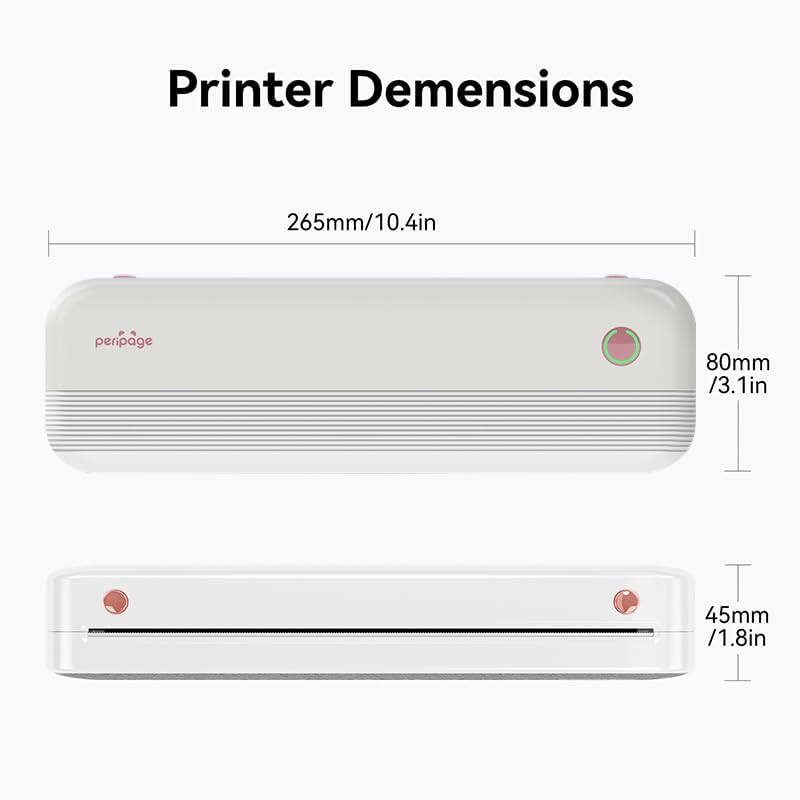
Image: The PeriPage P40 printer actively printing a document, with paper emerging from the front slot.
3. Pobieranie aplikacji i połączenie Bluetooth
The PeriPage P40 printer operates via the dedicated "PeriPage" mobile application.
- Szukaj "PeriPage" in your device's APP store (Google Play Store for Android, Apple App Store for iOS) and download the official application. Alternatively, scan the QR code provided in the physical instruction manual to download the app.
- Sprawdź, czy drukarka jest włączona i całkowicie naładowana.
- Włącz Bluetooth w swoim urządzeniu mobilnym.
- Open the "PeriPage" app. The app will guide you through connecting to your printer via Bluetooth. Select "P40" from the list of available devices.
- Once connected, the indicator light on the printer may change color or status to confirm the connection.
Instrukcja obsługi
Włączanie/wyłączanie
- Włączyć: Naciśnij i przytrzymaj przycisk zasilania, aż zaświeci się kontrolka.
- Wyłączyć: Naciśnij i przytrzymaj przycisk zasilania, aż kontrolka zgaśnie.
Printing from the App
Once your printer is connected to the PeriPage app:
- Open the PeriPage app on your smartphone.
- Select the type of content you wish to print (e.g., document, photo, web page, note).
- Adjust print settings such as density, size, and orientation within the app as needed.
- Confirm your selection and tap the print icon. The printer will begin printing.
Konserwacja
- Czyszczenie głowicy drukującej: Jeżeli jakość wydruku ulegnie pogorszeniu, delikatnie przetrzyj głowicę drukującą wacikiem bawełnianym.ampPrzemyć alkoholem izopropylowym. Przed czyszczeniem upewnić się, że drukarka jest wyłączona i ostygła. Przed użyciem pozostawić do całkowitego wyschnięcia.
- Czyszczenie powierzchni zewnętrznej: Use a soft, dry cloth to wipe the printer's exterior. Do not use abrasive cleaners or solvents.
- Składowanie: When not in use for extended periods, turn off the printer and store it in a cool, dry place away from direct sunlight and extreme temperatures. Remove any paper if storing for very long durations to prevent dust accumulation.
Rozwiązywanie problemów
| Problem | Możliwa przyczyna | Rozwiązanie |
|---|---|---|
| Drukarka się nie włącza. | Niski poziom naładowania baterii lub brak ładowania. | Connect the printer to a power source and charge it fully. |
| Nie można nawiązać połączenia przez Bluetooth. | Bluetooth is off on device; printer not in pairing mode; app issue. | Ensure Bluetooth is enabled on your phone. Restart the printer and the app. Try pairing again within the PeriPage app. |
| Poor print quality / Blank prints. | Incorrect paper loading; low battery; dirty print head; non-thermal paper. | Ensure thermal paper is loaded correctly with the print side facing up. Charge the printer. Clean the print head. Use only thermal paper. |
| Zacięcie papieru. | Nieprawidłowe załadowanie papieru; obcy przedmiot. | Turn off the printer. Open the cover and carefully remove any jammed paper. Ensure paper is loaded straight. |
Specyfikacje

Image: Diagram illustrating the dimensions of the PeriPage P40 printer: 265mm/10.4in (length), 80mm/3.1in (width), and 45mm/1.8in (height).
| Funkcja | Szczegół |
|---|---|
| Nazwa modelu | PeriPage-P40 |
| Technologia druku | Termiczny |
| Technologia łączności | Bluetooth |
| Kompatybilne urządzenia | Smartfony (Android, iOS) |
| Rezolucja | 300 x 300 dpi (Max Black and White Print Resolution, Max Color Print Resolution) |
| Maksymalny rozmiar nośnika | 210mm (8.26"x11.69" Sheet Size) |
| Media drukowane | Thermal Paper (Folding Paper, Inner Roll Paper) |
| Maksymalna pojemność arkuszy wejściowych | 10 |
| Wyjście drukarki | Monochromia |
| Bateria | 2600mAh (approx. 3 hours continuous print, 90 days standby) |
| Wymiary produktu | 2.5" gł. x 11" szer. x 4.1" wys. (ok. 265 mm x 80 mm x 45 mm) |
| Waga przedmiotu | 2.18 funta |
| Kolor | Biały |
Gwarancja i wsparcie
For warranty information and technical support, please refer to the warranty card included with your product or visit the official PeriPage webZachowaj paragon jako dowód zakupu na wypadek reklamacji.
For further assistance, you may contact PeriPage customer service through the contact information provided on their official website or within the PeriPage mobile application.


