1. Wprowadzenie
Welcome to the user manual for your new TTfone TT880 Mobile Phone. This phone is designed with simplicity and ease of use in mind, making it ideal for seniors and the elderly. It features a large, separated keypad, an emergency assistance button, and an extra loud speaker for clear communication. Please read this manual carefully to understand all features and ensure proper operation.
2. Co znajduje się w pudełku
Upon opening your TTfone TT880 package, you should find the following items:
- Telefon komórkowy TTfone TT880
- Akumulator do ponownego ładowania
- Kabel ładujący USB
- Instrukcja obsługi (ten dokument)

Image: The TTfone TT880 mobile phone, battery, and USB charging cable as typically found in the box.
3. Konfiguracja
3.1. Wkładanie karty SIM i baterii
- Zdejmij tylną pokrywę: Gently slide the back cover downwards from the top edge of the phone to remove it.
- Włóż kartę SIM: Locate the SIM card slot. Insert your 2G compatible SIM card into the slot with the gold contacts facing down and the cut corner aligned as shown in the diagram. Ensure it clicks into place.
- Włóż baterię: Align the battery contacts with the terminals inside the phone. Gently press the battery down until it is securely seated.
- Załóż tylną okładkę: Place the back cover over the phone and slide it upwards until it clicks securely into place.
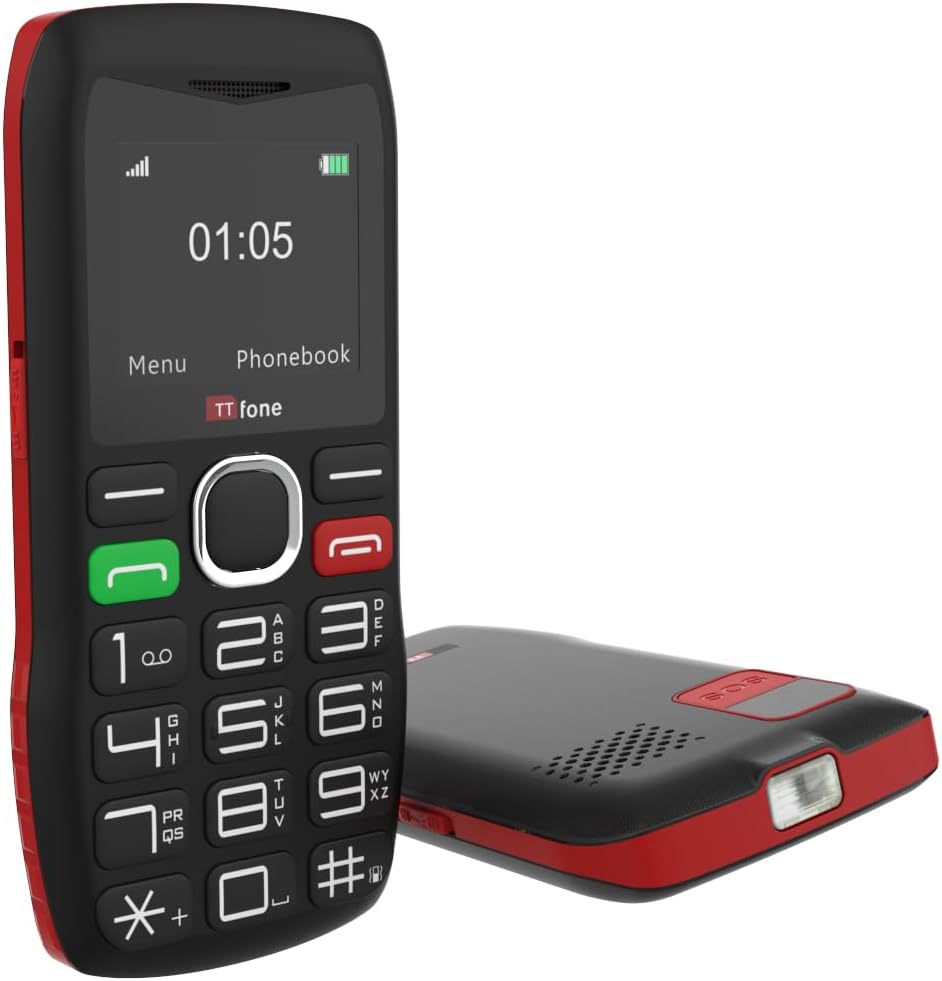
Obraz: Tył view of the TTfone TT880, illustrating the location for SIM card and battery insertion.
3.2. Ładowanie telefonu
Before first use, fully charge your TTfone TT880. Use the provided USB charging cable.
- Connect the small end of the USB cable to the charging port on the side or bottom of the phone.
- Connect the larger end of the USB cable to a compatible USB power adapter (not included with USB cable version) or a computer's USB port.
- The battery indicator on the screen will show charging progress. A full charge typically takes a few hours.

Image: The TTfone TT880 phone being charged via its USB cable, showing the charging indicator on the screen.
4. Instrukcja obsługi
4.1. Włączanie/wyłączanie zasilania
- Włączanie: Naciśnij i przytrzymaj czerwony przycisk zakończenia połączenia/zasilania (✖) aż ekran się zaświeci.
- Aby wyłączyć: Naciśnij i przytrzymaj czerwony przycisk zakończenia połączenia/zasilania (✖) until the power off options appear, then confirm.
4.2. Wykonywanie i odbieranie połączeń
- Zadzwonić:
- Wprowadź numer telefonu za pomocą klawiatury.
- Naciśnij zielony przycisk połączenia (✆) aby wybrać numer.
- Aby odebrać połączenie: When the phone rings, press the green Call button (✆) odpowiedzieć.
- Aby zakończyć połączenie: Naciśnij czerwony przycisk Zakończ połączenie (✖).

Image: A person holding the TTfone TT880, highlighting its large, easy-to-use physical keys for comfortable dialing.
4.3. Emergency Assistance Button (SOS)
The TT880 features a dedicated SOS button for emergencies. When activated, it will call and send an SMS to pre-set emergency contacts.
- Konfigurowanie kontaktów SOS:
- Navigate to the 'SOS Settings' in the phone's menu.
- Add up to 5 emergency contact numbers. These numbers will be called in sequence until one answers.
- You can also customize the emergency SMS message.
- Aktywacja SOS: Press and hold the SOS button on the back of the phone for a few seconds. The phone will emit an alarm and begin dialing your emergency contacts.

Image: The TTfone TT880 with its SOS button prominently displayed, illustrating its use in an emergency scenario.
4.4. Funkcja latarki
The TT880 includes a convenient torch function.
- Aby włączyć/wyłączyć: Use the dedicated torch switch located on the side of the phone.
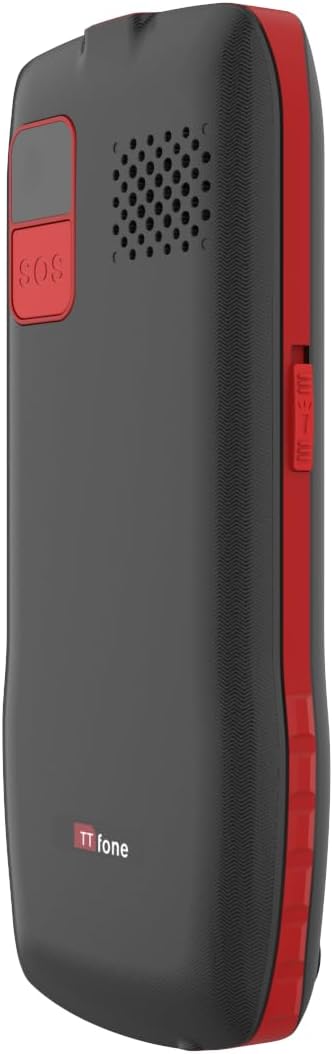
Image: The TTfone TT880 with its torch light illuminated, demonstrating its utility in low-light conditions.
4.5. Łączność Bluetooth
Pair your TT880 with other Bluetooth devices like headsets for hands-free communication.
- Navigate to 'Settings' > 'Bluetooth'.
- Włącz Bluetooth.
- Wybierać 'Szukaj devices' and choose your desired device from the list to pair.
5. Konserwacja
- Czyszczenie: Use a soft, dry cloth to clean the phone's surface. Avoid liquid cleaners or aerosols.
- Pielęgnacja baterii: To prolong battery life, avoid extreme temperatures. Do not leave the phone fully discharged for long periods.
- Składowanie: If storing the phone for an extended period, charge the battery to about 50% and store in a cool, dry place.
6. Rozwiązywanie Problemów
| Problem | Możliwa przyczyna | Rozwiązanie |
|---|---|---|
| Telefon się nie włącza. | Akumulator jest rozładowany lub nie został prawidłowo włożony. | Naładuj akumulator. Upewnij się, że akumulator jest prawidłowo włożony. |
| Nie można wykonywać ani odbierać połączeń. | No network signal, SIM card not inserted, or SIM card not activated. | Check network signal strength. Reinsert SIM card. Contact your network provider to activate SIM. Ensure it's a 2G network. |
| Słaba jakość połączeń / Niska głośność. | Słaby sygnał, zablokowany głośnik lub zbyt niski poziom głośności. | Move to an area with better signal. Ensure speaker is not blocked. Adjust call volume during a call. |
| Przycisk SOS nie działa. | SOS contacts not set up or invalid numbers. | Verify SOS settings and ensure valid numbers are programmed. |
7. Specyfikacje
- Model: TT880
- Marka: TTfone
- Rozmiar ekranu: 1.8 cali
- Technologia komórkowa: 2G
- Operator bezprzewodowy: Unlocked for All Carriers (2G networks only)
- Łączność: Bluetooth, USB
- Bateria: 1 bateria litowo-jonowa (w zestawie)
- Wymiary: Wymiary 15.1 x 11.3 x 2.4 cm
- Waga: 190 gramów
- System operacyjny: TTfone (Proprietary)
- Gniazdo karty SIM: Pojedyncza karta SIM
- Kolor: Czerwony
- Kraj pochodzenia: Chiny
8. Gwarancja i wsparcie
For warranty information and customer support, please refer to the documentation provided with your purchase or visit the official TTfone webZachowaj dowód zakupu na wypadek roszczeń gwarancyjnych.
Producent: TTfone
Kontakt: Please refer to the TTfone store on Amazon or their official webstrona dla danych kontaktowych.
Informacje o dostawie: Please note that certain products may have delivery restrictions outside mainland UK. Confirm delivery eligibility at checkout.


