1. Wprowadzenie
This manual provides detailed instructions for the setup, operation, and maintenance of your Vixic P-T M950 Label Maker Machine. Please read this manual thoroughly before using the device to ensure proper functionality and longevity.
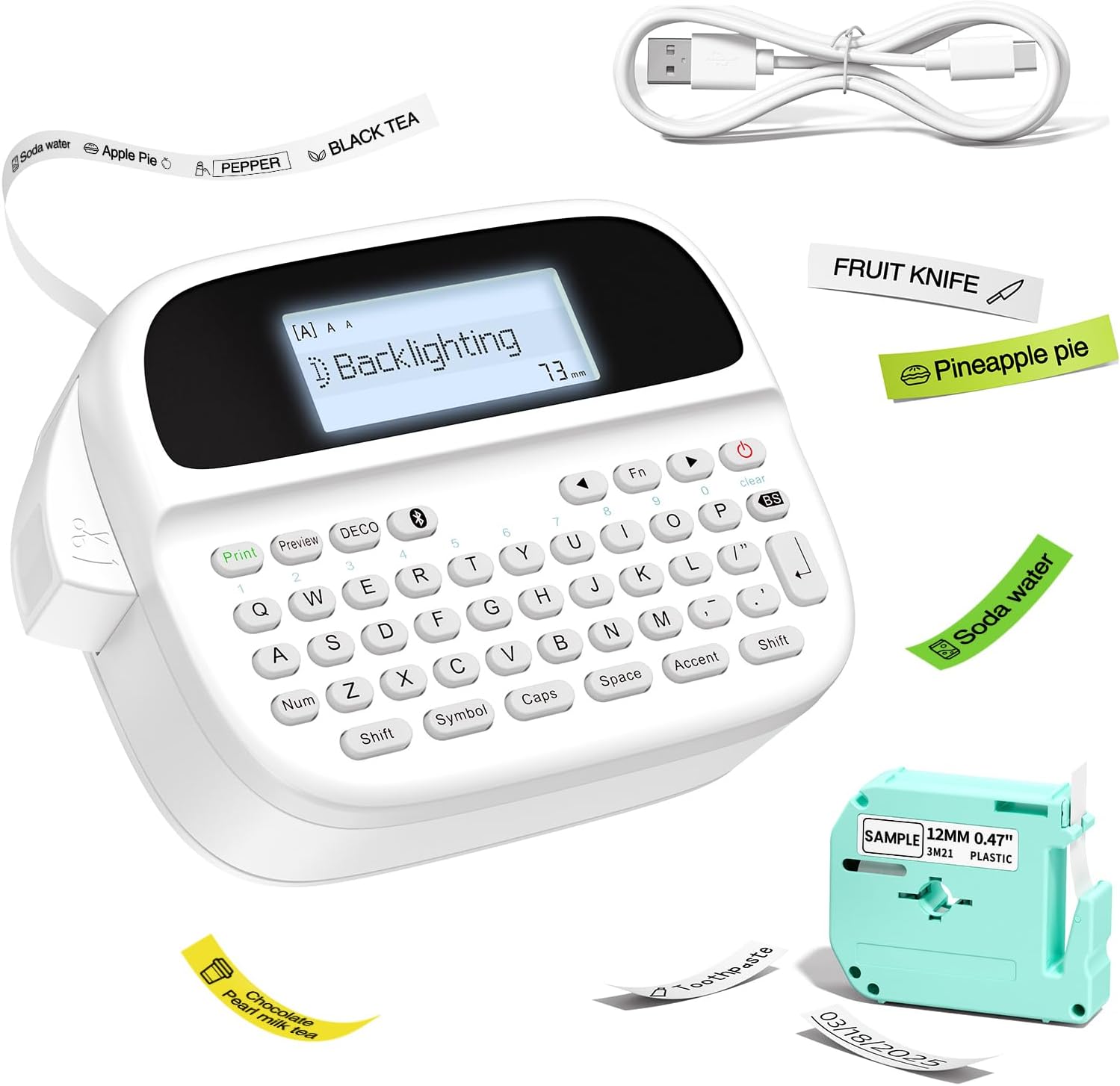
Figure 1: Vixic P-T M950 Label Maker Machine and accessories.
2. Zawartość opakowania
Sprawdź, czy w opakowaniu znajdują się wszystkie elementy:
- 1 x Vixic M950 Label Maker Machine
- 1 x MZ Label Tape (Black on White, 12mm*4m)
- 1 x kabel ładujący typu C
- 1 x Instrukcja obsługi
3. Konfiguracja
3.1 Ładowanie urządzenia
The label maker is equipped with a built-in 1200mAh lithium battery. Before first use, fully charge the device.
- Podłącz dołączony kabel ładujący typu C do portu ładowania w urządzeniu.
- Podłącz drugi koniec kabla do kompatybilnego zasilacza USB (nie ma go w zestawie).
- The device takes approximately 2.5 hours to fully charge. The charging indicator will show the charging status.

Figure 2: Charging the Vixic M950 Label Maker. A full charge allows for approximately 1.6 hours of continuous printing.
3.2 Ładowanie taśmy etykietowej
To load or replace the label tape:
- Locate the tape compartment on the back of the label maker.
- Open the integrated back cover.
- Insert the label tape cassette into the compartment, ensuring it clicks into place. The tape end should extend slightly from the printer's output slot.
- Zamknij dokładnie tylną pokrywę.

Figure 3: Loading the label tape cassette into the Vixic M950 Label Maker.
4. Instrukcja obsługi
4.1 Włączanie/wyłączanie
Press the power button to turn the device on or off. The backlit LCD display will illuminate upon powering on.
4.2 Tworzenie etykiet
The Vixic M950 offers two modes for label creation:
4.2.1 Keyboard Input Mode
- Włącz urządzenie.
- Use the QWERTY keyboard to type your desired text. The 14-character backlit LCD display allows for easy preview.
- Naciśnij przycisk „Drukuj”, aby wydrukować etykietę.
4.2.2 Bluetooth App Mode
For advanced customization, connect to the "Print Master" app via Bluetooth.
- Download the "Print Master" app from your device's app store.
- Upewnij się, że Bluetooth jest włączony w Twoim smartfonie.
- Open the "Print Master" app and connect to your Vixic M950 device.
- Use the app to design your label with various fonts, borders, symbols, and clip art.
- Send the design to the label maker for printing.

Figure 4: Label creation using both the integrated keyboard and the Bluetooth app.
4.3 Opcje dostosowywania
The Vixic M950 offers extensive customization:
- Czcionki: Choose from 8 artistic fonts.
- Granice: Select from 103 borders/underscores.
- Symbols & Clip Art: Access 791 symbols and clip art options.
- Przechowywanie etykiet: Store up to 9 labels for future printing, each supporting up to 89 characters.

Figure 5: Customization options available for label design.
4.4 Wycinanie etykiet
The device features a built-in cutter for clean label separation. After printing, press the cutter button to trim the label.
5. Konserwacja
5.1 Pielęgnacja baterii
Aby przedłużyć żywotność baterii:
- Przed pierwszym użyciem całkowicie naładuj urządzenie.
- The device automatically shuts down after 5 minutes of inactivity to conserve power.
- Unikaj wystawiania urządzenia na działanie ekstremalnych temperatur.
5.2 Czyszczenie
Gently wipe the exterior of the label maker with a soft, dry cloth. Do not use liquid cleaners or abrasive materials.
6. Rozwiązywanie Problemów
If you encounter issues with your Vixic M950, please refer to the following common solutions:
- Urządzenie się nie włącza: Ensure the battery is charged. Connect the device to the Type-C cable and a power source.
- No print or faint print: Check if the label tape is correctly installed and not empty. Ensure the tape is properly aligned in the output slot.
- Problemy z połączeniem Bluetooth: Make sure Bluetooth is enabled on your smartphone and the "Print Master" app is updated. Restart both the label maker and your smartphone.
- Labels not cutting cleanly: Ensure the tape is fully extended before cutting. The built-in cutter should be free of debris.
For further assistance, please contact Vixic customer support.
7. Specyfikacje
| Funkcja | Specyfikacja |
|---|---|
| Model | M950 |
| Marka | Vixic |
| Łączność | Bluetooth, QWERTY Keyboard |
| Technologia druku | Thermal / Thermal Transfer |
| Maksymalna rozdzielczość druku | 203 DPI |
| Maksymalna prędkość drukowania (monochromatyczna) | 10 mm/s |
| Compatible Label Widths | 9mm, 12mm |
| Typ wyświetlacza | Podświetlany wyświetlacz LCD |
| Bateria | 1200mAh litowo-jonowy (ładowalny) |
| Interfejs ładowania | USB typu C |
| Wymiary | 16.8 cm głębokości x 7.2 cm szerokości x 11.8 cm wysokości |
| Waga przedmiotu | 489 gram |
| Cechy specjalne | Built-in Cutter, Backlit LCD screen, QWERTY Keyboard, Portable, Rechargeable |
8. Gwarancja i wsparcie
Vixic provides professional customer service and technical support for its products. For any inquiries, technical assistance, or warranty claims, please contact our support team through the following channels:
- E-mail: Refer to your product packaging or the official Vixic webstrona zawierająca najnowszy adres e-mail.
- Czat na żywo: Available on the official Vixic webserwisu w godzinach pracy.

Figure 6: Vixic Customer Service and Technical Support.


