1. Konfiguracja
Before first use, ensure all components are present and properly assembled. The grinder features a safety mechanism that prevents operation unless the bean hopper and powder container are correctly installed.
1.1 Rozpakowanie i identyfikacja komponentów
Carefully remove all parts from the packaging. Verify that you have the main grinder unit, bean hopper, bean hopper lid, ground coffee container, and ground coffee container lid.
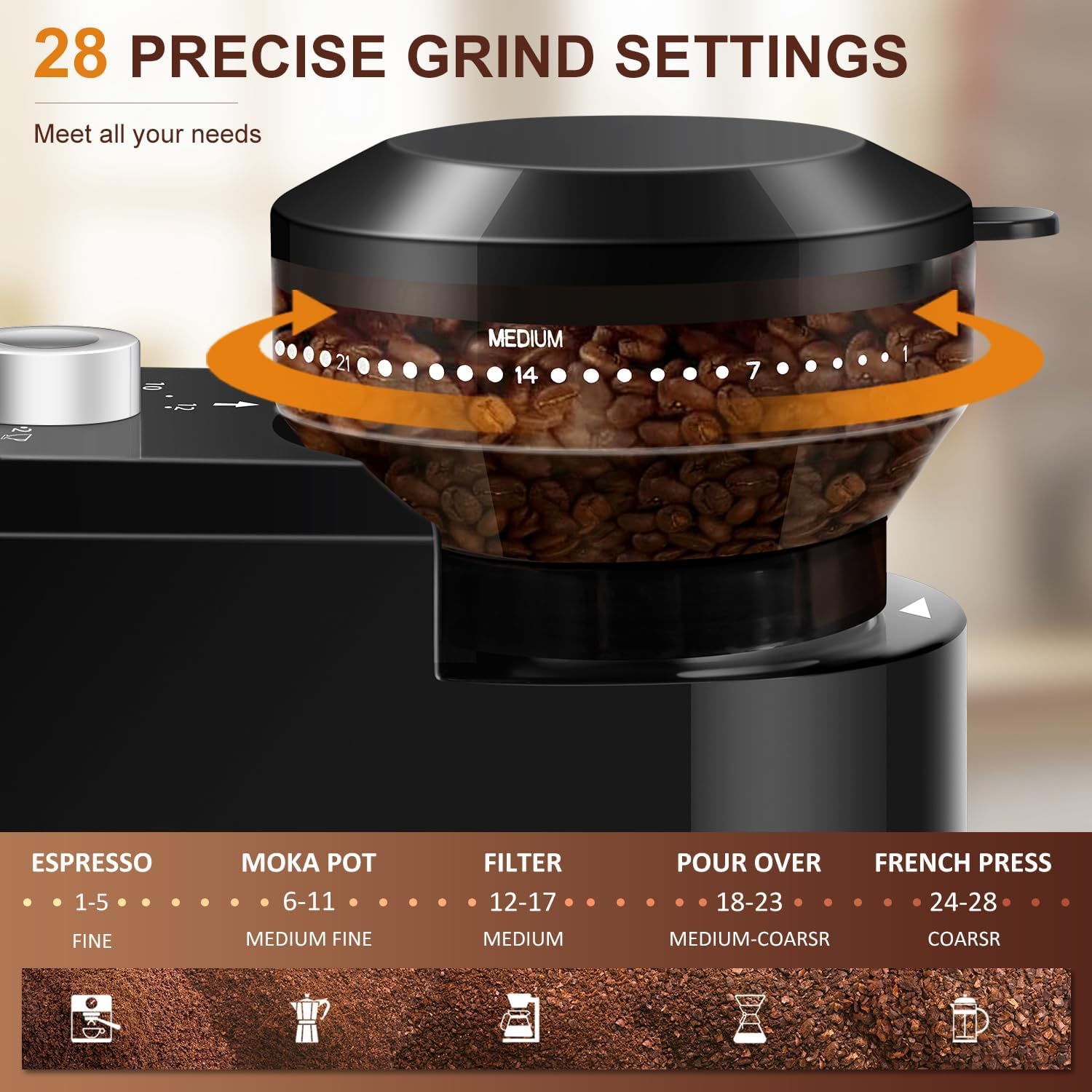
Image: All components of the KIRAINAFLY Flat Electric Burr Coffee Grinder, including the main unit, bean hopper, and ground coffee container, are displayed on a table.
1.2 Montaż
- Zainstaluj pojemnik na ziarna: Place the bean hopper onto the top of the main grinder unit. Rotate it clockwise until it locks securely into place. Ensure it can be adjusted smoothly after installation.
- Install the Ground Coffee Container: Slide the ground coffee container into the designated slot at the front of the grinder. Ensure it clicks into place, confirming proper placement.
- Podłącz zasilanie: Plug the power cord into a suitable electrical outlet. The power light should illuminate, indicating the grinder is ready. If the power light does not come on, recheck the installation of the bean hopper and ground coffee container.
Video: Demonstrates the proper installation of the bean hopper and ground coffee container, highlighting the safety features and power light indication.
2. Instrukcja obsługi
Follow these steps to grind your coffee beans for various brewing methods.
2.1 Dodawanie ziaren kawy
Open the bean hopper lid and pour your desired amount of whole coffee beans into the hopper. Close the lid securely.

Image: Coffee beans being poured into the grinder's bean hopper.
2.2 Selecting Grind Setting
Rotate the bean hopper to select your desired grind setting. The grinder offers 28 precise settings, ranging from fine to coarse, suitable for different brewing methods:
- Wyrażone: Ustawienia 1-5 (Dokładne)
- Kawiarka: Settings 6-11 (Medium Fine)
- Kawa przefiltrowana: Ustawienia 12-17 (średnie)
- Zalać: Ustawienia 18-23 (średnio-grube)
- Prasa francuska: Ustawienia 24-28 (grube)

Obraz: Szczegółowy view of the 28 grind settings on the bean hopper, with corresponding brewing methods.
2.3 Wybór ilości filiżanek
Use the cup selection dial on the front panel to choose the number of cups you wish to grind, typically ranging from 2 to 12 cups.

Image: The cup selection dial on the grinder, set to grind for 12 cups.
2.4 Rozpoczęcie procesu szlifowania
Press the power button to begin grinding. The grinder will automatically stop once the selected quantity has been processed.

Image: A hand pressing the power button to start the grinding process.
3. Konserwacja
Regularne czyszczenie zapewnia optymalną wydajność i wydłuża żywotność młynka do kawy.
3.1 Cleaning the Burr Grinders
- Odłącz młynek od zasilania: Przed czyszczeniem należy zawsze odłączyć przewód zasilający.
- Wyjmij pojemnik na ziarna kawy: Twist the bean hopper counter-clockwise and lift it off the unit.
- Czyste zadziory: Za pomocą dołączonej szczoteczki czyszczącej usuń resztki zmielonej kawy z żaren i komory mielącej.
- Wycieranie: Use a dry cloth to wipe the exterior of the grinder. Do not immerse the main unit in water.

Image: Cleaning the burr mechanism with the included brush.
3.2 Cleaning the Ground Coffee Container
The ground coffee container and its lid can be washed with warm, soapy water. Rinse thoroughly and ensure they are completely dry before reassembling.
4. Rozwiązywanie Problemów
If you encounter issues with your grinder, refer to the following common problems and solutions.
4.1 Grinder Does Not Start
- Sprawdź połączenie zasilania: Ensure the grinder is securely plugged into a working electrical outlet.
- Verify Safety Mechanism: The grinder will not operate if the bean hopper or ground coffee container are not properly installed and locked.
- Ensure the bean hopper is twisted clockwise until it clicks into place.
- Ensure the ground coffee container is fully inserted and clicks into its slot.
- Lampka zasilania: When properly assembled and plugged in, a red power light should illuminate. If it does not, recheck the installation of the bean hopper and ground coffee container.
Video: Demonstrates checking the power light and proper installation of the bean hopper to resolve startup issues.
4.2 Inconsistent Grind
- Czyste zadziory: Accumulated coffee oils and grounds can affect grind consistency. Refer to the Maintenance section for cleaning instructions.
- Check Bean Quality: Ensure you are using fresh, high-quality whole coffee beans. Stale or oily beans can impact grinding performance.
5. Specyfikacje
| Numer modelu | YMCCBG-8001 |
| Marka | KIRAINAFLY |
| Wymiary produktu | 6.7 x 4.3 x 7.5 cala |
| Waga przedmiotu | 2.4 funta |
| Cotage | 200 watów |
| Tomtage | 109.99 wolty |
| Pojemność | 4 uncji (ziaren kawy) |
| Ustawienia mielenia | 28 precise settings (Fine to Coarse) |

Image: Dimensions of the KIRAINAFLY Flat Electric Burr Coffee Grinder.
6. Informacje o gwarancji
This KIRAINAFLY product is covered by a manufacturer's warranty. Please refer to the product packaging or contact customer support for specific warranty terms and conditions.
7. Obsługa klienta
For further assistance, technical support, or inquiries regarding your KIRAINAFLY Flat Electric Burr Coffee Grinder, please contact the manufacturer's customer service. Contact details can typically be found on the product packaging or the official KIRAINAFLY webstrona.