Wstęp
This manual provides comprehensive instructions for the Douk Audio T7 7-Band Equalizer Balanced XLR/RCA Preamplifier. Please read this manual carefully before operating the device to ensure proper use and optimal performance.
Ważne instrukcje bezpieczeństwa
- Przeczytaj te instrukcje.
- Zachowaj tę instrukcję.
- Przestrzegaj wszystkich ostrzeżeń.
- Postępuj zgodnie ze wszystkimi instrukcjami.
- Nie należy używać tego urządzenia w pobliżu wody.
- Czyścić wyłącznie suchą szmatką.
- Nie zasłaniaj żadnych otworów wentylacyjnych. Montaż należy wykonać zgodnie z instrukcją producenta.
- Nie należy instalować w pobliżu źródeł ciepła, takich jak grzejniki, kratki wentylacyjne, piece lub inne urządzenia (w tym amp(lifiers) wytwarzające ciepło.
- Chroń przewód zasilający przed deptaniem i przytrzaśnięciem, zwłaszcza przy wtyczkach, gniazdkach i miejscach, w których wychodzi z urządzenia.
- Stosować wyłącznie dodatki/akcesoria wskazane przez producenta.
- Odłączaj urządzenie od zasilania podczas burzy z piorunami lub jeśli nie używasz go przez dłuższy czas.
- Wszelkie prace serwisowe należy zlecać wykwalifikowanemu personelowi serwisowemu. Serwisowanie jest wymagane, gdy urządzenie zostało w jakikolwiek sposób uszkodzone, np. przewód zasilający lub wtyczka są uszkodzone, płyn został wylany lub przedmioty wpadły do urządzenia, urządzenie zostało wystawione na działanie deszczu lub wilgoci, nie działa normalnie lub zostało upuszczone.
Zawartość opakowania

The image displays the Douk Audio T7 unit, a DC 12V power adapter, and a diagram showing the dimensions and weight of the unit and package.
Pakiet zawiera:
- 1 x Douk Audio T7 7-Band Equalizer Preampżywsze
- 1 x zasilacz prądu stałego 12 V
Cechy produktu
- 7-pasmowy korektor graficzny: Independent frequency band control (64Hz/125Hz/250Hz/500Hz/2KHz/4KHz/8KHz) with a range of -6dB to +6dB. Allows precise adjustment of treble, midrange, and bass to compensate for speaker characteristics and room acoustics.
- Zbalansowany przedwzmacniacz XLRampLiyfikator: Supports both XLR and RCA inputs and outputs. Delivers high-quality audio to amplifiers or active speakers with excellent channel separation, resolution, soundstage, and a clean background.
- Bypass Design & High Performance: Features a bypass mode that can be activated by turning off the power, allowing for the enjoyment of the original audio signal without equalization. The T7 boasts a Signal-to-Noise Ratio (SNR) exceeding 104dB, a frequency response range of 20Hz-20kHz, and a distortion level as low as 0.003%, ensuring accurate audio reproduction.
- Atrakcyjna i solidna konstrukcja: Housed in a black aluminum alloy chassis, providing effective shielding, a cool aesthetic, and durable construction. Ideal for audiophiles seeking high-fidelity sound.
- Przydatne funkcje: Operates without a volume control, outputting a predetermined level. Both XLR and RCA outputs function simultaneously.
Sterowanie i połączenia
Panel przedni

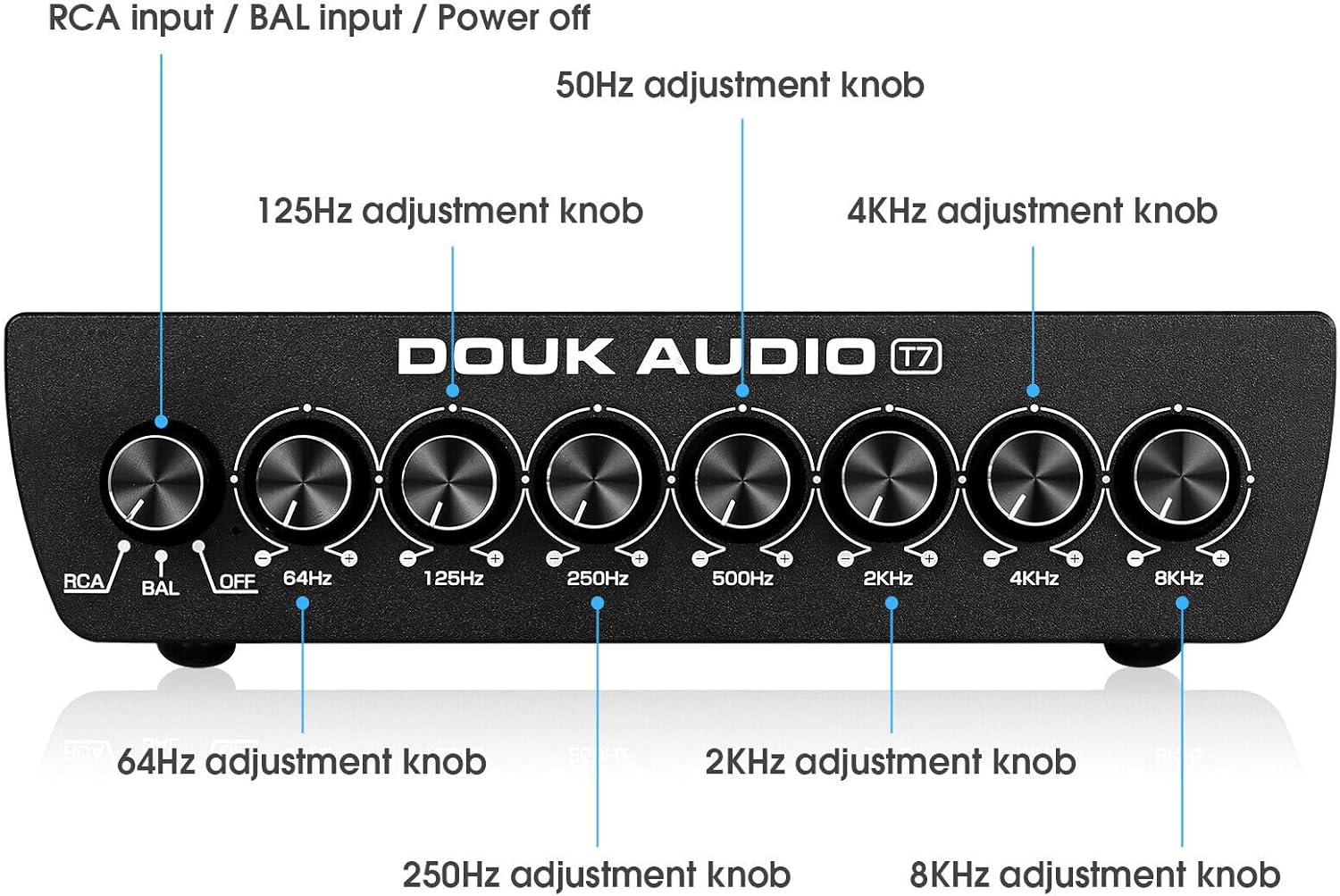
This image shows the front panel of the Douk Audio T7, highlighting the input selector knob (RCA/BAL/OFF) and the seven equalizer adjustment knobs for 64Hz, 125Hz, 250Hz, 500Hz, 2KHz, 4KHz, and 8KHz.
Na panelu przednim znajdują się następujące elementy sterujące:
- Input Selector Knob (RCA/BAL/OFF): Selects between RCA input, Balanced (XLR) input, or activates bypass mode (OFF).
- 64Hz Adjustment Knob: Adjusts the gain for the 64Hz frequency band.
- 125Hz Adjustment Knob: Adjusts the gain for the 125Hz frequency band.
- 250Hz Adjustment Knob: Adjusts the gain for the 250Hz frequency band.
- 500Hz Adjustment Knob: Adjusts the gain for the 500Hz frequency band.
- 2KHz Adjustment Knob: Adjusts the gain for the 2KHz frequency band.
- 4KHz Adjustment Knob: Adjusts the gain for the 4KHz frequency band.
- 8KHz Adjustment Knob: Adjusts the gain for the 8KHz frequency band.
Panel tylny
This image illustrates the rear panel connections of the Douk Audio T7, showing the Balanced XLR/RCA inputs, Balanced XLR/RCA outputs, and the DC 12V power input.
Na tylnym panelu znajdują się następujące złącza:
- Balanced XLR Input (L/R): For connecting balanced audio sources using XLR cables.
- Wejście RCA (L/P): For connecting unbalanced audio sources using RCA cables.
- Zbalansowane wyjście XLR (L/R): Do łączenia się z ampwzmacniacze lub aktywne głośniki wykorzystujące kable XLR.
- Wyjście RCA (L/P): Do łączenia się z amplifiers or active speakers using RCA cables.
- Wejście DC 12V: Power input for the included 12V DC adapter.
Przewodnik po konfiguracji
1. Podłączenie zasilania
Connect the included DC 12V power adapter to the "DC 12V IN" port on the rear panel of the T7. Plug the adapter into a suitable power outlet.
2. Podłączenie wejścia audio
Dla wejścia RCA: Connect your audio source (e.g., CD player, DAC, phone, tablet PC, TV set-top box, laptop) to the "RCA Input" jacks on the rear panel using RCA cables.
For Balanced XLR Input: Connect your audio source to the "Balanced XLR Input" jacks on the rear panel using XLR cables.
3. Podłączenie wyjścia audio
Connect the "RCA Output" jacks or "Balanced XLR Output" jacks on the rear panel of the T7 to your amplifier or active speakers using appropriate RCA or XLR cables. Both outputs can be used simultaneously.
4. Pierwsze włączenie zasilania
Ensure all connections are secure. Turn on your audio source and amplifier/active speakers. Then, power on the Douk Audio T7.
Instrukcja obsługi
1. Wybór trybu wprowadzania
Use the input selector knob on the front panel to choose your desired input: "RCA" for RCA sources, or "BAL" for Balanced XLR sources.
2. Adjusting Equalization
Once an input is selected, use the seven frequency adjustment knobs (64Hz, 125Hz, 250Hz, 500Hz, 2KHz, 4KHz, 8KHz) to fine-tune the audio frequencies. Rotate the knobs clockwise to boost the frequency band (+6dB) and counter-clockwise to cut the frequency band (-6dB).
Experiment with different settings to achieve your preferred sound profile or to correct room acoustics and speaker response.
3. Tryb obejścia
To listen to the original, unequlized audio signal, set the input selector knob to "OFF". This activates the bypass mode, allowing the audio signal to pass through the unit without any equalization.
4. Simultaneous Outputs
The T7 outputs audio simultaneously through both the RCA and Balanced XLR output ports. You can connect to multiple devices if needed.
Konserwacja
Czyszczenie
Wipe the unit with a soft, dry cloth. Do not use any liquid cleaners or solvents, as they may damage the finish or internal components.
Składowanie
If the unit will not be used for an extended period, disconnect it from the power supply and store it in a cool, dry place.
Wentylacja
Ensure that the ventilation openings are not blocked to prevent overheating. Maintain adequate space around the unit for proper airflow.
Rozwiązywanie problemów
Brak wyjścia dźwięku
- Sprawdź moc: Ensure the power adapter is securely connected to the T7 and a working power outlet.
- Check Input Selection: Verify that the input selector knob on the front panel is set to the correct input (RCA or BAL), not "OFF" (bypass mode).
- Sprawdź połączenia: Ensure all audio cables (input and output) are securely connected to both the T7 and your source/ampgłośniki/głośniki.
- Check Source/AmpLiyfikator: Confirm that your audio source is playing and your amplifier/active speakers are powered on and functioning correctly.
Zniekształcony dźwięk
- Check Gain Levels: Ensure that the equalizer knobs are not set to extreme boost levels, which can cause clipping or distortion. Try reducing the gain on specific frequency bands.
- Sprawdź kable: Sprawdź kable audio pod kątem uszkodzeń i luźnych połączeń.
- Jakość źródła: Verify the quality of the audio source. Poor quality source material can result in distorted output.
Szum lub hałas
- Pętla uziemienia: A hum can sometimes indicate a ground loop. Try connecting all audio equipment to the same power strip or outlet. If the issue persists, a ground loop isolator may be necessary.
- Jakość kabla: Stosuj wysokiej jakości ekranowane kable audio.
- Ingerencja: Keep the unit away from other electronic devices that may cause interference.
Specyfikacje
| Model: | T7 |
| Pasma częstotliwości: | 64Hz, 125Hz, 250Hz, 500Hz, 2KHz, 4KHz, 8KHz |
| Zakres wzmocnienia: | -6 dB do +6 dB na pasmo |
| Wejścia: | Balanced XLR (L/R), RCA (L/R) |
| Wyjścia: | Balanced XLR (L/R), RCA (L/R) |
| Stosunek sygnału do szumu (SNR): | >104dB |
| Pasmo przenoszenia: | 20Hz - 20kHz |
| Zniekształcenie: | <0.003% |
| Zasilanie: | Prąd stały 12 V |
| Wymiary produktu (dł. x szer. x wys.): | 15.2 x 12.6 x 4.2 cm (5.98 x 4.96 x 1.65 cala) |
| Masa netto: | 1.02 kg (2.25 funta) |
| Producent: | Douk Audio |
| Kraj pochodzenia: | Chiny |
Gwarancja i wsparcie
Douk Audio products are designed for reliability and performance. For warranty information and technical support, please refer to the documentation included with your purchase or visit the official Douk Audio webZachowaj paragon jako dowód zakupu na wypadek reklamacji.


