1. Wprowadzenie
The Lenovo USB-C Slim Travel Dock is a versatile 8-port docking solution designed to expand the connectivity of your USB-C enabled laptop. This device facilitates enhanced productivity by providing multiple ports for peripherals, external displays, and power delivery, all through a single USB-C connection. Its compact design makes it suitable for various work environments.

Rysunek 1: Góra view of the Lenovo USB-C Slim Travel Dock.
2. Funkcje produktu
The Lenovo USB-C Slim Travel Dock offers a range of features to enhance your connectivity:
- Rozszerzenie portów 8 w 1: Includes 2x USB-A 3.2 Gen 2, 3x USB-C 3.2 Gen 2 (one for power input only), 1x HDMI 2.1, 1x SD card reader, and 1x TF (MicroSD) card reader.
- Dostawa energii: Supports up to 65W Power Delivery (PD) pass-through to charge your USB-C laptop via the dock.
- 4K Display Support: The HDMI 2.1 port supports resolutions up to 4K at 60 Hz for high-quality external display output.
- Szybki transfer danych: USB-A and USB-C data ports provide up to 10 Gbps transfer speeds.
- Zintegrowany kabel USB-C: Features a 12.5 cm tuckable USB-C cable for convenient storage and portability.
- Uniwersalna kompatybilność: Compatible with USB-C Alt-Mode, Thunderbolt™ 3, and Thunderbolt™ 4 enabled laptops running Windows 10 or Windows 11.
- Zrównoważony projekt: Constructed with 66% Post-Consumer Recycled Content (PCC) in its exterior.
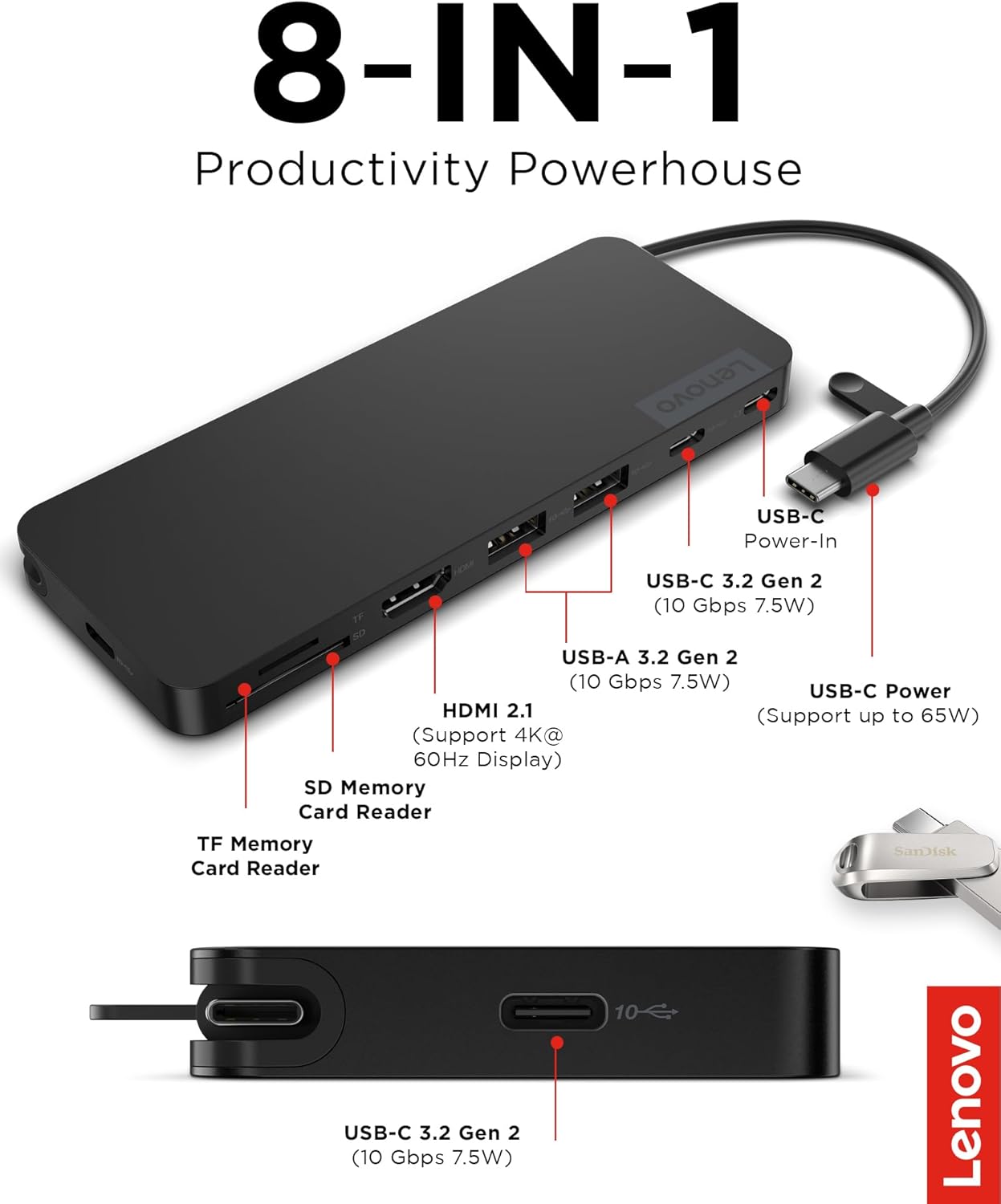
Rysunek 2: Koniecview of the 8-in-1 ports on the Slim Travel Dock.
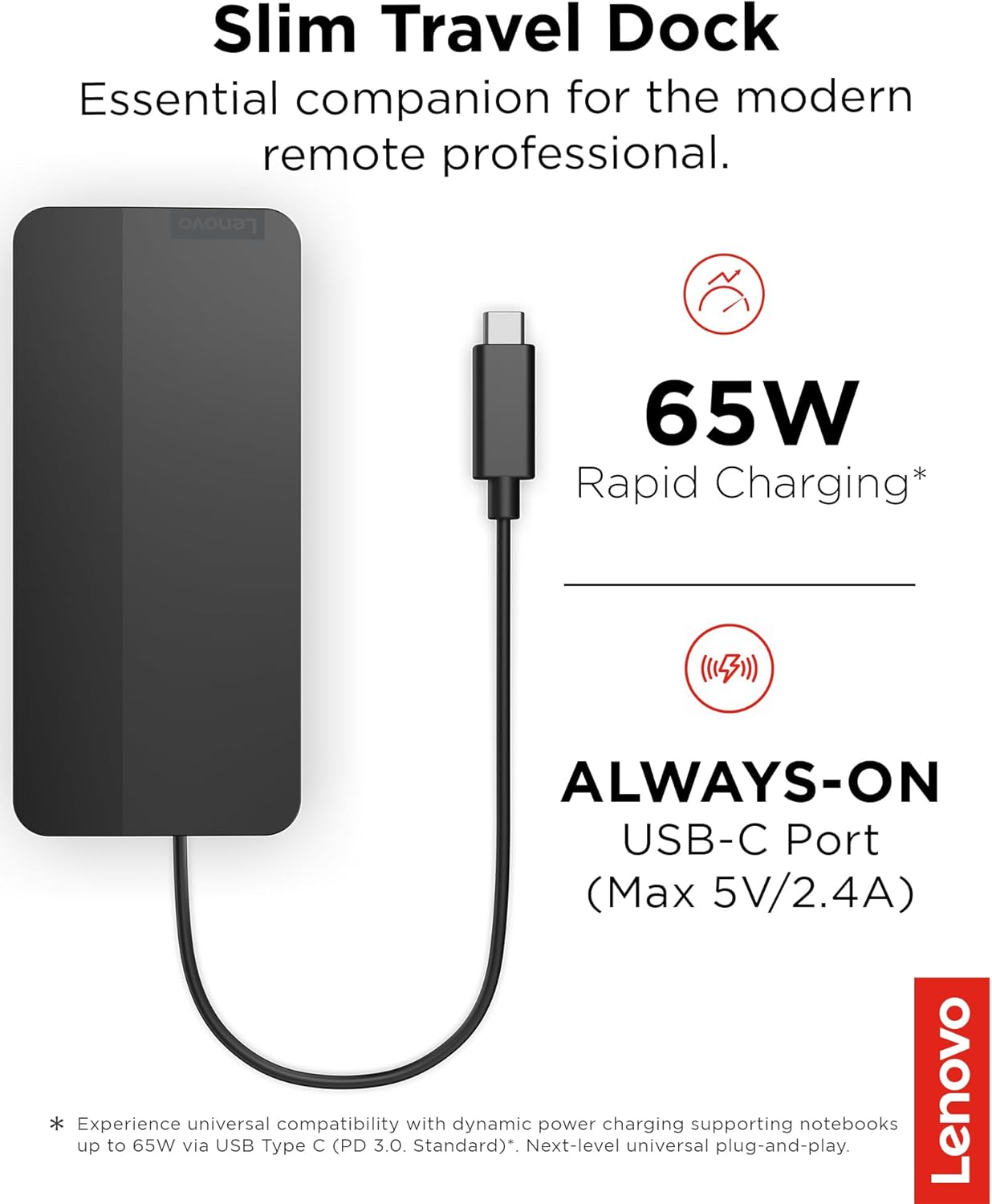
Figure 3: Dock features 65W rapid charging capability.

Figure 4: The dock's compact design and tuckable USB-C cable.
3. Instrukcje konfiguracji
Follow these steps to set up your Lenovo USB-C Slim Travel Dock:
- Połącz z urządzeniem hosta: Unfold the integrated USB-C cable from the dock and connect it to an available USB-C port on your laptop. Ensure your laptop's USB-C port supports DisplayPort Alternate Mode (Alt Mode) or Thunderbolt™ for full functionality.
- Podłącz zasilacz (opcjonalnie): If your laptop requires charging via the dock, connect your laptop's USB-C power adapter to the USB-C Power-In port on the dock. The dock supports up to 65W pass-through charging.
- Podłącz urządzenia peryferyjne: Connect your USB devices (e.g., mouse, keyboard, external hard drive) to the USB-A 3.2 Gen 2 or USB-C 3.2 Gen 2 data ports on the dock.
- Podłącz zewnętrzny wyświetlacz: Use an HDMI cable to connect your external monitor to the HDMI 2.1 port on the dock.
- Włóż karty pamięci: If needed, insert SD or TF (MicroSD) cards into the respective card reader slots.
The dock is designed for plug-and-play operation, meaning drivers are typically not required for basic functionality on supported operating systems (Windows 10/11).
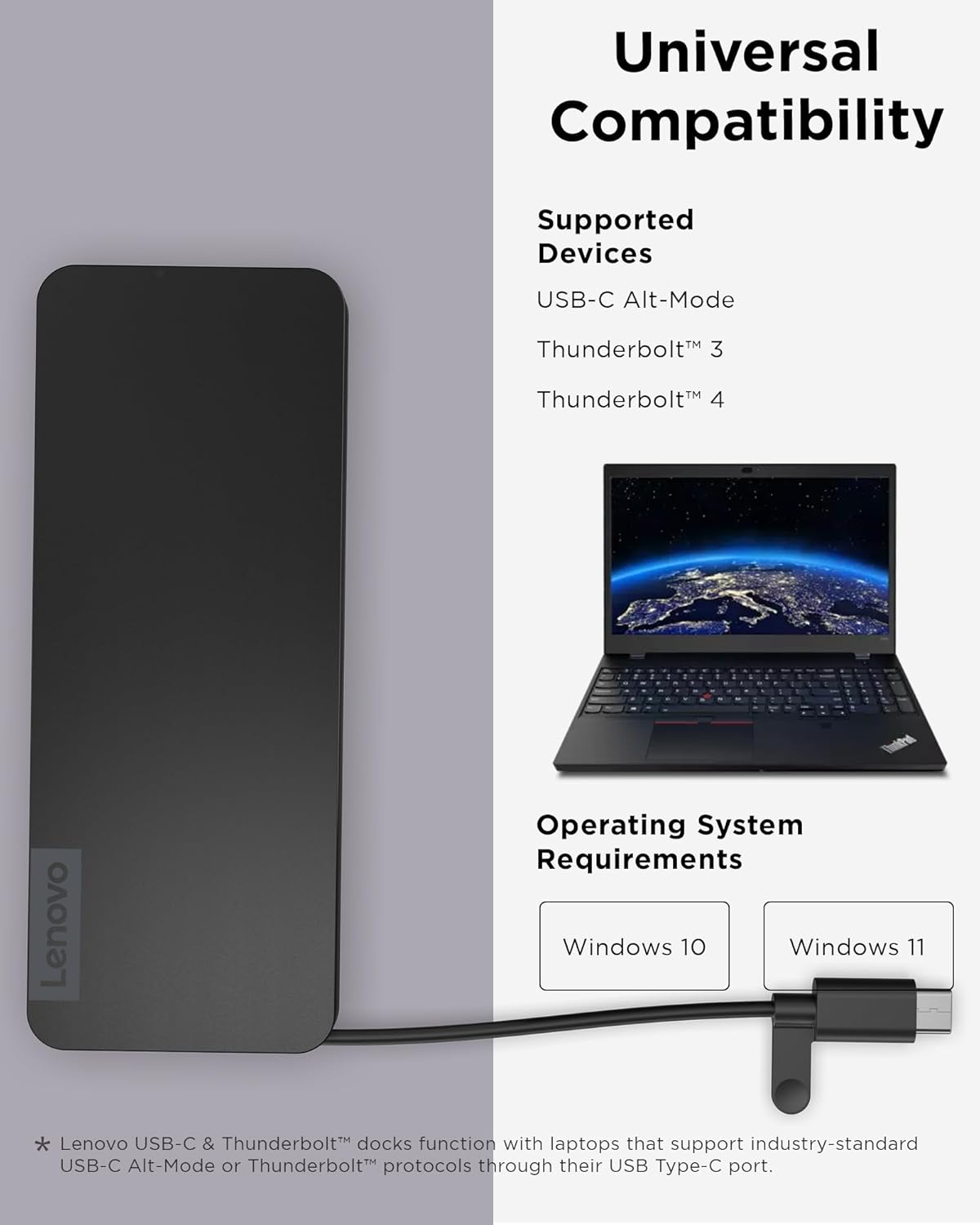
Figure 5: Compatibility information for the Slim Travel Dock.
4. Instrukcja obsługi
Once connected, the Lenovo USB-C Slim Travel Dock operates seamlessly with your laptop:
- Korzystanie z portów USB: Connect USB devices to the available USB-A or USB-C data ports. Data transfer will occur at up to 10 Gbps, depending on the connected device's capabilities.
- Wyświetlacz zewnętrzny: Your laptop should automatically detect the connected external display. You can configure display settings (e.g., extend, duplicate) through your operating system's display settings. The HDMI port supports 4K resolution at 60 Hz.
- Dostawa energii: If a power adapter is connected to the dock's USB-C Power-In port, your laptop will receive power and charge through the integrated USB-C cable.
- Czytniki kart pamięci: Insert SD or TF cards to access their contents directly on your laptop. They will appear as removable drives.

Figure 6: The dock supports 4K@60Hz display output via HDMI 2.1.

Figure 7: High-speed data transfer capabilities of the dock's USB ports.
5. Konserwacja
To ensure the longevity and optimal performance of your Lenovo USB-C Slim Travel Dock, follow these maintenance guidelines:
- Czyszczenie: Use a soft, dry, lint-free cloth to clean the exterior of the dock. Avoid using liquid cleaners, aerosols, or solvents.
- Składowanie: When not in use, store the dock in a cool, dry place. Utilize the tuckable USB-C cable feature to protect the connector.
- Obsługiwanie: Avoid dropping the dock or subjecting it to strong impacts. Do not expose it to extreme temperatures or moisture.
- Pielęgnacja kabli: Do not bend or twist the integrated USB-C cable excessively. Ensure the cable is not pinched or stressed.
6. Rozwiązywanie Problemów
If you encounter issues with your Lenovo USB-C Slim Travel Dock, refer to the following common troubleshooting steps:
- Brak wyjścia wyświetlacza:
- Sprawdź, czy kabel HDMI jest prawidłowo podłączony do stacji dokującej i monitora.
- Sprawdź, czy port USB-C Twojego laptopa obsługuje tryb DisplayPort Alt Mode.
- Sprawdź ustawienia wyświetlania laptopa, aby upewnić się, że monitor zewnętrzny został prawidłowo wykryty i skonfigurowany.
- Jeśli to możliwe, wypróbuj inny kabel HDMI lub monitor.
- Update your laptop's graphics drivers and USB-C port drivers.
- Laptop się nie ładuje:
- Ensure your laptop's original USB-C power adapter is connected to the dock's USB-C Power-In port.
- Verify the power adapter is functioning correctly and plugged into a working power outlet.
- Confirm your laptop supports charging via USB-C Power Delivery.
- Urządzenia USB nie są rozpoznawane:
- Ensure the USB devices are properly inserted into the dock's ports.
- Spróbuj podłączyć urządzenie USB bezpośrednio do laptopa, aby sprawdzić, czy działa.
- Uruchom ponownie laptopa i podłącz stację dokującą.
- Intermittent Connectivity/Performance Issues:
- Sprawdź, czy wszystkie połączenia są bezpieczne.
- Odłącz i ponownie podłącz stację dokującą do laptopa.
- Upewnij się, że system operacyjny i sterowniki Twojego laptopa są aktualne.
- Avoid overloading the dock with high-power-draw devices if not using an external power adapter.
7. Specyfikacje
| Funkcja | Specyfikacja |
|---|---|
| Numer modelu | 4X11N40213 |
| Wymiary produktu (dł. x szer. x wys.) | 4.72 x 2.17 x 0.79 cala (120 x 55 x 20 mm) |
| Waga przedmiotu | 4.8 uncji (136 g) |
| Kolor | Czarny |
| Interfejs sprzętowy | USB typu C |
| Łączna liczba portów USB | 8 (2x USB-A 3.2 Gen 2, 3x USB-C 3.2 Gen 2, 1x USB-C Power-In, 1x SD, 1x TF) |
| Porty USB-A 3.2 pierwszej generacji | 2 (10 Gbps, 7.5W) |
| USB-C 3.2 Gen 2 Data Ports | 2 (10 Gbps, 7.5W) |
| USB-C Power-In Port | 1 (Supports up to 65W PD Pass-Through) |
| Wszystkie porty HDMI | 1 |
| Wersja HDMI | 2.1 |
| Max. Display Resolution | 4K przy 60 Hz |
| Czytniki kart | SD, TF (MicroSD) |
| Kompatybilne urządzenia | USB-C Alt-Mode, Thunderbolt™ 3, Thunderbolt™ 4 enabled laptops (e.g., MacBook Pro) |
| Wsparcie systemu operacyjnego | Windows 10, Windows 11 |
| Producent | Lenovo |
8. Gwarancja i wsparcie
This Lenovo product is covered by a standard manufacturer's warranty. For specific warranty terms, duration, and support options, please refer to the warranty information included with your purchase or visit the official Lenovo support webZachowaj dowód zakupu na wypadek roszczeń gwarancyjnych.
For technical assistance, driver updates, or further inquiries, please contact Lenovo customer support or visit their online support portal.


