Wstęp
This manual provides detailed instructions for setting up, operating, and maintaining your AJAZZ A3060 Wireless Keyboard and Mouse Combo. Please read this manual carefully before use to ensure optimal performance and longevity of your product.
Zawartość opakowania
- 1 x AJAZZ A3060 Wireless Keyboard
- 1 x AJAZZ A3060 Wireless Mouse
- 1 x USB 2.4G Receiver

Image: The AJAZZ A3060 wireless keyboard and mouse combo, shown with the compact USB receiver.
Organizować coś
1. Instalacja baterii
- Dla klawiatury: Locate the battery compartment on the underside of the keyboard. Insert two (2) AAA batteries, ensuring correct polarity.
- Dla myszy: Locate the battery compartment on the underside of the mouse. Insert one (1) AA battery, ensuring correct polarity.
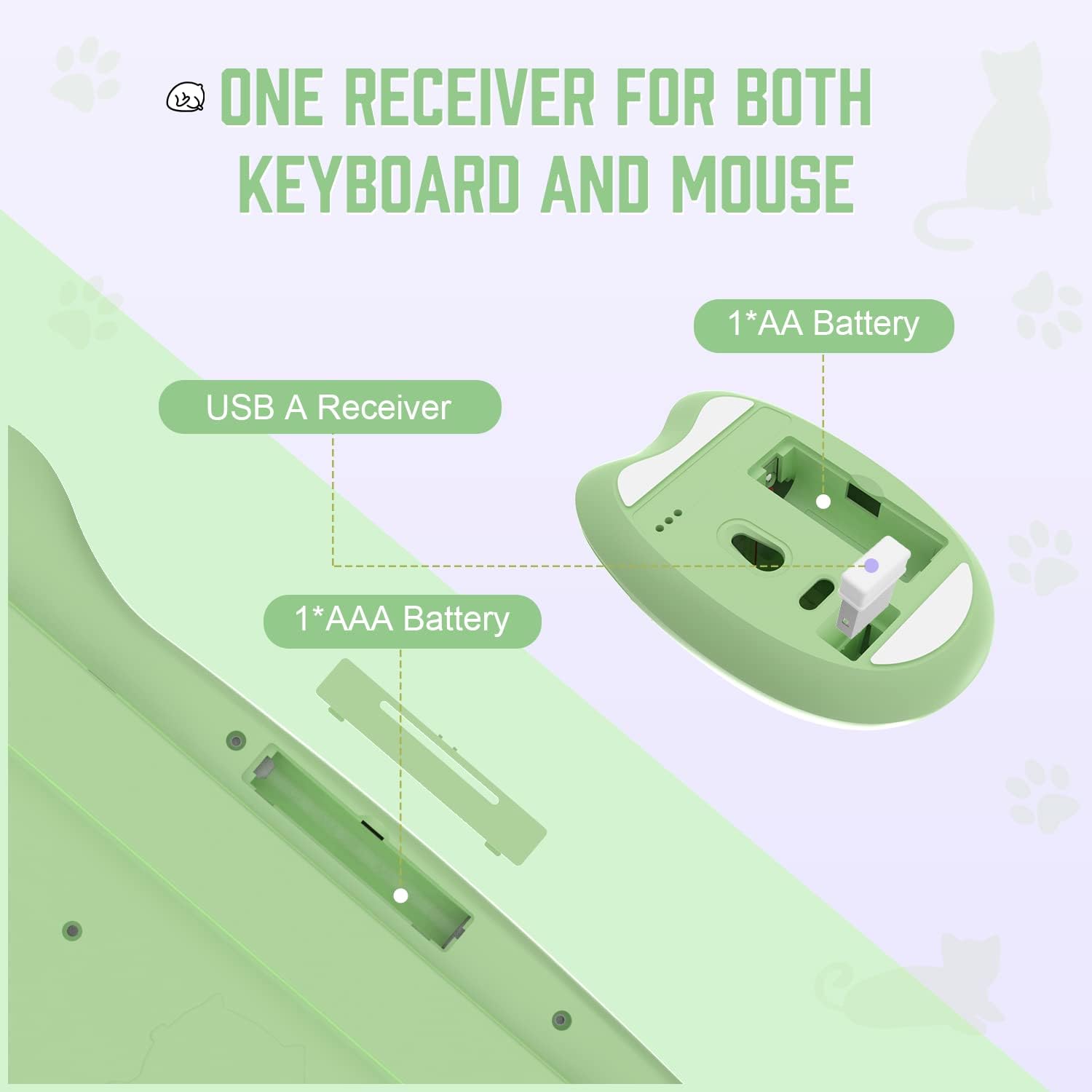
Image: Diagram illustrating the battery compartments for the keyboard (2x AAA) and mouse (1x AA), and the location of the USB receiver storage within the mouse.
2. Podłączanie odbiornika USB
- Wyjmij odbiornik USB z gniazda znajdującego się na spodzie myszy.
- Plug the USB receiver into an available USB-A port on your computer or compatible device.
- Ensure the mouse power switch (located on the underside) is in the 'ON' position.
- The keyboard and mouse should automatically connect to your device. No additional drivers are required.

Image: Visual guide demonstrating the six steps for connecting the wireless keyboard and mouse to a USB-A device, including receiver removal, plugging in, battery insertion, and power activation.
Instrukcja obsługi
Funkcje klawiatury
The AJAZZ A3060 keyboard features 84 keys with a retro round keycap design, providing a tactile and responsive typing experience. It includes dedicated media keys for enhanced control.
- Klawisze multimedialne: The function keys (F1-F12) have secondary media control functions. These can typically be accessed by pressing the 'Fn' key simultaneously with the desired F-key.
- Kontrolki: Located in the upper right corner of the keyboard. One light indicates uppercase/lowercase switching (Caps Lock), and the other indicates low battery or 2.4G connection status.

Image: An illustration of the AJAZZ A3060 keyboard highlighting the media key functions (F1-F12) and the indicator lights for Caps Lock and battery/connection status.
Funkcje myszy
The ergonomic cat-shaped mouse is designed for comfort and features adjustable DPI settings.
- Regulacja DPI: The mouse features a DPI button, typically located near the scroll wheel. Press this button to cycle through three adjustable DPI levels: 800, 1600, and 3200. This allows you to customize cursor sensitivity.
- Przycisk zasilania: An ON/OFF switch is located on the underside of the mouse to conserve battery life when not in use.

Image: A visual representation of the AJAZZ A3060 mouse, highlighting its ergonomic design and the three adjustable DPI settings (800, 1600, 3200).
Tryb oszczędzania energii
The combo is equipped with an intelligent power-saving feature. After a period of inactivity, the devices will automatically enter sleep mode to conserve battery. To wake them up, simply click any key on the keyboard or move/click the mouse.
A low battery indicator will alert you when it's time to replace the batteries.
Zgodność
The AJAZZ A3060 Wireless Keyboard and Mouse Combo offers broad compatibility with various operating systems and devices, ensuring versatile use.
- Systemy operacyjne: Compatible with Windows XP, Windows 7, Windows 8, Windows 10, and macOS.
- Urządzenia: Suitable for use with PCs, laptops, Smart TVs, workstations, projectors, and tablets.

Obraz: Ponadview showing the AJAZZ A3060 keyboard and mouse compatible with Smart TVs, PCs, Laptops, Macs, Workstations, and Projectors, and suitable for Windows operating systems.
Konserwacja
To ensure the longevity and optimal performance of your AJAZZ A3060 combo, follow these maintenance guidelines:
- Czyszczenie: Do czyszczenia powierzchni klawiatury i myszy używaj miękkiej, suchej ściereczki. W przypadku uporczywych zabrudzeń, delikatnie przetrzyj powierzchnię.amp Można użyć ściereczki, ale należy uważać, aby do urządzenia nie dostała się wilgoć.
- Wymiana baterii: Replace batteries promptly when the low battery indicator appears to avoid interruptions in use. Always use new, high-quality batteries of the specified type (AAA for keyboard, AA for mouse).
- Składowanie: When not in use for extended periods, turn off the mouse using its power switch and store the USB receiver in its designated slot to prevent loss.
- Unikaj płynów: Keep the devices away from liquids to prevent damage to internal components.
Rozwiązywanie problemów
- Brak połączenia/brak odpowiedzi:
- Sprawdź, czy odbiornik USB jest prawidłowo podłączony do działającego portu USB.
- Check if the mouse power switch is in the 'ON' position.
- Replace the batteries in both the keyboard and mouse with fresh ones.
- Spróbuj podłączyć odbiornik USB do innego portu USB w urządzeniu.
- Move the keyboard and mouse closer to the USB receiver (within 10 meters).
- Lagging/Delayed Response:
- Ensure there are no other 2.4GHz wireless devices causing interference nearby.
- Sprawdź poziom naładowania baterii i wymień ją, jeśli jest bliska rozładowania.
- Problemy z ruchem kursora myszy:
- Wyczyść czujnik optyczny znajdujący się na spodzie myszy.
- Upewnij się, że używasz myszy na odpowiedniej powierzchni (nie odblaskowej ani przezroczystej).
- Adjust the DPI setting to your preference.
Specyfikacje
| Model | A3060 |
| Typ połączenia | Bezprzewodowa sieć 2.4 GHz (odbiornik USB) |
| Zasięg bezprzewodowej | Do 10 metrów (33 stóp) |
| Układ klawiatury | 84 klucze |
| Bateria klawiatury | Baterie 2 x AAA (brak w zestawie) |
| Bateria myszy | 1 baterie AA (brak w zestawie) |
| DPI myszy | 800 / 1600 / 3200 (Regulowane) |
| Wymiary klawiatury | Około 13.6 cala x 6 cala x 1.1 cala |
| Wymiary myszy | Approx. 4.1 in x 2.7 in |
| Waga produktu | Approx. 730 grams (package weight) |
| Kraj pochodzenia | Chiny |

Image: Detailed dimensions of the AJAZZ A3060 wireless keyboard and mouse, showing measurements in inches.
Gwarancja i wsparcie
Aby uzyskać informacje dotyczące gwarancji i wsparcia technicznego, zapoznaj się z dokumentacją dołączoną do produktu lub skontaktuj się bezpośrednio ze sprzedawcą/producentem. Zachowaj dowód zakupu na wypadek roszczeń gwarancyjnych.


