1. Wprowadzenie
The Ferguson Regent i351S is a versatile internet radio designed to provide a rich audio experience with multiple connectivity options. This manual offers detailed instructions for setting up, operating, and maintaining your device, ensuring you can fully utilize its features including Wi-Fi, DAB+, FM radio, Bluetooth, Spotify Connect, and dual alarms. Please read this manual thoroughly before first use and keep it for future reference.
2. Informacje dotyczące bezpieczeństwa
Aby zapewnić bezpieczną obsługę i zapobiec uszkodzeniom, należy przestrzegać następujących środków ostrożności:
- Nie wystawiaj urządzenia na działanie deszczu, wilgoci ani ekstremalnych temperatur.
- Unikaj umieszczania urządzenia w pobliżu źródeł ciepła, takich jak grzejniki, piece i inne urządzenia wytwarzające ciepło.
- Nie blokuj żadnych otworów wentylacyjnych. Zapewnij odpowiednią ilość miejsca wokół urządzenia, aby zapewnić prawidłowy przepływ powietrza.
- Stosować wyłącznie dodatki/akcesoria wskazane przez producenta.
- Odłącz urządzenie od zasilania podczas burzy z piorunami lub gdy nie jest używane przez dłuższy czas.
- Nie otwierać casing. Wszelkie prace serwisowe należy zlecać wykwalifikowanemu personelowi.
- Trzymaj urządzenie z dala od silnych pól magnetycznych.
3. Zawartość opakowania
Proszę sprawdzić zawartość opakowania po rozpakowaniu. Jeśli brakuje któregokolwiek elementu lub jest on uszkodzony, prosimy o kontakt ze sprzedawcą.
- Ferguson Regent i351S Internet Radio
- Zasilacz
- Zdalne sterowanie
- Szybki przewodnik
4. Koniec produktuview
Familiarize yourself with the main components and controls of your Ferguson Regent i351S.
4.1 Panel przedni i wyświetlacz
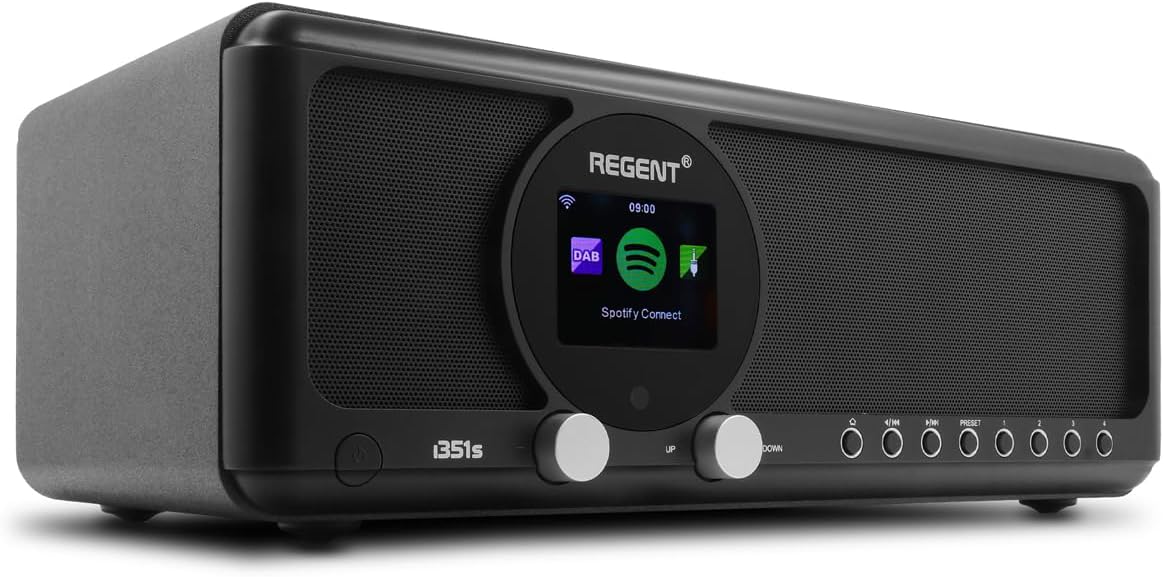
Obraz: Przód view of the Ferguson Regent i351S Internet Radio, showcasing the central color display, dual speakers, and control knobs/buttons.
The front panel features a prominent 2.4-inch TFT color display, two main control knobs (Up/Down), and several function buttons for navigation and mode selection. The stereo speakers are located on either side of the central display.
4.2 Panel tylny i złącza

Obraz: Tył view of the Ferguson Regent i351S Internet Radio, showing the telescopic antenna, USB port, power input, and bass reflex port.
The rear panel includes the telescopic antenna for DAB+/FM reception, a USB port for media playback, an AUX-in port for external audio sources, a 3.5mm headphone output, and the power adapter input.
4.3 Pilot zdalnego sterowania

Image: The remote control unit for the Ferguson Regent i351S Internet Radio, featuring various buttons for power, volume, navigation, mode selection, and presets.
The included remote control allows convenient operation of all radio functions from a distance.
4.4 Wymiary produktu

Image: Diagram showing the dimensions of the Ferguson Regent i351S Internet Radio: 33 cm (length), 17.30 cm (depth), and 11.50 cm (height).
The radio measures approximately 41 cm (length) x 17 cm (width) x 22 cm (height).
5. Przewodnik konfiguracji
Follow these steps for initial setup of your internet radio.
- Podłączenie zasilania: Connect the supplied power adapter to the DC IN port on the rear of the radio and then plug it into a wall outlet.
- Pierwsze włączenie: Aby włączyć radio, naciśnij przycisk zasilania na panelu przednim lub pilocie.
- Wybór języka: The display will prompt you to select your preferred language. Use the navigation knobs or remote to select and confirm.
- Konfiguracja sieci (Wi-Fi):
- Radio rozpocznie skanowanie w poszukiwaniu dostępnych sieci Wi-Fi. Wybierz sieć z listy.
- Enter your Wi-Fi password using the on-screen keyboard and navigation controls.
- Alternatively, if your router supports WPS, you can select the WPS option on the radio and activate WPS on your router for a quick connection.
- Po nawiązaniu połączenia na wyświetlaczu pojawi się ikona Wi-Fi.
- Czas i data: The radio will automatically synchronize the time and date via the internet connection.
6. Instrukcja obsługi
Learn how to use the various audio modes and features of your Ferguson Regent i351S.
6.1 Radio internetowe
Access a vast selection of online radio stations from around the world.
- Z menu głównego wybierz „Radio internetowe”.
- Możesz przeglądać stacje według lokalizacji, gatunku lub wyszukiwać konkretne stacje.
- Wybierz stację, aby rozpocząć odtwarzanie.
- To save a station as a preset, press and hold the "Preset" button until the save menu appears.
Radio 6.2 DAB+
Enjoy high-quality digital audio broadcasting.
- Rozłóż całkowicie antenę teleskopową.
- Select "DAB+" from the main menu. The radio will automatically scan for available DAB+ stations.
- Wybierz stację z listy za pomocą elementów nawigacyjnych.
6.3 Radio FM
Tune into traditional FM radio broadcasts with RDS information.
- Rozłóż całkowicie antenę teleskopową.
- Select "FM" from the main menu.
- Use the tuning controls to manually scan or auto-scan for stations.
- RDS (Radio Data System) information, such as station name, will be displayed if available.
6.4 Bluetooth Connectivity (Two-Way BT Transmitter)
The Regent i351S features unique two-way Bluetooth 5.0 capabilities, allowing both transmission and reception of high-quality audio.
- Receiving Audio (Bluetooth Speaker Mode):
- Select "Bluetooth" from the main menu. The radio will enter pairing mode.
- On your smartphone or other Bluetooth device, search for "Regent i351S" and pair.
- Po nawiązaniu połączenia możesz przesyłać strumieniowo dźwięk ze swojego urządzenia do radia.
- Transmitting Audio (Bluetooth Transmitter Mode):
- This mode allows the radio to send its audio output to Bluetooth headphones or speakers.
- Navigate to the Bluetooth settings on the radio and select "BT Transmitter" mode.
- Przełącz słuchawki/głośnik Bluetooth w tryb parowania.
- The radio will search for and connect to your Bluetooth audio device.
6.5 Połącz Spotify
Stream your Spotify playlists directly through the Regent i351S without needing Bluetooth pairing.

Image: Close-up of the Ferguson Regent i351S display, showing the Spotify Connect logo and interface.
- Upewnij się, że Twoje radio jest podłączone do tej samej sieci Wi-Fi co smartfon lub tablet z aplikacją Spotify.
- Otwórz aplikację Spotify na swoim urządzeniu.
- Odtwórz piosenkę i dotknij ikony „Dostępne urządzenia” (zazwyczaj jest to ikona głośnika lub komputera).
- Select "Regent i351S" from the list of available devices.
- The radio will begin streaming directly from Spotify.
6.6 Wejście USB/AUX
Connect external audio sources or play media from a USB drive.
- Odtwarzanie z USB: Insert a USB drive into the USB port on the rear panel. Select "USB" mode from the menu to browse and play audio files.
- Wejście AUX: Connect an external audio device (e.g., MP3 player) to the AUX IN port using a 3.5mm audio cable. Select "AUX In" mode to listen to audio from the connected device.
6.7 Dual Alarms
Set up two independent alarms with customizable sources and times.
- Dostęp do ustawień „Alarm” uzyskasz z menu głównego.
- Wybierz Alarm 1 lub Alarm 2, aby skonfigurować.
- Set the alarm time, source (e.g., buzzer, FM, DAB+, Internet Radio), volume, and recurrence (daily, weekdays, weekends, once).
- Potwierdź ustawienia, aby aktywować alarm.
6.8 Aplikacja do zdalnego sterowania
Control your radio using a dedicated mobile application for smartphones.
- Download the official Ferguson remote control app from your device's app store (e.g., Google Play Store for Android).
- Upewnij się, że Twój smartfon i radio są podłączone do tej samej sieci Wi-Fi.
- Open the app and follow the on-screen instructions to connect to your Regent i351S.
- The app provides full control over radio functions, including mode selection, station browsing, volume, and presets.
7. Konserwacja
Proper care will ensure the longevity of your Ferguson Regent i351S.
- Czyszczenie: Do czyszczenia obudowy radia należy używać miękkiej, suchej ściereczki. Nie należy używać środków ściernych, wosków ani rozpuszczalników.
- Antena: Należy obchodzić się ostrożnie z anteną teleskopową, aby jej nie wygiąć ani nie złamać.
- Składowanie: Jeśli radio będzie przechowywane przez dłuższy czas, należy odłączyć je od gniazdka zasilania i przechowywać w chłodnym, suchym miejscu.
8. Rozwiązywanie Problemów
Rozwiązania typowych problemów, na które możesz natrafić, znajdziesz w tej sekcji.
| Problem | Możliwa przyczyna | Rozwiązanie |
|---|---|---|
| Brak zasilania | Zasilacz nie jest podłączony; gniazdko elektryczne jest uszkodzone. | Ensure the power adapter is securely connected. Try a different power outlet. |
| Brak dźwięku | Zbyt niski poziom głośności; Wyciszenie włączone; Wybrano nieprawidłowe źródło dźwięku. | Increase volume. Check if mute is active. Select the correct audio source (e.g., Internet Radio, DAB+). |
| Wi-Fi connection unstable or lost | Weak Wi-Fi signal; Incorrect password; Router issues. | Move the radio closer to the Wi-Fi router. Re-enter Wi-Fi password. Restart your Wi-Fi router. Ensure no interference from other devices. |
| Cannot find DAB+/FM stations | Antenna not extended; Poor signal area. | Fully extend the telescopic antenna. Try repositioning the radio for better reception. Perform a full scan for stations. |
| Parowanie Bluetooth nie powiodło się | Device not in pairing mode; Radio not in correct Bluetooth mode. | Ensure both the radio and your external device are in Bluetooth pairing mode. Check if the radio is set to BT Receiver or BT Transmitter mode as needed. |
| Pilot nie działa | Dead batteries; Obstruction between remote and radio. | Replace batteries in the remote control. Ensure a clear line of sight to the radio's IR receiver. |
9. Specyfikacje
| Marka | Ferguson |
| Numer modelu | i351s |
| Kolor | Czarny |
| Technologia łączności | Pomocniczy, Bluetooth, USB, Wi-Fi |
| Cechy specjalne | Mobile app control, Built-In Clock, Weather alarm, Spotify Connect, DAB, DAB+ and FM tuner with RDS, Wi-Fi, Unique Two-Way Bluetooth IN/OUT Transmitter |
| Kompatybilne urządzenia | Speaker, Smartphone, Earphone |
| Wymiary produktu (dł. x szer. x wys.) | Wymiary: 41 cm x 17 cm x 22 cm |
| Technologia strojenia | Spotify Connect, Internet Radio, DAB, DAB+ and FM tuner with RDS |
| Źródło zasilania | AC adapter powered |
| Obsługiwane pasma radiowe | 2 pasm |
| Zawarte komponenty | Szybki przewodnik |
10. Informacje o gwarancji
The Ferguson Regent i351S comes with a manufacturer's warranty. Please refer to the warranty card included in your package for specific terms and conditions.
- Dostępność części zamiennych: 2 lat
- Gwarancja aktualizacji oprogramowania do: Informacje niedostępne
Zachowaj dowód zakupu na wypadek ewentualnych roszczeń gwarancyjnych.
11. Wsparcie
For further assistance, technical support, or service inquiries, please contact Ferguson customer support through their official webstronę internetową lub dane kontaktowe podane w dokumentacji produktu.
Możesz również odwiedzić strona produktu na Amazon Aby uzyskać dodatkowe zasoby i odpowiedzi na często zadawane pytania.


