Wstęp
This manual provides detailed instructions for setting up, operating, and maintaining your Samsung HW-Q6CC 3.1Ch 340W Soundbar System. This system is designed to enhance your audio experience with 340W of power, a dedicated wireless subwoofer, and support for Dolby Atmos and DTS. It also features built-in Bluetooth for streaming audio from your mobile devices.
Co jest w pudełku
Sprawdź, czy w opakowaniu znajdują się wszystkie komponenty:
- Samsung 3.1Ch Soundbar with AC power cord
- Subwoofer with AC power cord
- Kabel HDMI
- Zasilacz sieciowy
- Zestaw do montażu na ścianie
- Remote control with 2x AAA batteries

Figure 1: Contents of the Samsung HW-Q6CC Soundbar System box, showing the soundbar, wireless subwoofer, remote control, HDMI cable, power adapter, and wall mount kit.
Organizować coś
1. Umieszczenie fizyczne
Place the soundbar directly in front of your television, centered for optimal audio projection. Ensure there are no obstructions in front of the soundbar. The wireless subwoofer can be placed anywhere in the room, ideally near a power outlet and within range of the soundbar for a stable wireless connection. Consider placing it in a corner for enhanced bass response.

Figure 2: The Samsung HW-Q6CC Soundbar and its wireless subwoofer in a typical home setup.
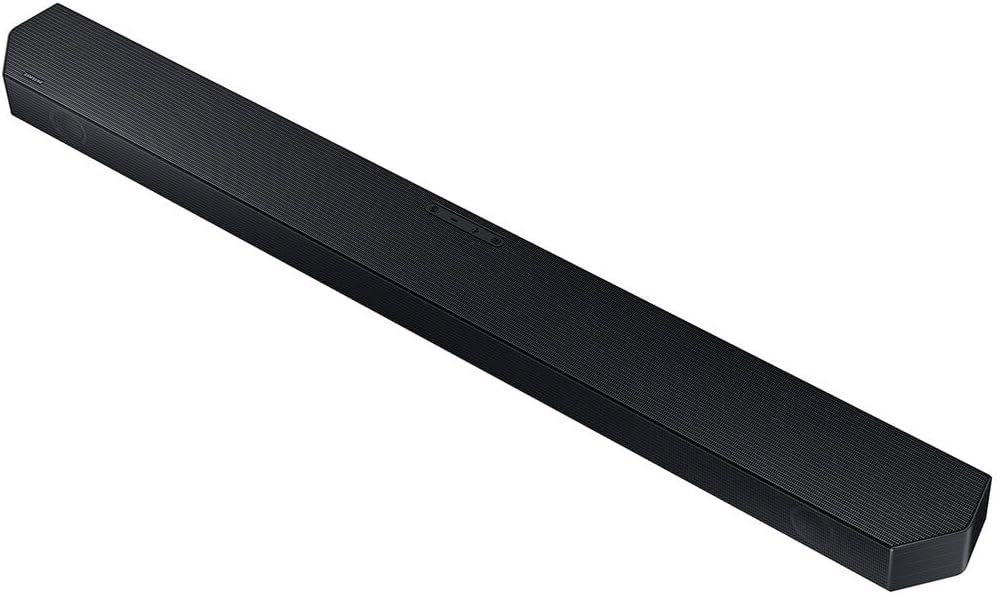
Rysunek 3: Szczegółowy view of the Samsung HW-Q6CC Soundbar unit.

Rysunek 4: Szczegółowy view of the Samsung HW-Q6CC Wireless Subwoofer unit.
2. Połączenia
- Podłączenie zasilania: Connect the AC power cords to the soundbar and the wireless subwoofer, then plug them into a wall outlet.
- Połączenie HDMI eARC: For the best audio quality and control, connect the soundbar to your TV's HDMI eARC port using the provided HDMI cable. This allows for high-quality audio transmission and control of the soundbar volume using your TV remote.
- Połączenie optyczne (alternatywne): If your TV does not have an HDMI eARC port, you can use an optical cable (not included) to connect the soundbar to your TV's optical digital audio output.
3. Bezprzewodowe parowanie subwoofera
The wireless subwoofer should automatically pair with the soundbar upon powering on. If the connection is not established, check the indicator light on the subwoofer. If it's blinking, press the 'ID SET' button on the back of the subwoofer, then press the 'PAIR' button on the soundbar remote control. The indicator light should turn solid blue once paired.
Instrukcja obsługi
1. Podstawowe sterowanie
The soundbar can be controlled using the buttons on the top panel or the included remote control.
- Przyciski na górnym panelu: Includes Power, Volume Up/Down, and Source Selection.
- Zdalne sterowanie: Provides comprehensive control over power, volume, sound modes, subwoofer level, and Bluetooth pairing.
2. Tryby dźwięku
Optimize your audio experience with various sound modes:
- Adaptive Sound Lite: Automatically analyzes content and optimizes sound settings for clear dialogue.
- Dolby Atmos & DTS Surround: Provides an immersive, virtualized surround sound experience for compatible content.
- Tryb gry: Synchronizes gaming audio for a more dynamic and responsive experience.
3. Przesyłanie strumieniowe Bluetooth
Connect your mobile devices to the soundbar via Bluetooth to stream music, podcasts, and other audio content wirelessly. Use the 'Bluetooth Multi Connection' feature to switch between two connected devices effortlessly. For quick pairing, utilize the 'Tap Sound' feature by gently tapping your compatible Samsung mobile device to the soundbar.
Konserwacja
To ensure the longevity and optimal performance of your soundbar system:
- Keep the soundbar and subwoofer clean by wiping them with a soft, dry cloth.
- Unikaj stosowania płynnych środków czyszczących i materiałów ściernych.
- Aby zapobiec przegrzaniu, należy zapewnić odpowiednią wentylację wokół obu jednostek.
- Nie wystawiaj urządzeń na działanie ekstremalnych temperatur, wilgoci ani bezpośredniego światła słonecznego.
Rozwiązywanie problemów
If you encounter issues with your soundbar system, try the following:
- Brak zasilania: Check if the power cords are securely connected to both the soundbar, subwoofer, and the wall outlets.
- Brak dźwięku: Verify the input source on the soundbar matches your TV's output. Check all cable connections. Ensure the TV's internal speakers are turned off or set to external audio.
- Subwoofer nie łączy się: Follow the wireless subwoofer pairing instructions in the Setup section. Ensure the subwoofer is within range and not obstructed.
- Problemy z połączeniem Bluetooth: Ensure Bluetooth is enabled on your mobile device and the soundbar is in Bluetooth pairing mode. Try unpairing and re-pairing the device.
- Pilot nie działa: Check the batteries in the remote control. Ensure there are no obstructions between the remote and the soundbar.
Specyfikacje
| Funkcja | Specyfikacja |
|---|---|
| Nazwa modelu | HW-Q6CC |
| Marka | SAMSUNG |
| Typ głośnika | Soundbar |
| Konfiguracja kanału dźwięku przestrzennego | 3.1 |
| Maksymalna moc wyjściowa głośnika | 340 watów |
| Technologia łączności | Bluetooth, HDMI, optyczny |
| Tryb wyjścia audio | Dolby Atmos, DTS Surround |
| Technologia komunikacji bezprzewodowej | Bluetooth, WiFi |
| Technologia łączności z subwooferem | Bezprzewodowy |
| Wymiary produktu | 2.2" gł. x 40.6" szer. x 4.1" wys. |
| Waga przedmiotu | 25.1 funta |
| Kolor | Czarny |
| Tworzywo | Metal, Plastik |
| Typ montażu | Montaż ścienny |
| Metoda kontroli | Zdalny |
Gwarancja i wsparcie
This Samsung Soundbar System comes with a Ograniczona gwarancja. For specific terms and conditions, please refer to the warranty card included in your product packaging or visit the official Samsung support webstrona.
Aby uzyskać dalszą pomoc, wsparcie techniczne lub zapytania dotyczące serwisu, skontaktuj się z Działem Obsługi Klienta firmy Samsung za pośrednictwem oficjalnego biura obsługi klienta firmy Samsung. webwitrynę lub dane kontaktowe podane w dokumentacji produktu.


