1. Wprowadzenie
Dziękujemy za zakupasing the Salange HY350 Smart Projector. This manual provides essential information for setting up, operating, and maintaining your projector. Please read it thoroughly before use to ensure optimal performance and safety.

Rysunek 1.1: Przód view of the Salange HY350 Projector, showcasinze względu na kompaktową konstrukcję i obiektyw.
2. Zawartość opakowania
Sprawdź, czy w przesyłce znajdują się wszystkie elementy:
- Salange HY350 Projector (without built-in battery)
- Kabel HDMI
- Power Cable (US Plug)
- Pilot zdalnego sterowania Bluetooth Voice
- Instrukcja obsługi
3. Koniec produktuview
3.1. Główne cechy
- Integrated Android 11.0 System: 2GB RAM + 32GB ROM for app downloads and streaming.
- Native 1080P Resolution with 4K Decoding Support: High brightness (15000LM) and 10000:1 contrast ratio for clear images.
- Dual-band WiFi 6 & Bluetooth 5.2: Supports 5G/2.4G WiFi for smooth streaming and Bluetooth for external audio devices.
- Automatic Keystone Correction & Electronic Focus: Front projection auto-correction and 4-point keystone adjustment (±50°). Focus controlled via remote.
- Wiele opcji łączności: HDMI, USB, 3.5mm audio port for various devices.
- Built-in HI-FI Stereo Speakers: 5W speakers for immersive audio.
3.2. Interfejsy i sterowanie
Familiarize yourself with the projector's ports and buttons.

Rysunek 3.1: Tył i bok view of the Salange HY350 Projector, showing HDMI, USB, and audio ports.
- Port HDMI: Connect to laptops, gaming consoles, TV sticks.
- Port USB: Connect USB flash drives for media playback or office documents.
- Gniazdo audio 3.5 mm: Podłącz zewnętrzne słuchawki lub głośniki.
- Pobór mocy: Podłącz kabel zasilający.
4. Przewodnik konfiguracji
4.1. Umieszczenie
Choose a suitable location for your projector. The HY350 supports various mounting options:
- Mocowanie statywu
- Montaż ścienny
- Montaż na podłodze
- Montaż sufitowy
- Umieszczenie na stole
For optimal image quality, ensure the projector is placed on a stable, flat surface or securely mounted.

Rysunek 4.1: Illustration of different projection sizes (50", 100", 250") achievable with the Salange HY350 Projector, demonstrating its versatility in various room sizes.
4.2. Podłączenie zasilania
- Podłącz kabel zasilający do portu wejściowego zasilania projektora.
- Podłącz drugi koniec kabla zasilającego do gniazdka elektrycznego.
- Naciśnij przycisk zasilania na projektorze lub pilocie, aby go włączyć.
4.3. Konfiguracja początkowa
Po pierwszym włączeniu projektor poprowadzi Cię przez początkowe kroki konfiguracji, obejmujące wybór języka i nawiązanie połączenia sieciowego.
Rysunek 4.2: The Android TV interface of the Salange HY350 Projector, showing various streaming app icons like Netflix, YouTube, Disney+, and Prime Video, indicating its smart capabilities.
- Połączenie internetowe: Navigate to Settings > Network & Internet to connect to your Wi-Fi network (supports 5G/2.4G WiFi 6).
- Parowanie Bluetooth: To connect the Bluetooth voice remote control or external Bluetooth speakers/headphones, go to Settings > Connected Devices > Pair new device.
5. Instrukcja obsługi
5.1. Regulacja obrazu
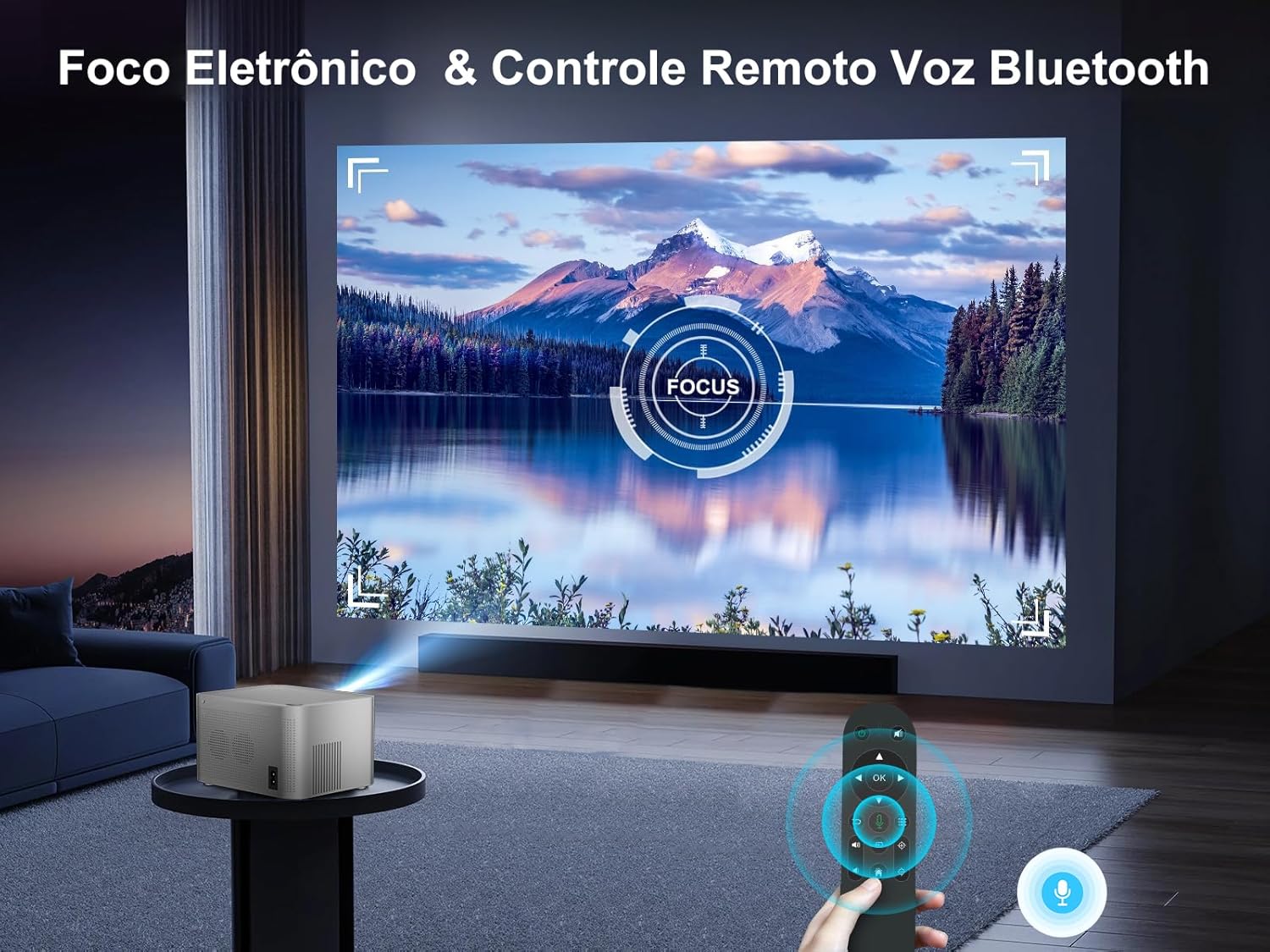
The HY350 features automatic keystone correction and electronic focus for a clear image.

Rysunek 5.1: A hand holding the remote control, adjusting the electronic focus on the Salange HY350 Projector, with a clear image projected onto a screen.
- Automatyczna korekcja trapezu: For front projection, the image will automatically correct its shape.
- Manual Keystone Adjustment (4-point): If needed, you can fine-tune the image corners by navigating to Settings > Projection Settings > Keystone Correction. This allows individual adjustment of the four corners up to ±50°.
- Skupienie elektroniczne: Za pomocą pilota ustaw ostrość, aby uzyskać ostry obraz.

Rysunek 5.2: Visual representation of the Salange HY350 Projector's automatic keystone correction, showing how distorted images are automatically squared and corrected for optimal viewing.
5.2. Podłączanie urządzeń zewnętrznych
Projektor obsługuje różne źródła sygnału wejściowego:
- HDMI: Connect your laptop, game console (e.g., Switch), or TV stick to the HDMI port. Select the HDMI input source from the main menu.
- USB: Insert a USB flash drive into the USB port to play videos, view photos, or present office documents (Word, PPT, PDF, Excel).
- Bezprzewodowe kopiowanie ekranu: Supports iOS and Android wireless display. Navigate to the screen mirroring app on the projector and follow the on-screen instructions to connect your smartphone or tablet.

Rysunek 5.3: An illustration highlighting the advanced WiFi 6 and Bluetooth 5.2 technology of the Salange HY350 Projector, showing seamless connectivity for gaming and audio.
5.3. Using Smart Features (Android 11.0)
The integrated Android 11.0 system allows you to access a wide range of applications.
- Sklep z aplikacjami: Download over 8,000 applications from the integrated APP Store.
- Usługi przesyłania strumieniowego: Access popular streaming platforms like Prime Video, Netflix, YouTube, Disney+, etc.
- Sterowanie głosowe: Use the Bluetooth voice remote control for convenient navigation and search.

Rysunek 5.4: The Salange HY350 Projector's smart interface, showcasing a variety of pre-installed and downloadable streaming applications, emphasizing its entertainment capabilities.
6. Konserwacja
6.1. Czyszczenie
- Obiektyw: Używaj miękkiej, niepozostawiającej włókien ściereczki przeznaczonej specjalnie do soczewek optycznych. Nie używaj środków czyszczących ani rozpuszczalników o właściwościach ściernych.
- Zewnętrzny: Przetrzyj zewnętrzną część projektora miękką, suchą ściereczką. W przypadku uporczywych zabrudzeń, delikatnie przetrzyj.amp Można użyć ściereczki, a następnie wytrzeć do sucha.
- Otwory wentylacyjne: Ensure ventilation ports are clear of dust and debris to prevent overheating. Use a soft brush or compressed air to gently clean them.
6.2. Przechowywanie
Jeśli projektor nie jest używany przez dłuższy czas, należy go przechowywać w chłodnym, suchym miejscu, z dala od bezpośredniego światła słonecznego i ekstremalnych temperatur. Należy używać oryginalnego opakowania lub etui ochronnego, aby zapobiec gromadzeniu się kurzu i uszkodzeniom.
7. Rozwiązywanie Problemów
| Problem | Możliwa przyczyna | Rozwiązanie |
|---|---|---|
| Brak wyświetlanego obrazu | Kabel zasilający nie jest podłączony; projektor nie jest włączony; wybrano nieprawidłowe źródło sygnału wejściowego. | Check power connection; Press power button; Select correct HDMI/USB input. |
| Rozmazany obraz | Focus not adjusted; Projector too close/far from screen; Keystone not corrected. | Adjust electronic focus via remote; Adjust projection distance; Use auto or manual keystone correction. |
| Brak dźwięku | Zbyt niski poziom głośności; Wyciszono; Zewnętrzne urządzenie audio nie jest prawidłowo podłączone; Bluetooth nie jest sparowany. | Zwiększ głośność; Włącz dźwięk; Sprawdź zewnętrzne połączenia audio; Ponownie sparuj urządzenie Bluetooth. |
| Problemy z połączeniem Wi-Fi | Nieprawidłowe hasło; Router jest za daleko; Zakłócenia sieciowe. | Verify password; Move projector closer to router; Try connecting to 2.4Ghz band if 5Ghz is unstable. |
| Pilot nie działa | Batteries low/dead; Not paired (for Bluetooth remote); Obstruction between remote and projector. | Replace batteries; Re-pair Bluetooth remote; Ensure clear line of sight. |
8. Specyfikacje
| Funkcja | Specyfikacja |
|---|---|
| Model | HY350-US |
| System operacyjny | Android 11.0 |
| Pamięć RAM + ROM | 2 GB pamięci RAM + 32 GB pamięci ROM |
| Rozdzielczość natywna | 1920x1080P |
| Obsługiwana rozdzielczość | Dekodowanie do 4K |
| Jasność | 15000 lumenów |
| Współczynnik kontrastu | 10000:1 |
| Proporcje obrazu | 16:9 |
| Wi-Fi | Dual-band 5G / 2.4G WiFi 6 |
| Bluetooth | BT 5.2 (bidirectional) |
| Korekcja trapezowa | Automatic (front projection), 4-point (±50°) |
| Centrum | Electronic Focus (via remote) |
| Głośnik | 5W HI-FI Stereo |
| Interfejsy | HDMI, USB, dźwięk 3.5 mm |
| Wymiary produktu | Wymiary 16 x 12 x 19 cm |
| Waga produktu | 1.32 kilogramów |
| Pobór mocy | 5 watts (speaker power) |
| Częstotliwość odświeżania | 60 Hz |
9. Gwarancja i wsparcie
Salange provides comprehensive support for your HY350 Projector:
- Gwarancja: 2-year manufacturer's warranty.
- Konserwacja: 3 years of maintenance support.
- Wsparcie techniczne: Dożywotnie wsparcie techniczne.
- Kontakt: For any issues or inquiries, please feel free to contact Salange customer service.


Rysunek 9.1: Salange customer support commitments, including 24-hour response, 7-day return, 24-month warranty, and lifetime technical support.


