1. Wprowadzenie
The Mastfuyi FY12DMM is a versatile 2-in-1 device combining a high-resolution thermal imager with a comprehensive digital multimeter. This instrument is designed for professionals and enthusiasts requiring precise measurements and visual thermal analysis in various fields, including electrical, mechanical, construction, and automotive diagnostics. This manual provides essential information for safe and effective operation.
2. Informacje dotyczące bezpieczeństwa
Always adhere to the following safety precautions to prevent personal injury or damage to the device.
- Przeczytaj i zrozum wszystkie instrukcje przed użyciem.
- Nie należy używać urządzenia, jeśli wydaje się uszkodzone lub nie działa prawidłowo.
- Ensure proper test lead connection before taking any measurements.
- Nie przekraczaj maksymalnych wartości znamionowych dla żadnej funkcji.
- Use caution when working with live electrical circuits.
- Utrzymuj urządzenie w suchym i czystym stanie.
- Only use accessories and replacement parts specified by the manufacturer.
3. Zawartość opakowania
Sprawdź, czy w opakowaniu znajdują się wszystkie elementy:
- 1 x Mastfuyi FY12DMM Thermal Imager Multimeter
- 1 x kabel ładujący (USB typu C)
- 1 x Etui transportowe
- 1 x Instrukcja obsługi (ten dokument)
- Przewody pomiarowe (czerwony i czarny)
Notatka: The flexible AC current clamp is not included in the standard package.

4. Urządzenie ponadview
The Mastfuyi FY12DMM integrates thermal imaging and digital multimeter functionalities into a single, portable unit. Its design focuses on ease of use and comprehensive diagnostic capabilities.

Kluczowe elementy obejmują:
- 3.98-inch TFT LCD Touch Screen: A full-view display for clear visualization of thermal images, multimeter readings, and intuitive menu navigation.
- Thermal Imager Lens: The optical component responsible for capturing infrared radiation.
- Gniazda wejściowe multimetru: Standard ports for connecting test leads for electrical measurements.
- Przycisk zasilania: Controls the device's power state.
- Koło nawigacyjne/przyciski: Provides alternative control for menu selection and parameter adjustments.
- Port USB typu C: Used for charging the internal battery and transferring data to a computer.

5. Konfiguracja
5.1 Pierwsze ładowanie
Przed pierwszym użyciem należy całkowicie naładować urządzenie.
- Connect the supplied USB Type-C charging cable to the device's charging port.
- Podłącz drugi koniec kabla do standardowego zasilacza USB (nie ma go w zestawie) lub do portu USB komputera.
- The charging indicator will illuminate. Allow the device to charge until the indicator shows a full charge.

5.2 Włączanie/wyłączanie zasilania
- Włączanie: Naciśnij i przytrzymaj przycisk zasilania, aż ekran się podświetli.
- Aby wyłączyć zasilanie: Naciśnij i przytrzymaj przycisk zasilania, aż pojawi się monit o wyłączenie, a następnie potwierdź.
6. Obsługa kamery termowizyjnej
6.1 Podstawowe obrazowanie termiczne
Upon powering on, the device typically defaults to thermal imaging mode, displaying a real-time thermal image with temperature readings.
- Zakres temperatur: Measures temperatures from -20℃ to 550℃ (-4℉ to 1022℉).
- Rozdzielczość IR: Features a 320 x 320 pixel infrared resolution for clear and detailed thermal images.
- Częstotliwość odświeżania: Operates at 25Hz, providing a smooth, real-time thermal video feed.
- Czułość termiczna (NETD): With a sensitivity of less than 60mk, the device can detect subtle temperature differences.
The device can perform microscopic detection at a component level, though a macro lens is not included as a standard accessory. If detailed close-up thermal imaging is required, a corresponding macro lens package would need to be acquired separately.

6.2 Thermal Palettes
The device offers 15 distinct thermal palettes to enhance the visualization of temperature differences. Selecting the appropriate palette can significantly improve the clarity of thermal patterns for specific applications.
- Access palette options via the touchscreen menu or navigation controls.
- Experiment with palettes like Iron Red, Rainbow, White Hot, and Black Hot to find the most suitable display for your inspection.
6.3 Regulacja emisyjności
Accurate temperature measurements depend on correct emissivity settings. The emissivity value (adjustable from 0.01 to 1.0) should match the material surface being measured.
- Locate the emissivity setting in the thermal imaging menu.
- Consult standard emissivity tables for common materials or adjust the value to achieve the most accurate readings for your specific target.
6.4 Alarm wysokiej i niskiej temperatury
The intelligent alarm function allows you to set custom temperature thresholds. The device will trigger immediate audible and visual alerts if temperatures exceed or fall below these predefined safety ranges.
- Access the alarm settings through the thermal imaging interface.
- Configure the upper and lower temperature limits to suit your monitoring requirements.
7. Obsługa multimetru
The FY12DMM includes a 20,000-count digital multimeter for precise electrical measurements.
7.1 Podłączanie przewodów pomiarowych
- Włóż czerwony przewód pomiarowy do gniazda wejściowego „VΩmA”.
- Włóż czarny przewód pomiarowy do gniazda wejściowego „COM” (wspólnego).
- For AC current measurements with an optional clamp, refer to the clamp's instructions.
7.2 Funkcje pomiarowe
Use the touchscreen or navigation to select the desired measurement function. The device supports auto-ranging for most functions.
- Objętość DCtage: Do 1000V.
- AC Objętośćtage: Do 750V.
- Opór: Do 200MΩ.
- Pojemność: Do 99.999mF.
- Test diody: Sprawdza funkcjonalność diody.
- Test ciągłości: Sygnał dźwiękowy potwierdzający ciągłość.
- Flexible AC Current: Up to 2000A (requires optional clamp).
- Temperatura: -20℃ to 1300℃ (-4℉ to 2372℉) using a K-type thermocouple (not included).
Urządzenie charakteryzuje się: Trzymać function to freeze the current reading and Zakres measurement modes for manual range selection if desired.
8. Zarządzanie danymi
8.1 Przechowywanie obrazów
The FY12DMM has a built-in memory card capable of storing up to 30,000 images in BMP format.
- To save a thermal image, press the designated capture button on the screen.
- Images are automatically saved to the internal memory.

8.2 Eksportowanie danych
Stored images and recorded waveform data can be exported to a computer for further analysis.
- Connect the device to a computer using the USB Type-C cable.
- Urządzenie powinno pojawić się jako wymienny nośnik danych.
- Copy the desired BMP image files or data logs to your computer.
9. Konserwacja
9.1 Czyszczenie
- Przetrzyj zewnętrzną część urządzenia miękką,amp ściereczka. Nie należy używać środków czyszczących o właściwościach ściernych ani rozpuszczalników.
- Gently clean the thermal imager lens with a lens cleaning cloth.
- Przed czyszczeniem upewnij się, że urządzenie jest wyłączone i odłączone od źródła zasilania.
9.2 Pielęgnacja baterii
- Aby zachować sprawność baterii, należy regularnie ją ładować, nawet jeśli urządzenie nie jest używane często.
- Unikaj przechowywania urządzenia w ekstremalnych temperaturach.
10. Rozwiązywanie Problemów
| Problem | Możliwa przyczyna | Rozwiązanie |
|---|---|---|
| Urządzenie nie włącza się. | Niski poziom naładowania baterii lub jej rozładowanie. | Charge the device fully using the supplied USB Type-C cable. |
| Niedokładne odczyty temperatury. | Incorrect emissivity setting; dirty lens. | Adjust emissivity for the target material; clean the thermal imager lens. |
| Wskazania multimetru są niestabilne lub nieprawidłowe. | Poor test lead connection; incorrect function selected. | Sprawdź, czy przewody pomiarowe są prawidłowo podłączone i czy wybrano właściwą funkcję pomiaru. |
| Nie można przesłać danych do komputera. | Wadliwy kabel USB; nieprawidłowy tryb połączenia. | Try a different USB Type-C cable; ensure the device is properly connected and recognized by the computer. |
11. Specyfikacje
11.1 Infrared Camera Specifications
| Funkcja | Specyfikacja |
|---|---|
| Rozmiar wyświetlacza | 3.98 Inch TFT LCD |
| Rozdzielczość IR | 320 x 320 pikseli |
| Rozdzielczość ekranu | 320 x 480 pikseli |
| Kąt View (pole widzenia) | 50.0°(poziomo) x 50.0°(pionowo) / 72.1°(gł.) |
| Rozdzielczość przestrzenna (IFOV) | 8.89 miliradianów |
| Zakres temperatur | -20 ℃ do 550 ℃ (-4 ℉ do 1022 ℉) |
| Czułość termiczna/NETD | Less than 60mk |
| Częstotliwość odświeżania | 25 Hz |
| Ustawienia odległości | 0.3 - 3 metrów |
| Emisyjność | 0.01 - 1.0 (adjustable) |
| Thermal Palettes | 15 |
| Number of Storage Images | 19,000 (internal memory) |
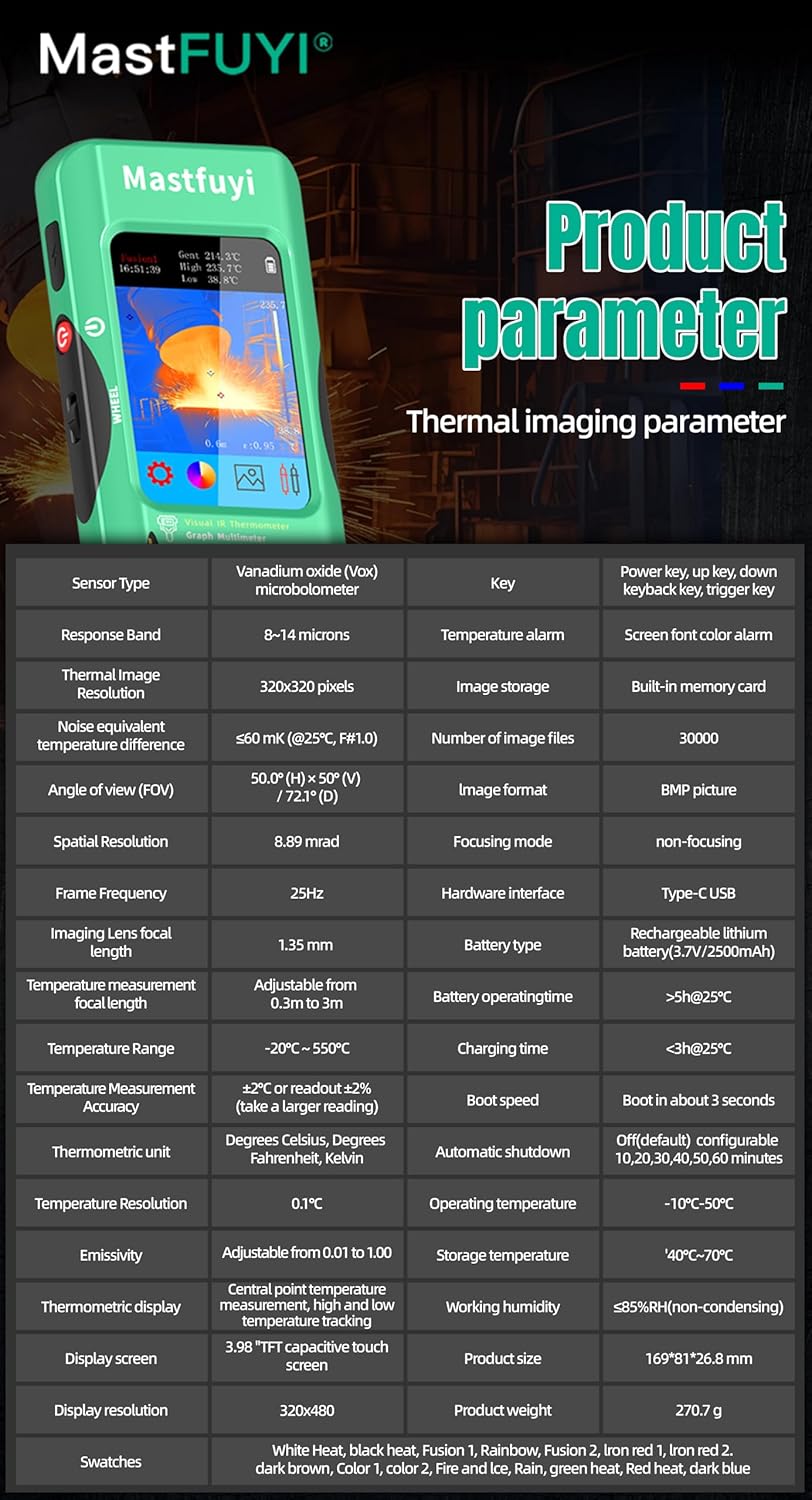
11.2 Specyfikacje multimetru cyfrowego
| Funkcja | Zakres | Rezolucja | Dokładność |
|---|---|---|---|
| Wyświetlacz MAX | 20000 liczy | ||
| Objętość DCtage | 20mV/200mV/2V/20V/200V/1000V | 0.001mV do 0.1V | ±(0.05%+3) do ±(0.5%+3) |
| AC Objętośćtage | 20mV/200mV/2V/20V/200V/750V | 0.001mV do 0.1V | ±(0.1%+3) do ±(0.5%+3) |
| Flexible AC Current | 200 A/2000 A | 0.1 A/1 A | ±(1.0%+5) |
| Opór | 200Ω do 200MΩ | 0.01Ω do 0.01MΩ | ±(0.2%+3) do ±(5%+5) |
| Pojemność | 999.99 nF do 99.999 mF | 0.01 nF do 0.001 mF | ±(2%+5) do ±(5%+20) |
| Temperatura | -20℃~1300℃/-4℉-2372℉ | 1 ℃ / 1 ℉ | ±(2%+5) |
| Dioda | Tak | ||
| Ciągłość | Tak | ||

11.3 Specyfikacje ogólne
- Moc: 2500mAh rechargeable battery (built-in)
- Rozmiar: Wymiary: 169 x 81 x 26.8 mm
- Waga: 270g
- Operating System Languages: English, Spanish, German, French, Italian, Japanese, Chinese (selectable)

12. Gwarancja i wsparcie
For warranty information and technical support, please refer to the warranty card included with your product or visit the official Mastfuyi webstrona.
Visit the Mastfuyi Store on Amazon aby poznać więcej produktów i zasobów pomocy.


