Wstęp
This manual provides comprehensive instructions for the setup, operation, and maintenance of your EARMOR M56 DUAL PTT unit. The M56 DUAL PTT is designed to facilitate simultaneous communication with two separate radios, enhancing operational coordination for users of EARMOR tactical headsets and compatible radio systems like Kenwood and Baofeng.
Ważne informacje dotyczące bezpieczeństwa
Please read all safety warnings before using this product to prevent damage or injury.
- Ostrzeżenie dotyczące zgodności: The Military Connector (NATO Military Standard 7.0) on this device is specifically designed for EARMOR PTTs or TCI/Nexus PTTs. It is nie compatible with Element or Z-Tactical PTTs. Using incompatible PTTs may result in malfunction or damage.
- Ensure all connections are secure before operation to prevent signal loss or intermittent communication.
- Trzymaj urządzenie z dala od ekstremalnych temperatur, wilgoci i substancji żrących.
- Do not attempt to disassemble or modify the unit, as this will void the warranty and may cause damage.
Produkt ponadview
The EARMOR M56 DUAL PTT unit allows for seamless integration of two two-way radios with a single tactical headset. Key components include:
- Dual Radio Connectors: Two Kenwood 2-pin style jacks for connecting to compatible radios.
- Złącze zestawu słuchawkowego: A NATO Military Standard 7.0 plug for EARMOR headsets.
- Dual Push-to-Talk Buttons: Separate buttons for activating transmission on each connected radio.
- Mini Jack Socket: For optional M50 Finger Push Button or other compatible accessories.
- Robust Clip: For secure attachment to gear.

Image: The EARMOR M56 DUAL PTT unit, showcasing its main body and two radio connection cables with Kenwood 2-pin style plugs.
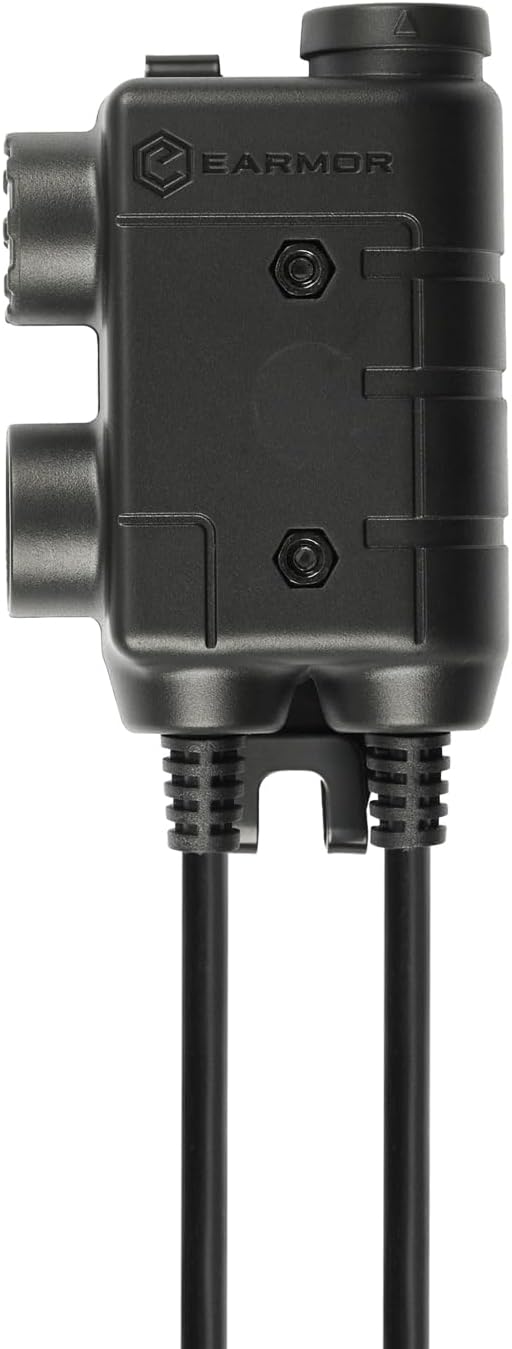
Obraz: Profesjonalista z bokufile of the EARMOR M56 DUAL PTT unit, highlighting its robust construction and connection ports.
Instrukcje konfiguracji
- Connect Radios:
Identify the two radio connector cables extending from the M56 DUAL PTT unit. Each cable terminates in a Kenwood 2-pin style jack. Plug these into the corresponding ports on your two compatible two-way radios (e.g., Kenwood, Baofeng). Ensure a firm connection.

Image: The M56 DUAL PTT unit connected to two separate two-way radios, illustrating the dual radio connection setup.
- Podłącz zestaw słuchawkowy:
Locate the NATO Military Standard 7.0 plug on the M56 DUAL PTT. Connect this plug to the input port on your EARMOR tactical headset. Verify that the connection is secure and fully inserted.

Image: A complete setup showing the M56 DUAL PTT connected to two radios and an EARMOR tactical headset, ready for use.
- Secure the PTT Unit:
Utilize the integrated clip on the M56 DUAL PTT to attach it securely to your vest, clothing, or other gear. Position it in an easily accessible location for quick activation.
- Optional M50 Finger PTT:
If using the optional M50 Finger Push Button, connect it to the mini jack socket on the M56 DUAL PTT unit for additional control flexibility.
Instrukcja obsługi
The M56 DUAL PTT allows for independent control of two communication channels.
- Power On Radios and Headset: Ensure both connected radios and your EARMOR headset are powered on and configured for communication.
- Transmit on Radio 1: Press and hold the designated PTT button for the first radio to transmit. Release the button to stop transmitting and return to receive mode.
- Transmit on Radio 2: Press and hold the designated PTT button for the second radio to transmit. Release the button to stop transmitting.
- Odbiór symultaniczny: You will receive audio from both radios through your headset simultaneously. Adjust radio volumes as needed for clarity.
- Using Optional Finger PTT: If connected, the M50 Finger Push Button will typically activate transmission on the primary radio channel. Refer to the M50 manual for specific functionality.
Konserwacja
Proper maintenance ensures the longevity and reliable performance of your M56 DUAL PTT unit.
- Czyszczenie: Wipe the unit with a soft, dry cloth. For stubborn dirt, a slightly damp cloth can be used, ensuring no moisture enters the ports. Do not use harsh chemicals or abrasive cleaners.
- Składowanie: Store the PTT unit in a cool, dry place away from direct sunlight and extreme temperatures when not in use.
- Pielęgnacja kabli: Avoid sharp bends or kinks in the cables. Do not pull on the cables to disconnect the unit; always grasp the plug itself.
- Ochrona portu: The PTT button features a rubber cover to help protect against water and dust. Ensure this cover is properly seated.
Rozwiązywanie problemów
| Problem | Możliwa przyczyna | Rozwiązanie |
|---|---|---|
| Brak dźwięku w zestawie słuchawkowym. |
|
|
| Cannot transmit on a radio. |
|
|
| Zniekształcony lub niewyraźny dźwięk. |
|
|

Image: A diagram illustrating the difference between Military (NATO J11) and Civilian wiring for PTT plugs, emphasizing that EARMOR headsets work only with EARMOR PTTs due to specific wiring.
Specyfikacje
| Funkcja | Szczegół |
|---|---|
| Model | M56 DUAL PTT |
| Marka | ARMOR |
| Radio Connectors | Kenwood 2-pin style jacks (x2) |
| Złącze zestawu słuchawkowego | NATO Military Standard 7.0 plug |
| Typ sterowania | Call Control (Dual Push-to-Talk) |
| Funkcja kabla | Wysuwany |
| Waga przedmiotu | 4.2 uncji |
| Wymiary opakowania | 4.25 x 2.36 x 1.18 cala |
| Funkcja specjalna | Lightweight, Expandable with Mini Jack Socket |
| UPC | 671716211020 |
| ASIN | B0CQK6DTT4 |
Gwarancja i wsparcie
Specific warranty details for the EARMOR M56 DUAL PTT are not provided in this manual. For warranty information, technical support, or service inquiries, please refer to the official EARMOR webOdwiedź witrynę lub skontaktuj się z autoryzowanym dealerem. Zachowaj paragon zakupu na wypadek reklamacji.


