1. Wprowadzenie
Thank you for choosing Rockville RM-PREMIUM-65 6.5" Marine Boat Speakers. These speakers are designed to deliver crisp, clear audio with robust lows and highs, making them ideal for marine and various outdoor vehicle applications. Built with durability in mind, they are fully marinized to withstand harsh salt and freshwater conditions.
This manual provides essential information for the proper setup, installation, operation, and maintenance of your new speakers. Please read it thoroughly before use to ensure optimal performance and longevity.

Figure 1: Rockville RM-PREMIUM-65 Marine Speakers
Produkt ponadview Wideo
Wideo 1: Overview of the Rockville RM-PREMIUM-65 speakers, highlighting their features and applications.
2. Co znajduje się w pudełku
Carefully unpack your Rockville RM-PREMIUM-65 speakers and ensure all items are present:
- Pair of 6.5" Marine Speakers
- 9.84 feet of Speaker Wire
- Śruby montażowe ze stali nierdzewnej

Figure 2: Included components with your RM-PREMIUM-65 speakers.
3. Instalacja
The RM-PREMIUM-65 speakers can be installed directly into a panel or into speaker pods such as wakeboard tower speakers or UTV kick panel pods. Ensure the chosen mounting location has sufficient space for the speaker's dimensions (5.787" cutout diameter, 2.56" mounting depth).
Installation into Speaker Pods
- Prepare the Pod: Identify the location for the speaker wire exit. The speaker terminals are located at the bottom of the speaker. Drill a hole in the pod at the desired location for the speaker wire.
- Podłącz przewody głośnikowe: Use the provided speaker wire with spade terminals. Connect the white wire to the positive (+) terminal and the black wire to the negative (-) terminal on the speaker. The positive terminal is typically connected to a red wire running to a fuse.
- Przewody trasowe: Feed the connected speaker wires through the drilled hole in the pod, leaving enough slack inside the pod for speaker placement.
- Miejsce prelegentów: Carefully fit the speakers into the pods. For a clean aesthetic, align the Rockville emblem at the bottom.
- Bezpieczne głośniki: Use the provided stainless steel mounting screws to secure the speakers to the pods. Align the screws with the holes on the speaker and use a drill to fasten them.

Figure 3: Drilling a hole in the speaker pod for wire routing.
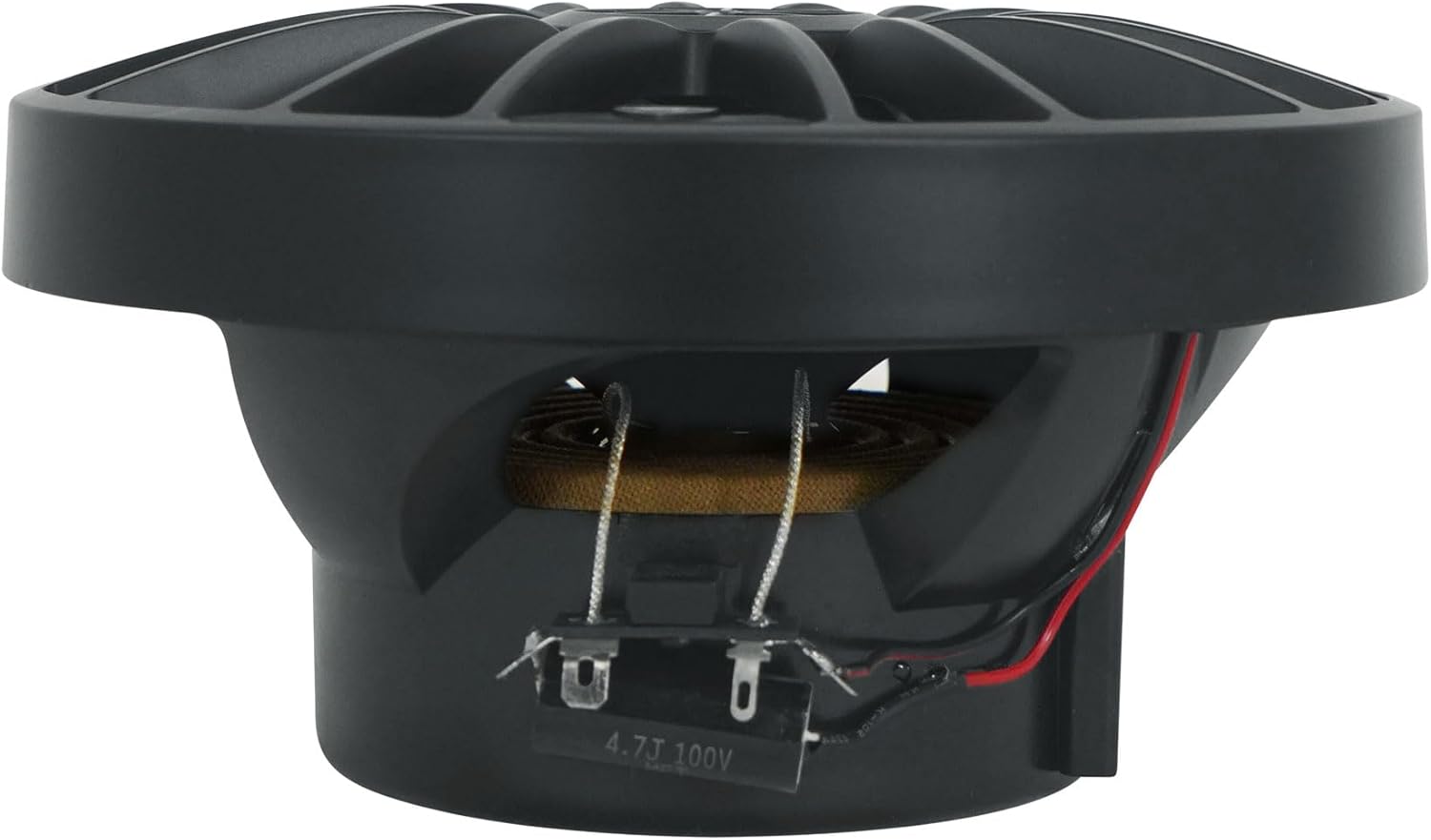
Figure 4: Connecting speaker wires to the terminals.
Figure 5: Routing speaker wires through the pod.

Figure 6: Speakers fitted into pods.
Figure 7: Securing speakers into pods.
Film instruktażowy dotyczący instalacji
Video 2: Detailed instructions on how to install your RM-PREMIUM-65 speakers into panel speaker pods.
4. Wiring and Setup
After securing your speakers, the next step is to connect them to your amplifier. Maintain consistency in wiring (e.g., white to positive, black to negative) for all speakers.
- Przygotowywać Amplifier Terminals: Use an Allen key to loosen the speaker terminals on your ampliyfikator.
- Connect Speaker Wires to AmpLiyfikator: Insert the white wire (from the speaker's positive terminal) into the positive (+) terminal of an amplifier channel. Insert the black wire (from the speaker's negative terminal) into the negative (-) terminal of the same ampkanał ściekowy.
- Bezpieczne połączenia: Once the wires are correctly inserted, use the Allen key to tighten the amplifier terminals, ensuring a secure connection.
- Regulować Ampustawienia lifiera: Ustaw amplifier to full range mode, as these are full range speakers. Adjust the level for the ampw razie potrzeby.
- Connect Music Source: Connect your head unit or music source to the ampliyfikator.

Figure 8: Connecting speaker wires to the ampliyfikator.
Konfiguracja wideo
Video 3: Step-by-step guide on how to set up your RM-PREMIUM-65 speakers with an ampliyfikator.
5. Specyfikacje
| Funkcja | Specyfikacja |
|---|---|
| Rozmiar głośnika | 6.5 cali |
| Obsługa mocy szczytowej | 600 W (na parę) |
| Obsługa mocy RMS | 150 Watts (per pair), 75 Watts (per speaker) |
| Impedancja | 4 omy |
| Głośnik wysokotonowy | 1" PEI Dome Tweeter with Neodymium Magnet |
| Magnes | 11 Oz Y35 Magnet |
| Wrażliwość | 93dB |
| Średnica wycięcia | 5.787" |
| Głębokość montażu | 2.56" |
| Tworzywo | Acrylonitrile Butadiene Styrene (ABS) Basket |
| Wodoodporny | Yes (Fully Marinized) |
| Zalecane zastosowania | Marine, Car, ATV, UTV |
6. Instrukcja obsługi
Once installed and wired, your RM-PREMIUM-65 speakers are ready for use. Ensure your amplifier is powered on and your music source is connected and playing. Adjust the volume and any equalizer settings on your head unit or amplifier to achieve your desired sound. These speakers are designed for high-power handling and deliver clear audio even at high volumes, but always listen responsibly to prevent hearing damage and speaker distortion.
7. Konserwacja
To ensure the longevity and optimal performance of your marine speakers, follow these maintenance guidelines:
- Czyszczenie: Regularly clean the speakers with a soft, damp cloth. Avoid harsh chemicals or abrasive cleaners that could damage the UV-treated cones or rubber surrounds.
- Kontrola: Periodically inspect all wiring connections for corrosion or looseness. Tighten any loose connections and clean any corrosion to maintain good electrical contact.
- Ochrona środowiska: While fully marinized, prolonged exposure to extreme conditions can still affect performance. If possible, cover the speakers when not in use for extended periods, especially in harsh sunlight or heavy rain.
8. Rozwiązywanie Problemów
If you experience issues with your RM-PREMIUM-65 speakers, refer to the following common troubleshooting steps:
- Brak dźwięku:
- Check all wiring connections from the speakers to the amplifier and from the amplifier to the music source. Ensure they are secure and correctly polarized (positive to positive, negative to negative).
- Zweryfikuj ampLififier jest włączony i działa prawidłowo.
- Confirm the music source is playing and its volume is turned up.
- Zniekształcony dźwięk:
- Reduce the volume on your head unit or amplifier. Distortion often occurs when the signal is too high.
- Sprawdzać amplifier gain settings. If set too high, it can cause distortion.
- Inspect speaker cones for any physical damage.
- Niska głośność:
- Increase the volume on both your music source and ampliyfikator.
- Zapewnić amplifier gain settings are appropriate for the input signal.
- Sprawdź, czy impedancja głośnika jest zgodna z amplifier's recommended load (4-Ohm).
9. Gwarancja i wsparcie
Your Rockville RM-PREMIUM-65 speakers come with a limited warranty. For specific warranty details, please refer to the warranty card included in your package or visit our official support webstrona.
For any questions, comments, or concerns regarding your product, please do not hesitate to contact our customer support team:
- Telefon: 1-646-758-0144 (Open 24/7)
- E-mail: sprzedaż@rockvilleaudio.com
- Wsparcie online: rockvillesupport.com/rm-premium-65-black

Figure 9: Rockville Logo


