1. Wprowadzenie
This manual provides essential information for the proper setup, operation, and maintenance of your Tele System SMART24 LS2 A11 24-inch Android Smart TV. Please read it thoroughly before using the product to ensure safe and efficient operation.
2. Co znajduje się w pudełku
Sprawdź, czy wszystkie komponenty są obecne:
- Tele System SMART24 LS2 A11 Smart TV
- Zdalne sterowanie
- Kabel zasilający
- Szybki przewodnik
- Warranty Paper
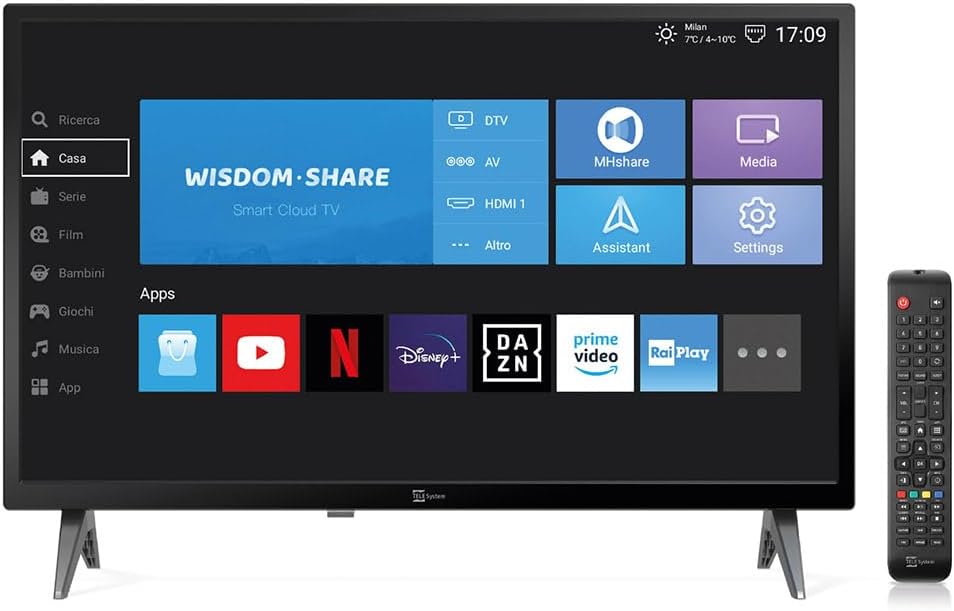
Image: The Tele System SMART24 LS2 A11 Smart TV displaying its home screen, with the included remote control positioned to the right. This illustrates the main components and initial user interface.
3. Konfiguracja
3.1. Rozpakowanie i ustawienie
- Ostrożnie wyjmij telewizor z opakowania.
- Place the TV on a stable, flat surface or mount it on a wall using a compatible VESA 100x100 wall mount (sold separately).
- Zapewnij odpowiednią wentylację wokół telewizora.
3.2. Podłączanie zasilania
Connect the power cable to the TV's power input and then to a suitable electrical outlet (100-240V AC). While the product description mentions 12/220V, the specifications indicate 100-240V AC. Ensure the power source matches the TV's requirements.
3.3. Kreator konfiguracji początkowej
Po pierwszym włączeniu telewizor poprowadzi Cię przez kreatora konfiguracji początkowej. Obejmuje on:
- Wybór języka.
- Połączenie sieciowe (Wi-Fi lub Ethernet).
- Channel scanning for DVB-T2 (Digital Terrestrial) and Satellite channels.
- Tivùsat LCN channel numbering setup (if applicable).
4. Instrukcja obsługi
4.1. Zdalne sterowanieview

Image: The standard remote control for the Tele System Smart TV, showing various buttons for power, numbers, volume, channel, navigation, and smart TV functions.
Familiarize yourself with the remote control buttons for power, volume, channel selection, navigation, and smart TV functions.
4.2. Funkcje telewizora Smart TV z systemem Android
Your TV runs on Android AOSP, providing access to a wide range of applications.
- Dostęp do aplikacji: Navigate to the "Apps" section on the home screen to download and use applications like Prime Video, YouTube, Disney Plus, and DAZN.
- Dublowanie ekranu: Use the mirroring function to share content from your mobile devices (smartphone, tablet) to the TV screen. This includes photos, videos, and music.
- MHshare App: Download the free MHshare app on your smartphone to use it as an additional remote control for your TV.

Image: The Smart TV displaying a streaming service interface with various movie and series titles, demonstrating the Android app capabilities.

Image: The Smart TV screen displaying "Mirroring" with an arrow pointing from a smartphone icon to the TV, illustrating the screen mirroring function.
4.3. TV Pause (USB)
The TV Pause function allows you to temporarily pause live TV broadcasts. To use this feature:
- Connect an external USB memory stick (not included) to the TV's USB port.
- While watching live TV, press the 'Play/Pause' button on your remote control to pause the program.
- Press 'Play' again to resume.

Image: A TV screen displaying a "TV Pause" overlay with playback controls, indicating the functionality to pause live television.
4.4. Digital Terrestrial (DVB-T2) and Satellite (Tivùsat LCN)
The TV supports DVB-T2 for digital terrestrial broadcasts and satellite reception. It features a CI+ slot for maximum compatibility with TELE System certified Tivùsat CAMs, enhancing viewing quality and experience.
- Wyszukiwanie kanałów: The TV allows for satellite channel search with Tivùsat HD classification.
- Gniazdo CI+: Insert a compatible CI+ module (e.g., Tivùsat CAM) into the CI+ slot for access to encrypted channels.
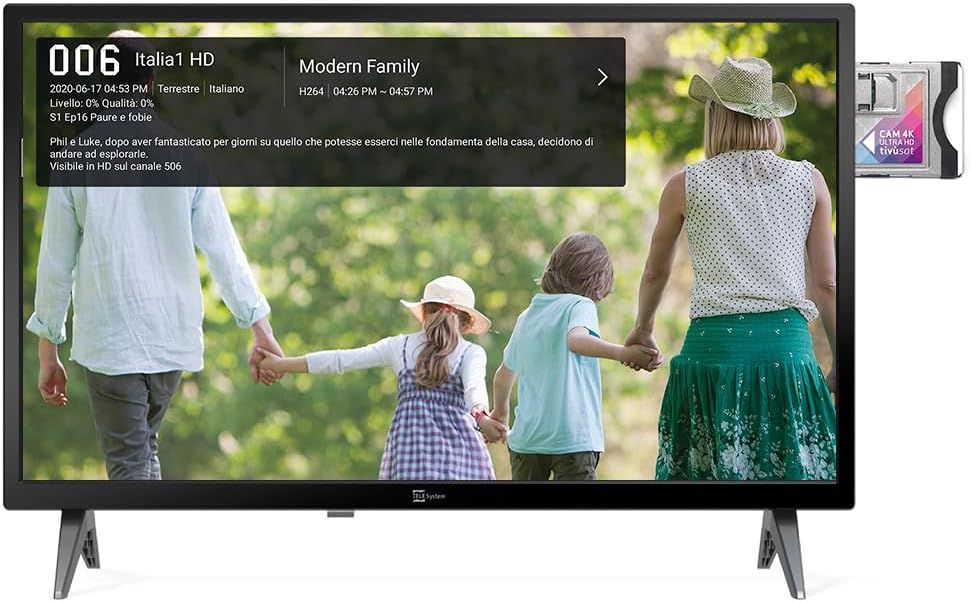
Image: The Smart TV displaying channel information for "Italia 1 HD" and a CI+ module inserted into the side, indicating support for encrypted satellite channels.
4.5. Tryb hotelowy
The Hotel Mode function is designed for use in hospitality environments. It allows for specific settings to be pre-defined:
- Set maximum audio levels.
- Determine the default channel upon power-on.
- Adjust the initial volume when the unit is turned on.
- Select the default source signal.
5. Konserwacja
5.1. Czyszczenie
- Zawsze odłączaj telewizor od zasilania przed czyszczeniem.
- Do przecierania ekranu i obudowy używaj miękkiej, suchej ściereczki.
- W przypadku uporczywych plam delikatnieampPrzetrzyj szmatkę wodą lub delikatnym, nieściernym środkiem do czyszczenia ekranów.
- Unikaj stosowania silnych środków chemicznych i materiałów ściernych.
5.2. Przechowywanie
If storing the TV for an extended period, ensure it is kept in a cool, dry place, protected from dust and extreme temperatures.
6. Rozwiązywanie Problemów
Jeśli napotkasz problemy, zapoznaj się z poniższymi typowymi rozwiązaniami:
- Brak zasilania: Sprawdź, czy kabel zasilający jest prawidłowo podłączony do telewizora i gniazdka elektrycznego. Upewnij się, że gniazdko jest sprawne.
- Brak obrazu/dźwięku: Verify the correct input source is selected. Check cable connections for external devices. For broadcast channels, perform a channel scan.
- Pilot nie działa: Wymień baterie. Upewnij się, że między pilotem a czujnikiem podczerwieni telewizora nie ma żadnych przeszkód.
- Problemy z połączeniem sieciowym: Check your Wi-Fi router or Ethernet cable. Try restarting the TV and your router.
- Błędy oprogramowania: Perform a factory reset (refer to the TV's settings menu for this option). Note that a factory reset will erase all personal settings and installed apps.
7. Specyfikacje
Below are the technical specifications for the Tele System SMART24 LS2 A11 Smart TV:
| Funkcja | Szczegół |
|---|---|
| Numer modelu | TELE System SMART24 LS2 A11 2022 |
| Rozmiar ekranu | 23.6 cali (60 cm) |
| Technologia wyświetlania | PROWADZONY |
| Rezolucja | 720p (1366x768) |
| Częstotliwość odświeżania | 60 Hz |
| System operacyjny | Android AOSP |
| Łączność | Ethernet, Wi-Fi |
| Proporcje obrazu | 16:9 |
| Wymiary (z podstawką) | Wymiary 60.4 x 37.5 x 10.5 cm |
| Waga | 3 kilogramów |
| Ocena efektywności energetycznej | E |
| Moc wejściowa | 100-240V, 50/60Hz (AC) |
| Cechy specjalne | TV Pause (USB), Digital Terrestrial DVB-T2, Satellite, Tivùsat LCN, Hotel Mode, Screen Mirroring |

Image: A detailed table listing the technical specifications of the SMART24 LS2 A11 TV, including display size, resolution, operating system, and connectivity options.

Image: The EU Energy Label for the Tele System SMART24 LS2 A11, showing an energy efficiency rating of 'E' and power consumption details. For more information, visit eprel.ec.europa.eu/qr/1183185.
8. Gwarancja i wsparcie
Your Tele System SMART24 LS2 A11 TV comes with a standard manufacturer's warranty. Please refer to the included Warranty Paper for specific terms and conditions.
For technical support, service, or further inquiries, please visit the official Tele System website or contact their customer service department. Contact information can typically be found in the Quick Start Guide or on the manufacturer's webstrona.
Official Tele System Webstrona: www.telesystem-świat.com


